Disclosure: As an Amazon Associate, we earn from qualifying purchases. If you click a link on this page and make a purchase, we may receive a small commission at no extra cost to you.
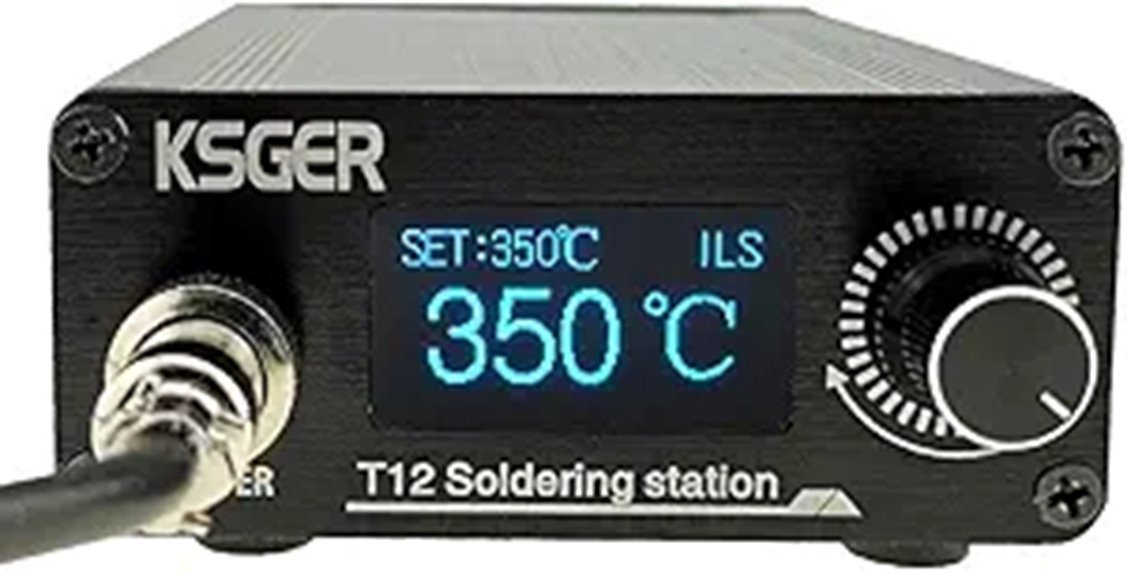
A soldering station can save you time only if it heats quickly, holds useful working temperatures, and accepts tips that suit the jobs on your bench. The KSGER T12 Soldering Station with STM32 V3.1S controller combines a compact aluminum-alloy station, OLED controls, interchangeable T12 cartridges, and a claimed heat-up to 300°C in about 8 seconds. It offers a lot of flexibility for electronics repair and hobby work, but the Amazon listing contains a few inconsistent specifications and does not include a power plug. This review explains what you actually get, where the station makes sense, and what you should check before buying.
Quick Verdict
Rating: 8/10, Recommended with caveats
Best For: Electronics hobbyists, DIY repair work, and technicians who want a compact T12-based bench station.
Bottom Line: The KSGER T12 gives you fast heat-up, useful OLED controls, and a versatile cartridge-tip system in a small station. Its main drawbacks are the missing power plug and inconsistent temperature specifications in the product listing.
| Specification | Detail |
|---|---|
| Brand | KSGER |
| Product type | T12 soldering station |
| Controller | STM32 V3.1S |
| Display | OLED |
| Case material | Aluminum alloy |
| Station dimensions | 130 × 88 × 38 mm (about 5.12 × 3.46 × 1.5 in) |
| Item weight | 520 g |
| Input voltage | 110–240V AC listed |
| Rated power | 72W, with up to 120W maximum claimed by the listing |
| Temperature range | Amazon advertises 50–480°C, while detailed listing text also states 150–480°C |
| Heat-up claim | About 300°C in 8 seconds |
| Tip system | T12 cartridge tips |
| Included tips | T12-K, T12-C1, and T12-JL02 |
| Controls | Temperature adjustment, auto-sleep, auto-standby, saved temperature groups, and tip calibration support |
| Package note | Power plug is not included according to the listing |
Key Takeaways
- The compact 130 × 88 × 38 mm aluminum-alloy station takes relatively little bench space.
- The listing claims a heat-up to 300°C in about 8 seconds, which is useful when you want to start work quickly.
- The STM32 V3.1S OLED controller supports sleep, standby, presets, and tip calibration functions.
- You get T12-K, T12-C1, and T12-JL02 cartridges, giving you different tip shapes for general and finer soldering work.
- The Amazon listing is not fully consistent about temperature range and stability, so you should not buy it expecting laboratory-grade temperature specifications.
- A power plug is not included, so check what compatible power connection you need before placing the station on your bench.
What Is the KSGER T12 Soldering Station?
The KSGER T12 is a temperature-controlled bench soldering station built around T12 cartridge tips. The heater and temperature sensor are integrated close to the tip in this cartridge style, allowing the station to respond quickly when heat is drawn away by a solder joint.
This version uses an STM32 V3.1S controller and OLED display inside an aluminum-alloy station case. It is aimed at electronics repair, PCB assembly, cable work, hobby projects, and similar jobs where a basic fixed-temperature iron can feel slow or difficult to control.
The package listing includes the station, a T12 handle, and three cartridges: T12-K, T12-C1, and T12-JL02. That gives you several starting tip shapes without requiring an immediate separate tip purchase.
Who Should Buy It?
Best For
- Electronics hobbyists moving up from a simple plug-in soldering iron.
- Repair technicians who want quick heat-up and interchangeable T12 cartridges.
- Bench users who value a compact station, OLED controls, presets, sleep, and calibration functions.
Skip If
- You want a complete package with the required power plug already supplied.
- You require tightly documented, independently certified temperature accuracy for professional process control.
- You regularly solder very large thermal masses that call for a heavier-duty high-power station.
Before You Buy: The listing says the power plug is not included. It also gives conflicting temperature-range and stability figures in different sections, so confirm the current package contents and specifications on the product page if those details are critical to your work.
Design and Build Quality
The station uses an aluminum-alloy case rather than a large molded-plastic enclosure. At 130 × 88 × 38 mm and 520 g, it is compact enough for a crowded electronics bench or a small repair workspace.
The compact body is useful if you often move tools around, but the station should still sit where its ventilation and power connection are unobstructed. The OLED display provides the controller information without requiring a large front panel.
The included handle is described as a plastic or ABS-style T12 handle in the listing details. This corrects the original article’s description of the handle itself as aluminum alloy. The metal construction applies to the station case.
Heating Performance and Temperature Control
Speed is one of the main reasons to consider this KSGER station. The listing claims it can reach 300°C in about 8 seconds. That reduces the waiting period compared with many basic irons that use a separate heater and conventional tip.
The station is rated at 72W, while the listing also claims a 120W maximum. For normal electronics soldering, the more important benefit is how quickly the T12 cartridge can respond when the tip touches a joint and loses heat.
Temperature accuracy needs more caution. Different parts of the current listing show different stability figures, including approximately 5°C in one section and 10°C in another. The detailed instructions also refer to normal temperature fluctuation. For that reason, it is more accurate to describe the station as an adjustable, calibratable soldering tool rather than promise ±2°C precision.
Temperature Range
The main Amazon bullet points advertise an output range of 50–480°C. Other detailed text on the same listing describes the working range as 150–480°C. Most routine electronics soldering takes place well inside those limits, but the conflicting lower-limit specification is worth knowing if you need unusually low-temperature operation.
OLED Controls, Sleep, and Presets
The STM32 V3.1S controller adds features that you do not get with a simple dial-only iron. The product information describes auto-sleep, auto-standby, multiple saved temperature groups, and separate calibration parameters for T12 tips.
Sleep and standby are especially useful on a repair bench. Instead of leaving the cartridge at full working temperature while you inspect a board or prepare the next component, the controller can reduce heat during idle periods. That can lower unnecessary tip oxidation and reduce the amount of time the iron stays at a high temperature.
T12 Tips and Included Accessories
The package is listed with T12-K, T12-C1, and T12-JL02 cartridges. Different tip geometries can make a noticeable difference in how efficiently heat moves into a joint, so having three shapes gives you more flexibility than receiving only one general-purpose tip.
The controller documentation also states that it can store calibration information for different T12 tips. This matters because changing cartridge shape or replacing a tip can affect how closely displayed temperature matches the behavior at the working surface.
Do not assume every third-party handle will automatically fit. T12 cartridges are widely used, but handles, connectors, wiring, grounding arrangements, and build quality can vary. Match replacement parts to the station’s actual connector and electrical requirements.
Pro Tip: Choose the largest tip shape that comfortably fits the joint. A tip with enough contact area can transfer heat faster, letting you complete the joint without simply increasing the temperature.
How It Performs in Real Use
For PCB and Component Work
For through-hole parts, connectors, wires, and common PCB repairs, the quick-heating T12 cartridge system is a good match. The C1 or JL02-style tips can help when you need access to smaller pads, while the K-style cartridge provides more contact area for broader work.
For Repeated Bench Repairs
Fast warm-up becomes more useful when you power the station on and off several times during a workday. Auto-sleep and standby also suit repair sessions where the iron may sit unused while you diagnose a circuit or prepare replacement parts.
For Larger Joints
The 72W rated output and fast thermal response should handle many connectors and heavier electronics joints better than a small low-power iron. Very large ground planes, battery tabs, heavy-gauge cable, or substantial metal parts can still demand more thermal capacity or a specialized tool.
For Small Workspaces
The 130 × 88 × 38 mm station body takes up little room. That makes it practical for a home electronics desk, compact repair bench, or workspace where test equipment already consumes most of the available surface.
Setup Tips Before First Use
- Confirm the power connection first. The listing says a power plug is not included, so use a compatible connection that matches the station and your local electrical supply.
- Seat the T12 cartridge fully. Poor cartridge contact can lead to erratic heating or temperature readings.
- Start with a suitable tip. Use a broader tip for larger joints and a finer tip only when access requires it.
- Use calibration when needed. If you change cartridge types and accurate temperature matters, use the controller’s tip-calibration function according to its instructions.
- Set sleep and standby behavior. These functions are useful for reducing idle temperature during longer repair sessions.
Temperature, Tip Care, and Safety
The manufacturer information warns against running the tip continuously at unnecessarily high temperatures. It specifically notes that operation above roughly 380°C can accelerate oxidation and shorten tip or heater life.
Use the lowest temperature that produces a clean joint with your solder, tip shape, component size, and thermal load. Keep the working surface tinned, clean it with an appropriate tip cleaner, and avoid aggressively scraping plated cartridges.
Soldering equipment can cause serious burns and produces fumes during use. Keep the hot iron in a stable holder, work in a suitably ventilated area, keep combustible materials away from the tip, and disconnect power before servicing the station. Follow the manufacturer’s instructions for electrical setup and maintenance.
Pros and Cons
Pros
- Claims to reach 300°C in about 8 seconds.
- Compact 130 × 88 × 38 mm aluminum-alloy station.
- STM32 V3.1S OLED controller with sleep, standby, presets, and calibration functions.
- Includes three T12 cartridge shapes: K, C1, and JL02.
- 72W rated output gives it useful capacity for common electronics work.
Cons
- Power plug is not included according to the Amazon listing.
- Published temperature range and stability figures are inconsistent across the listing.
- Replacement handles and third-party T12 parts still require compatibility checks.
Is It Worth the Price?
The KSGER T12 makes the most sense as a value-focused enthusiast or repair station. You get a metal station enclosure, OLED controller, three T12 cartridges, rapid heat-up claims, and useful software-controlled functions without moving into the price class of higher-end professional soldering systems.
Its value is strongest if you specifically want the T12 cartridge format and spend enough time soldering to benefit from quick heat-up, calibration, sleep, and tip changes. It is less attractive if you want a turnkey package with every power accessory supplied or if your work requires tightly documented process-control specifications.
How It Compares to Alternatives
The Pinecil V2 is worth considering if portability matters more than having a traditional desktop station. It uses a slim all-in-one format with USB-C or DC power options, making it easier to carry between work areas.
If you need a more professional station with stronger manufacturer documentation and support, the Hakko FX-971 sits in a different class with a 100W station design and a modern cartridge-tip system. The KSGER T12 makes more sense when your priority is getting a compact T12-based bench setup with useful controls at a value-oriented level.
Frequently Asked Questions
Does the KSGER T12 station include a power plug?
No. The current Amazon listing specifically states that the power plug is not included. Check the station’s power connection and use a compatible power setup for your region.
How quickly does it heat up?
KSGER’s Amazon listing claims the station reaches 300°C in about 8 seconds. Actual warm-up behavior can vary with the cartridge, starting temperature, power conditions, and selected setpoint.
What temperature range does the station support?
The main product bullets advertise 50–480°C, but detailed text elsewhere on the listing describes 150–480°C. Because the listing is internally inconsistent, buyers needing a specific low-temperature range should confirm the current documentation before purchase.
Which soldering tips come with it?
The reviewed package is listed with T12-K, T12-C1, and T12-JL02 cartridges. These give you several tip shapes for broader joints and finer electronics work.
Can you use other T12 tips?
The controller information says it supports T12 tip types and can save calibration parameters for different cartridges. With third-party parts, check physical fit and quality rather than assuming every cartridge or handle will perform identically.
Is it suitable for lead-free solder?
Its available working temperatures cover common lead-free soldering temperatures. Use an appropriate cartridge shape and the lowest effective setting rather than running the tip near maximum temperature continuously.
What warranty does the KSGER T12 have?
The visible Amazon product information does not provide a clear fixed manufacturer warranty term for this exact package. Review the current seller warranty, return terms, and support information on the product page before ordering.
The Bottom Line
The KSGER T12 STM32 V3.1S soldering station is worth considering if you want fast heat-up, interchangeable T12 cartridges, OLED controls, and a compact metal station for electronics and repair work. Skip it if you need a fully supplied power setup or highly standardized temperature-performance documentation, since the current listing contains specification inconsistencies.
For the right bench user, the combination of T12 tip flexibility, 72W rated power, auto-sleep, calibration, and three included cartridges makes it a capable value-focused station.
Ready to Buy?
Check the latest price, availability, package contents, and product details before you decide.