Disclosure: As an Amazon Associate, we earn from qualifying purchases. If you click a link on this page and make a purchase, we may receive a small commission at no extra cost to you.
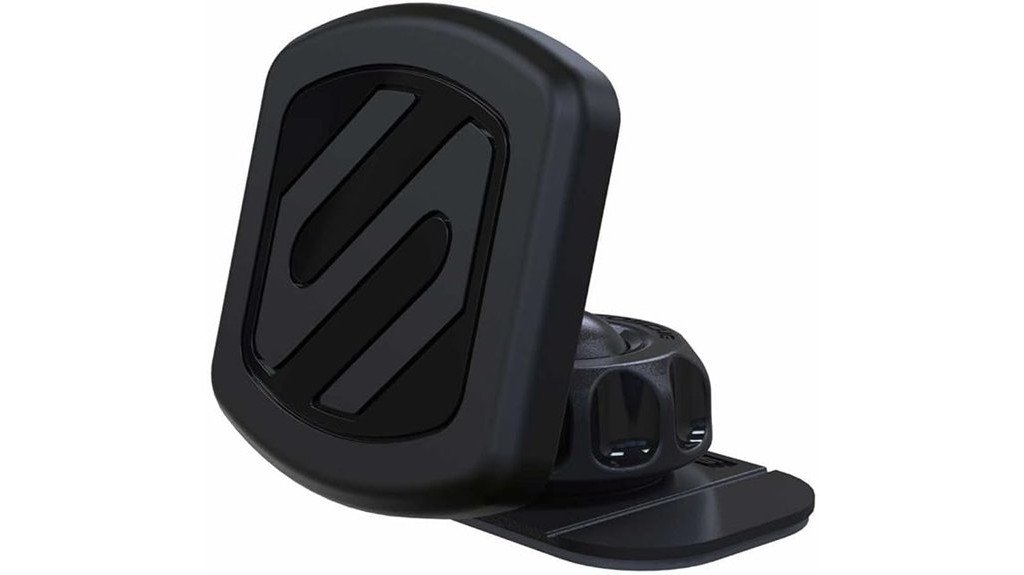
A phone mount should keep your screen visible without forcing you to fight with clamps every time you enter the car. The Scosche MAGDMB MagicMount uses an adhesive dashboard base, a rotating magnetic head, and a metal MagicPlate attached to your phone or case. Its simple design works well for navigation and quick one-handed removal, but correct plate placement and dashboard preparation matter. This review explains its strengths, installation limits, charging concerns, and the buyers who may prefer a newer mounting system.
Quick Verdict
Rating: 8/10, recommended with caveats
Best For: Drivers who want a compact, cradle-free dashboard mount and do not mind attaching a metal plate to their phone or case.
Bottom Line: The MAGDMB offers quick phone attachment, useful angle adjustment, and a small dashboard footprint. Its main tradeoffs are the permanent-style adhesive installation and possible interference between the MagicPlate and wireless charging.
Key Takeaways
- Rare-earth neodymium magnets hold a phone through an included metal MagicPlate rather than a mechanical cradle.
- The 360-degree adjustable head helps you position the screen in portrait or landscape orientation.
- The adhesive dashboard base needs a clean, suitable surface and adequate curing time before you load it with a phone.
- Thick, textured, soft-touch, or uneven cases may reduce magnetic strength or prevent secure plate adhesion.
- The metal MagicPlate can interfere with wireless charging when it overlaps the phone’s charging coil.
- The compact design works best for drivers who are comfortable choosing a semi-permanent mounting location.
Scosche MAGDMB MagicMount Specifications
| Specification | Detail |
|---|---|
| Brand | Scosche |
| Model | MAGDMB |
| Product type | Magnetic dashboard phone mount |
| Phone-holding system | Rare-earth neodymium magnets with a metal MagicPlate |
| Mounting method | Adhesive dashboard base |
| Approximate base size | About 2.5 inches in diameter |
| Head adjustment | 360-degree rotation |
| Orientation | Portrait or landscape |
| Design | Cradle-free, one-handed attachment and removal |
| Cable management | Integrated charging-cable clip |
| Built-in charging | None |
| Best use | Navigation, hands-free display, and everyday driving |
What Is the Scosche MAGDMB MagicMount?
The MAGDMB is a compact phone holder that attaches to a vehicle dashboard with an adhesive base. Instead of gripping your phone with spring-loaded arms, it uses magnets in the adjustable head and a thin metal MagicPlate attached to your device or case.
This cradle-free design makes it easy to place or remove your phone with one hand. You can also rotate the head to change the viewing angle or switch between portrait and landscape orientation without releasing a clamp.
The mount does not include wireless charging, powered controls, or an adjustable extension arm. Its appeal comes from simplicity, a small footprint, and quick access rather than advanced charging or positioning features.
Who Should Buy It?
Best For
- Drivers who want faster phone placement than a clamp-style cradle provides
- People with a flat, clean dashboard area suitable for an adhesive base
- Users who mainly charge by cable and can position the MagicPlate carefully
Skip If
- You do not want adhesive or a metal plate attached to your phone setup
- Your dashboard is heavily textured, curved, soft-touch, or coated with protectant
- You rely on wireless charging and cannot keep the plate away from the charging coil
Before You Buy: Check your dashboard shape, case material, wireless-charging layout, and airbag locations before installing the mount. The adhesive base and MagicPlate work best when you choose the correct positions the first time.
Design and Build Quality
The MAGDMB has a compact, low-profile design that takes up less dashboard space than many arm-style mounts. Its rounded magnetic head avoids the side grips and bottom feet found on mechanical cradles, so your phone remains easy to reach.
The approximately 2.5-inch adhesive base spreads the mounting load across the dashboard. A broad base can improve stability, but it also needs a reasonably flat surface. Deep grain, sharp curves, loose trim, or soft dashboard padding can prevent full adhesive contact.
The integrated cable clip gives you a place to route a charging cable near the phone. It does not charge the device by itself, but it can stop a loose cable from falling beside the seat when your phone is removed.
Magnetic Technology and Holding Performance
The mount uses rare-earth neodymium magnets to pull against the metal MagicPlate on your phone or case. This arrangement removes the need to adjust clamps for different phone widths, making it useful when more than one person drives the same vehicle.
Holding strength depends on more than the magnet. Plate size, plate location, case thickness, phone weight, road vibration, and the angle of the mount all affect stability. A large phone mounted far from the center of the magnetic head creates more leverage than a smaller phone positioned directly over it.
Thin plastic cases usually create fewer problems than thick rugged cases. Wallet cases, cases with kickstands, heavily textured cases, and soft silicone surfaces may leave too much space between the magnet and plate or prevent secure adhesive contact.
Pro Tip: Center the MagicPlate over the magnetic head during your first test. Drive on familiar roads before relying on the mount during a long trip, and reposition the plate if the phone twists or tilts.
Fit and Phone Compatibility
The cradle-free head does not impose a fixed phone-width limit. Compatibility instead depends on whether you can attach or place the MagicPlate securely and create enough magnetic contact through your case.
You may attach the plate directly to the phone, attach it to the outside of a case, or place it inside a thin case when the setup provides enough holding force. Placing it inside a thick case usually weakens the connection because distance reduces magnetic pull.
A removable case can make the setup easier to manage. You can keep the plate on the case rather than applying it directly to the phone, and you can switch cases when you need unobstructed wireless charging.
Installation Process and Setup Tips
Start by choosing a dashboard location that keeps the phone within reach without blocking your windshield, gauges, vehicle controls, vents, or airbag deployment areas. Sit in your normal driving position and test the sightline before removing any adhesive backing.
Clean the chosen area to remove dust, oil, silicone dressing, and dashboard protectant. Let the surface dry fully. Adhesive pads bond poorly to contaminated surfaces, and pressing harder will not correct a surface that was not prepared properly.
Press the base firmly and allow the adhesive to set before attaching the full weight of your phone. The supplied article recommends a 24-hour setting period. Follow the instructions packaged with your exact unit if they specify a different preparation or curing process.
Suggested Installation Steps
- Park the vehicle and test several mounting positions from the driver’s seat.
- Confirm that the mount will not obstruct your view or interfere with controls and airbags.
- Clean and dry the dashboard surface.
- Apply the mount once you are confident about the location.
- Press the base evenly rather than loading only one edge.
- Allow the adhesive to cure before placing your phone on the mount.
- Attach or position the MagicPlate and test the phone in portrait and landscape orientation.
Common Installation Mistakes
- Applying the base over dashboard dressing or cleaning residue
- Choosing a curved area that prevents full contact around the adhesive pad
- Loading the mount immediately instead of allowing the adhesive to set
- Positioning the phone where it blocks vehicle controls or your forward view
- Placing the MagicPlate off-center, causing the phone to rotate on rough roads
Wireless Charging and Cable Use
The MAGDMB is a passive phone mount and does not provide wireless charging. You can connect a normal charging cable while the phone is mounted, and the integrated clip can help keep that cable within reach.
The MagicPlate may interfere with Qi wireless charging when the metal overlaps the charging coil. Results vary by phone, case, charger, and plate position, so you should not assume wireless charging will work normally after installation.
Possible solutions include placing the plate lower on the case, using a smaller plate when supported, removing the case before wireless charging, or keeping a separate charging-friendly case. Test charging before permanently attaching the plate.
Compatibility and Driving Safety
A phone mount can make navigation easier to glance at, but it does not make phone interaction risk-free. Set your destination, audio, and notifications before driving. Use voice controls only when they do not take your attention away from traffic.
Keep the mount outside the windshield sightline and away from steering-wheel, dashboard, knee, curtain, and passenger airbag deployment zones. Your vehicle manual can help you identify restricted mounting areas.
Check the base and magnetic hold periodically, especially after hot weather, cold weather, dashboard cleaning, or long drives over rough roads. Stop using the mount if the adhesive lifts, the head loosens, or the phone begins rotating unexpectedly.
How It Performs in Real Use
Daily Commuting
The magnetic design saves time during short trips because you can place the phone without opening a cradle. The cable clip also helps when you plug in for navigation or music during a regular commute.
Navigation in Portrait or Landscape Mode
The 360-degree head makes it easy to rotate the phone for different navigation layouts. Position the mount so the phone remains visible with a brief glance rather than requiring you to look down toward the console.
Bumpy Roads
The magnets can provide a firm hold when the plate is centered and the case is not too thick. Heavy phones, off-center plates, rough pavement, and steep head angles can increase movement, so testing your exact setup matters.
Shared Vehicles or Multiple Phones
A cradle-free mount can accommodate phones of different widths without adjustment. Each phone still needs a compatible metal plate or case, so occasional drivers may need their own MagicPlate-equipped case.
Pros and Cons
Pros
- Fast one-handed phone placement and removal
- Compact design uses less space than many clamp mounts
- 360-degree adjustment supports portrait and landscape viewing
- Rare-earth magnets provide a direct cradle-free hold
- Integrated clip helps keep a charging cable accessible
Cons
- The adhesive base is less convenient to relocate than a suction or vent mount
- The MagicPlate may interfere with wireless charging
- Thick cases and unsuitable dashboard surfaces can reduce performance
Is It Worth the Price?
The MAGDMB offers the most value when you want a straightforward magnetic mount without charging electronics, an extension arm, or a mechanical cradle. Its simple construction also gives you fewer controls to adjust during daily use.
Value depends heavily on installation compatibility. Buyers with a clean, flat dashboard and a thin phone case are more likely to get the intended experience. Buyers who must protect a soft dashboard, use a thick case, or preserve wireless charging may spend more time working around the design.
It is worth considering for quick everyday phone placement, especially when you charge by cable. It is not the best fit when you need easy relocation, built-in charging, or a plate-free connection.
How It Compares to Alternatives
The MAGDMB represents Scosche’s traditional MagicPlate-based mounting approach. Newer alternatives such as the Scosche MagicMount Select MS Dash focus on MagSafe-compatible attachment, while the Scosche MagicMount MS Window/Dash offers a different mounting location and greater placement flexibility.
A clamp-style cradle may suit you better when you do not want a metal plate on your phone. The MAGDMB makes more sense when you value a compact dashboard footprint, fast attachment, and simple one-handed removal.
Frequently Asked Questions
Does the Scosche MAGDMB fit every phone size?
The magnetic head does not use fixed-width arms, so phone width is not the main limitation. Compatibility depends on phone weight, case thickness, MagicPlate placement, and the strength of the connection through the case.
Can I use it with a thick or rugged phone case?
A thick case can weaken the magnetic hold, especially when the plate sits inside the case. Attaching the MagicPlate to the case exterior usually creates a stronger connection, but the plate adhesive may not bond well to textured or soft surfaces.
Will the MagicPlate interfere with wireless charging?
It can interfere when the metal plate overlaps the phone’s wireless-charging coil. Test the plate position before permanent installation, or use a removable case when you need wireless charging.
Where should I attach the MagicPlate?
Place it where the phone can sit centered over the magnetic head. Before attaching it permanently, check the phone’s wireless-charging coil, camera layout, case features, and the orientation you use most often.
Can I move the dashboard mount after installation?
The adhesive installation is intended to remain in one location. Removing the mount may weaken the pad or leave residue, so choose the position carefully and obtain the correct replacement adhesive before reinstalling it.
How long should I wait before placing my phone on the mount?
The supplied product information recommends allowing about 24 hours for the adhesive to set. Follow the instructions included with your exact unit because surface preparation and curing guidance may differ.
What warranty does the MAGDMB include?
Warranty coverage can vary by product, purchase date, seller, and packaging. Keep your proof of purchase and confirm the terms included with your exact MAGDMB unit or contact Scosche before relying on a specific coverage period.
The Bottom Line
The Scosche MAGDMB MagicMount is a good choice when you want quick magnetic attachment, 360-degree adjustment, and a compact dashboard installation. Skip it when you need built-in wireless charging, frequent repositioning, or a plate-free phone setup.
Its magnetic simplicity is the main strength, while dashboard and MagicPlate compatibility remain the main limitations. Check your mounting surface and charging setup before committing to the adhesive installation.
Ready to Buy?
Check the latest product details and confirm that the mount fits your dashboard and phone setup.