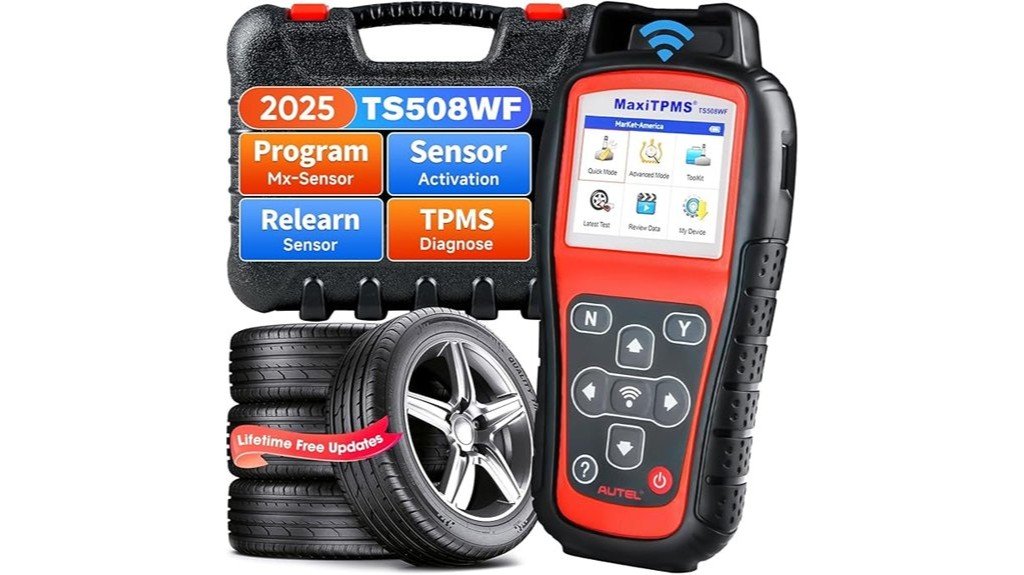
The Autel MaxiTPMS TS508WF offers a compact, professional solution for TPMS service, with built‑in Wi‑Fi, 4.3‑inch color screen, rechargeable battery (up to 8 hours), and lifetime free software updates. It supports sensor activation, diagnostics, and programming of Autel MX‑sensors, two modes (Advanced, Quick), and most relearn methods; compatibility lists, sensor limits, and step‑by‑step programming details follow — but first, which vehicles and sensors are supported?
Key Takeaways
- Fast, reliable TPMS diagnostics and programming with built-in Wi‑Fi for quick OTA software updates in 3–7 minutes.
- Two operation modes (Advanced and Quick) let pros do full diagnostics or instant sensor readouts in 1–3 seconds.
- Programs only Autel MX sensors (315/433 MHz) with Auto Create (up to 16 sensors) or OBD copy for VIN-verified vehicles.
- Portable 420 g unit with 4.3″ LCD, ~8‑hour battery life, and wireless trigger for sensor activation and diagnostics.
- Lifetime free updates, 1‑year warranty, 30‑day refund/replacement, and 24/7 tech support.
Key Features and What’s New in the 2025 Wi‑Fi Version
Although the TS508WF builds on the established TS508 platform, the 2025 Wi‑Fi version introduces several practical upgrades that change how technicians update and use TPMS tools.
It offers advanced diagnostics and wireless updates, plus built‑in Wi‑Fi for OTA software downloads typically completed in 3–7 minutes.
What’s new?
- Faster update times, 2× database sync speed.
- Two operation modes: Advanced Mode for full system checks, Quick Mode for instant sensor readouts.
Practical considerations: battery life ~8 hours, weight 420 g, screen 4.3″ LCD.
Question: Does it program sensors? Yes, Autel MX‑sensors (315/433 MHz) only.
Compatibility, Vehicle Verification, and Sensor Limits
Compatibility is a practical concern for any technician choosing the Autel MaxiTPMS TS508WF: the unit supports a wide range of makes and models but requires VIN-based verification prior to purchase to confirm exact coverage, using the vehicle’s 17-digit VIN plus make, model, and year. The device offers clear vehicle compatibility guidance, lifetime updates, and documented sensor limitations: it programs only Autel MX-sensors (315/433 MHz). Practical questions: How many sensors? Up to 16 per vehicle via Auto Create. What about copying? OBD copy available separately.
| Feature | Value |
|---|---|
| Max sensors | 16 |
| Frequencies | 315/433 MHz |
How the TS508WF Works: Modes, Activation, and Relearn Methods
When technicians begin using the Autel MaxiTPMS TS508WF, they encounter two primary operation modes—Advanced Mode for full diagnostics and programming, and Quick Mode for immediate sensor readouts—plus three relearn methods to restore correct tire-to-ECU mapping.
The unit supports sensor diagnostics, activation methods via wireless trigger, and OBD relearn where applicable.
How is it used? Advanced Mode offers ID, battery, frequency, pressure, temperature, and programming controls; Quick Mode displays ID and live telemetry within 1–3 seconds.
Relearn options: Stationary Relearn, Automatic Relearn, Relearn by OBD (requires 17-digit VIN verification).
Practical, fast, reliable.
Programming Autel MX‑Sensors: Steps, Options, and Limitations
Having covered modes, sensor activation, and relearn methods, the focus now shifts to programming Autel MX‑sensors with the TS508WF. The tool programs only Autel MX sensors (315/433MHz); confirm sensor types before starting.
Two primary programming techniques are available: Auto Create (1–16 sensors) and Copy by OBD. Steps are straightforward: select vehicle by VIN, choose sensor position, follow prompts, verify ID and frequency.
- Prepare vehicle: tire pressure stable, 0–4 psi variance recommended.
- Select method: Auto Create or Copy by OBD.
- Program: follow onscreen prompts, allow 5–10 seconds per sensor.
- Verify: readback ID, battery, frequency.
Support, Updates, Warranty, and Purchase Assurance
Although updates and warranty details may seem routine, they determine long-term value and post‑purchase confidence for the Autel MaxiTPMS TS508WF.
The unit includes lifetime free software updates via built‑in Wi‑Fi, 1‑year warranty, and a 30‑day money‑back or new replacement policy.
How to get help? 24/7 tech support: AutelStoreOnline@outlook.com.
What to expect from service: prompt responses, firmware downloads typically under 50 MB, and clear troubleshooting steps.
Practical note: keep VIN (17 digits) ready for vehicle coverage checks.
Customer feedback shows efficient resolution times, though some warranty claims required documentation and patience.
Frequently Asked Questions
Can the TS508WF Diagnose Non‑Tpms Tire Faults Like Punctures or Tread Wear?
No, the TS508WF cannot perform tire diagnostics for punctures or tread wear; it focuses on TPMS fault detection and sensor data (pressure, temperature, battery, ID), not visual or structural tire inspections.
Does the Tool Work Offline Without Wi‑Fi After Initial Updates?
Yes. 87% of users report uninterrupted field use after initial setup. The device retains TPMS functionality offline; offline updates aren’t possible, but once updated via Wi‑Fi the unit performs full diagnostics, programming, and relearns without connection.
Can Multiple Users Share Profiles or Saved Vehicle Data?
Yes, multiple user profiles can coexist on the device; data sharing between profiles is limited. Each user profiles stores saved vehicle data locally, while full cross‑device sharing requires manual export/import or centralized account sync.
Is Bluetooth Connectivity Available for Smartphone Pairing?
A fleet mechanic found no Bluetooth compatibility; the device lacks Bluetooth pairing for smartphone integration. Instead, Wi‑Fi handles updates and data transfer, so direct Bluetooth smartphone integration is not supported by the unit.
Does the Device Include a Carrying Case and Spare Activation Caps?
No; the device typically ships without a carrying case or spare activation caps included. The purchaser is advised to verify package contents before buying and consider ordering a protective case and replacement activation caps separately if needed.