Disclosure: As an Amazon Associate, we earn from qualifying purchases. If you click a link on this page and make a purchase, we may receive a small commission at no extra cost to you.
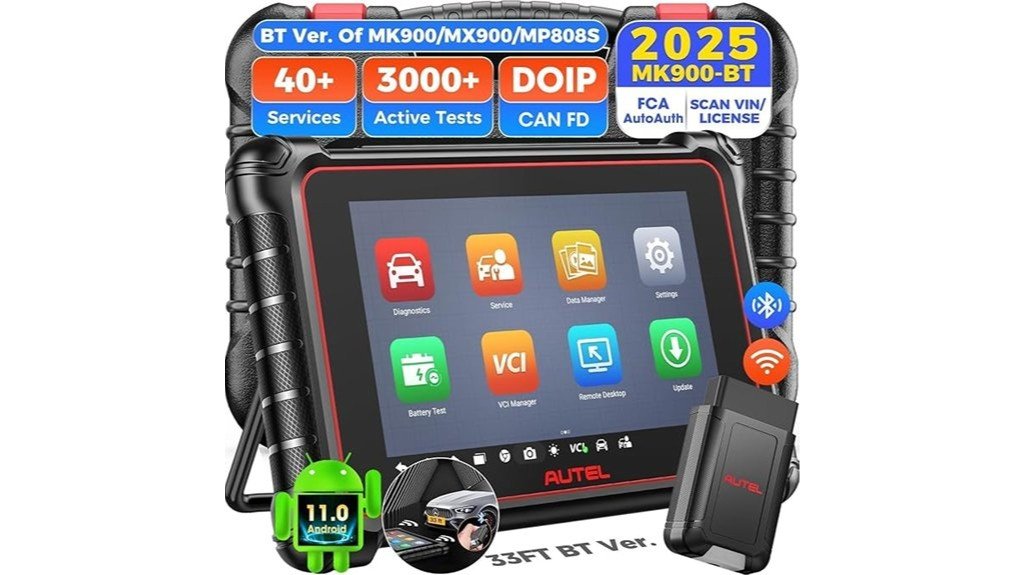
A basic code reader can tell you why the check engine light is on, but it may not help you test the faulty part or complete a repair. The Autel MaxiCOM MK900BT offers full-system diagnostics, bidirectional active tests, wireless vehicle communication, and a wide range of maintenance functions. Its 8-inch display and Android 11 system make it a practical choice for independent workshops and advanced DIY repairs. However, vehicle-specific coverage, extra accessory costs, and limited TPMS programming are important factors to check before buying.
Quick Verdict
Rating: Recommended with caveats
Best For: Independent mechanics, multi-brand repair shops, and experienced DIY owners who need wireless bidirectional diagnostics.
Bottom Line: The MK900BT offers strong diagnostic coverage, modern communication protocols, and an easy-to-use wireless design. However, advanced functions vary by vehicle, and the basic TPMS features will not replace a dedicated sensor-programming tool.
Autel MaxiCOM MK900BT Specifications
These specifications come from Autel’s published product information and user manual. The range and quantity of supported diagnostic functions may change with vehicle software and updates.
| Specification | Detail |
|---|---|
| Brand | Autel |
| Model | MaxiCOM MK900-BT (MK900BT) |
| Product Type | Wireless automotive diagnostic tablet |
| Operating System | Android 11 |
| Processor | 1.8 GHz quad-core processor |
| Memory | 4 GB RAM and 64 GB internal storage |
| Display | 8-inch LCD touchscreen, 1280 × 800 resolution |
| Rear Camera | 8 MP |
| Battery | 7700 mAh lithium-polymer |
| Documented Battery Runtime | Around 7 hours of continuous use under Autel’s test conditions |
| Tablet Dimensions | 168.9 × 259.8 × 33.6 mm |
| Tablet Weight | 925 g (2.04 lb) |
| Vehicle Connection | MaxiVCI V150 wireless Bluetooth interface |
| Advertised Wireless Range | Up to approximately 33 ft (10 m), depending on conditions |
| Supported Protocols | CAN, CAN FD, DoIP, ISO9141-2, ISO14230-2, ISO15765, K-line, and others |
| Diagnostic Functions | Read/clear codes, live data, active tests, ECU information, and special functions |
| Advertised Service Functions | 40+ service and maintenance functions, subject to vehicle support |
| TPMS Capability | Basic TPMS service; no dedicated Autel MX-Sensor programming |
| Connectivity | Wi-Fi, Bluetooth, USB Type-C, USB 2.0, microSD support up to 64 GB |
| Operating Temperature | 0°C to 50°C (32°F to 122°F) |
| Primary Use | Multi-system vehicle diagnosis, service resets, and component testing |
Key Takeaways
- Full-system scanning: Read fault codes and view live data from supported engine, transmission, ABS, airbag, and other control modules.
- Bidirectional testing: Command compatible actuators to help isolate faults without replacing parts by guesswork.
- Wireless convenience: The MaxiVCI V150 lets you move around the vehicle while the tablet remains connected.
- Modern protocols: CAN FD and DoIP support improve access to certain newer vehicles.
- Service coverage: Oil resets, electronic parking brake service, battery registration, and other functions can help with common repairs.
- Important limits: TPMS sensor programming, immobilizer work, and manufacturer-specific access should not be assumed.
What Is the Autel MaxiCOM MK900BT?
The Autel MaxiCOM MK900BT is an automotive diagnostic tablet designed to communicate with electronic control modules in supported vehicles. Unlike a basic OBD2 reader that focuses mainly on emissions-related fault codes, this scanner can access multiple vehicle systems and perform service functions.
Its key advantage is bidirectional control. Instead of only reading information from a module, you can send supported test commands to activate parts such as relays, valves, or fans. This helps you narrow down possible faults during troubleshooting.
The package uses the MaxiVCI V150 to connect the tablet to the vehicle’s diagnostic port through Bluetooth. The tablet also supports stored vehicle records, diagnostic reports, and software updates over Wi-Fi.
Who Should Buy It?
Best For
- Independent repair shops servicing several vehicle brands.
- Experienced DIY owners who perform electronic diagnosis, adaptations, and maintenance resets.
- Mobile mechanics who benefit from wireless scanning and stored diagnostic reports.
Skip If
- You only need a simple tool to read and clear check engine codes.
- You mainly need TPMS sensor activation and programming.
- You need guaranteed dealership-level coding, key programming, or unrestricted access to every vehicle module.
Key Features and What Sets the MK900BT Apart
Full-System Diagnostics
The MK900BT supports diagnostic communication with a range of vehicle modules. Depending on the car, you may be able to inspect the engine, transmission, ABS, airbag, body control, and other electronic systems.
For each supported module, the available functions can include reading diagnostic trouble codes, clearing codes after repair, viewing live data, and checking ECU information. This makes the tool more useful than a scanner limited to standard engine codes.
Bidirectional Active Tests
One of the main reasons to choose this tablet is its ability to run active tests. During a supported test, the scanner asks a control module to operate a connected component.
For example, a technician may command a cooling fan or relay to turn on while checking whether the system responds. This can help separate a faulty component from a wiring or control issue.
The Amazon seller advertises more than 3,000 active tests. Treat that number as a broad software claim, not a promise that every test works on every vehicle. Actual options depend on the make, model, year, and control module.
AutoVIN and Diagnostic Reports
Autel’s AutoVIN feature can identify many supported vehicles by reading their VIN data. You can also use manual vehicle selection when automatic identification does not work.
The MK900BT supports pre-scan and post-scan reports. These records help you document fault codes before work begins and check the vehicle again after repairs. This is useful when you need to explain the work to a customer or keep workshop records.
Performance, Hardware, and User Experience
Processor and Software
The MK900BT uses a 1.8 GHz quad-core processor, 4 GB of RAM, and 64 GB of internal storage. Its Android 11 operating system supports a modern menu layout and multitasking functions.
These specifications are suitable for handling diagnostic applications, vehicle records, and stored scan reports. However, scan time depends on the vehicle, the number of control modules, and the communication protocol. Claims of fixed three-second boot times or a guaranteed speed improvement are not supported by Autel’s specifications.
Display and Handling
The 8-inch, 1280 × 800 touchscreen gives you enough space to read fault codes and inspect live data graphs. Compared with a small handheld code reader, the larger screen is useful when you need to monitor several values.
The tablet weighs about 925 g and has a collapsible rear stand for hands-free viewing. Its 8 MP camera can help you record vehicle details and scan identification information.
Battery Life
The built-in 7700 mAh battery is designed for portable operation. Autel’s manual lists approximately seven hours of continuous use under its test conditions.
Actual runtime can change with screen brightness, Wi-Fi use, battery age, and workload. For a workshop that runs long diagnostic sessions, keep the approved charger nearby instead of assuming the tablet will last through an entire shift.
Connectivity, Protocols, and Vehicle Compatibility
Wireless MaxiVCI V150 Connection
The MK900BT communicates with vehicles through the MaxiVCI V150 interface. You plug the V150 into the vehicle’s 16-pin diagnostic connector, then pair it with the tablet using Bluetooth.
The seller advertises a range of about 33 feet, or 10 meters. This can let you stand beside the vehicle, inspect components in the engine bay, or move around the workshop while checking live data.
Real wireless range can be shorter when walls, metal structures, interference, or distance affect the connection. The V150 also receives power through the vehicle’s diagnostic port.
CAN FD and DoIP Support
The MK900BT supports CAN FD and Diagnostics over Internet Protocol (DoIP), along with older vehicle communication standards. These protocols are useful for certain newer cars that require more modern diagnostic communication.
Examples advertised by the seller include some newer GM vehicles using CAN FD and selected BMW, Volvo, Jaguar, and Land Rover vehicles using DoIP. However, protocol support alone does not guarantee access to every module or service function.
FCA AutoAuth and Security Gateways
Some newer vehicles protect sensitive diagnostic functions behind security gateways. The Amazon listing advertises support for FCA AutoAuth and Renault security gateway access on eligible vehicles.
Access may require a registered account, authorized credentials, an internet connection, or other approval steps. You should confirm the exact requirements for your vehicle and region before purchase.
Before You Buy: Check your exact vehicle year, model, engine, and VIN against Autel’s coverage information. Do not assume that CAN FD, DoIP, AutoAuth, or a general vehicle-support claim guarantees every reset, actuator test, or coding function. Also verify that the seller’s package includes the MK900-BT and MaxiVCI V150.
Service Functions, Active Tests, and Use Cases
The MK900BT includes an extensive service menu for repairs that require electronic resets or adaptations. The seller advertises more than 40 maintenance functions, although individual functions depend on the vehicle.
Oil, Brake, and Steering Services
- Oil Reset: Reset compatible service reminders after an oil change.
- EPB Service: Operate supported electronic parking brake service functions during brake maintenance.
- SAS Calibration: Perform supported steering angle sensor calibration procedures.
- ABS Service: Access supported ABS diagnostic and bleeding procedures.
Battery and Engine-Related Services
- BMS Registration: Register a replacement battery on supported vehicles.
- DPF Service: Access supported diesel particulate filter maintenance procedures.
- Throttle Adaptation: Perform applicable throttle relearn or calibration functions.
- Other Adaptations: Access vehicle-specific initialization and service procedures where supported.
TPMS Features and Their Limits
The MK900BT offers basic tire pressure monitoring system functions. Autel’s manual describes reading TPMS sensor IDs from supported vehicle control units and carrying out available replacement or reset procedures.
However, the MK900BT does not provide the full TPMS sensor activation and Autel MX-Sensor programming functions of the MK900-TS. If tire sensor programming is a major part of your work, a dedicated TPMS tool is a better choice.
Optional Battery and Inspection Accessories
Autel lists support for battery analysis and videoscope accessories. For example, the compatible BT506 battery tester can extend the tablet’s capabilities to battery, starting, and charging-system tests.
These accessories should not be assumed to come in the standard MK900BT package. Check the product bundle before ordering.
How It Performs in Real Use
The following examples show how the MK900BT’s documented functions can help during common repairs. They are practical workflow examples, not claims of independent hands-on testing.
1. Diagnosing a Check Engine Light
Imagine a vehicle arrives with a rough idle and an illuminated check engine light. You can read fault codes, inspect freeze-frame information where available, and compare live sensor readings.
If the vehicle supports an appropriate actuator test, you may also be able to command a component while checking its response. This gives you more diagnostic information than a basic code reader, though electrical and mechanical tests may still be needed to confirm the cause.
2. Servicing Electronic Parking Brakes
When replacing rear brake pads on a vehicle with an electronic parking brake, the correct service procedure may require a diagnostic command.
On supported models, the MK900BT can access EPB service functions. You must follow the vehicle’s repair procedure, work on level ground, and restore normal parking brake operation after the repair.
3. Registering a Replacement Battery
Some modern vehicles need a battery management reset or registration after battery replacement. The MK900BT includes BMS service functions for supported vehicles.
For a vehicle that requires registration, you can use the relevant menu to enter or confirm the required information. A separate BT506 accessory is needed if you want its additional battery testing functions.
4. Documenting Repairs in a Workshop
For a workshop handling several cars each day, pre-scan and post-scan reports can make repair records easier to manage.
You can save diagnostic findings before work begins, complete the repair, then scan the car again to see which faults remain. This provides a useful record, but it does not prove that every possible mechanical or electrical problem has been resolved.
Setup Tips Before First Use
- Charge the tablet: Use the supplied or manufacturer-approved power equipment before your first diagnostic session.
- Register the device: Create or sign in to your Autel account, then follow the product registration steps.
- Connect to Wi-Fi: Download available diagnostic software and firmware updates before starting important work.
- Connect the V150: Plug it into the vehicle’s diagnostic port and pair it through the VCI Manager.
- Select the vehicle: Use AutoVIN when available, or enter the make, model, and year manually.
- Start with a full scan: Record existing codes and relevant live data before clearing anything.
- Run supported tests carefully: Read the on-screen instructions and confirm the vehicle is prepared for each operation.
Pro Tip: Save a pre-scan report before clearing diagnostic codes or running adaptations. After the repair, repeat the scan and compare the results. This gives you a useful record of what changed and helps you spot faults that still need attention.
Compatibility and Safety
Diagnostic scanners can control vehicle components, so active tests and maintenance procedures require care. Always follow the manufacturer’s service instructions for the exact vehicle.
- Keep the vehicle in a safe, stable position before running actuator or brake-system tests.
- Stay clear of fans, belts, and other moving parts during engine-related tests.
- Do not interrupt a critical adaptation or calibration procedure without following the on-screen instructions.
- Use an appropriate vehicle power supply when a service procedure requires stable battery voltage.
- Avoid using or storing the tablet outside its specified temperature limits.
- Use authorized security gateway access and protect customer vehicle information.
The tablet’s documented operating temperature is 0°C to 50°C. Its storage temperature range is different, so the tool should not be operated below freezing simply because it can be stored at a lower temperature.
Autel’s documentation also describes VIN-related cloud functions. If you work on customer vehicles, use these features according to your workshop’s privacy and data-handling policies.
Pros and Cons
Pros
- Full-system diagnostics and bidirectional active tests for supported vehicles.
- Wireless MaxiVCI V150 makes vehicle-side testing more convenient.
- CAN FD and DoIP support for compatible newer vehicles.
- 8-inch display, Android 11, and 64 GB storage support practical workshop use.
- Useful service functions, saved reports, and optional accessory support.
Cons
- Advanced active tests and service functions vary by vehicle.
- Does not provide full TPMS sensor-programming functionality.
- Optional battery testers and videoscopes add to the total cost.
Pricing, Support, and Real-World Feedback
The MK900BT is aimed at buyers who need more capability than an entry-level scan tool. Its value comes from combining wireless communication, bidirectional testing, service functions, and vehicle reporting in one tablet.
The Amazon listing advertises one year of software updates, a 12-month warranty, and technical support. It also displays a return policy, which may depend on the seller, purchase date, and order conditions. Check the current offer and confirm future software renewal costs before buying.
The seller emphasizes wireless range, diagnostic coverage, and service capabilities. These claims are helpful for understanding the product’s intended use, but they should not be treated as independent performance test results. In particular, actual vehicle coverage and wireless performance can vary.
Is It Worth the Price?
The Autel MK900BT is worth considering if you regularly diagnose different electronic systems or need supported maintenance resets. The combination of active tests, wireless operation, and scan reports may reduce the need to switch between several basic tools.
For a workshop, its value depends on how often you use those features and how many customer vehicles it supports. For an owner who only checks an engine light once or twice a year, a simpler OBD2 reader may be more economical.
Remember to budget for any future software renewals, optional accessories, or required security gateway services. The purchase price alone may not represent the full long-term cost.
How It Compares to Alternatives
The Autel MaxiCOM MK900 is worth comparing if you want similar tablet-based diagnostic features but prefer a wired vehicle connection. The MK900BT’s wireless V150 interface is its main convenience advantage.
The Autel MaxiCOM MK900-TS is the stronger choice if you perform regular TPMS work. Autel lists advanced TPMS diagnostics, sensor activation, and MX-Sensor programming for the MK900-TS, functions not included in the standard MK900BT.
Compared with the older MK808-BT, the MK900BT offers newer hardware, Android 11, a larger display, and built-in DoIP support. If these upgrades match your repair needs, the MK900BT is the more capable option to consider.
Frequently Asked Questions
Does the MK900BT Require Internet for Initial Activation or Updates?
Internet access is needed for online registration and software downloads. Once the tablet is properly set up, many installed diagnostic functions can work through the local vehicle connection. However, updates, cloud services, and certain authorized access functions require internet connectivity.
Can Multiple Users Share the Same Device Profile?
Several technicians can use the same physical tablet in a workshop, subject to the account and licensing rules. However, separate personal user profiles and individual VIN-based permissions are not established by the official specifications. Check Autel’s account-management options before relying on shared access.
Is Vehicle Immobilizer Programming Supported?
The MK900BT should not be treated as a dedicated key or immobilizer programmer. Some vehicle-specific service menus may include immobilizer-related functions, but full key learning and advanced security programming are not guaranteed. Confirm the exact function with Autel before buying it for this purpose.
Are Replacement Accessories Sold Separately by Autel?
Compatible replacement and optional accessories may be available separately through Autel or its dealers. These can include power accessories, battery testing equipment, and inspection tools. Always confirm that an accessory supports the MK900-BT before ordering.
What Operating Temperature Range Does the Tablet Tolerate?
Autel specifies an operating temperature of 0°C to 50°C (32°F to 122°F). The storage temperature range is -10°C to 60°C, which should not be confused with the operating range. Avoid leaving the tablet in extreme heat or cold.
Can the MK900BT Program TPMS Sensors?
No, the standard MK900BT does not offer the dedicated Autel MX-Sensor programming functions found on the MK900-TS. It supports basic TPMS-related services on compatible vehicles. Choose a dedicated TPMS tool if sensor programming is essential to your work.
Will the MK900BT Work With My Car?
The MK900BT supports many U.S., Asian, and European vehicles, but compatibility varies by model, year, and electronic system. Check Autel’s vehicle coverage information or request confirmation for your VIN and the specific function you need. General support does not mean every advanced feature will be available.
Does the MK900BT Include a Battery Tester?
The tablet has BMS service functions, but those are different from comprehensive physical battery testing. A compatible accessory such as the Autel BT506 is used for additional battery, charging, and starting-system tests. Check the package contents because optional accessories may not be included.
The Bottom Line
The Autel MaxiCOM MK900BT is a practical choice if you need wireless full-system diagnostics, bidirectional active tests, and maintenance functions across compatible vehicles. It offers useful hardware and modern protocol support, but it is not the right replacement for dedicated TPMS programming or advanced security tools. Choose it when its verified vehicle coverage matches your repair work, and skip it if you only need basic code reading.
Ready to Buy?
Check the latest Amazon price, included accessories, and seller terms before deciding.