UGREEN Car Phone Mount Review
A phone mount can look secure on a product page yet wobble once you add a heavy phone, thick case, weak vent, or textured dashboard. The UGREEN Car Phone Mount addresses that problem with an N52 magnetic head, two installation options, and 360° rotation. It is designed for direct use with MagSafe phones and for many non-MagSafe devices through the included metal rings. This review explains where the compact design helps, where fit can fail, and what you should check before ordering.
Quick Verdict
Rating: 7.5/10, recommended with caveats
Best For: Drivers who want a compact magnetic holder with both vent and dashboard mounting options.
Bottom Line: The mount combines a broad magnetic face, quick one-hand phone placement, and flexible positioning. Its main limitation is fit, because vent shape, dashboard texture, case thickness, and metal-ring placement can all affect performance.
Key Specifications
| Specification | Detail |
|---|---|
| Brand | UGREEN |
| Product type | Magnetic car phone mount |
| ASIN | B0FH1RBYK5 |
| Magnet type | N52 magnet, according to the supplied product details |
| Listed magnetic pull | About 2500 g |
| Magnetic face | About 65 mm across |
| Approximate depth | About 40 mm from clip to magnetic face |
| Mounting options | Air vent hook or dashboard pad |
| Stated vent fit | Vent slats about 5 to 8 mm thick |
| Rotation | 360° rotating head |
| Housing | ABS housing with reinforcement around the hook area, according to the supplied article |
| Phone compatibility | MagSafe phones and cases, plus many non-MagSafe devices when used with a metal ring |
| Included accessories | Metal rings for compatible non-MagSafe phones or cases |
| Important limitation | A metal ring can interfere with wireless charging, and the mount may not fit every vent or dashboard surface |
What Is the UGREEN Car Phone Mount?
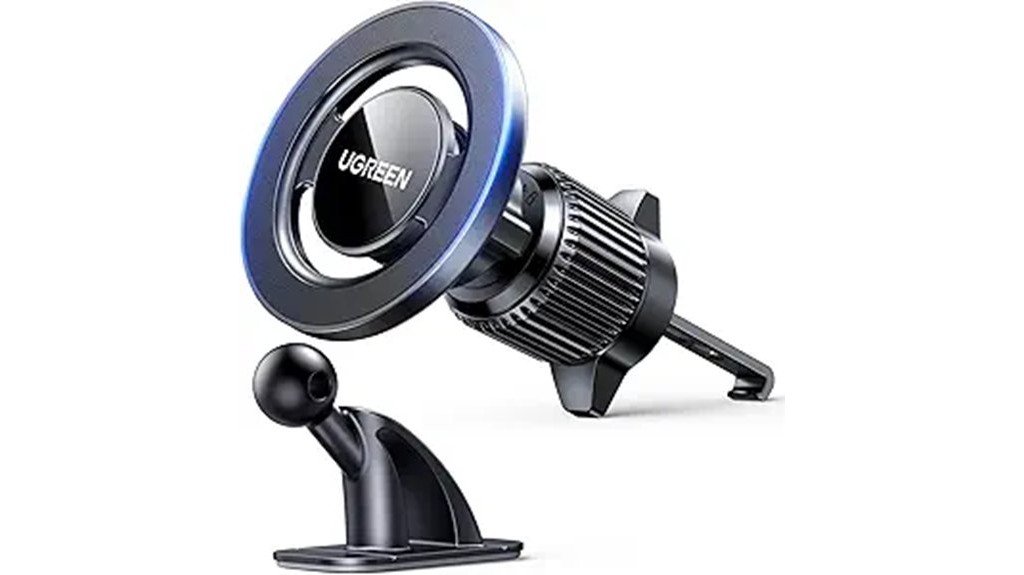
The UGREEN Car Phone Mount is a compact holder that keeps a compatible phone within view without using side arms or a large cradle. You can attach it to a suitable air vent with the hook assembly or place it on a smooth dashboard area with the supplied pad. The magnetic head then holds the phone while the rotating joint lets you choose portrait or landscape orientation.
MagSafe iPhones and MagSafe cases are intended to connect directly to the magnetic face. For many Android phones, older iPhones, or standard cases, the included metal ring creates the contact point. The mount is presented as a holder rather than a charging accessory, so your charging setup remains separate.
Who Should Buy It?
Best For
- MagSafe users who want fast one-hand attachment and removal.
- Drivers who need a choice between vent and dashboard placement.
- People who prefer a small magnetic face instead of a clamp-style cradle.
Skip If
- Your vents are round, fragile, loose, unusually thin, or thicker than the stated range.
- Your dashboard is heavily textured, sharply curved, dusty, or covered in soft-touch material.
- You need uninterrupted wireless charging with a non-MagSafe phone that requires a metal ring.
Before You Buy: Measure or inspect your vent slats and choose a flat dashboard area before ordering. The stated 5 to 8 mm vent range does not cover every vent design, and adhesive pads work best on clean, smooth, level surfaces.
Feature-by-Feature Review
Magnetic Hold and Phone Stability
The supplied details list an N52 magnet with about 2500 g of pull force. The 65 mm magnetic face gives the phone a broad contact area, which can help reduce twisting when you brake, turn, or travel over uneven pavement. A direct MagSafe connection should provide the cleanest setup because the phone or case already has a centered magnetic ring.
Real stability still depends on phone weight, case thickness, ring placement, and the strength of the mounting point. A thick case can increase the gap between the phone and magnet. An off-center metal ring can also make the phone sit unevenly or rotate more easily.
Vent and Dashboard Installation
The 2-in-1 design gives you two ways to position the holder. The vent hook can be useful when you want a removable setup and do not want adhesive on the dashboard. The dashboard pad can place the screen higher or closer to your normal line of sight when the vents are weak, hidden, or poorly located.
The vent hook is described as reinforced around the attachment area and intended for slats between 5 and 8 mm thick. That range matters because an oversized hook may not tighten securely on a thin blade, while a narrow opening may not fit a thick vent. The dashboard option also needs a smooth, flat surface that allows the pad to make full contact.
Compact Build and Viewing Angle
The magnetic face measures about 65 mm across, while the listed depth is about 40 mm from the clip to the magnet. That compact profile should take up less visual space than a wide cradle with side arms. It also leaves the phone edges open, making it easier to pick up the device when parked.
The 360° rotating head supports portrait and landscape viewing. Portrait mode normally works better for turn-by-turn navigation, while landscape mode can make wider maps or media controls easier to read. Set the angle before moving so you do not need to adjust the screen while driving.
MagSafe and Non-MagSafe Compatibility
MagSafe phones and cases can attach without an added plate when their magnetic ring aligns with the mount. Non-MagSafe phones need one of the included metal rings attached to the phone or case. This expands compatibility, but it also makes correct placement more important.
A ring placed too high or low can shift the phone’s center of gravity and reduce stability. Metal can also interfere with wireless charging on some devices. Check your preferred case, charger, and ring position together before making the setup permanent.
Setup Tips Before First Use
- Choose the location first. Keep the phone outside airbag deployment areas and away from controls, gauges, and your direct road view.
- Test the vent without the phone. Tighten the hook gently, then check that the blade does not bend, twist, or move under light pressure.
- Prepare dashboard surfaces. Remove dust and residue, let the area dry, and apply the pad only where its full base can sit flat.
- Center the metal ring. For a non-MagSafe phone, align the ring near the device’s center so the weight is balanced on the magnetic face.
- Test your complete setup. Attach the phone with its normal case, drive slowly over a familiar route, and recheck the mount for movement before regular use.
Pro Tip: Before attaching a metal ring, place it temporarily between the phone and case to test balance, magnetic grip, and wireless-charging behavior. Apply it permanently only after you confirm the position works.
How It Performs in Real Use
For Daily Commuting
The main benefit during a commute is quick attachment. You can place a compatible phone on the mount with one hand before driving and remove it without opening side clamps. The rotating head also lets you correct glare or choose the orientation that matches your navigation app.
For Rough Roads and Firm Braking
The article describes the mount as stable during normal braking and uneven driving, but your result depends on the complete setup. A direct MagSafe connection or well-centered ring should hold better than a thick, soft, or weakly magnetic case. The vent or dashboard base must also remain firm, because a strong magnet cannot correct a loose mounting point.
For Shared or Multiple Vehicles
The vent option may be easier to move between compatible cars because it does not rely on a permanently placed dashboard pad. You still need to check the vent shape and thickness in each vehicle. The dashboard option makes more sense when you want a fixed position in one car.
For Long Trips
A compact mount can keep navigation visible without filling much of the console area. Before a long drive, check that heat has not loosened the dashboard adhesive, the vent hook remains tight, and the phone does not block airflow or important controls. Reposition the mount while parked, not while the vehicle is moving.
Compatibility and Safety
Install the mount where it will not obstruct your view, steering controls, hazard controls, gauges, or an airbag deployment path. A phone holder can reduce the need to handle a device, but it does not make phone interaction safe while driving. Enter your route, connect audio, and set the screen angle before you move.
Heat can affect plastics and adhesives over time. Check the dashboard pad after hot days and inspect the vent hook if the mount has been moved often. Stop using the holder if the vent blade bends, the base loosens, or the phone falls during normal driving.
Pros and Cons
Pros
- N52 magnetic design with a listed pull of about 2500 g.
- Vent hook and dashboard pad provide two placement options.
- About 65 mm of magnetic contact area helps support stable positioning.
- 360° rotation supports portrait and landscape viewing.
- Included metal rings extend use to many non-MagSafe phones and cases.
Cons
- The stated 5 to 8 mm vent range does not suit every vent shape or blade.
- Dashboard adhesion may weaken on curved, textured, dusty, or heat-exposed surfaces.
- Metal rings can interfere with wireless charging and may require placement testing.
Is It Worth the Price?
The UGREEN Car Phone Mount is worth considering if you value flexible installation more than built-in charging. Its practical value comes from the combination of a compact magnetic face, two mounting methods, a rotating joint, and support for both MagSafe and many non-MagSafe devices.
You get the most value when your phone connects directly through MagSafe and your car has a compatible vent or smooth dashboard surface. It is not the best fit when you need a charging mount, have unusual vent geometry, or must add a metal ring that disrupts wireless charging. Check the current product page for package details and compatibility notes before buying.
How It Compares to Alternatives
The ESR HaloLock Magnetic Car Mount is worth comparing if you prefer another MagSafe-focused design. The Belkin BoostCharge Magnetic Wireless Car Charger may suit you better when charging is a priority, while a LISEN MagSafe Car Mount gives you another range of vent and dashboard configurations to compare.
The UGREEN mount makes the most sense when you want a simple holder with two installation choices and do not need built-in wireless charging. Compare the attachment method, vent compatibility, dashboard base, and phone-case requirements before choosing among them.
Frequently Asked Questions
Does the UGREEN Car Phone Mount work with MagSafe iPhones?
The supplied article says it supports MagSafe iPhones and MagSafe cases through direct magnetic attachment. Check the current listing for any model-specific compatibility notes and test thick cases before driving.
Can you use it with an Android phone?
Many Android phones and non-MagSafe cases can use the mount with an included metal ring. Center the ring carefully and confirm that the phone remains balanced in both portrait and landscape positions.
Will the metal ring affect wireless charging?
It can block or weaken wireless charging on a non-MagSafe phone or case. Test the ring position with your charger before applying it permanently, or use a removable case for mounting.
Does it fit every car air vent?
No. The supplied details state a fit range of about 5 to 8 mm for vent slats, but shape and strength also matter. Round vents, fragile blades, loose assemblies, and unusual slat angles may not provide a secure base.
Can you mount it on a textured dashboard?
A textured or curved dashboard may not give the adhesive pad enough contact area. Choose a clean, smooth, flat section and check the base regularly, especially after exposure to high cabin temperatures.
Does this mount charge your phone?
The supplied article describes it as a magnetic holder, not a wireless charger. You will need a separate charging cable or charging accessory if you want power while driving.
Is it safe to place near an airbag?
Do not place the mount or phone in an airbag deployment path. It should also stay clear of controls, gauges, and the driver’s direct view of the road.
What is the most common setup mistake?
Common mistakes include applying the dashboard pad to a dusty or curved surface, attaching the hook to an incompatible vent, and placing a metal ring off-center. Test the full setup with your normal case before relying on it during a trip.
The Bottom Line
The UGREEN Car Phone Mount is a practical choice for drivers who want a compact magnetic holder with vent and dashboard placement. Its strongest points are quick attachment, a listed 2500 g magnetic pull, a 65 mm face, and 360° rotation, while its main weakness is setup-dependent compatibility. Skip it if your vent or dashboard cannot support the mount securely, or if a required metal ring conflicts with your wireless-charging routine.