Disclosure: As an Amazon Associate, we earn from qualifying purchases. If you click a link on this page and make a purchase, we may receive a small commission at no extra cost to you.
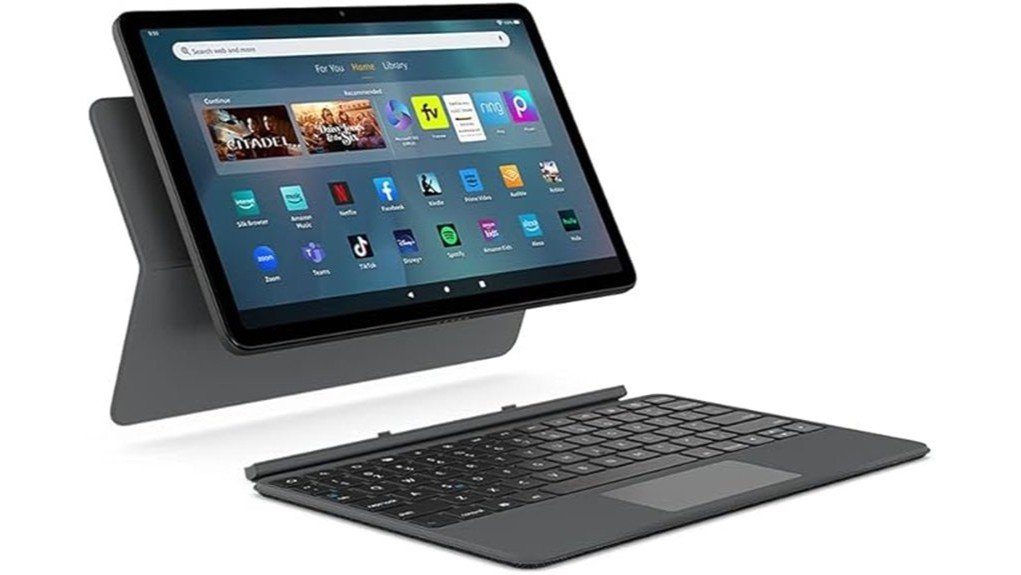
Typing long emails or editing documents on a tablet screen can feel slow and awkward. The Amazon Fire Max 11 Keyboard Case gives your compatible Fire Max 11 tablet a physical keyboard, integrated trackpad, and adjustable stand. Its magnetic connection and tablet-powered design make setup simple, but its narrow compatibility means it is not useful with other Fire models. This review covers the features, limitations, and practical buying details to help you decide whether this accessory is worth adding to your tablet.
Quick Verdict
Rating: Recommended with caveats
Best For: Owners of the 2023 Amazon Fire Max 11 who want easier typing, pointer control, and hands-free viewing.
Bottom Line: The official keyboard case is a useful productivity accessory with 15 shortcut keys, a built-in trackpad, and no separate charging requirement. Its main drawback is that it only works with one specific tablet generation, and it does not turn Fire OS into a full desktop operating system.
Amazon Fire Max 11 Keyboard Case Specifications
| Specification | Details |
|---|---|
| Brand | Amazon |
| Product | Fire Max 11 Keyboard Case |
| Model number | SA6DIN |
| ASIN | B0B5VQ3XML |
| Compatibility | Fire Max 11 tablet, 13th generation (2023 release) only |
| Product dimensions | 10.3 × 6.54 × 0.21 inches, as listed by Amazon |
| Listed item weight | 14.88 ounces (about 422 g) |
| Connection | Magnetic attachment with pogo-pin connection |
| Power source | Powered by the connected tablet |
| Keyboard shortcuts | 15 preset shortcut keys and 2 customizable shortcut keys |
| Trackpad | Integrated, with multi-finger gestures and adjustable pointer speed |
| Stand | Detachable back cover with multi-position stand |
| Materials | Contains 31% post-consumer recycled plastics, according to Amazon |
| Package contents | One keyboard case with detachable back cover and stand; tablet sold separately |
| Best use | Emails, notes, documents, basic spreadsheets, and hands-free viewing |
Specifications refer to the keyboard case, not the Fire Max 11 tablet itself. Listed measurements may differ from the dimensions of the complete tablet-and-case setup.
What Is the Amazon Fire Max 11 Keyboard Case?
The Amazon Fire Max 11 Keyboard Case is an official accessory for the 13th-generation Fire Max 11 tablet released in 2023. It combines a physical keyboard, touch-sensitive trackpad, and removable rear cover with an adjustable stand.
Unlike a typical Bluetooth keyboard, this accessory attaches magnetically and uses pogo-pin contacts for power and communication. You do not need to charge a separate keyboard battery or complete a Bluetooth pairing process. It is designed to make everyday tasks easier while keeping the Fire Max 11 portable.
The keyboard does not include a tablet. You need a compatible Fire Max 11 to use it, and the software capabilities still depend on the tablet’s Fire OS and supported apps.
Who Should Buy It?
Best For
- Fire Max 11 owners who regularly type emails, notes, or short documents.
- Students and home users who want keyboard shortcuts and trackpad control.
- Travelers who prefer a detachable keyboard and an adjustable viewing stand.
Skip If
- You own a Fire HD 10, Fire HD 8, or another incompatible tablet.
- You need a universal keyboard for several devices.
- You depend on desktop-only software or advanced laptop workflows.
Compatibility and Design
Made for the 2023 Fire Max 11
Compatibility is the most important detail to check before buying. This keyboard case is designed exclusively for the 2023 Fire Max 11, 13th generation. Its magnetic attachment and physical connector position are made for that tablet.
The Fire Max 11 has an approximately 11-inch screen, but screen size alone does not determine keyboard compatibility. A different 11-inch tablet or an older Fire device will not automatically fit or connect.
Before You Buy: Confirm that your tablet is the Fire Max 11 released in 2023, not a Fire HD 10 or another Fire model. This case requires the correct magnetic connection and contact layout. Also confirm that the Amazon listing is for the keyboard case rather than a tablet bundle.
Detachable Design and Adjustable Stand
The rear cover includes an integrated multi-position stand. You can remove the keyboard portion while keeping the back cover attached to the tablet, which is helpful when you want to watch videos or make video calls without typing.
The adjustable stand gives you more viewing flexibility than a simple fixed-angle cover. For the most secure setup, place the tablet on a firm, level surface before adjusting the angle.
Portability and Added Weight
Amazon lists the accessory at 14.88 ounces. It is portable enough to carry with your tablet, but it adds noticeable weight compared with using the tablet alone.
If you mainly read books or watch videos while holding the tablet, a simpler cover may be more comfortable. The keyboard case makes more sense when you expect to type frequently.
Typing Experience
Physical Keys and Shortcuts
A physical keyboard gives your fingers dedicated keys instead of relying on an on-screen layout. That can make writing longer emails, entering notes, and editing text more convenient.
The keyboard has 15 preset shortcut keys and 2 customizable shortcut keys. These controls reduce the need to navigate through menus for supported tasks. They are useful when you switch between typing and tablet controls during a work session.
The layout is designed around the compact tablet format rather than a full desktop keyboard. If you spend hours entering data or prefer a large keyboard with a number pad, a separate full-size keyboard may suit you better.
Integrated Trackpad and Gestures
The built-in trackpad lets you move the pointer without touching the screen for every action. It supports gestures including two-finger scrolling, pinch-to-zoom, and task switching.
You can adjust pointer speed to match your preference. The Fn + Tab shortcut also lets you enable or disable the trackpad, which can be helpful if you keep touching it by accident while typing.
Gesture behavior can vary by app. Some tablet apps have touch-first designs and may not respond to pointer actions in exactly the same way as desktop software.
No Separate Keyboard Charging
One practical advantage is the pogo-pin power connection. Once the keyboard is attached correctly, it draws power from the Fire Max 11 instead of relying on a separate rechargeable keyboard battery.
This removes another charging cable from your routine. However, the keyboard still uses power supplied by the tablet, so the tablet’s available battery life remains important during longer sessions.
Productivity Features
Documents, Email, and Spreadsheets
The Fire Max 11 keyboard case is most useful for tasks that involve regular text entry. You can use it with compatible apps for writing documents, sending messages, creating notes, and working with basic spreadsheets.
The combination of physical keys and trackpad control can reduce how often you reach for the touchscreen. However, the keyboard does not add extra processing power, desktop software, or operating-system features to your tablet.
Microsoft 365 Personal Trial
Amazon originally promoted a three-month Microsoft 365 Personal trial with the Fire Max 11 tablet. The offer was associated with the tablet experience, not a permanently included subscription supplied by the keyboard case itself.
Trial eligibility, sign-up requirements, subscription pricing, and renewal terms may change. Check the current offer before purchasing, especially if Microsoft 365 is a major part of your buying decision.
For demanding office tasks, also confirm that the Fire tablet supports the apps and specific functions you need. Mobile productivity tools may not offer every feature found in their desktop counterparts.
Materials, Cleaning, and Safety
Construction and Recycled Materials
Amazon states that the keyboard case is made with 31% post-consumer recycled plastics. It also describes the product packaging as fully recyclable, excluding shipping packaging.
This is useful if material sourcing matters to you. However, those statements do not establish that the product is waterproof, impact-proof, or suitable for rough handling.
Cleaning the Keyboard Case
For routine cleaning, detach the keyboard from the tablet and use a soft, dry microfiber cloth to remove dust and fingerprints. Avoid spraying cleaners directly onto the keys or trackpad.
Keep liquids away from the pogo-pin contacts and connection points. If the product needs more detailed cleaning, follow Amazon’s device-care instructions rather than using harsh solvents or excessive moisture.
Handling and Storage
Use the stand on a stable surface to reduce the chance of the tablet tipping over. Avoid forcing the magnetic parts into place or placing debris between the connection contacts.
Amazon’s safety documentation lists an operating temperature range of 32°F to 95°F (0°C to 35°C) for model SA6DIN. Keep the accessory away from excessive heat, moisture, and conditions outside the manufacturer’s guidance.
How It Performs in Real Use
The following examples explain how the verified features can help in common situations. They are practical use scenarios, not claims from a hands-on durability or performance test.
For Daily Emails and Notes
If you often reply to longer emails or write class notes, the physical keyboard can be more convenient than the touchscreen. The shortcut keys may also reduce repeated menu navigation.
The trackpad lets you select fields and move through supported apps without covering part of the screen with your hand.
For Documents and Spreadsheets
The keyboard is suitable for short reports, document editing, and light spreadsheet work using compatible software. Two-finger scrolling and pointer control can make moving through longer files easier.
For large spreadsheets, advanced formatting, or specialized office tools, the limits of the tablet and its apps may matter more than the keyboard hardware.
For Video Calls and Entertainment
The rear stand supports hands-free viewing during supported video calls, streaming, or reading. You can remove the keyboard when you want a cleaner viewing setup.
This flexibility is useful on a desk or table. The stand should not be treated as a guarantee of stability on soft or uneven surfaces.
For Travel and Shared Workspaces
The magnetic attachment makes it practical to switch between tablet-only and keyboard use. You do not need to manage a second Bluetooth pairing process when attaching the official keyboard.
In a café, classroom, or hotel room, a flat table offers a better working surface than your lap. Remember that carrying the keyboard case adds weight to your overall setup.
Setup Tips Before First Use
The keyboard is designed for quick attachment, but a few simple checks can help you avoid common connection problems.
- Confirm the tablet model: Check that your device is the 2023 Fire Max 11 before trying to attach the accessory.
- Inspect the connectors: Make sure the magnetic contact area is clean and free from dust or debris.
- Attach the keyboard: Align the keyboard with the compatible tablet connector and let the magnetic attachment seat it in place.
- Test basic controls: Open a text field, type a few words, and check pointer movement and scrolling.
- Adjust your setup: Position the rear stand on a flat surface, then adjust pointer speed if needed.
Pro Tip: If you accidentally move the pointer while typing, press Fn + Tab to disable the trackpad. Turn it back on when you need pointer navigation. This is especially useful when writing long documents.
Pros and Cons
Pros
- Direct magnetic attachment designed for the Fire Max 11.
- No separate keyboard battery or charging routine.
- Integrated trackpad with useful navigation gestures.
- 15 preset shortcuts and 2 customizable shortcut keys.
- Removable keyboard and adjustable stand for flexible viewing.
Cons
- Only compatible with the 2023 Fire Max 11 tablet.
- Adds weight compared with carrying the tablet alone.
- Does not overcome Fire OS app limitations or replace every laptop function.
Is It Worth the Price?
The Amazon Fire Max 11 Keyboard Case is best viewed as a first-party productivity accessory rather than a basic protective cover. You are paying for the direct magnetic connection, integrated trackpad, dedicated shortcuts, and detachable stand. These features matter most if you use your Fire Max 11 for typing almost every day.
Its value is less compelling if you mainly watch videos or read books. A simpler stand case can cover those needs without adding a keyboard. The official keyboard case also has limited value once you stop using the compatible Fire Max 11.
Compare the current selling price with alternative cases and keyboard setups before buying. A discount can make the accessory easier to justify, but fit and actual use matter more than a temporary price reduction.
How It Compares to Alternatives
The AGPtek KB62 Keyboard Case is another option designed for the 2023 Fire Max 11. It uses a removable wireless keyboard and offers a different design and connection approach. If you prefer a wireless keyboard setup, it is worth comparing, although pairing and charging introduce extra steps that the Amazon pogo-pin keyboard avoids.
The Fintie Fire Max 11 Keyboard Case offers a detachable Bluetooth keyboard for the same tablet generation. Fintie’s Slim Tri-Fold Case is another alternative if you only need a protective stand and do not need typing hardware. The official Amazon case is the better fit when your main priorities are direct attachment, tablet-powered operation, and an integrated trackpad.
Frequently Asked Questions
Can I use the keyboard cover without the Fire Max 11?
No. The keyboard requires the compatible Fire Max 11 tablet for its connection and power. It is not designed to function as a standalone Bluetooth keyboard for computers, phones, or other tablets.
Will this keyboard case fit the Fire HD 10 or other Fire tablets?
No. Amazon specifies compatibility with the Fire Max 11, 13th generation, released in 2023. Other Fire tablets have different physical designs and connections, even when their screen sizes are similar.
Does the keyboard case need charging or Bluetooth pairing?
No separate keyboard charging or Bluetooth pairing is needed. The magnetic pogo-pin connection supplies power from the Fire Max 11 and allows the keyboard to work when attached correctly.
Is the keyboard cover water-resistant or spill-proof?
Amazon does not specify a waterproof or spill-resistant rating for this keyboard case. Keep drinks and liquids away from the keys, trackpad, and electrical contacts. Do not assume it can safely handle accidental spills.
Can I remove the keyboard and still use the tablet stand?
Yes. The keyboard portion can be separated from the back cover, which includes the adjustable stand. This lets you keep the tablet upright for video calls, reading, or watching content without leaving the keyboard attached.
How do I clean the keyboard cover?
Detach the keyboard and wipe it gently with a clean, dry microfiber cloth. Avoid spraying liquid cleaners onto the keyboard or connector pins. Follow Amazon’s device-care guidance for any cleaning that requires more than routine dust removal.
What colors are available for the keyboard cover?
Multiple color variants could not be confirmed from the linked Amazon product details. Check the currently selected listing and any available color options before ordering. Do not assume that colors offered for regular Fire Max 11 covers are also available for the keyboard case.
Does the keyboard case come with a warranty?
Amazon provides device warranty and support information, but a specific one-year warranty term was not confirmed for the linked offer. Check the applicable limited warranty, seller details, and return terms before purchasing. Coverage may depend on the purchase conditions.
The Bottom Line
The Amazon Fire Max 11 Keyboard Case is recommended with caveats for owners of the 2023 Fire Max 11 who want physical typing, trackpad navigation, and an adjustable stand without managing a separate keyboard battery. Its biggest strengths are the direct magnetic connection and practical productivity controls, while its biggest limitations are exclusive tablet compatibility and the software constraints of Fire OS. Skip it if you need a universal keyboard or a complete replacement for a laptop.
Ready to Buy?
Confirm your Fire Max 11 model and check the current product details before making your decision.