Disclosure: As an Amazon Associate, we earn from qualifying purchases. If you click a link on this page and make a purchase, we may receive a small commission at no extra cost to you.
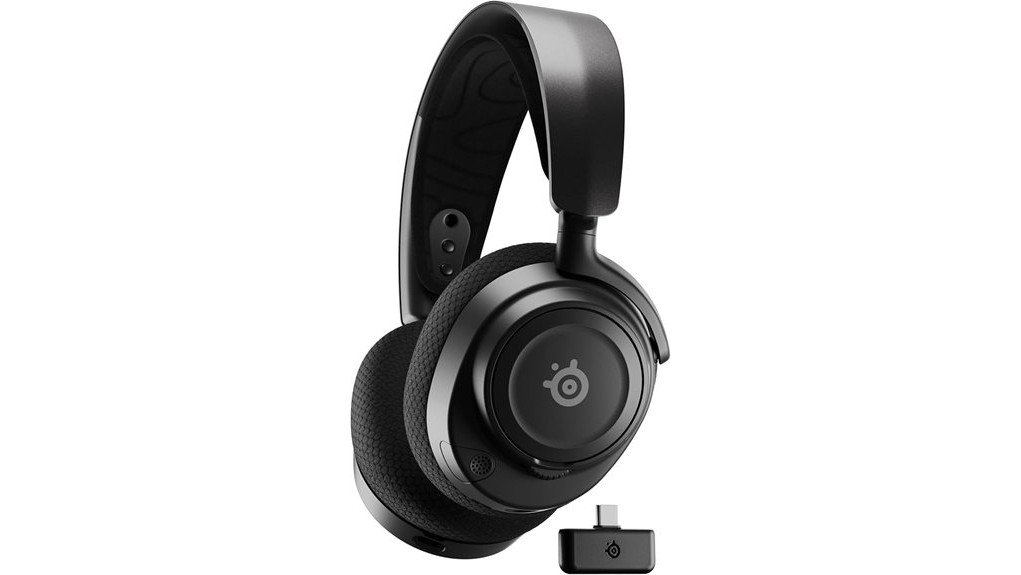
Choosing a wireless gaming headset can be tricky when you need clear game audio, reliable voice chat, and comfort during long sessions. The SteelSeries Arctis Nova 7 Wireless offers simultaneous 2.4GHz and Bluetooth audio, a flexible suspension headband, and up to 38 hours of rated battery life. It is especially useful if you play on a PC or PlayStation while keeping your phone connected. This review explains its sound, comfort, compatibility, and limitations, including an important detail: the linked Amazon product is a Renewed headset, not a new one.
Quick Verdict
Rating: Recommended with caveats
Best For: PC and PlayStation gamers who want dual wireless audio, comfortable ear cushions, and long battery life.
Bottom Line: The Arctis Nova 7 combines flexible audio connections with a comfortable design and useful PC sound controls. However, the linked Renewed version requires extra attention to battery condition, included accessories, and return coverage.
SteelSeries Arctis Nova 7 Key Specifications
| Specification | Detail |
|---|---|
| Brand | SteelSeries |
| Model | Arctis Nova 7 Wireless, original 2022 generation |
| Product type | Over-ear wireless gaming headset |
| Amazon listing condition | Renewed; exact cosmetic grade depends on the offer |
| Color | Black, as listed for the linked version |
| Headset weight | Approximately 325g (11.5 oz) |
| Headband | Adjustable suspension band with steel headband structure |
| Ear cushions | Breathable AirWeave memory foam |
| Audio system | SteelSeries Nova Acoustic System |
| Spatial audio | 360° Spatial Audio with supported software and platforms |
| Wireless connections | 2.4GHz USB-C dongle and Bluetooth, including simultaneous use |
| Wired connection | Compatible 3.5mm analog audio cable |
| Platform compatibility | PC, Mac, PS4, PS5, Nintendo Switch, and compatible mobile devices |
| Xbox wireless support | Not supported by the standard Nova 7 model; consider Nova 7X |
| Microphone | Retractable ClearCast Gen 2 microphone |
| PC software | SteelSeries GG and Sonar, including parametric EQ |
| Rated battery life | Up to 38 hours, manufacturer claim for the original model |
| Fast charging | 15 minutes for up to six additional hours of use |
| Charging connector | USB-C |
| Accessories | Original configuration uses a wireless dongle and compatible cables; verify the contents of the Renewed offer |
What Is the SteelSeries Arctis Nova 7?
The SteelSeries Arctis Nova 7 is a wireless gaming headset designed for players who use more than one audio device. Its main feature is the ability to receive low-latency 2.4GHz game sound and Bluetooth audio at the same time. You can play on your PC while listening to music or receiving a phone call.
The original Nova 7 debuted in 2022. It uses SteelSeries’ Nova Acoustic System, breathable over-ear cushions, and a retractable microphone for team communication. Its design aims to balance gaming performance with comfort and everyday use.
The Amazon link in this review points to a refurbished version sold through Amazon Renewed. Its core features should match the original model, but battery health, cosmetic appearance, and included accessories can differ from a factory-new unit.
Who Should Buy It?
Best For
- PC gamers who want game audio and Bluetooth phone audio together.
- PlayStation and Nintendo Switch players who want wireless headset flexibility.
- Gamers who prefer breathable fabric cushions, long battery life, and adjustable fit.
Skip If
- You need wireless Xbox compatibility; the Nova 7X is the appropriate version.
- You want a guaranteed factory-new headset with a new battery.
- You prefer simple plug-and-play audio without PC software or EQ adjustments.
Before You Buy: The linked Amazon product is a Renewed SteelSeries Arctis Nova 7. Check its cosmetic grade, battery condition, return policy, and included USB-C wireless dongle. Also confirm that you are buying the standard Nova 7 rather than the 7P, 7X, or newer Gen 2 model. These versions have important differences.
Design and Comfort Features
The Arctis Nova 7 uses SteelSeries’ ComfortMAX design. Its suspension headband helps distribute pressure across the top of your head, while the adjustable ear cups let you change the fit.
Headband and Ear Cushions
The headband combines a steel structure with an adjustable suspension strap. Rather than relying only on a padded band, it spreads the headset’s weight across a broader contact area. This can make it more comfortable during extended sessions.
The AirWeave memory foam ear cushions use a breathable fabric surface. Compared with fully sealed leatherette-style cushions, this design may feel less warm during long gaming sessions, though comfort depends on your head shape and room temperature.
Weight and Adjustability
The headset weighs approximately 325g (11.5 oz), based on published headset specifications. This is more useful for judging on-head comfort than a retailer’s shipping or package weight.
The ear cups rotate and adjust to help you find a secure fit. A good seal matters for sound quality, but the headset should not press painfully against your ears or glasses.
Fit Tips for Better Comfort
- Adjust the suspension strap before tightening the ear cups against your head.
- Center each ear cushion around your ear rather than resting the pad directly on it.
- If you wear glasses, check that the ear cushions do not press too firmly against the frames.
- Take regular listening breaks and keep the volume at a comfortable level.
Audio Performance and Quality
The Arctis Nova 7 uses the SteelSeries Nova Acoustic System, with custom speaker drivers designed for detailed gaming audio. Its sound can be adjusted through supported SteelSeries software on PC.
Sound Detail and Spatial Audio
The headset supports 360° Spatial Audio, which can help place supported in-game sounds around your character. This may make it easier to notice audio cues such as footsteps, movement, and environmental effects.
Actual directional accuracy depends on the game, sound mix, platform, and audio settings. Spatial audio does not guarantee a competitive advantage in every game.
SteelSeries Sonar and the 10-Band Equalizer
On a supported Windows PC, SteelSeries Sonar provides a 10-band parametric equalizer and additional audio controls. You can tune the sound for different games or adjust frequencies that seem too strong or too weak.
You may prefer one profile for competitive shooters and another for story-driven games or music. Start with the default sound before changing several settings at once. The full Sonar software experience is not available directly on PlayStation or Nintendo Switch.
Microphone and Voice Chat
The retractable ClearCast Gen 2 microphone is built for gaming communication. Its position can be adjusted near your mouth, and compatible PC software provides additional noise-reduction options.
This is useful for Discord calls, team chat, and online meetings. However, noise reduction cannot remove every background sound, especially loud voices or sudden noise near your microphone.
For clearer communication, position the microphone close to the side of your mouth rather than directly in front of your lips. Check the input level before joining an important call.
Connectivity and Compatibility
The Arctis Nova 7 supports two wireless connection methods: a dedicated 2.4GHz connection through its USB-C dongle and Bluetooth for compatible phones, tablets, and computers.
Simultaneous 2.4GHz and Bluetooth
Unlike headsets that force you to switch between devices, the Nova 7 can mix audio from both wireless sources. You can hear your game through the dongle while listening to music or taking a call over Bluetooth.
There is one important limitation: the microphone does not transmit your voice to both audio sources at once. When you take a Bluetooth call, microphone use switches to that call rather than broadcasting to both connections.
PC, PlayStation, Switch, and Mobile Compatibility
- PC: 2.4GHz wireless for gaming, plus Bluetooth and supported SteelSeries software.
- Mac: Compatible wireless connections, with software features depending on platform support.
- PS4 and PS5: Wireless audio through a compatible USB connection to the dongle.
- Nintendo Switch: Compatible wireless operation using the supported USB-C connection setup.
- Phones and tablets: Bluetooth audio, with dongle support depending on the device.
- Xbox: The standard Nova 7 does not support Xbox wireless connectivity. The Nova 7X is designed for that purpose.
Using the 3.5mm Wired Connection
The Nova 7 also supports analog audio through a compatible 3.5mm cable. This gives you another way to use the headset when wireless power is not needed or the battery is depleted.
Connecting the analog cable disables the headset’s wireless operation. It is a separate listening mode rather than a third simultaneous audio stream. Make sure you use the correct cable type for the headset.
Battery Life and Charging Efficiency
SteelSeries rates the original Arctis Nova 7 for up to 38 hours of battery life. That is enough for several gaming sessions between charges under suitable usage conditions.
The USB-C fast-charging feature can provide up to six hours of additional use from a 15-minute charge. This helps if you forget to charge the headset before a planned gaming session.
You can also use the headset while it is charging. However, the 38-hour figure is a manufacturer rating for the original product. Actual runtime varies with volume, wireless settings, battery age, and battery health.
What About Battery Life on a Renewed Unit?
Because the linked listing is refurbished, you should not assume that its battery will deliver exactly the same runtime as a new headset. Amazon Renewed products are inspected and tested, but battery capacity may be lower than the original specification.
If you receive a Renewed unit, charge it fully and evaluate battery performance early in the return period. Check for unusual charging behavior or unexpected shutdowns.
Materials, Listening Safety, and Care
The Arctis Nova 7 uses breathable fabric-covered memory foam cushions and an adjustable headband. These surfaces come into contact with your skin, so keeping them clean and dry helps maintain comfort.
Avoid soaking the headset or exposing the charging port to moisture. Use a soft, dry cloth for routine cleaning and follow SteelSeries’ care instructions before using any cleaning product.
Keep listening volume moderate, especially during long sessions. Spatial audio and clear game effects do not require maximum volume. If the headset causes discomfort or irritation, stop using it until you identify the cause.
Setup Tips Before First Use
- Inspect the contents: Check that the Renewed package includes the correct headset and a functioning wireless dongle.
- Charge the headset: Connect a suitable USB-C charging cable before your first extended session.
- Connect the dongle: Use a compatible USB-C port or appropriate USB-A adapter for your PC or console.
- Pair Bluetooth: Follow the headset’s pairing instructions to connect your phone or tablet.
- Test the microphone: Confirm that voice chat works with the intended device.
- Adjust the fit: Set the suspension strap and ear cups before judging comfort.
- Configure PC audio: Install supported SteelSeries software if you want Sonar EQ and additional controls.
Pro Tip: On PC, test 2.4GHz game audio and Bluetooth phone audio together before you start a long gaming session. Adjust each source’s volume and check microphone routing so an incoming call does not cause confusion during team chat.
How It Performs in Real Use
The following scenarios explain how the headset’s verified features apply to common situations. They are practical use assessments based on product specifications, not claims of original hands-on testing.
Competitive PC Gaming
The 2.4GHz wireless connection is the primary choice for responsive PC gaming audio. Supported spatial audio and Sonar adjustments give you control over how footsteps and other sound effects are presented.
For competitive play, spend time learning the game’s audio mix rather than assuming one EQ preset works for every title. Microphone placement and chat volume also affect how easily you communicate with teammates.
PlayStation and Console Gaming
On PS4 or PS5, the wireless dongle provides a convenient connection without a headset cable running to your controller. Compatible console spatial-audio features can enhance supported games.
Console users should remember that SteelSeries Sonar is primarily a PC software feature. Some audio controls available on Windows may not transfer directly to the console.
Gaming While Taking Phone Calls
Simultaneous Bluetooth and 2.4GHz audio is useful when you want to stay connected to your phone during a game. You can listen to two sources without repeatedly disconnecting and pairing the headset.
During Bluetooth calls, pay attention to microphone routing. Your voice cannot be sent to both connected devices at the same time.
Long Sessions and Everyday Use
The suspension headband and AirWeave cushions are designed to improve comfort over long periods. The rated 38-hour battery life also reduces the need for daily charging.
For general music, calls, and videos, Bluetooth adds flexibility beyond gaming. A Renewed unit may require more frequent charging if its battery has lost some original capacity.
Customer Feedback and Market Position
The Arctis Nova 7 has been reviewed by both customers and independent audio publications. Common points of interest include its dual wireless connections, flexible fit, battery life, and PC software features.
During the October 2026 editorial check, the linked Amazon Renewed listing displayed 4.0 out of 5 stars from 185 ratings. These figures are a snapshot, not a permanent score, and can change as more customers leave feedback.
Because this specific listing is Renewed, you should read recent seller and condition-related reviews separately from general reviews of the original headset. Product design quality and refurbished-unit condition are different buying concerns.
The original Nova 7 also faces competition from newer wireless models, including SteelSeries’ own Gen 2 lineup. Its value now depends heavily on the condition and price of the particular offer.
Pros and Cons
Pros
- Simultaneous 2.4GHz and Bluetooth audio supports gaming and phone use together.
- Breathable AirWeave memory foam cushions and adjustable suspension headband.
- Up to 38 hours of rated battery life with useful USB-C fast charging.
- SteelSeries Sonar provides detailed PC audio customization.
- Retractable microphone, multi-platform support, and an analog listening option.
Cons
- The linked Renewed unit may have reduced battery capacity or cosmetic wear.
- The standard Nova 7 does not support wireless Xbox audio.
- Full Sonar audio customization requires a supported PC setup rather than a console alone.
Is It Worth the Price?
The SteelSeries Arctis Nova 7 is a feature-rich wireless headset. Its original positioning was in the premium gaming-headset category, with dual wireless connectivity and PC sound customization as major selling points.
The Renewed version is worth considering if its price offers a meaningful saving compared with a new headset. You get the same basic model design and supported features, but the exact condition and remaining battery capacity matter.
It is not the best value if the Renewed offer costs almost as much as a newer, factory-new model. Compare the final price, condition grade, included accessories, and return terms rather than choosing only by the product name.
How It Compares to Alternatives
The SteelSeries Arctis Nova 7X is the more suitable member of the original Nova 7 family if Xbox wireless compatibility is essential. The SteelSeries Arctis Nova 3 is worth comparing if you prefer a simpler wired USB gaming headset and do not need simultaneous wireless audio.
The newer SteelSeries Arctis Nova 7 Gen 2 offers an updated design and a manufacturer-rated battery life of over 50 hours. It is a logical alternative if you prefer a new-generation model. The original Nova 7 Renewed makes more sense when the asking price reflects its age and refurbished condition.
Frequently Asked Questions
Does the SteelSeries Arctis Nova 7 work with PS5, PC, and Nintendo Switch?
Yes. The standard Arctis Nova 7 supports compatible PC, PlayStation, and Nintendo Switch connections through its wireless dongle. Some settings and software features differ by platform. Xbox wireless support requires a suitable Xbox-compatible model such as the Nova 7X.
Can I use Bluetooth and 2.4GHz wireless at the same time?
Yes. You can hear game audio over 2.4GHz while receiving music or calls through Bluetooth. Both audio streams can play together, but the microphone does not send your voice to both devices simultaneously.
Does the Renewed Arctis Nova 7 include a warranty?
The linked version is an Amazon Renewed product, so applicable Amazon Renewed return or guarantee terms should be checked with the specific offer. Do not assume it carries the same manufacturer warranty as a factory-new headset. Confirm the seller, condition grade, and protection details before purchasing.
Can I use the Arctis Nova 7 while charging?
Yes. SteelSeries confirms that its wireless Arctis headsets support use while charging. The Nova 7 charges through USB-C, and its fast-charge feature can provide up to six hours of additional use after 15 minutes of charging.
Are the Arctis Nova 7 ear cushions comfortable for long gaming sessions?
The headset uses breathable AirWeave memory foam cushions and an adjustable suspension headband. These features are designed to reduce pressure and improve airflow. Comfort still depends on your head shape, glasses, room temperature, and listening habits.
Can I replace the ear cushions or wireless dongle?
SteelSeries offers compatible replacement ear cushions and model-specific wireless dongles. Check compatibility with the original Nova 7 before ordering, since dongles for different Nova versions are not universally interchangeable. Availability of individual replacement parts can change.
Can I use SteelSeries Sonar on PS5?
The full SteelSeries Sonar software suite is intended for supported Windows PC use. The Arctis Nova 7 can still provide audio on PS5, but you should not expect the same PC-based parametric EQ and software controls directly on the console.
What should I check after receiving a Renewed Arctis Nova 7?
Inspect the ear cushions, headband, charging port, and microphone. Confirm that the wireless dongle connects correctly, Bluetooth works, and the battery charges normally. Test both audio connections early so you can use the applicable return process if the headset does not match its description.
The Bottom Line
The SteelSeries Arctis Nova 7 Wireless remains a good option for PC and PlayStation gamers who value simultaneous wireless audio, adjustable comfort, and long rated battery life. The linked Renewed version is recommended with caveats: consider it if the price and condition are favorable, but choose a new model or the Nova 7X if you need factory-new battery performance or wireless Xbox compatibility.
Ready to Compare the Price?
Check the current Amazon offer, Renewed condition, included accessories, and return terms before you decide.