Disclosure: As an Amazon Associate, we earn from qualifying purchases. If you click a link on this page and make a purchase, we may receive a small commission at no extra cost to you.
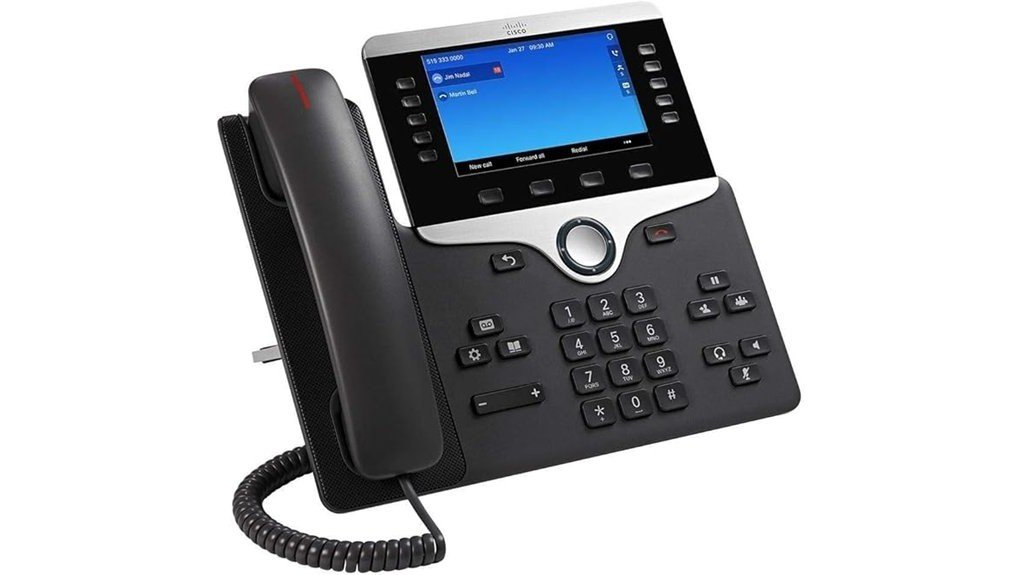
Choosing a business desk phone is not just about sound quality. You also need to know whether it works with your office phone system and how you will power it. The Cisco 8841 VoIP Phone offers wideband audio, a color display, and useful call controls for Cisco-based workplaces. However, the renewed model linked in this review does not include a power supply, and its firmware compatibility needs careful checking before you buy.
Quick Verdict
Rating: Recommended with caveats
Best For: Offices using compatible Cisco call-control systems that need an affordable replacement desk phone.
Bottom Line: The Cisco 8841 provides useful voice features, a clear display, and wired network connectivity. The main drawbacks are its limited wireless features, the need for compatible phone-system configuration, and the missing power adapter in this renewed listing.
Key Specifications at a Glance
| Specification | Detail |
|---|---|
| Brand | Cisco |
| Model | Cisco IP Phone 8841 |
| Amazon listing model | CP-8841-K9-RF, renewed |
| Product type | Wired business VoIP desk phone |
| Display | 5-inch color WVGA, 800 x 480 pixels |
| Line keys | Five programmable line keys |
| Audio | Wideband handset, full-duplex speakerphone, acoustic echo cancellation |
| Network | Two-port 10/100/1000 Mbps Ethernet switch |
| Power | IEEE 802.3af/802.3at PoE, Class 2, or compatible 48V DC adapter |
| Wireless connectivity | No built-in Wi-Fi or Bluetooth |
| Headset connection | RJ-9 analog headset port and auxiliary port for supported electronic hookswitch accessories |
| Dimensions | 9.02 x 10.13 x 1.57 inches, excluding foot stand, per Cisco |
| Weight | 2.58 lb (1.17 kg), with handset |
| Housing material | Textured polycarbonate and ABS plastic |
| Mounting | Two-position foot stand; optional wall-mount kit |
| Condition | Renewed, according to the linked Amazon listing |
| Power adapter included | No, according to the linked listing |
| Listed warranty | 90-day limited warranty for this renewed listing; confirm current seller terms |
What Is the Cisco 8841 VoIP Phone?
The Cisco 8841 is a business IP telephone designed to handle calls over an organization’s data network. Instead of using a traditional telephone line, it connects through Ethernet and relies on a compatible call-control platform to manage extensions, routing, voicemail, and other phone functions.
Its main appeal is a familiar desk-phone layout with more advanced office features. You get a color screen, programmable line keys, a speakerphone, and dedicated controls for common tasks such as holding and transferring calls.
The Amazon version reviewed here is a renewed Cisco 8841. That makes the product condition, warranty, and included accessories especially important. You should treat it as a replacement or addition to a compatible business phone system, not as a standalone home telephone.
Product Features and Specifications
5-Inch Color Display and Call Controls
The Cisco 8841 uses a 5-inch, 800 x 480 pixel color screen. It displays phone information, menus, directories, and call features without requiring a computer.
Five programmable line keys can be assigned to directory numbers or functions such as speed dial. You also get dedicated buttons for hold, transfer, conference, voicemail, and other common tasks.
These controls are useful when you regularly move between calls. Reception desks and shared office lines can benefit from visible call information, although the exact functions depend on the phone-system configuration.
Wideband Audio and Speakerphone
Clear speech is one of the Cisco 8841’s main strengths. Its handset supports wideband audio, and Cisco includes features such as acoustic echo cancellation, automatic gain control, and dynamic noise reduction.
The full-duplex speakerphone allows both sides to speak during a hands-free call. This is useful for desk work and audio conference calls.
Actual voice quality still depends on network conditions, codec settings, and the person you are calling. A congested network or poor headset can affect the result.
Ergonomic Design and Build Quality
The phone has a textured plastic housing, a traditional handset, and a two-position foot stand. Cisco specifies viewing angles of 35 and 50 degrees, giving you some flexibility on your desk.
At 2.58 pounds with its handset, it has enough weight to sit firmly on a normal office surface. Cisco’s physical dimensions are 9.02 x 10.13 x 1.57 inches without the stand.
The linked Amazon listing also reports dimensions of 16 x 3 x 11 inches. For planning actual desk space, use Cisco’s manufacturer measurements while allowing extra room for the stand, handset, and cables.
Wired Network and Ethernet Features
A built-in two-port Gigabit Ethernet switch lets you connect the phone to your network and provide a second Ethernet connection for a nearby computer.
This can reduce the need for separate desk network connections. It does not remove the need for proper network settings, a compatible phone service, or an active Ethernet connection.
The Cisco 8841 has no built-in Wi-Fi or Bluetooth. If you need wireless networking, you should compare it with a model that offers that feature.
Compatibility and Requirements
Compatibility is the most important buying check for the Cisco 8841. You need more than an internet connection to make the phone work.
Cisco Call-Control Systems
The standard Cisco 8841 is designed for supported Cisco enterprise calling platforms. Cisco’s published data sheet lists Unified Communications Manager 12.5 and later, Unified Communications Manager Express 10.0 and later through the applicable support path, and other supported Cisco business and hosted systems.
Older Cisco deployments may have different software requirements. Your administrator should confirm the exact firmware, platform release, device support, and licensing before installation.
Cisco also specifies an Enhanced User Connect License for connecting the phone to Unified Communications Manager. Your organization’s existing licensing arrangement may affect what you need to purchase.
Enterprise Firmware vs. 3PCC Firmware
Not every Cisco 8841 works with the same phone provider straight out of the box.
Cisco offers Enterprise and Multiplatform Phone (MPP), also known as 3PCC, firmware options. The standard CP-8841-K9 family is associated with Cisco enterprise deployments, while 3PCC versions are designed for supported third-party calling environments.
A device running Enterprise firmware may need a supported firmware migration before it can work with a compatible third-party service. That process may require extra licensing or administrative work.
For hosted providers such as Nextiva, verify the exact phone model, firmware, and provisioning support directly with the provider. Do not assume that a standard Cisco 8841 will register automatically.
Before You Buy: This Amazon listing is for a renewed Cisco 8841 and says the power supply is not included. Confirm that your phone system supports its firmware and that you have a PoE network connection or compatible power adapter. Buying the wrong firmware version can create a costly setup problem.
Power over Ethernet and Adapter Requirements
The Cisco 8841 supports IEEE 802.3af and 802.3at Power over Ethernet. With a suitable PoE switch or injector, the phone can receive power through its Ethernet cable.
For networks without PoE, Cisco specifies the optional Power Cube 4 adapter, which supplies 48V DC. The correct regional AC power cord is also needed.
Do not use an unverified power adapter simply because its connector fits. Check Cisco’s power specifications and use compatible equipment.
Compatibility and Security
Cisco includes support for security functions such as encrypted signaling through TLS and protected voice media through SRTP. These features can help organizations secure phone communications when the call-control platform and administrator enable them correctly.
Encryption should not be treated as automatic for every call. The actual protection depends on firmware, certificates, network setup, and calling-system configuration.
If you are installing the phone in a workplace that handles sensitive information, have your IT administrator verify secure provisioning, network access, and calling policies.
The 8841 also supports a Kensington-style security slot for compatible physical security equipment. This can be useful in shared or publicly accessible offices.
Who Should Buy It?
Best For
- Businesses replacing a phone in a compatible Cisco calling system.
- Office workers who need clear wired audio and easy access to call controls.
- IT teams that can handle provisioning, licensing, and PoE setup.
Skip If
- You need a phone that connects to Wi-Fi or pairs with Bluetooth headsets.
- You need video calling or a built-in camera.
- You want a plug-and-play phone for a hosted provider without checking compatibility.
How It Performs in Real Use
The following scenarios explain how the Cisco 8841’s published features apply to common office tasks. They are based on documented capabilities, not a claim of hands-on testing.
Daily Office Calls
For routine calls, the wideband handset and color screen are the key benefits. You can see call information and use dedicated controls without searching through computer menus.
This setup makes sense for workers who spend much of the day at one desk. A stable wired connection also avoids depending on the quality of office Wi-Fi.
Reception and Shared Office Lines
Five programmable line keys help when your work involves multiple extensions or common call functions. Depending on the phone system, you may configure keys for separate lines or frequently used actions.
For larger reception environments, five physical line keys may feel limiting. You should review your required line layout before ordering.
Long Calls and Audio Meetings
The 8841 offers a wideband-capable handset, headset port, and full-duplex speakerphone. These give you several ways to handle longer conversations.
A compatible wired headset can be useful when you need your hands free. The phone supports audio conferencing, but it does not offer a camera or built-in video conferencing.
Replacing an Existing Cisco Phone
Replacing a damaged or worn office phone is one of the strongest reasons to consider the renewed 8841. If your organization already supports the correct model and firmware, the hardware may fit an established setup.
However, an existing extension does not guarantee immediate operation. Your administrator may need to register the replacement device and update its configuration.
Setup Tips Before First Use
Planning the installation before opening the box can prevent most common buying mistakes.
- Verify your calling platform: Confirm that your Cisco or hosted phone system supports the exact model and firmware.
- Check the network: Make sure you have an active Ethernet connection and the required network configuration.
- Plan the power source: Use supported PoE equipment or obtain a compatible 48V DC adapter and power cord.
- Inspect the renewed unit: Check the handset, display, keypad, ports, and accessories when it arrives.
- Arrange provisioning: Have your administrator register the device and apply approved phone settings.
- Test basic functions: Confirm incoming and outgoing calls, speakerphone, mute, transfer, and voicemail where available.
Pro Tip: Before buying a renewed Cisco 8841, ask your IT team for the exact phone part number and firmware type used in your office. Matching those details can save more time than choosing a lower-priced phone that later needs firmware conversion.
Pros and Cons
Pros
- 5-inch color display with clear call information and menus.
- Wideband handset and full-duplex speakerphone for voice calls.
- Five programmable line keys and dedicated call-control buttons.
- Gigabit Ethernet switch and PoE support for office installations.
- Security features and integration with supported Cisco communication platforms.
Cons
- No built-in Wi-Fi, Bluetooth, or video calling.
- The linked renewed listing excludes the power adapter.
- Phone-system compatibility, licensing, and firmware setup may require IT assistance.
Customer Insights and Ratings
When reviewing customer feedback for a renewed business phone, look beyond the overall star rating. Unit condition, the power accessories supplied, and the buyer’s calling environment can have a major effect on the experience.
The linked Amazon listing contains customer reviews, but a buyer’s experience with one renewed unit does not guarantee that every unit will arrive in the same condition. Read recent seller and product feedback before ordering.
Pay particular attention to comments about:
- Audio: Whether buyers report clear handset and speakerphone sound.
- Physical condition: Signs of keypad wear, screen damage, or loose connectors.
- Included items: Whether the received package matches the seller’s description.
- Setup: Whether users report firmware or registration problems with their phone systems.
A low price does not compensate for a phone that cannot register with your service. Compatibility should come before customer ratings in your buying decision.
Is It Worth the Price?
The Cisco 8841 makes the most sense as a value-focused replacement for an established Cisco office phone system. You get business-grade call controls and a color display without needing to change the way your workplace handles calls.
Because this listing is renewed, the total cost matters more than the product price alone. You may need a power adapter, an Ethernet cable, compatible headset accessories, or help from an administrator. Those costs can reduce the value of a cheaper refurbished unit.
It is worth considering when your existing setup already supports the 8841. It is less attractive if you need wireless calling, video, or substantial firmware changes to make it work.
How It Compares to Alternatives
The Cisco 8851 is worth comparing if you need Bluetooth support and a USB port. The Cisco 8861 adds built-in Wi-Fi and additional USB connectivity, making it a better choice for some offices that cannot rely on a wired network connection at every desk.
If video calls are essential, the Cisco 8845 includes video capabilities that the 8841 lacks. The 8841 remains a practical choice when your priority is straightforward wired voice calling in a compatible Cisco environment.
Warranty, Support, and Reference Information
Cisco’s manufacturer data sheet states a standard one-year replacement warranty for the Cisco 8841 product family. However, that does not mean a renewed unit purchased from a third-party seller automatically receives the same coverage.
The linked Amazon listing describes a 90-day limited warranty. Read the current warranty, return, and seller conditions before purchasing, especially if the phone will be used for an important business line.
Technical help may come from your employer’s IT team, your calling-service provider, the seller, or an eligible Cisco support arrangement. Do not assume full Cisco technical support is included with the renewed purchase.
For hardware specifications and supported features, see the official Cisco IP Phone 8841 data sheet. For setup and operation, see the Cisco IP Phone 8800 Series user guide.
Frequently Asked Questions
What Is the Warranty Period for the Cisco 8841 VoIP Phone?
Cisco specifies a standard one-year replacement warranty for the phone family. The linked renewed Amazon listing separately describes a 90-day limited warranty. Check the seller’s current terms, since renewed-unit coverage is not necessarily the same as new-product coverage.
Can the Cisco 8841 Be Used Wirelessly?
The Cisco 8841 has no built-in Wi-Fi or Bluetooth. It uses Ethernet for its network connection, and its handset is corded. If you need a phone with built-in Wi-Fi, compare the Cisco 8861.
Does It Support Video Conferencing Features?
No. The Cisco 8841 is designed for voice communication and does not include a camera or built-in video calling. It supports audio conferencing through compatible phone-system features. Consider the Cisco 8845 if you require a video-capable desk phone.
Does the Cisco 8841 Need a Power Adapter?
Not if you have a compatible Power over Ethernet connection. The phone supports IEEE 802.3af/802.3at PoE. Without PoE, you need a supported external power supply, and the linked renewed listing says one is not included.
Can I Use the Cisco 8841 With a Third-Party VoIP Provider?
Compatibility depends on the exact firmware and your provider’s supported devices. Cisco has Enterprise and Multiplatform/3PCC firmware options. Ask the provider whether the phone can be registered and provisioned before buying a standard Enterprise unit.
Can You Connect a Headset to the Cisco 8841?
Yes. The phone includes an RJ-9 analog headset connection and an auxiliary port for supported electronic hookswitch accessories. Check headset compatibility before purchasing. The 8841 does not offer native Bluetooth headset pairing.
What Troubleshooting Resources Are Available for Users?
Cisco provides online user guides, administrator documentation, and technical support resources. Your workplace IT team can also help with registration, firmware, and network issues. For a renewed device, contact the seller if the hardware or included items do not match the listing.
Is Technical Support Included With the Purchase?
Full manufacturer technical support should not be assumed with this renewed listing. Support eligibility depends on your Cisco service arrangement, provider, and seller terms. Confirm those details if you need direct assistance after installation.
The Bottom Line
The Cisco 8841 VoIP Phone is recommended with caveats for offices that already use a compatible Cisco calling system and want dependable wired voice features. Its color display, wideband audio, and programmable controls make it useful for everyday desk work, but buyers who need wireless calling, video, or simple third-party provisioning should consider another model. Before purchasing this renewed unit, confirm its firmware, power requirements, and warranty.
Ready to Buy?
Check the latest price, seller warranty, and product details before you decide.