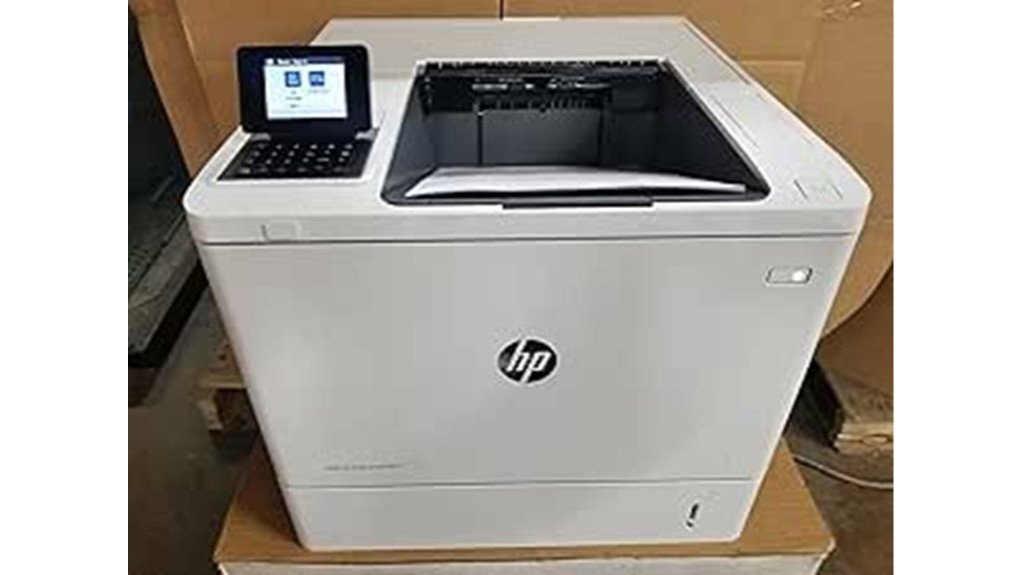
The HP LaserJet M607n Printer stands out in the competitive landscape of business printers. With impressive specifications such as a printing speed of 55 pages per minute and a resolution of 1200 x 1200 dpi, it caters to high-volume demands. Key features include a robust monthly duty cycle of 250,000 pages and versatile connectivity options. But what truly enhances its appeal are the advanced security measures in place. How does it stack up against similar models?
Overview of Specifications
The HP LaserJet M607n printer stands out in the domain of monochrome laser printers, combining high performance with robust features tailored for demanding business environments.
With a print speed of up to 55 pages per minute and a resolution of 1200 x 1200 dpi, it guarantees exceptional print quality. The user experience is enhanced by its fast wake-up, producing the first page in just 5.3 seconds.
Designed for heavy workloads, it has a monthly duty cycle of up to 250,000 pages, making it ideal for high-volume printing tasks.
Paper Handling and Media Support
In the domain of paper handling and media support, the HP LaserJet M607n printer excels with a variety of features designed to accommodate diverse printing needs.
Its robust input capacity includes a 100-sheet multipurpose feeder and a 550-sheet input feeder, allowing for seamless workflows.
Key features include:
- Support for various media types, such as plain paper, cardstock, and envelopes.
- Compatibility with multiple media sizes, including Letter, Legal, and custom dimensions.
- Manual duplex printing capability to save resources.
This printer’s extensive support for media types and impressive input capacity positions it as a versatile choice for demanding environments.
Connectivity and Compatibility
When evaluating connectivity and compatibility, the HP LaserJet M607n printer stands out with its extensive features that cater to a wide range of user needs.
It supports wireless printing through HP ePrint, Apple AirPrint, and Mopria, ensuring effortless mobile access. Standard connectivity includes Hi-Speed USB 2.0 and Gigabit Ethernet, accommodating various environments.
The printer offers software compatibility with Windows, macOS, Linux, and Android, making it versatile for diverse users. Additionally, it employs network protocols like TCP/IP and IPv4, enhancing integration into existing systems.
This combination of features fosters a liberated printing experience for users seeking efficiency and flexibility.
Security Features
Robust security features characterize the HP LaserJet M607n printer, ensuring that sensitive information remains protected in various printing environments. This printer employs advanced security management practices, helping users maintain control over their data.
Robust security features of the HP LaserJet M607n printer protect sensitive information across diverse printing environments.
Key features include:
- Kerberos and LDAP authentication for secure access
- Data encryption for stored information, including encrypted PDFs and emails
- Run-time intrusion detection to monitor and respond to potential threats
These elements work together to create a thorough security framework, empowering organizations to safeguard their information effectively and ensuring compliance with industry standards while enabling a liberated and secure printing experience.
Performance and Energy Efficiency
Exceptional performance and energy efficiency define the HP LaserJet M607n printer, making it a prime choice for high-demand environments. With a remarkable print speed of up to 55 pages per minute and a fast wake-up time, this printer is designed for efficiency. Its energy consumption is distinctly low, operating at 780 watts during printing and just 3.1 watts in sleep mode.
| Feature | Measurement | Significance |
|---|---|---|
| Print Speed | Up to 55 ppm | High productivity |
| Energy Consumption | 780 watts (printing) | Cost-effective |
| Monthly Duty Cycle | Up to 250,000 pages | Suitable for commercial use |
Frequently Asked Questions
What Is the Warranty Period for the HP Laserjet M607N Printer?
The warranty details for the HP LaserJet M607n printer typically include a one-year warranty coverage, encompassing parts and labor. This guarantees users can confidently operate the printer without concerns about potential defects or malfunctions.
Can I Use Third-Party Toner Cartridges With This Printer?
Using third-party toner cartridges with this printer is like walking a tightrope; it offers potential savings but risks compromised toner quality. Compatibility varies, so caution is advised for those seeking true printing liberation.
What Is the Printer’s Noise Level During Operation?
The printer operates at a noise level typical for high-speed devices, maintaining impressive print quality and speed performance. Users seeking liberation from noisy environments may find it a suitable option for quieter printing needs.
Is There a Mobile App for Managing Print Jobs?
In a digital landscape, where convenience reigns, mobile printing apps emerge as guiding stars, illuminating paths for effortless print management. They empower users to transcend boundaries, transforming mundane tasks into seamless experiences of liberation and efficiency.
How Do I Perform Maintenance on the HP Laserjet M607N?
To guarantee ideal printer upkeep, the user should regularly clean the printer, check for firmware updates, replace toner cartridges as needed, and inspect paper paths for jams. Following these maintenance tips promotes longevity and efficiency.
Conclusion
To summarize, the HP LaserJet M607n Printer stands out as a premier choice for high-volume printing needs, offering impressive speed, exceptional print quality, and robust security features. While some may question its initial investment, the long-term savings from increased efficiency and lower maintenance costs justify the expense. With a monthly duty cycle of 250,000 pages and versatile connectivity options, this printer is well-equipped to meet the demands of any professional environment, ensuring reliable performance day after day.