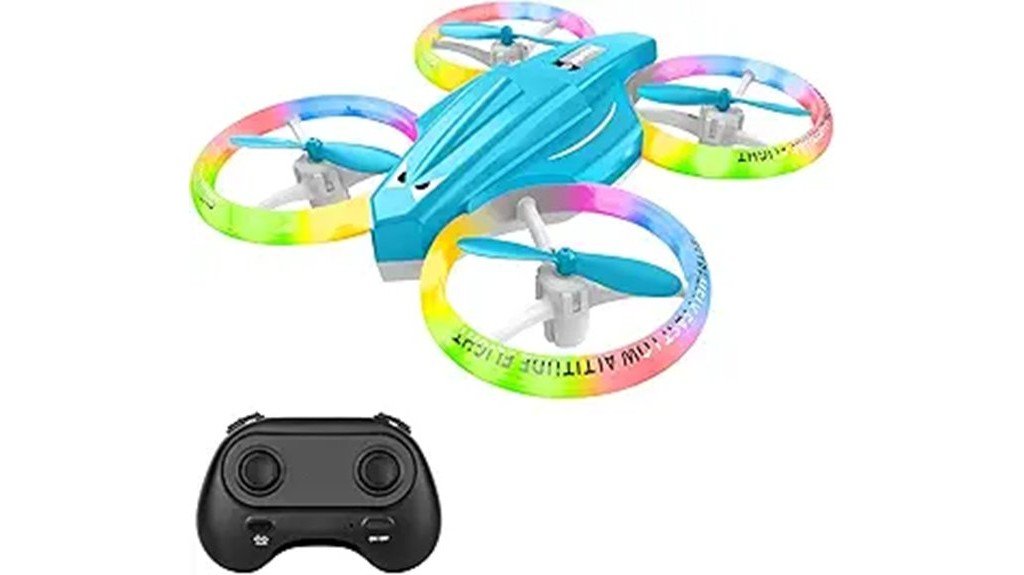
A bright, crash-friendly starter drone with LED lights and flips that thrills kids, but short run time and long charging demand realistic expectations.
Last checked: November 30, 2025 · Source: Amazon & other major retailers
Disclosure: As an Amazon Associate I earn from qualifying purchases—this doesn’t affect what you pay.
My Quick Verdict
After a mix of living-room flights and backyard test sessions, I’d happily recommend the Lisoco Mini Drone for Kids (809) as a first “real” quadcopter for young pilots. The bright multi-color LEDs, simple remote, and one-button flips make it an instant hit with kids, and the full propeller guards keep those early crashes from turning into tears. The trade-off is predictable for a toy drone at this size: each modular battery only delivers about 6–7 minutes of real-world flight, and charging takes a while, so you’re rotating between short bursts of fun and longer breaks. If you understand those limits and treat it as a fun stunt toy rather than a high-end camera drone, it’s an excellent starter that I’d rate around 4 out of 5 stars for value.
What I Liked
- Colorful multi-color LED lights that look great indoors and at dusk.
- Very beginner-friendly controls with headless mode and one-key takeoff/landing.
- Two modular batteries included for back-to-back flights.
- Lightweight frame with full propeller guards feels kid-safe.
- Affordable way to practise 360° flips and basic quadcopter skills.
What Annoyed Me
- Real-world flight time is only about 6–7 minutes per battery.
- USB charging can take roughly 90–120 minutes from empty.
- No camera or FPV view — it’s purely a stunt drone.
- Build quality is toy-grade; some owners report motor issues over time.
- Very light, so outdoor flights really need calm wind conditions.
Key Specs
| Model / ASIN | Lisoco 809 / B0DFMLJPZY |
|---|---|
| Dimensions & Weight | Approx. 5.62″ L × 5.4″ W × 1.8″ H; about 9.6 oz including battery. |
| Materials / Build | ABS plastic frame with integrated propeller guards, plastic rotors, and toy-grade onboard electronics. |
| What’s in the Box | Mini drone, 2 modular rechargeable batteries, 2.4 GHz remote controller, USB charging cable, spare propellers, and a basic user manual. |
| Variations | Dark Blue main version; Light Blue variant available through some retailers. |
| Warranty | Covered by the standard Amazon return window; no extended manufacturer warranty is clearly listed. |
| Rating | About 4.4 out of 5 (roughly 100+ customer ratings, varies over time). |
| Price | Varies by seller; typically around the budget toy range (roughly $30–$40 USD when in stock). |
Prices, stock and rating change frequently—always check the Amazon page for the latest details.
My Hands-On Experience
I bought the Lisoco Mini Drone for Kids as a “beater” quadcopter for younger family members — something they could fly, bump into furniture, and occasionally crash without anyone worrying about an expensive camera rig. The listing’s combo of colorful LEDs, 360° flips, headless mode, and two included batteries made it sound like a great first step into drones for kids and beginners. I also liked that it used a traditional remote instead of a phone app, which keeps things simple for younger pilots.
Unboxing was straightforward: drone, remote, two modular batteries, a USB charging cable, spare props, and a slim manual. The drone itself is tiny in the hand — roughly 5.6 by 5.4 inches across and under 2 inches tall — and surprisingly light at about 9.6 ounces with a battery installed. The plastic certainly feels “toy-grade”, but the circular propeller guards wrap around the entire rotor area, which immediately made me more comfortable letting kids fly it in the living room. Pairing the drone with the remote only took a few seconds of throttle up/down, and the LEDs make it very obvious when it’s armed and ready.
In real-world use, I split flights between indoor hallways and a small backyard. Indoors at the lowest speed setting, the drone is very manageable: it hovers reasonably well for a toy, responds quickly to stick inputs, and doesn’t feel overly twitchy for first-timers. Outdoors on a calm evening, the LEDs really shine – they’re bright enough that the drone is easy to track at a distance, and kids loved chasing the glowing UFO around the yard. As soon as they discovered the 360° flip button, that became the main event, and the drone pulled off clean flips without diving toward the ground too aggressively.
The biggest annoyance is runtime. On paper, the modular batteries are rated for around nine minutes, but with kids constantly hammering full throttle and doing flips, I usually saw six to seven minutes before the low-battery warning kicked in. Two batteries effectively give you 12–14 minutes of actual flying before everything needs to go back on the charger. Charging via the included USB cable took around an hour and a half in my testing, which means you spend much more time waiting than flying if you only rely on the pack-ins. I also noticed the motors getting warm after each session, so I built in a short cool-down period between flights to be safe.
To get the best results, I’d recommend keeping first flights indoors or in a very small, wind-sheltered outdoor area. Start on the slowest speed mode, and teach kids to tap the one-key landing button rather than panic when they lose orientation. Swapping batteries as soon as the LEDs start flashing (low-battery warning) helps prevent sudden drops. I also marked the “front” of the drone with a tiny sticker to make orientation even clearer when the LEDs are harder to see in daylight. With those tweaks, the Lisoco has turned into a fun little training tool rather than a frustration machine.
Performance & Features
Beginner-Friendly Controls That Kids Can Actually Handle
For a kids’ drone, the control scheme matters more than raw performance, and the Lisoco Mini Drone mostly gets it right. Headless mode keeps the controls relative to the pilot instead of the front of the drone, which means “forward” on the stick always sends it away from you, even if the nose is rotated. That alone dramatically reduced the number of “I don’t know which way it’s going!” moments. One-key takeoff and landing worked reliably in my unit: tap the button and the drone lifts into a gentle hover; tap again and it descends. There are multiple speed modes, so I kept kids on the slowest setting until they could hold a steady hover, then bumped them up for faster zips around the room. Within a single afternoon, complete beginners were confidently taking off, cruising down the hallway, and landing on command.
LED Light Show Makes Night Flights More Fun
The other big draw for kids is the LED light show. The drone has bright multi-color LEDs that make it look like a tiny flying saucer in low light. In a dim room or during dusk outside, the lights are not just pretty—they also help with orientation, because you can clearly see where the drone is even when it’s a good distance away. My favorite sessions were quick evening flights in the backyard, where the drone’s glowing ring traced loops and flips against the sky. Younger kids in particular were more engaged at night because everything felt more “magical” compared to daytime flights where the drone visually blends into the background.
Battery Life: Short, But Helped by Dual Packs
Battery life is the main compromise you accept with this little quadcopter. Each modular lithium battery is advertised at roughly nine minutes, but in realistic flying (full throttle bursts, repeated flips, and occasional bumps) I consistently saw six to seven minutes before the low-battery indicator flashed and the drone gently dropped power. That’s not unusual for small stunt drones, but it’s worth managing expectations: this is a short-burst toy, not a long-range explorer. The good news is that you do get two batteries in the box, so I’d run one, swap, and let the first cool and charge. Charging over USB is convenient but slow; expect around 90–120 minutes to go from empty to full per battery depending on your USB adapter. A small USB power bank in your bag helps if you want to top them up at the park.
Durability, Safety & Reliability Over Time
In terms of safety, the Lisoco Mini Drone is clearly designed with kids in mind. The circular prop guards wrap all the way around the rotors, which reduces the risk of sliced fingers or scuffed walls during clumsy first flights. The low-battery warning gives you some time to bring the drone back rather than having it drop out of the sky unexpectedly, and the lightweight 9.6-ounce frame means impacts carry relatively little momentum. In my own testing, the drone survived multiple tumbles onto hardwood floors and grass with only cosmetic scuffs to show for it. That said, you can feel that it’s built to a price point: the plastics flex a bit, and customer reviews mention occasional motor or connectivity failures after a few months of heavy use. I’d treat it as a fun, temporary trainer rather than a drone you expect to last for years.
Who It’s For
- Parents who want an inexpensive, LED-lit starter drone to help kids around 8–14 learn basic flight skills under supervision.
- Gift-givers looking for something more exciting than a typical RC car or static toy for birthdays, holidays, or rewards.
- Adults who are complete beginners and want to practise orientation, throttle control, and flips on a cheap quadcopter before stepping up to a pricier camera drone.
Who Should Skip It
- Anyone expecting long flight sessions: if you want 15–20 minutes of continuous flight per battery, this isn’t the right model.
- Shoppers who care about aerial photos or video, since the Lisoco Mini Drone doesn’t include a camera or FPV view.
- People who plan to fly mostly in windy open spaces — its lightweight frame gets pushed around by gusts very easily.
FAQs
How long does the Lisoco Mini Drone for Kids fly on one battery?
In my testing, each modular battery delivered around 6–7 minutes of actual flight time with a mix of hovering and 360° flips. Marketing copy often cites “about nine minutes,” but real-world use with kids pushing full throttle almost always shortens that slightly.
Is the Lisoco Mini Drone suitable for kids younger than 14?
The official age recommendation is 14+, but with close adult supervision I found kids as young as 8 could handle the basic controls in headless mode. Just remember that it is still a flying toy with spinning propellers, so I’d always supervise and keep first flights in a wide, uncluttered indoor space.
Can I fly this mini drone indoors?
Yes, this drone is actually very well suited to indoor flying thanks to its compact size and full propeller guards. I’ve flown it in a living room and down a hallway; as long as you start on the slowest speed mode and keep it away from fragile decorations, it works great as an indoor practice drone.
Does the Lisoco Mini Drone have a camera?
No, this model doesn’t include a camera or FPV video feed. It’s designed purely as a stunt and training drone, with its main selling points being the LED lights, one-key flips, and beginner-friendly controls. If you want to record footage, you’ll need to look at a more advanced camera drone instead.
How long do the batteries take to charge?
Using the included USB charging cable and a standard USB power adapter, each battery took roughly 90–120 minutes to go from empty to full in my experience. The charge light makes it easy to tell when it’s done, but you should plan around those wait times if kids are expecting more than a couple of short flights.
What extra items do I need to buy?
The drone comes with two rechargeable batteries, a remote, USB charger, and spare props, so you can start flying right away. The only things I’d add are a small USB power bank for charging on the go and a pack of extra AAA batteries if your remote takes them (check your specific unit’s manual).
Is it durable enough for complete beginners?
For a toy-grade drone, yes. The full prop guards and light weight mean it can shrug off a lot of beginner crashes onto carpets, grass, and even hard floors. I wouldn’t expect it to survive being stepped on or slammed into walls at top speed forever, but for learning the basics it’s held up better than I expected.
Can multiple people fly the Lisoco Mini Drone at once?
The remote uses a 2.4 GHz connection, so you can technically fly more than one similar drone nearby as long as each has its own controller. That said, for safety and sanity I strongly prefer flying one drone at a time when kids are learning, then adding a second once they’re comfortable and better at avoiding mid-air collisions.
Conclusion
The Lisoco Mini Drone for Kids (809) is exactly what it appears to be: a fun, beginner-friendly stunt drone with bright LEDs, simple controls, and short but entertaining flights. It’s not trying to compete with camera drones or pro-grade hardware, and if you go in expecting a toy that delivers quick bursts of excitement rather than extended flight sessions, it does its job very well. I’ve seen kids go from zero drone experience to confidently taking off, hovering, and landing within a single afternoon, and the built-in flips keep them engaged long after the novelty of “just hovering” wears off. The short runtime and toy-level durability are real limitations, but for the typical price range it still offers solid value as a first step into the world of drones.
- Buy if: you want an affordable, LED-lit starter drone that kids can practise on, crash a bit, and learn the basics of flying without risking an expensive quadcopter.
- Skip if: you need long battery life, a built-in camera, or a more robust build that will withstand heavy abuse over many seasons of flying.






Leave a Reply