Disclosure: As an Amazon Associate, we earn from qualifying purchases. If you click a link on this page and make a purchase, we may receive a small commission at no extra cost to you.
Learning to fly a drone should be fun, but tiny controls, unexpected crashes, and short battery life can make your first flight frustrating. The Sky Viper Dash Nano Drone aims to make indoor flying easier with automatic takeoff, assisted hovering, adjustable flight modes, and stunt controls. Its compact size makes it appealing for beginners, but it is not designed for aerial photography or long flights. This review explains its verified features, practical limitations, setup process, and value so you can decide if it suits your needs.
Quick Verdict
Rating: Recommended with caveats
Best For: Beginners ages 12 and up, indoor drone practice, and short stunt-flying sessions.
Bottom Line: The Sky Viper Dash Nano Drone offers useful flight assistance, simple controls, and entertaining flips in a compact design. However, its small battery limits extended play, and it does not provide the camera features needed for aerial photography.
Sky Viper Dash Nano Drone Specifications
| Specification | Detail |
|---|---|
| Brand | Sky Viper |
| Product | Dash Nano Drone |
| Model Number | 18380, part number 01942 |
| ASIN | B07G1RJXGF |
| Product Type | Remote-controlled nano quadcopter |
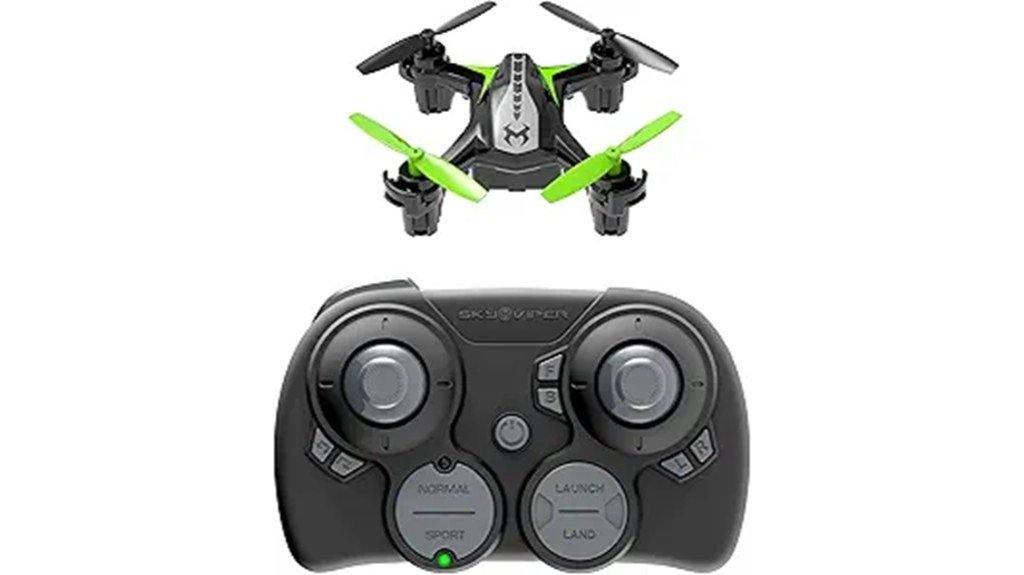
| Color | Black and green |
| Design | Compact, palm-sized drone intended mainly for indoor flying |
| Flight Modes | Auto and Manual, each with Normal and Fast speed settings |
| Flight Assistance | Assisted hover, automatic launch, and automatic landing |
| Stunts | Directional flips and barrel rolls |
| Advertised Speed | Up to 25 mph according to the Amazon product description; not independently tested here |
| Remote Control | 2.4 GHz radio controller |
| Drone Battery | Rechargeable 3.7V, 100mAh lithium-polymer battery |
| Controller Batteries | Three AAA batteries, not included according to the flying guide |
| Charging | USB charging cable |
| Camera | No camera documented in the official Dash flying guide or manufacturer feature description |
| Package Contents | Drone, controller, charging cable, and replacement blades according to the manufacturer guide; confirm the seller’s current bundle |
| Recommended Age | 12 years and older according to Amazon’s manufacturer-age field |
| Best Use | Indoor practice, hovering, directional control, and short stunt sessions |
Before You Buy: Do not purchase this model expecting 1080p video recording. Although a video-resolution field appears on the Amazon listing, Sky Viper’s official Dash product information does not document a camera. Also, this is an older model, so check the current seller, package contents, and availability before ordering.
Product Overview
What Is the Sky Viper Dash Nano Drone?
The Sky Viper Dash Nano Drone is a small remote-controlled quadcopter designed to introduce you to basic flying skills. It focuses on simple takeoffs, assisted hovering, directional movement, and aerial tricks rather than photography or advanced navigation.
Sky Viper combines a compact frame with flight-control software that helps reduce unwanted drift. The controller has dedicated launch and landing functions, along with flight settings that allow you to move from beginner-friendly hovering to faster manual control.
This model dates back to 2018 and remains listed as an older version. It is best viewed as a recreational flying toy rather than a modern camera drone.
Features & Specs
Auto and Manual Flight Modes
One of the Dash Nano’s main advantages is its choice of flight modes. In Auto mode, the drone uses altitude assistance to make basic flying easier. You can focus on steering while the drone helps maintain its height.
Manual mode gives you more direct control over throttle and motor response. It takes more practice and is better suited to pilots who already understand how to manage height, turning, and landing.
The flying guide also identifies four combinations:
- Auto Normal: A sensible starting point for your first flight.
- Auto Fast: Faster handling while retaining assisted altitude control.
- Manual Normal: More direct throttle control at the normal speed setting.
- Manual Fast: More responsive flying for experienced users.
You can move to faster settings as your control improves. There is no need to start in the most responsive mode.
Automatic Takeoff, Landing, and Hover Assistance
The dedicated Launch button lifts the drone a short distance above the ground. The Land button starts an automatic landing sequence, reducing the need to manage every step by hand.
Auto mode also assists with hovering. This is useful when you want to stop moving, regain your sense of direction, or prepare for your next maneuver.
However, assisted hovering does not mean the drone can avoid obstacles or hold an exact position in every condition. Air movement, nearby fans, and incorrect trim settings can still affect its flight.
Directional Control and Flight Speed
The controller separates height and turning from directional movement. The left stick manages throttle and rotation, while the right stick moves the drone forward, backward, left, or right.
Sky Viper advertises speeds of up to 25 mph in its Amazon product description. That is a manufacturer-marketed figure, not an independently measured result from this review.
For indoor use, accurate steering matters more than maximum speed. Fast settings leave you less time to correct a mistake when furniture, walls, or other obstacles are nearby.
Flips and Barrel Rolls
The Dash Nano includes stunt controls for flips and barrel rolls. According to the flying guide, you can trigger directional flips from a hover by holding the stunt button and tapping the directional stick.
Barrel rolls are also supported during forward or reverse flight. These tricks add variety once you can take off, hover, turn, and land reliably.
Stunts require more space than basic hovering. The manufacturer recommends at least six feet of height and six feet of clearance in every direction before performing them.
Battery Life and USB Charging
The drone uses a rechargeable 3.7V, 100mAh lithium-polymer battery. That is a small battery suited to a lightweight flying toy, but it does not provide the extended flight sessions associated with larger drones.
The original review described flight times ranging from three to ten minutes. However, we could not confirm a reliable flight-time rating specifically for this Dash model from its official flying guide. Treat that range as an unverified estimate rather than a promise.
Sky Viper’s guide shows USB charging with a red indicator during charging and a green indicator when charging is complete. Allow the battery to cool after flying, and follow the supplied charging instructions.
The remote requires three AAA batteries, which are separate from the drone’s rechargeable battery.
Who Should Buy It?
Best For
- First-time pilots ages 12+: Auto mode and dedicated launch and land buttons make early practice simpler.
- Indoor flying enthusiasts: Its compact design suits controlled flying in rooms with enough open space.
- Casual stunt flyers: Flips, barrel rolls, and faster modes provide a next step after learning basic controls.
Skip If
- You want photography: This model is not documented as having a camera or video-recording system.
- You need long flights: Its small rechargeable battery is better suited to short sessions.
- You want advanced navigation: It is not a GPS-equipped drone with automatic return-to-home or obstacle avoidance.
Pros & Cons
The Dash Nano offers useful beginner features, but it also has practical limits that matter when you choose your first drone.
Pros
- Automatic takeoff and landing reduce the difficulty of early flights.
- Auto mode includes altitude assistance for easier hovering.
- Normal and Fast settings support gradual skill development.
- Directional flips and barrel rolls add entertainment and challenge.
- Compact design and replaceable blades suit indoor recreational use.
Cons
- The small battery limits the length of individual flying sessions.
- No verified onboard camera, GPS navigation, or obstacle avoidance.
- Fast flying and stunts require practice and generous clearance, even indoors.
How It Performs in Real Use
The following scenarios explain how the Dash Nano’s documented features fit practical flying situations. They are feature-based assessments, not results from independent hands-on testing.
First Flights in a Living Room
A room with open floor space is a useful place to learn the basics. Start in Auto Normal mode, launch from a flat surface, and practice slow movement before making sharp turns.
Hover assistance can reduce your workload, but you still need to steer away from furniture and maintain a safe distance from people.
Indoor Obstacle Courses
Once you can control direction, you can set up a simple course using lightweight, nonbreakable markers. Practice moving forward, stopping, turning, and returning to your starting point.
This teaches more precise control than flying at maximum speed. Keep obstacles well away from spinning propellers and leave enough room for mistakes.
Stunt Practice
Flips and rolls give experienced beginners something new to learn. First, become comfortable holding a hover. Then attempt stunts only in an area that meets the manufacturer’s clearance guidance.
Repeated stunt flying may reduce your available flight time, and a poorly timed move can lead to a crash.
Calm Outdoor Practice
Its small size makes the Dash Nano sensitive to changing air conditions. A calm, open area may offer more flying room than an indoor space, but wind can make a tiny drone much harder to control.
Stay away from roads, power lines, people, and animals. Keep the drone in sight and check your local rules before flying outdoors.
Setup Tips Before Your First Flight
Correct setup improves your chances of a controlled first flight. Follow these steps from Sky Viper’s operating guidance.
- Charge the drone: Use the supplied charging cable and allow charging to finish before flying.
- Prepare the controller: Install three fresh AAA batteries with the correct polarity.
- Choose a flat surface: Set the drone down on a level area before powering and pairing it.
- Face the same direction: Place the drone in front of you with its green blades facing away. This makes directional control easier to understand.
- Start in Auto Normal: Use the Launch button and make small movements with the directional stick.
- Practice landing: Learn to use the Land button before attempting faster flight or stunts.
Pro Tip: Practice hovering at a steady height, moving a short distance forward, and landing in the same area. Repeat this simple exercise before increasing speed. If the drone drifts without a steering command, land and adjust the trim controls using the flying guide.
Common Setup Mistakes to Avoid
Do not launch from an uneven surface, start with aggressive manual control, or attempt stunts near a ceiling. Avoid flying directly toward yourself while you are still learning how direction changes when the drone turns.
If the drone starts drifting after a collision, place it back on a level surface and check the trim settings. Avoid compensating for persistent drift with sudden, large stick movements.
Safety, Materials, and Battery Care
The Dash Nano has fast-spinning propellers, so its small size should not be mistaken for zero risk. Keep fingers, hair, loose clothing, and faces away from moving blades.
Sky Viper’s instructions call for adult supervision and inspection of the drone and battery before use. The manufacturer’s age guidance on the Amazon product details is 12 years and up, although another listing field provides conflicting information.
Safer Flying Habits
- Use an open flying area away from fragile objects, ceiling fans, and pets.
- Keep the drone within your line of sight.
- Do not fly near roads, power lines, or crowds.
- Power off the drone before inspecting or replacing a blade.
- Do not operate a drone with a damaged or swollen battery.
- Do not leave the battery charging unattended.
Battery and Propeller Maintenance
Allow the battery to return to room temperature after flying before recharging it. Use the manufacturer’s recommended charging equipment and keep the drone away from excessive heat and moisture.
If a propeller stops spinning correctly, turn off the drone and inspect it for hair, dust, or other debris. The manual identifies specific A and B blade positions, so replacement blades must be installed in their correct locations.
Do not force a damaged blade back onto the motor shaft. Follow the official replacement instructions to avoid damaging the motor or fitting the wrong propeller.
Customer Reviews
The Sky Viper Dash Nano Drone has received generally favorable customer feedback. During the October 2026 editorial check, the Amazon listing displayed an average rating of approximately 4.3 out of 5 stars. This is a customer rating, not an independent editorial test score, and it can change.
The existing review material describes buyers enjoying its maneuverability, compact size, and entertaining indoor flight. Ease of control and resilience during minor crashes are recurring positive themes.
Short battery life is a common concern in the source review. You may find brief practice sessions acceptable, but longer sessions with fewer charging breaks call for a drone with a different battery arrangement.
Customer reports should not be treated as proof that the drone can survive every impact. Read recent seller-specific reviews, particularly when buying an older model with potentially varying accessories.
Best Use Cases & Value
The Dash Nano delivers the most value when you use it for controlled flying and basic skill development instead of advanced aerial tasks.
| Use Case | Why It Fits |
|---|---|
| Beginner Practice | Auto mode helps you learn takeoff, hovering, and landing. |
| Indoor Flying | Compact size suits open indoor spaces when flown carefully. |
| Stunt Training | Flips and rolls offer a challenge after basic control is mastered. |
| Directional Drills | Manual steering practice builds coordination and orientation skills. |
| Family Recreation | Suitable for supervised turn-taking and short flying activities. |
Is It Worth the Price?
The Sky Viper Dash Nano belongs in the entry-level recreational drone category. Its value comes from flight assistance, straightforward controls, and stunt functions rather than camera quality or advanced technology.
It is worth considering if you want a compact drone for learning basic flight skills and the current selling price is reasonable. The older model’s availability and package details deserve extra attention before purchase.
It is less appealing if you want extended flight sessions, replacement battery flexibility without confirming compatibility, or video recording. Those needs may justify comparing newer beginner drones instead.
How It Compares to Alternatives
The Holy Stone HS210 is another beginner-focused mini drone. Its manufacturer describes altitude hold, headless mode, several speed settings, and a package with three batteries. That makes it worth comparing if you want more battery flexibility for repeated practice sessions.
If video capture matters more than compact stunt flying, the Sky Viper Vista HD Streaming Drone is a more relevant product category to investigate. Sky Viper describes the Vista as a video-capable model. The Dash Nano is the simpler choice when you mainly want indoor steering practice and stunts.
Frequently Asked Questions
Does the Sky Viper Dash Nano Drone have a camera?
The official Dash flying guide and manufacturer feature page do not document an onboard camera. Despite a conflicting video-resolution field on Amazon, you should not expect 1080p recording or live video from this model.
Is the Sky Viper Dash Nano suitable for beginners?
Yes. Auto mode, assisted hovering, and dedicated launch and landing controls can make your first flights easier. Start in Auto Normal mode and practice in an open space before trying manual control.
How long does the Sky Viper Dash Nano battery last?
It uses a rechargeable 3.7V, 100mAh battery intended for short recreational flights. A dependable runtime for this exact model was not confirmed from its official flying guide, so do not treat broad online flight-time estimates as guaranteed.
Can you fly the Dash Nano Drone indoors?
Yes. It is designed with indoor flying in mind, but you should choose a room with enough open space and avoid furniture, ceiling fans, pets, and fragile items. Use the slower settings while learning.
How old should a child be to use the Sky Viper Dash Nano?
Amazon’s manufacturer-age field recommends ages 12 and older, although another listing section gives a different minimum age. Follow the packaging instructions for the exact product supplied and provide appropriate adult supervision.
Why does my Sky Viper Dash Nano drift while hovering?
Drifting may result from uneven setup, air movement, or trim settings. Land the drone on a flat surface and use the controller’s trim adjustments as explained in the manufacturer guide. Do not attempt adjustments near spinning propellers.
What is included with the Sky Viper Dash Nano Drone?
The manufacturer flying guide lists the nano drone, controller, USB charging cable, and four replacement blades. The controller requires three AAA batteries. Seller descriptions may differ, so verify the package before buying.
Who should skip the Sky Viper Dash Nano Drone?
Skip it if you need a camera, GPS navigation, obstacle avoidance, or extended flights. It is intended mainly for short recreational flying and learning basic drone controls, not professional photography or long-distance use.
Review Methodology and Sources
This editorial review evaluates the product information available from the Amazon listing, Sky Viper’s official product page, and the manufacturer’s flying guide. We have not independently measured flight speed, battery runtime, impact resistance, or long-term reliability.
For operating procedures, trim adjustments, battery precautions, and stunt clearance, refer to the official Sky Viper Dash instructions. Product bundles, seller availability, and customer ratings may change over time.
The Bottom Line
The Sky Viper Dash Nano Drone is worth considering if you want a compact indoor drone with assisted hovering, beginner-friendly controls, and fun stunt features. Its small battery and lack of documented camera capability make it a poor match for long flying sessions or aerial photography. For supervised beginners ages 12 and up who value simple recreational flying, it earns a recommendation with caveats.