Disclosure: As an Amazon Associate, we earn from qualifying purchases. If you click a link on this page and make a purchase, we may receive a small commission at no extra cost to you.
Last checked: July 14, 2026 (Asia/Dhaka) · Sources: Amazon listing details for ASIN B0F4348FKG, related Weavixol K13 MAX listing information, third-party product mirrors, and current FAA recreational drone guidance
Weavixol K13 MAX Drone Review: Beginner Drone With Screen Controller
Learning to fly becomes harder when a starter drone drifts, needs a complicated phone setup, or disappears after one wrong control input. The Weavixol K13 MAX drone tries to reduce that frustration with brushless motors, beginner flight modes, two batteries, and a controller with its own screen. Its simple controls make it suitable for short practice flights, but the lack of GPS and automatic return-to-home demands careful flying. This review explains where the K13 MAX helps, where it falls short, and who should consider buying it.
How this review was checked: The editorial team compared the article with available listing details for ASIN B0F4348FKG, related Weavixol K13 MAX listings, seller-supported specifications, included accessories, control instructions, battery claims, and current recreational drone safety rules. We did not conduct a laboratory or long-term flight test.
Quick Verdict
Our Verdict
Rating: 7/10, recommended with caveats
Best For: First-time pilots who want a compact practice drone with a built-in controller screen and simple flight assistance.
Bottom Line: The K13 MAX combines brushless motors, altitude hold, headless mode, a basic 1080p camera, and two batteries in an approachable starter kit. Its biggest tradeoffs are the lack of GPS, return-to-home, obstacle sensing, and verified camera stabilization.
Key Specifications
| Specification | Detail |
|---|---|
| Brand | Weavixol |
| Model / ASIN | K13 MAX / B0F4348FKG |
| Product Type | Foldable beginner camera quadcopter |
| Controller | Radio controller with a built-in display for the camera feed |
| Listed Weight Class | Marketed as under 249 g; confirm the actual takeoff weight before relying on a regulatory exemption |
| Camera | Entry-level camera marketed for 1080p video |
| Lens | 110° wide-angle view with manual tilt up to about 90° |
| Camera Stabilization | No verified mechanical gimbal or electronic image stabilization |
| Motors | Brushless motors |
| Flight Assistance | Altitude hold, headless mode, one-key takeoff and landing, trim adjustment, 360° flips, and trajectory flight |
| GPS / Return-to-Home | Not included |
| Batteries | Two rechargeable lithium-ion flight batteries |
| Advertised Flight Time | Seller information advertises up to roughly 12 to 15 minutes per battery, depending on the listing version and flight conditions |
| Connectivity | Radio flight control and Wi-Fi video connection; the listing warns that only one video display connection can be active at a time |
| Listed Maximum Range | Up to 328 ft under suitable conditions; beginners should practice much closer |
| Build | Lightweight plastic shell with folding arms |
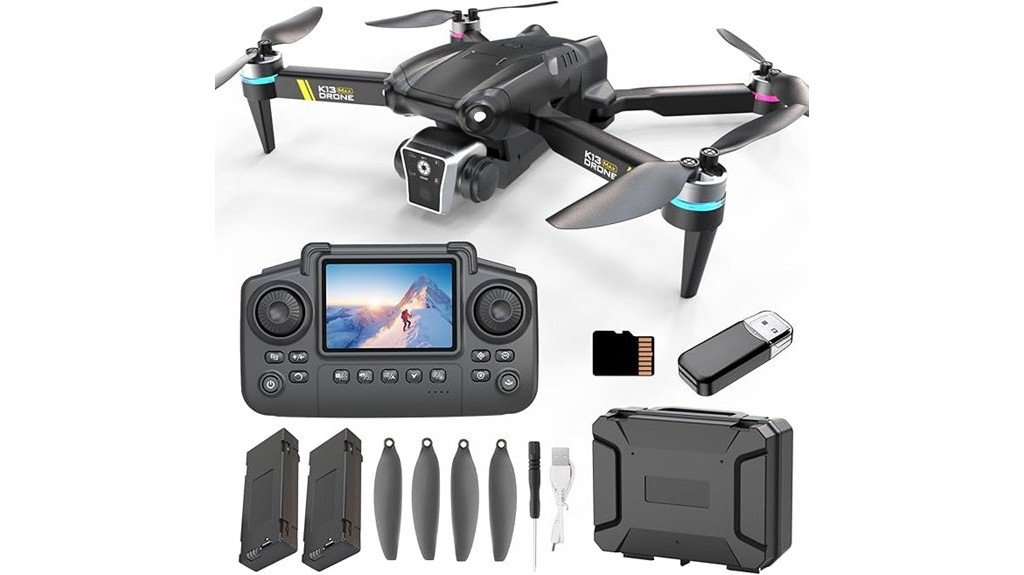
| Included Items | Drone, screen-equipped controller, two flight batteries, propeller accessories, and USB charging cable; verify the current package before ordering |
| Listed Color | Black or dark gray, depending on listing description and photography |
| Warranty | No clear manufacturer warranty term confirmed |
Product specifications, package contents, seller details, availability, and regulatory claims can change. Check the current Amazon listing, product manual, and package label before you fly.
What Is the Weavixol K13 MAX Drone?
The Weavixol K13 MAX is a lightweight, foldable quadcopter designed for basic flight practice and casual aerial clips. It sits above the simplest brushed-motor toy drones because it uses brushless motors and includes a controller with its own display.
The screen lets you frame the camera view without attaching your phone for every flight. The drone also includes altitude hold, headless mode, one-key takeoff and landing, trim adjustment, flips, and trajectory flight. These controls can reduce the early learning curve, but they do not provide the positional accuracy of GPS.
The K13 MAX is not a small professional camera drone. It lacks automatic return-to-home, obstacle sensing, and verified camera stabilization. You will get the best experience when you treat it as a close-range trainer rather than a long-range photography platform.
Who Should Buy the Weavixol K13 MAX?
Best For
- First-time pilots who want one-key takeoff, altitude hold, headless mode, and trim controls.
- Buyers who prefer a controller screen instead of depending on a phone for every short flight.
- Casual users who want to practice hovering, turning, landing, and recording simple outdoor clips.
Skip If
- You need GPS position hold, automatic return-to-home, or obstacle avoidance.
- You want stabilized 4K footage for paid work, travel films, or polished social content.
- You regularly fly in wind or need dependable long-range performance.
Before You Buy: The K13 MAX has no verified GPS or automatic return-to-home system. Losing orientation, flying behind an obstruction, or pushing the listed range can result in a lost drone. Use it in a calm, open area and keep it close enough to see directly.
Performance and Features
Foldable, Lightweight Beginner Design
The folding arms reduce the space the drone takes up in a small bag or storage box. The plastic construction also keeps the aircraft light, which helps with portability but limits impact resistance. Hard landings on concrete can damage the arms, propellers, or motor housings.
The listing markets the drone as weighing under 249 g. That claim can matter for qualifying recreational registration rules, but you should confirm the actual takeoff weight. Guards, accessories, replacement parts, or other payloads can change the total weight.
Brushless Motors and Basic Hover Assistance
Brushless motors avoid the friction-producing brushes used in many low-cost toy drones. They generally provide smoother power delivery and require less motor maintenance than basic brushed designs. You still need to inspect each motor and propeller after a hard landing.
Altitude hold helps the drone maintain a rough height while you practice direction and yaw control. It does not lock the aircraft to a precise point on the ground. Without GPS, the drone can still drift sideways in light wind or after an uneven calibration.
1080p Camera and Manual Lens Adjustment
The K13 MAX is marketed with an entry-level 1080p camera and a 110° wide-angle lens. The wider view makes it easier to include a person, yard, or landscape in the frame. You can manually tilt the camera by up to about 90° before takeoff.
No reliable listing evidence confirms a mechanical gimbal or electronic image stabilization for this ASIN. Fast turns, sudden climbs, propeller vibration, and wind can produce shaky footage. Use slow stick inputs and brief, straight flight paths when recording.
Controller With a Built-In Screen
The controller screen is the K13 MAX’s clearest convenience feature. It reduces the need to attach a phone, join a Wi-Fi network, and open an app before each basic practice session. That makes the kit easier to share with a supervised beginner.
The small built-in display should not be confused with a bright, high-resolution monitor used on advanced camera drones. Glare, distance, signal conditions, and camera quality can affect what you see. Always watch the aircraft directly instead of relying only on the video feed.
Battery Life and Charging
The package includes two rechargeable flight batteries. Seller information advertises roughly 12 to 15 minutes per battery, although listing versions differ. Wind, repeated flips, full-throttle climbs, continuous video transmission, battery age, and cold weather can shorten each flight.
Let a warm battery cool before recharging it. Use the included cable and a compatible basic USB power source unless the manual specifies another input. Stop using a battery that becomes swollen, damaged, unusually hot, or wet.
Range and Signal Limits
The listing gives a maximum range of up to 328 feet under suitable conditions. That number should not become your practice target. Buildings, trees, interference, battery condition, controller orientation, and local conditions can reduce the usable range.
For your first flights, keep the drone below about 30 feet and within roughly 100 feet, as the seller’s own beginner guidance recommends. Staying close gives you more time to correct drift and respond to a weakening signal.
Setup Tips Before Your First Flight
Charge the controller and both flight batteries before going outside. Inspect the propellers for cracks, bends, looseness, or incorrect placement. Insert the battery fully and confirm that it locks into the aircraft.
Place the drone on a flat, level surface before calibration. Available Weavixol instructions describe holding both controller sticks down and outward for about two seconds. Follow the supplied manual because control combinations can vary between listing revisions.
After pairing, test the controls a few feet above soft grass. Check whether the aircraft drifts while you leave the sticks centered. Use the controller’s trim adjustment in small steps rather than holding a large correction.
Pro Tip: Practice one skill per battery. Use the first pack for takeoff, hovering, and landing. Use the second for slow squares, figure-eight turns, and gentle camera passes. This approach builds control faster than spending both packs on flips and high-speed flying.
Common Mistakes to Avoid
- Do not launch before completing the level-calibration process.
- Do not fly with a damaged propeller or a battery that is not fully seated.
- Do not begin near trees, roofs, roads, power lines, people, pets, or water.
- Do not rely on headless mode as a substitute for learning the drone’s orientation.
- Do not continue flying after low-battery warnings, signal drops, or weak motor response.
- Do not test the maximum range during your first sessions.
Safety and Legal Considerations
A lightweight drone can still injure a person or damage property. Keep your hands away from moving propellers, supervise younger pilots, and use an open launch area. Stop flying when people, vehicles, animals, or low-flying aircraft enter the area.
In the United States, recreational flyers must complete TRUST and carry proof when flying. A drone under 250 g may qualify for an exception from recreational registration, but that exception does not automatically cover Part 107 operations, non-recreational work, or a drone whose actual takeoff weight reaches 250 g.
Drones that must be registered, or that have been registered, generally must follow applicable Remote ID requirements unless operated under an allowed exception such as a qualifying FAA-Recognized Identification Area. You must also follow airspace restrictions, maintain visual line of sight, yield to other aircraft, and check local rules before every flight.
Rules differ outside the United States. Check the civil aviation authority, local property restrictions, and privacy laws for the place where you plan to fly.
How It Performs in Real Use
For First Open-Field Practice
The K13 MAX’s altitude hold, headless mode, and one-key takeoff reduce the number of controls you must manage at once. A calm field with short grass gives you room to correct mistakes and provides a softer landing surface than pavement.
For Backyard Flying
A large, clear backyard may work for low hovering and landing practice. Small yards with fences, trees, wires, roofs, or nearby people leave little room for recovery. The lack of GPS makes tight spaces less forgiving when the drone drifts.
For Family and Park Clips
The wide-angle camera can record casual group scenes, scenery, or short overhead views. Slow passes will look better than quick turns because the camera lacks verified stabilization. Avoid flying directly over people, even when the drone feels stable.
For Learning Before an Upgrade
The K13 MAX can teach throttle control, orientation, calibration, trim correction, battery management, and visual line-of-sight habits. Those skills transfer to more advanced drones. A future GPS model will feel easier to manage once you understand how a non-GPS drone responds.
Pros and Cons
Pros
- Built-in controller screen reduces phone setup for basic flights.
- Brushless motors are a useful upgrade over many entry-level brushed toy drones.
- Altitude hold, headless mode, trim controls, and one-key takeoff help new pilots practice.
- Two flight batteries provide more total practice time than a one-battery kit.
- Foldable arms and the under-249 g listing claim support easy transport and storage.
Cons
- No GPS, obstacle sensing, or automatic return-to-home.
- No verified gimbal or electronic stabilization for smooth camera footage.
- Flight time, range, exact weight, warranty coverage, and some package details rely on seller claims that may vary.
Is It Worth the Price?
The K13 MAX offers reasonable value when you judge it as an entry-level practice drone. The screen controller, brushless motors, two batteries, and beginner flight controls create a more complete learning kit than a basic one-battery toy drone.
Its value drops when camera quality or automated safety matters more than simple flight practice. A GPS-equipped drone with return-to-home and a stabilized camera will cost more, but it will provide steadier footage and more predictable position control.
The K13 MAX is worth considering when your main goals are learning basic controls, flying short sessions, and recording casual clips. It is not the best fit when one lost signal, rough landing, or unstable video could ruin an important project.
How It Compares to Alternatives
A DJI Mini 4K or another current GPS-equipped DJI Mini model is a stronger choice when you need return-to-home, precise hovering, longer flight time, and stabilized video. Those models cost considerably more and require a more serious buying commitment.
A small Holy Stone or DEERC mini drone may make more sense for low-risk indoor practice or simple recreational flying. The Weavixol K13 MAX fills the middle ground for buyers who specifically want brushless motors, two batteries, and a screen controller without moving into a premium camera-drone system.
Frequently Asked Questions
Does the Weavixol K13 MAX require FAA registration?
The listing markets the drone as weighing under 249 g. A drone below 250 g may qualify for the U.S. recreational registration exception when flown only under the recreational rules. Confirm its actual takeoff weight and register it when required for your operation.
Do you need to take the TRUST test?
Yes, U.S. recreational flyers must complete The Recreational UAS Safety Test and carry proof of completion while flying. The requirement applies even when a lightweight recreational drone does not need registration.
Does the K13 MAX need Remote ID?
A qualifying under-250 g drone flown only under the recreational exception may not need registration or Remote ID. Part 107 operations and drones that must be registered generally have additional registration and Remote ID requirements.
Does the K13 MAX have GPS or automatic return-to-home?
No verified listing information shows GPS or automatic return-to-home for this model. It uses altitude hold and basic flight assistance, but you remain responsible for orientation, distance, and returning the drone manually.
Can you use a phone instead of the controller screen?
Available instructions describe a Wi-Fi phone connection, but they warn that only one display connection can be active at a time. Follow the supplied manual’s connection order because app and controller behavior may differ between package revisions.
How long does each K13 MAX battery last?
Seller information advertises roughly 12 to 15 minutes per battery, although listing versions vary. Wind, aggressive throttle, flips, continuous video, temperature, and battery age can reduce the actual time.
Is the 1080p camera suitable for YouTube or TikTok?
It can record casual clips for personal social posts, especially when you fly slowly in calm conditions. It is not a strong choice for polished creator work because no verified mechanical gimbal or electronic stabilization is included.
What should you do before the first flight?
Charge both batteries, inspect the propellers, read the supplied manual, and calibrate the drone on a level surface. Start over short grass in a calm open area, keep the aircraft close, and land as soon as you notice a low-battery warning or unstable response.
The Bottom Line
The Weavixol K13 MAX drone earns a 7/10 as a beginner trainer with useful brushless motors, two batteries, straightforward controls, and a convenient screen-equipped controller. Buy it for short, supervised practice flights and casual video, but skip it when you need GPS, automatic return-to-home, obstacle sensing, or stabilized creator-quality footage.