Disclosure: As an Amazon Associate, we earn from qualifying purchases. If you click a link on this page and make a purchase, we may receive a small commission at no extra cost to you.
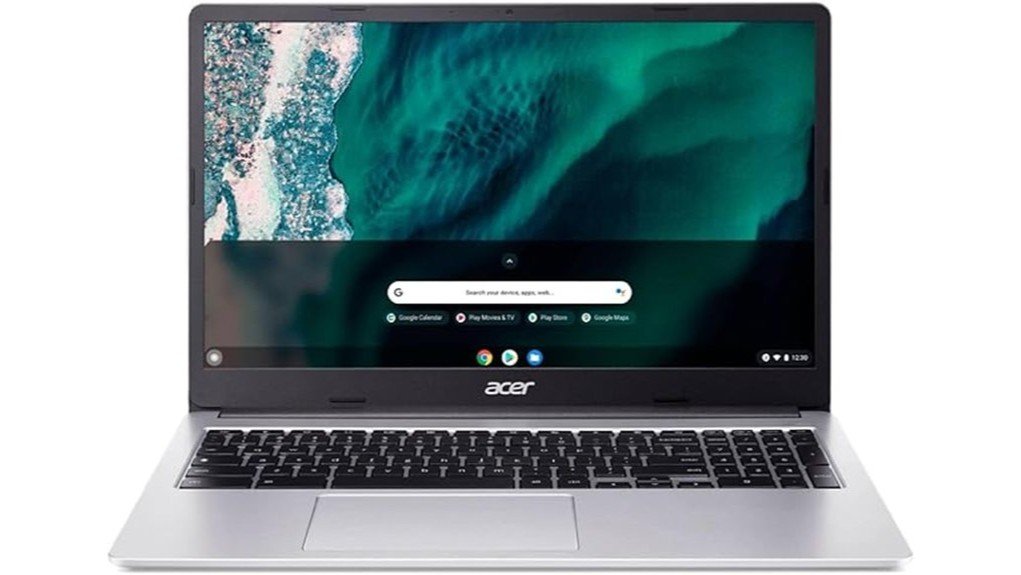
A large-screen Chromebook can make web browsing, schoolwork, and streaming more comfortable, but low-cost models often force you to choose between screen size and performance. The renewed Acer 315 Chromebook reviewed here pairs a 15.6-inch Full HD display with an Intel Celeron N4500 processor, 4GB of RAM, and 64GB of storage. It is best suited to everyday ChromeOS tasks rather than demanding desktop software or serious gaming. Its biggest attractions are the spacious display and simple cloud-focused setup, while the limited memory and entry-level processor are the main tradeoffs.
Quick Verdict
Rating: 8/10
Best For: Students, home users, web-based work, video calls, and buyers who want a larger Chromebook screen at a value-focused price.
Bottom Line: The Acer 315 gives you a roomy Full HD screen and enough hardware for everyday ChromeOS use. Its 4GB of memory and dual-core Celeron processor make it less suitable for heavy multitasking, advanced creative software, or demanding games.
| Specification | Detail |
|---|---|
| Brand | Acer |
| Product | Acer 315 Chromebook, renewed configuration |
| Processor | Intel Celeron N4500, dual-core, 1.10 GHz base speed |
| Graphics | Integrated Intel UHD Graphics |
| Memory | 4GB LPDDR4X RAM |
| Storage | 64GB flash storage |
| Display | 15.6-inch Full HD, 1920 × 1080 |
| Operating system | ChromeOS |
| Color | Pure Silver |
| Approx. chassis size | 14.4 × 9.6 inches, about 0.79 inch thick |
| Camera and microphone | Integrated webcam and microphone |
| Battery claim | Up to about 10 hours, depending on workload and settings |
| Condition | Renewed / refurbished |
What Is the Acer 315 Chromebook?
The Acer 315 is a 15.6-inch ChromeOS laptop designed around web-based computing. This renewed configuration uses Intel’s Celeron N4500 dual-core processor, 4GB of LPDDR4X memory, 64GB of flash storage, and integrated Intel UHD Graphics.
Those specifications put it in the everyday-computing category. You can use it for browsing, Google Docs, email, online classes, streaming, video calls, and other lightweight tasks without paying for hardware intended for professional editing or high-end gaming.
The large Full HD screen is an important part of its appeal. Many inexpensive Chromebooks use smaller or lower-resolution panels, while this configuration gives you a 1920 × 1080 workspace that is better suited to documents, websites, and video.
Before You Buy: This ASIN is sold as a renewed Chromebook. Check the current Amazon listing for the exact condition, included accessories, seller warranty or return coverage, and port configuration before ordering. Renewed inventory can differ from a factory-new retail package.
Who Should Buy It?
Best For
- Students who mainly work in a browser, Google Workspace, or online learning platforms.
- Home users who want a large screen for email, browsing, video calls, and streaming.
- Budget-focused buyers who are comfortable purchasing a renewed computer.
Skip If
- You regularly edit large videos, run demanding desktop applications, or need workstation-level performance.
- You want generous RAM for heavy multitasking with many active apps and browser tabs.
- You specifically need Windows or macOS software that does not have a suitable ChromeOS or web alternative.
Design and Build Quality
The Acer 315 uses a Pure Silver chassis with a footprint of roughly 14.4 × 9.6 inches and a thickness of about 0.79 inch. That gives you a full-size 15.6-inch machine without an unusually thick body.
The larger footprint is useful when screen space matters more than extreme portability. It gives documents, browser windows, and video more room than an 11-inch or 13-inch Chromebook, although a 15.6-inch notebook naturally takes up more bag and desk space.
This particular product is renewed rather than factory-new. That can improve value, but you should inspect the current condition description carefully. Cosmetic condition, packaging, and accessory details deserve more attention with a renewed computer than with a sealed new unit.
15.6-Inch Full HD Display
The screen has a 1920 × 1080 Full HD resolution. On a 15.6-inch Chromebook, that resolution gives you a useful amount of desktop space for reading, writing, spreadsheets, websites, and streaming.
Full HD is also a better match for video content than a basic 1366 × 768 panel. Text and interface elements can appear more defined, and you have more room to work with multiple browser elements on screen.
What you should not assume from the resolution alone is professional-grade color accuracy or exceptional brightness. Those claims were not confirmed for this specific renewed ASIN. If color-sensitive photo or design work is important, this Chromebook is not the safest choice without checking the exact panel specification first.
Processor, Memory, and Storage
The Intel Celeron N4500 is a dual-core processor designed for efficient everyday computing. In ChromeOS, it is a reasonable match for web browsing, document editing, streaming, email, and school portals.
The bigger restriction is the 4GB of LPDDR4X RAM. Four gigabytes can handle normal Chromebook use, but performance can become less comfortable when you keep many demanding browser tabs and apps active at the same time. You will get the best experience by closing tasks you are no longer using.
The Chromebook includes 64GB of flash storage. ChromeOS is designed around web and cloud services, so 64GB is workable for users who keep much of their content online. Buyers who store many large videos, offline files, or Android apps should pay closer attention to remaining local storage.
Pro Tip: Before buying a 4GB Chromebook, think about your normal browser workload. If you routinely keep dozens of tabs, video meetings, and several apps running together, an 8GB Chromebook is a better long-term fit.
Battery Life
The product information associated with this configuration lists up to about 10 hours of battery life. That is enough on paper for a school day, several classes, or a long stretch of browser-based work without staying next to an outlet.
Real battery life will depend on screen brightness, video streaming, conferencing, wireless activity, connected accessories, and battery condition. That last point is especially relevant because this is a renewed computer. Treat the 10-hour figure as a usage target rather than a guarantee for every unit.
ChromeOS and Everyday Usability
ChromeOS is the main reason modest hardware can still feel practical for basic computing. The operating system centers on the Chrome browser, Google services, web applications, and supported apps rather than traditional Windows desktop programs.
For a student or home user, that approach keeps the workflow simple. Google Docs, Gmail, YouTube, web-based learning systems, cloud storage, and video-conferencing services fit naturally into the platform.
The tradeoff is software compatibility. Before purchasing, check any program you consider essential. A Chromebook is not a direct replacement for a Windows laptop when your school, employer, accessory, or specialist software requires a Windows-only executable.
Webcam and Online Learning
The Acer 315 includes an integrated webcam and microphone, so you do not need separate basic hardware for video classes or routine online meetings. Combined with the larger screen, this can make it easier to follow a call while viewing documents or course material.
The N4500 and 4GB RAM are appropriate for basic conferencing, but running a video meeting alongside many active browser tabs can put more pressure on limited memory. Closing unnecessary tabs before an important call is a simple way to keep more system resources available.
Connectivity and External Displays
Connectivity details need extra care because Acer sells several Chromebook 315 configurations. Acer’s CB315-4H documentation lists USB Type-C and USB Type-A connections on relevant N4500 models, with video output available through DisplayPort over USB-C.
The original article described a built-in HDMI port, but that could not be confirmed for this configuration. Do not buy it specifically for HDMI without checking the current Amazon unit. If your exact model supports video through USB-C, a compatible USB-C display adapter may be required for an HDMI monitor or television.
How It Performs in Real Use
For School and Online Classes
The combination of ChromeOS, a 15.6-inch Full HD display, webcam, and microphone fits browser-based education well. You have enough screen space for reading assignments and working in online documents, while the N4500 handles normal classroom websites and video playback.
For Home and Everyday Browsing
Email, shopping, news sites, streaming, and basic document work are appropriate tasks for this hardware. The large screen may be especially useful if you prefer readable layouts over the compact size of a smaller Chromebook.
For Travel and Portable Work
The slim chassis and claimed 10-hour battery make portable use realistic, but the 15.6-inch footprint is larger than a compact travel Chromebook. It works better for buyers who want a bigger workspace and are willing to carry a larger notebook.
For Heavy Multitasking
This is where the 4GB memory limit matters most. Several lightweight tabs are reasonable, but many complex sites, apps, and a live video call can compete for the same limited memory. An 8GB configuration makes more sense if multitasking is central to your daily routine.
Setup Tips Before First Use
Because you are buying a renewed computer, start by checking the physical condition, charger, keyboard, trackpad, webcam, speakers, wireless connection, USB ports, and battery behavior while you are still within the seller’s applicable return period.
After connecting to Wi-Fi, allow ChromeOS to install available system updates before judging performance. Then sign in, restore only the apps and extensions you actually use, and check available local storage before downloading large offline files.
If you plan to connect a monitor, projector, printer, dock, or other accessory, confirm ChromeOS support and the exact port requirements first. This prevents buying an accessory that depends on a connection or driver your particular Chromebook does not provide.
Renewed Condition: What to Check
A renewed Chromebook can offer stronger specifications for your budget than a similarly priced new machine, but condition becomes part of the buying decision. Review the current Amazon seller information instead of assuming every renewed Acer 315 is packaged identically.
Once the unit arrives, look for screen defects, unusual hinge movement, charging problems, keyboard issues, damaged ports, or battery behavior that does not match normal use. Also confirm that ChromeOS can update and that the device is not locked to a previous organization or account.
The listing describes the product as professionally refurbished, but the practical step for you is still to test the individual unit you receive.
Pros and Cons
Pros
- Large 15.6-inch Full HD display with 1920 × 1080 resolution.
- Intel Celeron N4500 is suitable for routine ChromeOS and browser tasks.
- 64GB storage is practical for a cloud-focused Chromebook.
- Integrated webcam and microphone support classes and video meetings.
- Up to about 10 hours of listed battery life supports mobile use.
Cons
- 4GB RAM can become restrictive with heavy multitasking.
- The N4500 is intended for everyday work rather than demanding creative or gaming workloads.
- Renewed condition means you should verify the individual unit, accessories, coverage, and exact configuration carefully.
Is It Worth the Price?
The renewed Acer 315 makes the most sense as a budget-focused everyday Chromebook. You are getting a Full HD 15.6-inch screen, 4GB of memory, 64GB of storage, and an N4500 processor in a platform designed around web-based work.
Its value is strongest for students and home users who would rather have a larger display than pay extra for processor power they may not use. ChromeOS also works well when your documents, email, photos, and applications already live mainly in the cloud.
It is less compelling if the price approaches that of a new Chromebook with 8GB of RAM or a faster processor. Because renewed pricing can change, compare the current cost and condition with newer configurations before deciding.
How It Compares to Alternatives
Within Acer’s Chromebook 315 range, configurations with 8GB of RAM are a better choice for buyers who keep more tabs and applications open. Acer also sells Chromebook 315 configurations with different processors, so model numbers and specifications should be compared carefully rather than assuming every Chromebook 315 is identical.
You may also encounter Acer 315 listings built around processors such as the N5100. A higher-spec configuration can make sense if multitasking matters more than the lowest purchase cost. This N4500/4GB/64GB version is most attractive when simple everyday use and a large Full HD screen are your priorities.
Frequently Asked Questions
Is the Acer 315 Chromebook good for students?
Yes, it is a practical fit for browser-based schoolwork, Google Workspace, streaming lessons, and video classes. The 15.6-inch Full HD display is useful for reading and documents, but students running demanding specialist software should confirm ChromeOS compatibility first.
Is 4GB of RAM enough for this Chromebook?
Four gigabytes is adequate for light ChromeOS use such as browsing, documents, email, and streaming. If you regularly keep many demanding tabs, apps, and video meetings open together, an 8GB Chromebook gives you more headroom.
Can you upgrade the RAM or storage?
Acer’s CB315-4H family uses onboard LPDDR4X memory in documented configurations, so you should not buy this model expecting a simple RAM upgrade. The reviewed unit has 64GB of internal storage, so buyers who keep many large local files should plan around that capacity and available cloud storage.
Does the Acer 315 Chromebook have HDMI?
A built-in HDMI port could not be verified for this renewed configuration. Acer’s relevant CB315-4H documentation lists DisplayPort output through USB-C, so an appropriate USB-C video adapter may be needed for an HDMI display. Check the exact unit before purchasing an adapter.
How long does the battery last?
The product information lists battery life of up to about 10 hours. Your result will vary with screen brightness, streaming, video calls, wireless activity, connected devices, and the battery condition of the renewed unit.
Is the Acer 315 Chromebook good for gaming?
It is not designed as a gaming laptop. The Celeron N4500, integrated graphics, and 4GB RAM are better suited to everyday ChromeOS tasks. Browser games and compatible lightweight titles are more realistic than demanding PC games.
What should you check when buying this Chromebook renewed?
Check the seller’s current condition description, included charger and accessories, return or warranty terms, and exact port configuration. After delivery, test the display, keyboard, trackpad, webcam, Wi-Fi, charging, ports, speakers, and battery before relying on the computer for school or work.
The Bottom Line
The renewed Acer 315 Chromebook is a good fit if you want a large Full HD display, simple ChromeOS workflow, and enough performance for routine web-based work. Its 4GB RAM and entry-level N4500 processor are the main reasons to skip it if heavy multitasking, demanding software, or gaming is important to you.
For students, home users, and casual productivity, it earns an 8/10 rating with the important caveat that you should verify the condition and exact configuration of the renewed unit before buying.
Ready to Buy?
Check the latest price, renewed condition, and product details before you decide.