The Acer NX.A94AA.001 2-in-1 Chromebook presents an intriguing option for users seeking functionality without excessive costs. Its lightweight design and decent battery life make it appealing for everyday tasks. However, limitations in storage and performance may raise concerns for some. Evaluating its features and potential drawbacks can provide insight into whether this Chromebook meets specific needs. A closer examination of its capabilities will reveal more about its suitability for various users.
Overview
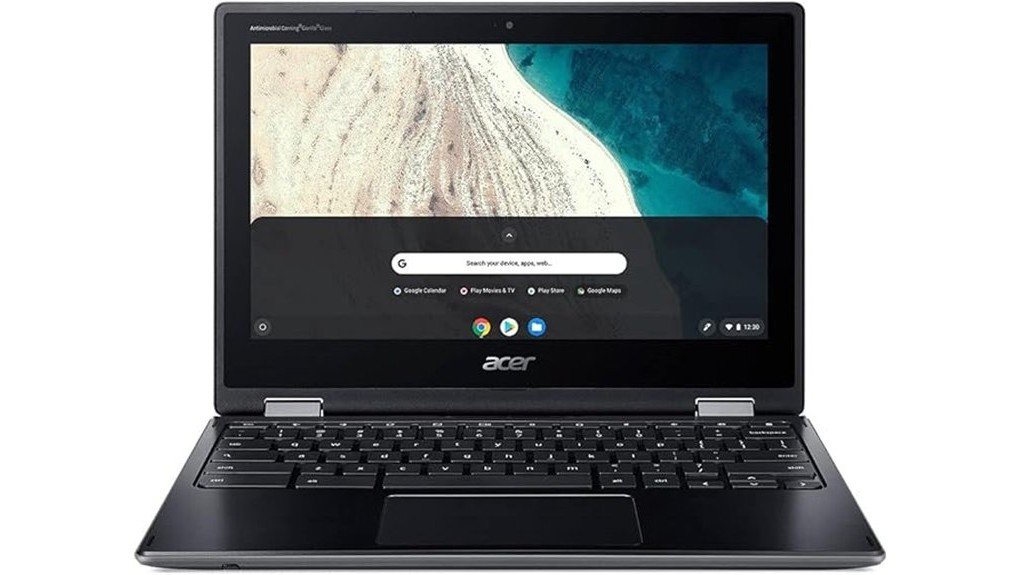
The Acer NX.A94AA.001 2-in-1 Chromebook, specifically the Spin 511 R752T C2YP model, presents a versatile computing solution tailored for users seeking portability and functionality.
Its design aesthetics, characterized by a sleek Shale Black finish, appeal to a modern audience valuing both style and efficiency.
The convertible nature of the device caters to students and professionals alike, emphasizing adaptability in various settings, from classrooms to home offices.
The device’s versatile design seamlessly adapts to diverse environments, ideal for both students and professionals.
With a lightweight structure and compact dimensions, it meets the demands of a target audience that prioritizes ease of transportation, ensuring users can remain productive while on the go.
Detailed Features
Detailed features of the Acer NX.A94AA.001 2-in-1 Chromebook highlight its practicality and user-friendly design.
The 11.6-inch HD display supports an engaging user experience, while the Intel Celeron N4020 processor guarantees adequate performance for everyday tasks.
With 4 GB of RAM and 32 GB eMMC storage, it meets basic computing needs effectively.
Connectivity options include two USB 3.0 ports and 802.11ac wireless, enhancing versatility for users.
The lightweight design, weighing only 2.78 pounds, further contributes to its portability, making it a suitable choice for those seeking a functional device for both work and leisure.
Pros and Cons
While evaluating the Acer NX.A94AA.001 2-in-1 Chromebook, it becomes clear that the device offers a mix of advantages and disadvantages that potential buyers should consider.
Pros:
- Long battery life averaging 10 hours enhances user experience.
- Lightweight design at 2.78 pounds increases portability.
- Affordable pricing makes it accessible to a broader audience.
- Good software compatibility with various applications.
Cons:
- Limited storage space may hinder users with extensive files.
- Display resolution lacks sharpness for some tasks.
- Performance may lag with demanding software.
- Build quality may not satisfy those seeking premium materials.
Concluding Thoughts
Although the Acer NX.A94AA.001 2-in-1 Chromebook presents a compelling option for budget-conscious consumers seeking versatility, its limitations warrant careful consideration.
The device offers a decent user experience with a lightweight design and satisfactory battery life, making it suitable for basic tasks. However, the modest hardware specifications may hinder performance under more demanding applications.
Ultimately, the value proposition lies in its affordability and portability, appealing to those who prioritize budget over advanced capabilities. Consumers should weigh these factors against their specific needs to determine if this Chromebook aligns with their expectations for productivity and functionality.
Frequently Asked Questions
What Operating System Does the Acer Chromebook Run?
What if an operating system could blend simplicity with power? The Chromebook operates on Chrome OS, showcasing advantages like swift boot times and seamless integration with Google services, enhancing productivity through its intuitive features and cloud-centric design.
Can I Upgrade the RAM or Storage?
Upgrading the RAM is generally not possible due to inherent limitations, while storage options are restricted to the existing 32 GB eMMC. Users seeking flexibility might consider external storage solutions for additional capacity.
Is There a Warranty Included With the Renewed Product?
The renewed product typically includes warranty coverage, symbolizing assurance amidst uncertainty. The renewal process often provides peace of mind, allowing users to explore its capabilities without fear of unforeseen issues, fostering a sense of liberation.
Does It Support Touchscreen Functionality?
The device supports touchscreen functionality, enhancing user experience through intuitive touchscreen usage. Touchscreen benefits include easier navigation, improved accessibility, and the ability to interact directly with applications, fostering a more engaging and liberated computing environment.
What Types of Applications Can I Run on It?
What types of applications can one run on a device like this? Primarily, users can access web applications and Android apps, enabling a diverse range of functionalities from productivity to entertainment within a compact form factor.