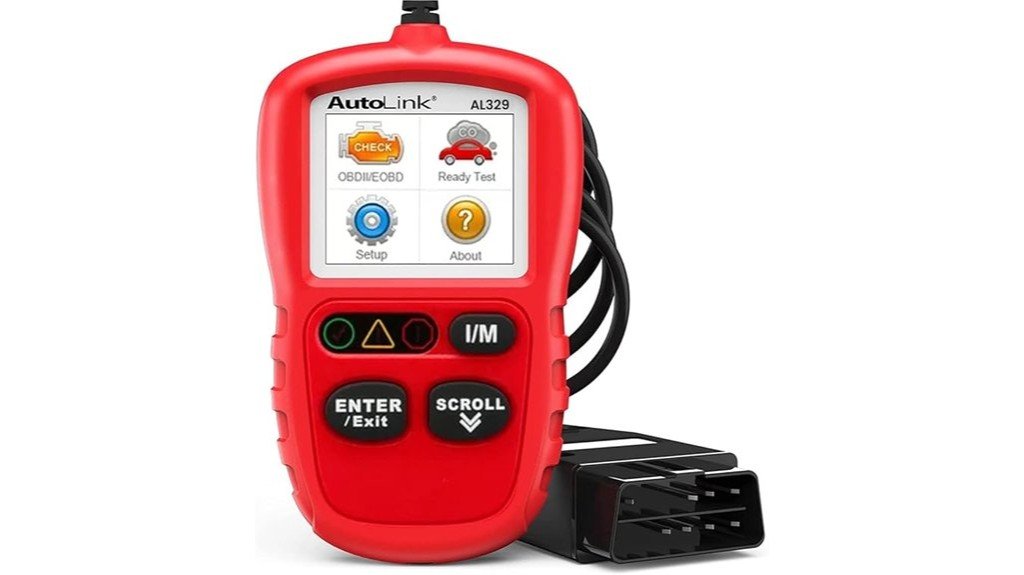
The Autel Autolink AL329 code reader is a compact OBD‑II scanner for 1996‑newer vehicles that pulls DTCs, shows live data, runs I/M readiness tests, and displays freeze frame parameters. It suits DIYers and techs who want a simple, rugged unit with a 2.8‑inch color screen, grease‑ and water‑resistant housing, tri‑lingual menus, and graphs for live sensors. How well does it balance price, features, and durability for routine diagnostics?
Key Takeaways
- Compact, durable OBD-II code reader ideal for 1996-and-newer domestic, Asian, and European vehicles.
- Retrieves and clears generic and manufacturer DTCs, pending codes, and supports Mode 6 diagnostics.
- Displays freeze frame data and graphs live data, with recording and playback for troubleshooting.
- Features AutoVIN, one-click I/M readiness checks, tri-lingual menus, and intuitive controls for ease of use.
- Portable 6.5×2.5×1.2-inch unit with 48-inch cord, suited for DIYers, fleet managers, and light professional use.
What the Autel Autolink AL329 Does and Who It Fits
One compact tool covers a broad range of needs: the Autel Autolink AL329 is a handheld OBD II/EOBD code reader designed for 1996-and-newer domestic, Asian, and European vehicles, offering both basic and some advanced diagnostic functions in a grease- and water-resistant housing.
The compatibility overview clarifies vehicle suitability: it supports 1996+ OBD II standards, domestic and import models.
Compatibility: works with 1996-and-newer OBD-II vehicles, covering domestic, Asian, and European imports.
Who is it for? Home mechanics, fleet managers, and technicians needing quick checks.
What size is it? About palm-sized, 220×176 DPI color screen.
Practical note: verify OBD II port access, expect plug-and-play use, simple I/M readiness checks.
Key Features and Diagnostic Capabilities
Having summarized where the AL329 fits and how it looks, attention now turns to what the unit actually does: its key features and diagnostic capabilities.
The AL329 performs fast code retrieval, displays freeze frame, supports Mode 6, and clears DTCs; it reads generic and manufacturer codes for 1996+ OBDII vehicles. Live data can be graphed, recorded, and played back on a 220×176 TFT screen.
Practical considerations: weight, grease-resistant housing, and tri-lingual menus aid garage and DIY use.
- What codes? Retrieves P0/P1/P2/P3, U0/U1, and pending codes.
- Data handling? Graphs, records, replays live data.
- Emissions? One-Click I/M readiness tests.
Real-World Use, Durability, and Verdict
In everyday garage work and weekend DIY, the Autel Autolink AL329 proves itself as a straightforward, dependable scanner with a compact footprint (about 6.5 x 2.5 x 1.2 inches) and a corded OBD-II lead roughly 48 inches long, making it easy to reach under dashboards.
The user experience is intuitive: one-click I/M, Autovin, clear codes, view live data, graph and playback.
Intuitive controls: one-click I/M and AutoVIN, clear codes, live data, graphing and playback for quick diagnostics.
Durability: grease- and water-resistant housing suggests solid long term reliability for shop use.
Verdict: ideal for DIYers and technicians seeking basic, fast diagnostics.
Q: Who should buy it?
A: Owners of 1996+ OBD-II vehicles.
Frequently Asked Questions
Does It Include an OBD-II Cable or Require Separate Purchase?
Yes — it includes the OBD II cable. The reviewer notes OBD II compatibility and a convenient cable length for typical vehicles, enabling easy plug-in diagnostics without requiring a separate cable purchase.
Is There a Warranty and How Long Does It Last?
Yes — it includes a limited warranty, typically one year. Warranty details specify coverage for manufacturing defects; customer support handles claims, repair, or replacement. Users should retain proof of purchase and contact Autel customer support for service.
Can Firmware Be Updated via USB or SD Card?
Yes, firmware updates are possible via USB, not SD card. Anticipating connectivity worries, the device uses USB connectivity options for updates and guarantees straightforward firmware updates, keeping diagnostic functions and vehicle coverage current.
What Is the Device’s Battery or Power Consumption Rating?
The device draws power directly from the vehicle OBD-II port; it has no internal battery. Its battery efficiency depends on vehicle supply, and estimated power usage is minimal during idle scans, preserving vehicle battery health.
Does It Work With Diesel Vehicles and Heavy-Duty Trucks?
Diesel compatibility is limited: the unit supports OBD-II diesel cars but not heavy-duty trucks. He notes truck limitations often stem from different connectors and protocols; commercial diesel diagnostics require dedicated heavy-duty tools.