Disclosure: As an Amazon Associate, we earn from qualifying purchases. If you click a link on this page and make a purchase, we may receive a small commission at no extra cost to you.
Managing high call volumes in a busy corporate environment requires hardware that combines audio clarity with swift navigation. The AVAYA IP Phone 9608G is designed specifically for enterprise users who depend on clear voice communication and dedicated call handling features. While its robust feature set caters well to office environments, buyers often debate whether its performance justifies the price compared to alternative VoIP handsets. This review evaluates the build quality, call performance, network capabilities, and system compatibility of the Avaya 9608G to help you decide if it fits your organizational needs.
Quick Verdict
Rating: 8.2/10 – Recommended for Avaya Ecosystems
Best For: Enterprise employees, call center operators, and office managers utilizing Avaya IP Office or Aura PBX systems.
Bottom Line: The Avaya 9608G offers dependable wideband HD audio, dual Gigabit Ethernet pass-through, and 8 programmable keys for efficient workflow management. However, it requires a compatible enterprise server environment to function and is not meant for direct residential telephone lines.
| Specification | Detail |
|---|---|
| Brand | Avaya |
| Model | 9608G IP Deskphone (Global Edition) |
| Display Screen | 3.2 in x 2.2 in Monochrome Backlit Display (8 lines view) |
| Audio Performance | High-Definition Wideband Audio (G.722) Handset, Speaker, Headset |
| Programmable Buttons | 8 Line/Feature Keys with Dual LEDs (Red/Green) |
| Network Switch | Dual 10/100/1000 Mbps Gigabit Ethernet Ports |
| Power Protocol | PoE IEEE 802.3af Class 1 (Optional 5V AC Adapter Sold Separately) |
| PBX Compatibility | Avaya IP Office (v6.1+) / Avaya Aura Communication Manager |
| Dimensions & Weight | 3.87 x 3.1 x 1.09 in (Base Footprint) / 2.42 lbs |
| Headset Interface | Dedicated RJ9 Port with Electronic Hook Switch (EHS) support |
What Is the Avaya IP Phone 9608G?
The Avaya IP Phone 9608G is an enterprise-grade VoIP deskphone engineered for everyday office communications. Positioned within the Avaya 9608 line, the “G” designation signifies integrated Gigabit Ethernet support. This allows office workstations to share a single network drop without choking data speeds to connected computers.
Designed primarily for knowledge workers, receptionists, and call handlers, the device links directly to Avaya IP Office and Avaya Aura telephony servers. It focuses on functional reliability, providing physical navigation keys, rapid speed dials, and direct access to system features through customizable buttons.
Who Should Buy It?
Best For
- Offices running Avaya IP Office or Aura voice systems.
- Staff who require Gigabit PC network pass-through at their desk.
- Users who prefer physical line buttons over software softphones.
Skip If
- You need an analog deskphone for a regular home landline.
- Your office uses standard non-Avaya open SIP providers without custom configuration.
- You require a full-color graphical display (look at the 9611G instead).
Before You Buy: The Avaya 9608G is an enterprise IP phone that requires an active Avaya PBX platform (such as IP Office or Aura). It will not operate directly out of a standard residential phone jack or with generic home internet setups without professional IT server setup.
Design and Build Quality
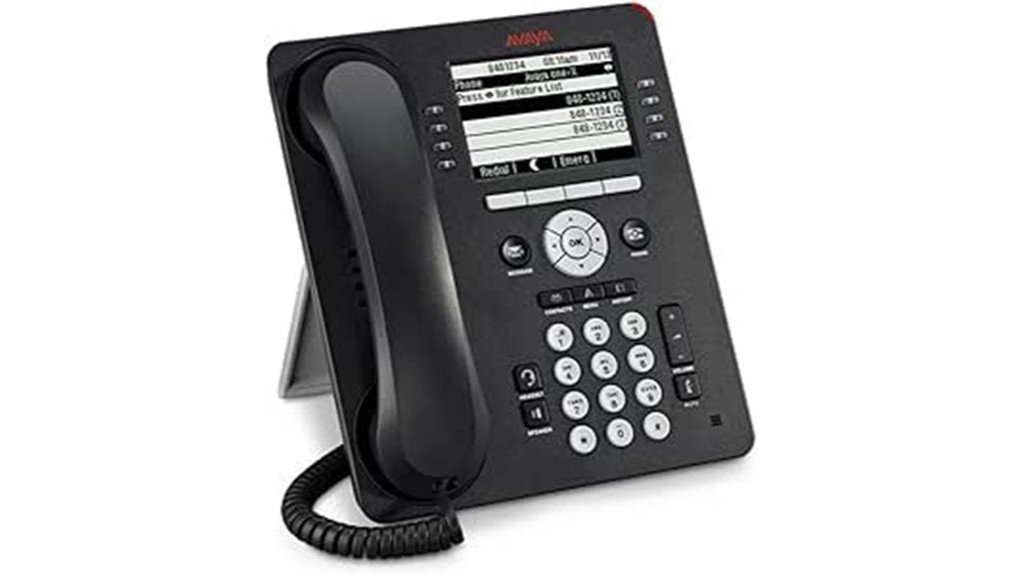
The layout of the Avaya 9608G prioritizes ergonomic functionality. Measuring 3.87 x 3.1 x 1.09 inches across its base footprint and weighing 2.42 pounds, it sits securely on a desk without sliding when pulling on the coiled handset cord. The dark grey plastic casing resists fingerprints and withstands heavy daily usage in commercial environments.
The screen is a 3.2-inch by 2.2-inch white backlit monochrome display. While some buyers mistakenly expect a color screen, this contrast-adjustable monochrome panel delivers high visibility under overhead fluorescent lighting while keeping power consumption low.
The phone includes a dual-position stand that lets you adjust the tilt angle for reduced glare. For facilities with limited desk area, the phone can also be mounted to a wall using an optional wall-mount bracket adapter.
Features and Audio Performance
Call clarity is a primary strength of the 9608G. Equipped with wideband audio technology (supporting the G.722 audio codec), voice reproduction sounds natural and crisp. This reduces listener fatigue during back-to-back conference calls or lengthy client conversations.
Key hardware capabilities include:
- 8 Programmable Feature Keys: Outfitted with dual red and green LEDs, these keys support up to 24 administrative lines or feature shortcuts across three scrolling page views.
- High-Definition Audio: Full wideband support across the corded handset, integrated headset jack, and full-duplex speakerphone.
- Fixed Context Keys: Dedicated buttons for core functions including Mute, Volume, Speaker, Headset, Contacts, History, Home, and Voicemail.
- Four-Way Cluster Navigation: Intuitive directional pad for toggling menus, call history, and internal directories.
Pro Tip: Power the deskphone using Power over Ethernet (PoE Class 1) directly from your network switch. This eliminates extra power adapters on your desk and allows centralized UPS battery backup during power outages.
Gigabit Network Pass-Through
Network speed bottlenecks can hinder workplace productivity. The “G” variant of the 9608 includes two 10/100/1000 Mbps Gigabit Ethernet ports on the rear panel. One port connects to the wall network outlet, while the second port routes high-speed Ethernet to the user’s computer.
This pass-through setup saves office cabling costs by allowing data and voice traffic to share a single Ethernet outlet while preserving full Gigabit throughput for file transfers, cloud access, and video streaming on the connected PC.
How It Performs in Real Use
Daily Corporate Desk Use
For standard desk work, the 9608G handles call management smoothly. Placing callers on hold, transferring extensions, or setting up multi-party conferences requires only one or two button presses. The backlight on the display activates immediately upon receiving an incoming call or pressing any key, ensuring caller ID information is clear in any light.
Call Center and Reception Settings
In high-volume call environments, the 8 programmable keys prove invaluable. Operators can configure line appearance LEDs to see at a glance whether colleagues are currently on a call or available. The dedicated RJ9 headset jack supports Electronic Hook Switch (EHS) adapters, enabling wireless headset users to answer calls remotely without a mechanical handset lifter.
Remote Branch Office Deployment
When deployed at remote branch offices or managed teleworker desks, the 9608G connects securely back to the central Avaya server via VPN or H.323 protocols. Once programmed by an administrator, the phone loads user profiles, internal extensions, and speed dials automatically upon boot-up.
Setup and Deployment Tips
To ensure smooth installation of the Avaya 9608G across your IT infrastructure, keep these practical setup tips in mind:
- Verify PoE Budgeting: The handset utilizes IEEE 802.3af Class 1 PoE. Ensure your managed network switch has sufficient PoE power available before connecting multiple deskphones.
- Use EHS Adapters for Wireless Headsets: If your office relies on wireless headsets, install an Electronic Hook Switch adapter into the RJ9 port to enable remote answer and end capabilities without needing mechanical lifters.
- Server Firmware Sync: Confirm that your Avaya IP Office server is running software version 6.1 or higher so that full button mapping and feature page views populate automatically upon phone boot.
Is It Worth the Price?
From an enterprise investment perspective, the Avaya 9608G offers solid long-term value for organizations already using Avaya PBX platforms. Built with heavy-duty commercial plastics and durable mechanical switches, these phones frequently remain operational for years with minimal maintenance.
While third-party consumer VoIP phones may appear cheaper initially, they lack native integration with Avaya software features like centralized management, automated extension provisioning, and dual-LED busy lamp fields. For enterprise deployments, the 9608G strikes an effective balance between cost and functional capability.
How It Compares to Alternatives
If you prefer a full-color display for easier navigation through busy directory listings, the Avaya 9611G is a direct upgrade that shares the same platform architecture. If your office infrastructure only requires standard 10/100 Mbps Ethernet speeds without Gigabit PC pass-through, the non-G Avaya 9608 offers identical telephony performance at a slightly lower hardware price.
For organizations using standard open-SIP cloud platforms (such as RingCentral or Zoom Phone) without an Avaya PBX core, universal SIP endpoints from brands like Yealink or Poly will provide far easier setup and complete native compatibility.
Pros and Cons
Pros
- Clear wideband HD audio on handset and full-duplex speakerphone.
- Dual Gigabit Ethernet ports maintain full PC network speeds.
- 8 programmable keys supporting up to 24 line/feature views.
- Power over Ethernet (PoE Class 1) support reduces desk cable clutter.
- Sturdy build quality designed for heavy commercial use.
Cons
- Requires an Avaya IP Office or Aura system to operate fully.
- Monochrome screen rather than full-color display.
- AC power adapter is not included in standard packaging (requires PoE or separate power supply).
Frequently Asked Questions
Is the AVAYA IP Phone 9608G suitable for home office use?
It is suitable only if your home office connects to your company’s Avaya IP Office or Avaya Aura IP PBX system via a secure VPN or teleworker gateway. It cannot plug directly into a standard analog home wall jack or generic residential router without server provisioning.
Does the Avaya 9608G have a color display?
No, the 9608G features a 3.2-inch monochrome white backlit screen. If your office requires a full color screen, consider the upgraded Avaya 9611G IP deskphone.
What is the difference between the Avaya 9608 and 9608G?
The standard 9608 model features dual 10/100 Mbps Ethernet ports, while the 9608G includes dual 10/100/1000 Mbps Gigabit Ethernet ports. The “G” model ensures that pass-through internet speeds to a connected desktop PC remain at full Gigabit performance.
Does the package include an AC power supply adapter?
Standard enterprise packaging does not include an AC wall power adapter because the phone operates over Power over Ethernet (PoE Class 1). If your network switch lacks PoE, a separate 5V Avaya AC power adapter must be purchased separately.
Can the Avaya 9608G be used with non-Avaya phone systems?
The 9608G is engineered specifically for Avaya IP Office and Avaya Aura call platforms. While open SIP firmware exists, key feature mapping and line keys work reliably only when integrated with an Avaya PBX server environment.
Does the Avaya 9608G support wireless headsets?
Yes, the deskphone includes a dedicated RJ9 headset port and supports Electronic Hook Switch (EHS) adapters. This allows staff to answer and terminate calls directly from a wireless headset without needing a mechanical handset lifter.
How many line appearances can be displayed on the screen?
The screen shows 8 physical programmable feature keys with dual LEDs. Through three selectable scrolling page views, users can manage up to 24 call lines, internal extensions, or feature shortcuts.
Final Verdict: Is the Avaya IP Phone 9608G Worth It?
The Avaya IP Phone 9608G remains a dependable workhorse deskphone for businesses using Avaya communication platforms. High-definition audio, responsive physical navigation, and 8 dual-LED feature keys make daily call handling straightforward. The inclusion of Gigabit Ethernet pass-through ensures your workstation PC retains maximum network performance without extra cabling.
While the monochrome display and reliance on specialized Avaya server platforms mean it is not intended for residential users or open-SIP home offices, it delivers excellent long-term durability and functionality for corporate deployment. If your workplace operates on Avaya infrastructure, the 9608G represents a solid, productive investment.