
Disclosure: As an Amazon Associate, we earn from qualifying purchases. If you click a link on this page and make a purchase, we may receive a small commission at no extra cost to you.
CHUBORY A77 Drone Review
Choosing a first drone can be confusing when the listing combines big camera, range, and flight-time claims in one compact package. The CHUBORY A77 is marketed as a foldable WiFi FPV drone with brushless motors, three batteries, beginner flight modes, and a camera described as 4K HD. Those features make it appealing for practice and casual outdoor clips, but the camera wording, bundle details, app experience, and real-world range deserve a careful check.
This review helps you decide whether the A77 fits your needs, how to set it up safely, and which claims need realistic expectations. It is best viewed as a budget-minded starter drone rather than a dependable platform for professional video.
Quick Verdict
Rating: 7/10, Recommended with caveats
Best For: Beginners who want a foldable WiFi FPV drone with brushless motors, three batteries, and simple practice modes.
Bottom Line: The CHUBORY A77 puts several beginner-friendly features into one portable kit. Its main tradeoffs are uncertain listing details, variable WiFi FPV performance, and camera results that may not match what you expect from the 4K wording.
| Specification | Detail |
|---|---|
| Brand | CHUBORY |
| Model | A77 |
| Product Type | Foldable WiFi FPV quadcopter for beginners |
| Camera | Marketed as a 4K HD camera; confirm the exact live listing and saved-file specification before purchase |
| Motors | Brushless motors |
| Battery Bundle | Three flight batteries listed |
| Advertised Flight Time | Up to 84 minutes total across three batteries under ideal conditions |
| Advertised Control Range | Up to 2650 ft under ideal conditions; practical WiFi video range may be shorter |
| Connectivity | Remote controller plus WiFi FPV connection to a phone app |
| Listed Flight Modes | One Key Start/Landing, Altitude Hold, Optical Flow Positioning, Follow Me, Headless Mode, Speed Adjustment, Gesture Selfie, Trajectory Flight, and 3D Flips |
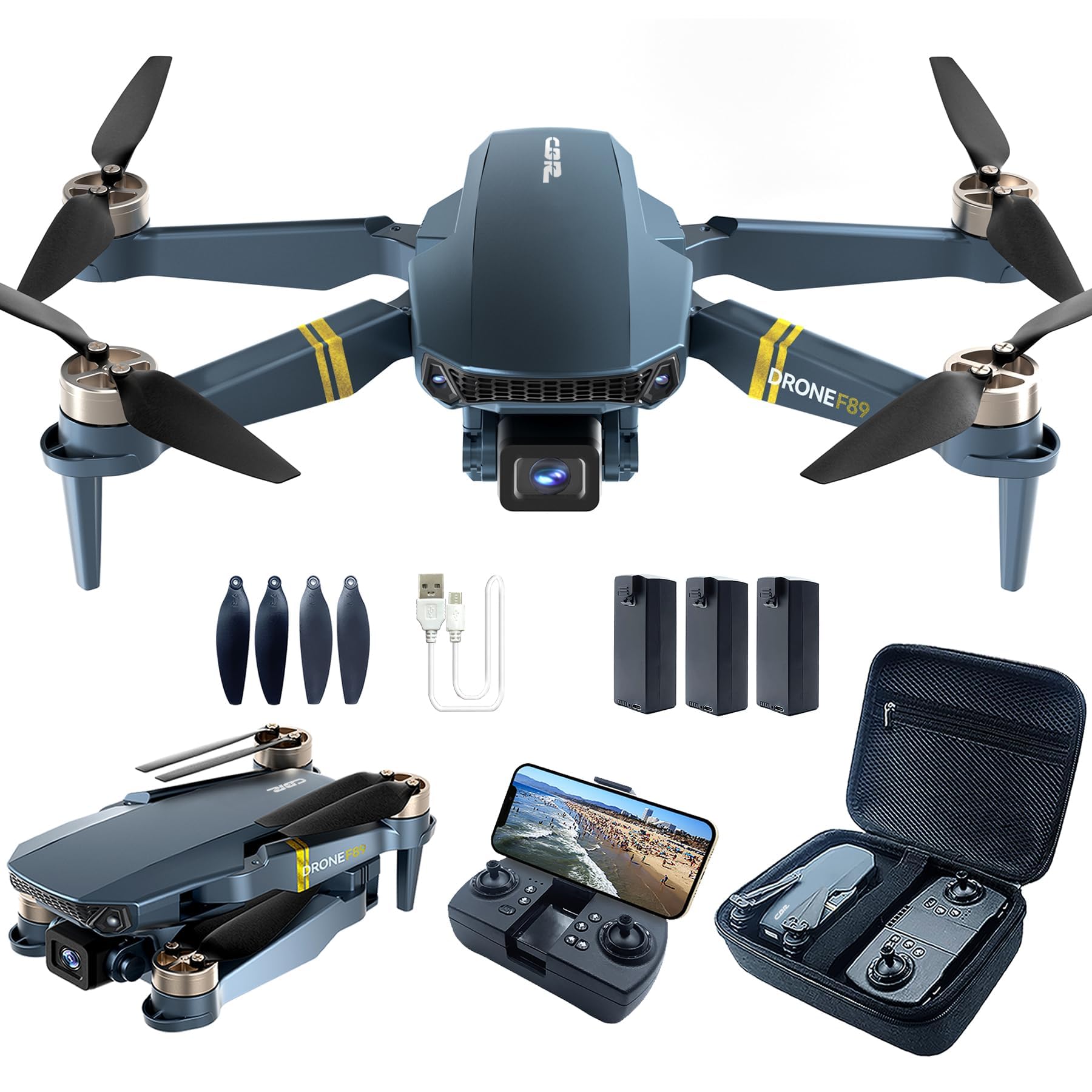
| Listed Accessories | Remote controller, three flight batteries, carrying case, spare propellers, screwdriver, USB charging cable, and manual |
| Best Use | Beginner practice, short outdoor flights, and casual photos or clips in open areas |
Before You Buy: Treat 84 minutes as a combined maximum across three batteries, not one continuous flight. Also confirm the current camera wording, included accessories, warranty, weight, and dimensions on the live seller page because product data can vary.
What Is the CHUBORY A77?
The CHUBORY A77 is a compact quadcopter made for first-time pilots and casual users. Its arms fold for storage, while the included controller and phone-based WiFi FPV system let you fly and frame shots without buying a separate display.
The main attraction is the combination of brushless motors, three batteries, beginner modes, and a camera marketed as 4K HD. The A77 makes the most sense when portability and practice time matter more than advanced stabilization, GPS-assisted return features, or dependable long-range video.
How This Review Was Checked
We checked the A77 model family against CHUBORY’s current product and support pages. We also compared the source article’s camera, battery, range, app, feature, and accessory claims for consistency. Direct access to the linked Amazon page was not available during review, so you should confirm the active seller bundle and technical wording before ordering.
The 7/10 rating reflects a useful beginner feature set with clear limitations. The A77 is worth considering for low-risk practice, but conflicting or incomplete listing details prevent a stronger recommendation.
Who Should Buy It?
Best For
- First-time pilots who want Altitude Hold, Headless Mode, and One Key Start/Landing for basic practice.
- Casual users who value three listed batteries and a carrying case for longer sessions away from home.
- Travel-light buyers who want a foldable drone for open parks, scenic stops, and simple family clips.
Skip If
- You need stable, repeatable footage for paid work, events, real estate, or important travel projects.
- You expect the advertised controller range to include a smooth WiFi video feed at the same distance.
- You want a polished GPS drone experience with stronger stabilization and mature flight software.
Feature-by-Feature Review
Design and Build Quality
The foldable frame makes the A77 easier to store than a fixed-arm quadcopter. You can place the drone, controller, batteries, spare propellers, cable, and small tools in the listed carrying case for a compact day-trip setup.
Its lightweight beginner-drone construction also requires careful handling. Folding joints, propellers, arms, and the camera can suffer damage after hard landings, so open grass is a better practice surface than pavement.
Brushless motors are a useful strength in this category. They generally need less routine motor replacement than brushed designs, although they do not protect the frame or propellers from crash damage.
Camera Quality and WiFi FPV
The camera is marketed as 4K HD, but that label alone does not confirm stabilization, bitrate, frame rate, or the resolution of every saved file. You should judge the A77 as a casual camera drone and check sample files from your exact unit before relying on it for an important trip.
The live view travels through WiFi to your phone. Feed quality can change with phone compatibility, app permissions, nearby wireless interference, distance, and obstacles. The preview may also look different from the final saved photo or video.
Test recording while the drone is close and low. Confirm that files save correctly, play back on your phone, and show the detail you expect before flying farther.
Flight Time and Three-Battery Bundle
The advertised 84-minute figure is a combined maximum for three batteries under ideal conditions. It should not be read as 84 minutes from one battery, and your usable time may fall with wind, recording, rapid climbs, flips, and high-speed flight.
Even with that limitation, three batteries are useful for learning. You can divide a session into short blocks for takeoff, hovering, turning, camera framing, and landing instead of trying to learn every control during one battery cycle.
Let batteries cool before recharging and follow the manual’s charging and storage instructions. Stop using any battery that becomes swollen, damaged, unusually hot, or difficult to secure.
Range, Controller Response, and Visual Line of Sight
The A77 advertises up to 2650 ft of control range in ideal conditions. Real conditions rarely match an open, interference-free test area, and the WiFi FPV feed may weaken before the controller loses basic response.
Build distance slowly and keep the drone where you can see its position and direction. A range claim should not encourage you to fly behind trees, buildings, hills, or other obstacles.
App Experience and Phone Compatibility
The CHUBORY FLY app is listed for A77 connection and control. Setup normally requires joining the drone’s WiFi network, granting the requested permissions, and checking the live feed before takeoff.
If you see a black screen, failed file saves, or repeated disconnects, recheck local-network, camera, photo, storage, and WiFi permissions. Restart the phone and drone, then test close to the takeoff point. App behavior can vary by phone model and operating-system version.
Altitude Hold, Follow Me, and Other Flight Modes
Altitude Hold can reduce the amount of throttle correction needed during basic hovering. Optical Flow Positioning may improve low-level stability when the ground has visible texture and enough light.
Follow Me, Gesture Selfie, Trajectory Flight, and 3D Flips add variety, but they should come after you can take off, hover, turn, and land without help. Follow Me on a budget WiFi drone may react slowly or track poorly when movement is fast, phone positioning is weak, or obstacles enter the flight path.
Headless Mode can help when you lose track of the drone’s nose. It is still worth learning normal orientation because Headless Mode does not replace basic directional awareness.
Setup Tips Before Your First Flight
- Charge each battery fully with the supplied charging method and inspect it for damage.
- Unfold every arm completely, secure the battery, and check each propeller for cracks or looseness.
- Place the drone on a level surface and complete any calibration steps in the manual.
- Connect the phone app while the drone is close, then test live view and file saving.
- Use the lowest speed mode in a wide, open area with calm wind.
- Practice hovering and landing before trying Follow Me, flips, trajectory flight, or longer range.
Pro Tip: Number the three batteries and rotate them in order. This makes it easier to notice one battery that delivers shorter flights or becomes warmer than the others.
Safety and Local Drone Rules
Fly in a clear area away from people, roads, power lines, animals, and fragile property. Stop when wind begins moving the drone faster than you can correct, and keep enough battery for a controlled landing.
Inspect the propellers, arms, battery lock, and camera before every flight. Follow the manual for charging, calibration, emergency stopping, and storage. Check the drone rules that apply to your location because registration, altitude limits, restricted airspace, and operating requirements can depend on country, drone weight, and flight site.
What People Say
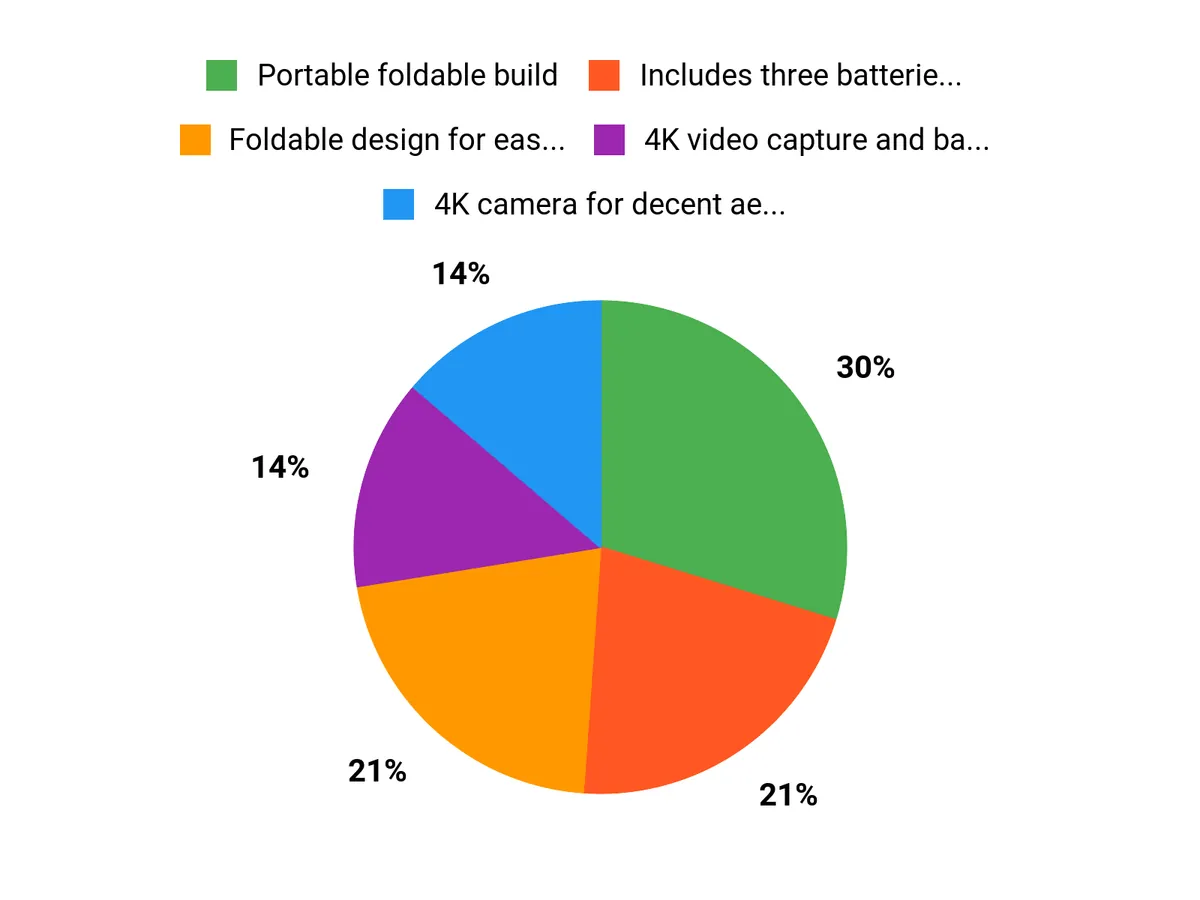
The source article describes mixed buyer signals. Positive comments tend to focus on the foldable size, spare batteries, beginner modes, and casual camera use, while negative comments focus on app connection, shorter real flight time, Follow Me consistency, and differences between advertised and practical performance.
Overall Sentiment: Mixed, based on limited review signals and conflicting product details.

How It Performs in Real Use
For Beginner Practice
The A77 is most useful during short, controlled sessions. Altitude Hold, Headless Mode, One Key Start/Landing, and the lowest speed setting can help you focus on stick movement without rushing into advanced maneuvers.
For Family Gatherings
The camera and Follow Me mode can capture simple outdoor moments when the drone stays close. Choose a clear area, keep people out of the takeoff and landing zone, and test recording before asking anyone to pose.
For Weekend Hikes
The foldable body, carrying case, and three batteries are convenient for scenic stops. Open viewpoints are safer than narrow wooded trails, where branches, wind shifts, and uneven landing areas increase crash risk.
For Light Travel
The compact kit can fit into a daypack, but you still need the controller, all batteries, charging cable, spare propellers, screwdriver, and any local travel documentation. Airline and destination rules for lithium batteries and drones should be checked before departure.
Pros and Cons
Pros
- Foldable design and a listed carrying case make the kit easier to transport and store.
- Three listed batteries support several short practice flights in one session.
- Brushless motors are a meaningful advantage over many basic brushed starter drones.
- Altitude Hold, Headless Mode, speed settings, and One Key Start/Landing support early practice.
- WiFi FPV, Follow Me, Gesture Selfie, Trajectory Flight, and flips add casual creative options.
Cons
- The 84-minute claim is a combined ideal-condition figure, not one continuous flight.
- WiFi video, app connection, and automated tracking may require trial and error.
- Camera wording, dimensions, weight, bundle contents, and warranty details should be confirmed on the current listing.
Is It Worth the Price?
The CHUBORY A77 offers strong value for the price when you judge it as a budget beginner kit. The foldable design, brushless motors, three batteries, carrying case, and practice modes give you several useful features without moving into a premium GPS-drone category.
It is worth considering if you want short practice flights and casual outdoor footage. It is not the best fit if your main goal is stabilized video, dependable automated tracking, long-range FPV, or a polished app experience.
How It Compares to Alternatives
A DJI Mini 4K or another DJI Mini model is a better step up when camera stabilization, flight software, and repeatable video matter more than bundle size. Potensic ATOM models are also worth comparing when you want a more camera-focused GPS platform.
Holy Stone HS-series models cover a broad beginner range and may offer different combinations of GPS, batteries, and camera features. The A77 makes the most sense when you prioritize a foldable three-battery practice kit and can accept basic WiFi FPV limitations.
Why Choose the A77?
You may choose the A77 because it combines portability, brushless motors, three batteries, WiFi FPV, and several beginner modes in one kit. Those features suit casual learning and simple outdoor shots better than demanding camera work.
Choose it only with realistic expectations. The A77 is a practice-focused option, not a replacement for a stabilized GPS camera drone with mature software and proven long-distance video.
Frequently Asked Questions
How long does the CHUBORY A77 fly on one battery?
The listing claim of up to 84 minutes refers to the combined total across three batteries under ideal conditions. Wind, recording, faster modes, repeated climbs, and battery age can shorten each flight.
Does the CHUBORY A77 record true 4K video?
The camera is marketed as 4K HD, but listing data may not explain stabilization, frame rate, bitrate, or every saved-file mode. Confirm the current seller specification and inspect sample files from your unit.
Is the CHUBORY A77 suitable for a first-time pilot?
It can suit a beginner because it lists Altitude Hold, Headless Mode, speed adjustment, and One Key Start/Landing. Start in calm weather, use the lowest speed, and master hovering and landing before trying automated modes.
Can you use the full 2650 ft advertised range?
The 2650 ft figure is an ideal-condition control claim. Practical distance can be shorter, and WiFi video may weaken before basic controller response, so keep the drone within visual line of sight.
Which app does the CHUBORY A77 use?
The CHUBORY FLY app is listed for A77 connection and control. Join the drone’s WiFi network, grant the needed permissions, and confirm live video and file saving before takeoff.
What should come in the CHUBORY A77 box?
The source material lists the drone, controller, three batteries, carrying case, spare propellers, screwdriver, USB charging cable, and manual. Check the current seller bundle because package contents can change.
What are the most common setup mistakes?
Common mistakes include skipping calibration, flying before testing the app, starting in a high-speed mode, and taking off near obstacles. A loose propeller or battery can also cause immediate control problems.
Who should skip the CHUBORY A77?
Skip it if you need dependable professional footage, strong GPS-assisted flight, polished automated tracking, or stable long-range video. It is better suited to casual practice and simple clips.
The Bottom Line
The CHUBORY A77 earns a 7/10 for beginners who want a foldable three-battery practice kit with brushless motors and several easy flight modes. Skip it if you need verified professional camera performance, polished software, or dependable long-range FPV.
Its strongest point is the broad starter feature bundle. Its main limitation is uncertainty around listing details and the gap between advertised claims and normal WiFi-drone performance.
Ready to Buy?
Check the latest price, seller bundle, camera wording, and product details before you decide.