Disclosure: As an Amazon Associate, we earn from qualifying purchases. If you click a link on this page and make a purchase, we may receive a small commission at no extra cost to you.
Creality Laser Rotary Roller Pro Review
Round objects can be hard to engrave cleanly because they roll, slip, or sit at the wrong height under the laser head. The Creality Laser Rotary Roller Pro gives your Creality laser engraver a rotary chuck setup for tumblers, cups, rings, bracelets, spheres, and larger creative items. This review explains what you get in the kit, how it connects, where it works best, and whether it is worth buying for your engraving projects.
Our Verdict
Rating: 8/10
Best For: Creality laser engraver owners who want to engrave cylindrical, spherical, and ring-shaped objects with a more stable rotary setup.
Bottom Line: The Creality Laser Rotary Roller Pro is a strong add-on if you already use a compatible Creality Falcon or Falcon A1 laser engraver. You get all-metal construction, multiple clamping ranges, risers, and goggles, but you must check the cable requirement before using it with Falcon A1 machines.
| Specification | Detail |
|---|---|
| Brand | Creality |
| Model | Laser Rotary Roller Pro, Y-axis Rotary Chuck |
| Product Size | 360 × 122 × 100 mm |
| Product Weight | 1.95 kg |
| Outside Clamp Range | 1 to 110 mm cylindrical objects |
| Inner Prop Range | 25 to 75 mm cylindrical objects |
| Sphere Range | 10 to 130 mm with hex stud support |
| Ring and Bracelet Range | 15 to 100 mm with hex stud support |
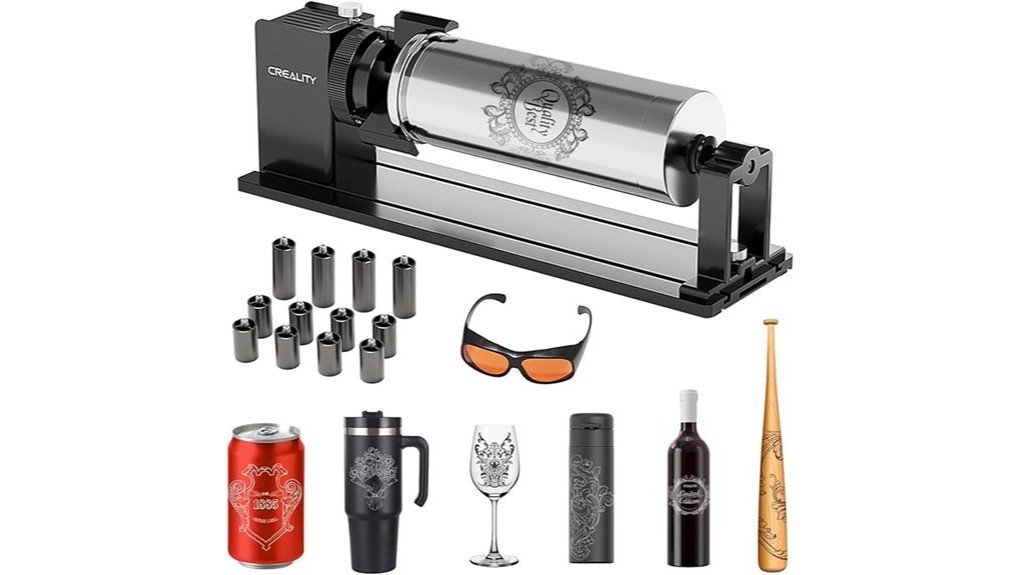
| Included Accessories | 1 rotary roller, 4 × 56 mm risers, 8 × 28 mm risers, connection cable, professional goggles |
| Compatibility | Creality series laser engravers, including Falcon, Falcon2, Falcon2 Pro, Falcon2 Pro S, and Falcon A1 series with the correct A1 cable |
| Build | All-metal construction |
How this review was evaluated
This review checks the live Amazon product listing, visible product details, included accessories, compatibility notes, and published product specifications. The goal is to help you decide if this rotary kit fits your Creality laser setup and your engraving projects.
What Is the Creality Laser Rotary Roller Pro?
The Creality Laser Rotary Roller Pro is a rotary chuck accessory for compatible Creality series laser engravers. Instead of keeping a flat workpiece under the laser head, it rotates round or irregular objects so your laser can engrave around the surface. That makes it useful for cups, cans, thermos bottles, wine glasses, rings, bracelets, and small spheres.
The kit sits in the accessory category for Creality Falcon laser machines. It works as a Y-axis rotary attachment, so you connect it to the Y-axis motor path and adjust your software settings before engraving. The package includes the rotary roller, risers, a connection cable, and professional goggles.
The main strength is its 3-in-1 jaw design. You can clamp some objects from the outside, support other objects from the inside, or use the hex stud setup for spheres and circular items. That gives you more range than a basic roller that only supports straight cylinders.
Usage and Functionality
The Creality Laser Rotary Roller Pro works best when you want to engrave round items with controlled rotation. The outside clamp supports cylindrical objects from 1 to 110 mm, which covers many cans, tumblers, and thermos bottles. The inner prop supports 25 to 75 mm objects, which helps with items such as wine glasses that need support from the inside.
| Application | Diameter Range |
|---|---|
| Clamp from outside | 1 to 110 mm |
| Prop from inside | 25 to 75 mm |
| Hex stud for spheres | 10 to 130 mm |
| Hex stud for rings | 15 to 100 mm |
This range gives you more project flexibility than a simple two-wheel roller. You can move from bottle engraving to ring or bracelet engraving without buying a separate accessory. You still need to measure each object and enter the correct diameter in your laser software, because the rotary movement depends on accurate setup.
Who It’s For
- You own a Creality Falcon, Falcon2, Falcon2 Pro, Falcon2 Pro S, or Falcon A1 laser engraver and want a matching rotary accessory.
- You engrave tumblers, cans, bottles, wine glasses, rings, bracelets, or small spherical objects.
- You need extra risers to create more clearance under your laser engraver for taller or bulkier projects.
Who Should Skip It
- You use a non-Creality laser engraver and cannot confirm motor cable compatibility before buying.
- You only engrave flat materials such as wood sheets, acrylic panels, leather patches, or metal cards.
- You need a plug-and-play setup with no software parameter changes or object diameter calibration.
Installation and Setup
The setup process stays fairly simple because the external claw comes pre-installed in clamp mode. You connect the included cable to the Y-axis motor connection on your engraving machine, start the machine, and connect your computer as you normally would. After that, you adjust the rotary settings and object diameter in your operating software.
You should pay close attention to the machine model before setup. The included cable works with Falcon, Falcon2, Falcon2 Pro, and Falcon2 Pro S series machines. Falcon A1 series machines need the specific A1 cable that comes with the A1 machine package, so you should confirm that cable before planning your first engraving job.
Use the correct cable, secure the object in the jaws, and enter the correct diameter in your engraving software before starting the job.
Installation Tips:
- Confirm your laser engraver model before connecting the rotary kit.
- Use the 56 mm and 28 mm risers when your workpiece needs more vertical clearance.
- Check that the jaws grip the object evenly before you start the engraving pass.
- Reduce speed or acceleration if the object slips during rotation.
The risers connect with M6 screws and help raise the laser engraver above larger workpieces. The package includes four 56 mm risers and eight 28 mm risers, so you can build different height combinations based on your project. This matters for taller items such as bottles, mugs, and larger objects that need extra room under the frame.
Build Quality and Design
The Creality Laser Rotary Roller Pro uses an all-metal build, which gives it a stronger feel than lightweight plastic rotary accessories. The metallic finish also matches the look of many Creality laser engravers, so the kit feels like part of the same tool family. That does not change the engraving result by itself, but it helps the accessory feel stable on the work surface.
| Feature | Specification |
|---|---|
| Material | All-metal construction |
| Texture | Consistent metallic finish |
| Dimensions | 360 × 122 × 100 mm |
| Weight | 1.95 kg rotary kit |
| Compatibility | Creality series laser engravers |
The 1.95 kg weight gives the unit enough mass to sit securely during normal use. You still need to center the object and tighten the jaws correctly, because even a sturdy rotary kit can slip if the object is uneven or poorly supported. For narrow rings, curved bracelets, and small spheres, take a few extra minutes to align the hex stud setup before running the laser.
Enhanced Capability
The biggest reason to buy the Creality Laser Rotary Roller Pro is the jump from flat engraving to round-object engraving. The 1 to 110 mm outside clamp range covers many common drinkware projects, while the 10 to 130 mm sphere range gives you more room for creative objects. The 15 to 100 mm ring and bracelet range also makes the kit useful for small gift items and personalized accessories.
The included risers also increase the usable space under the laser engraver. That helps when you want to work on larger items such as guitars, skateboards, or surfboards, as long as your laser machine and workspace can physically handle the project. The rotary kit does not make every large object easy, but it removes one major limit by raising the engraver and adding rotation support.
This is where the kit provides strong value for the price. You are not just buying a roller for cups. You are getting a rotary chuck system, multiple support modes, risers, and safety goggles in one package.
How It Performs in Real Use
For Tumblers and Bottles
For tumblers, cans, and thermos bottles, the outside clamp range of 1 to 110 mm gives you useful flexibility. You need to secure the object firmly and enter the correct diameter in the software to keep the design aligned. When you set it up carefully, the rotary motion helps the laser mark the curved surface more evenly than a fixed flat setup.
For Wine Glasses and Narrow Cylinders
The 25 to 75 mm inner prop range helps with objects that need internal support. This can be useful for wine glasses and similar items with a shape that does not sit well on a standard roller. You should test placement at low power first, because thin glass and angled shapes need careful alignment.
For Rings, Bracelets, and Spheres
The hex stud setup supports spheres from 10 to 130 mm and rings or bracelets from 15 to 100 mm. That makes the Creality Laser Rotary Roller Pro more versatile than a basic tumbler-only roller. Small circular items need extra patience, because a tiny shift in grip can move the engraving path.
Pros and Cons
Pros
- Wide 1 to 110 mm outside clamp range covers many cups, cans, and bottles.
- Hex stud support handles 10 to 130 mm spheres and 15 to 100 mm rings or bracelets.
- All-metal construction gives the rotary kit a sturdy, stable feel during setup.
- Included 56 mm and 28 mm risers help create more clearance under your engraver.
- Package includes professional goggles, which adds useful safety value for laser work.
Cons
- Falcon A1 users need the specific A1 cable from the machine package, not just the included cable.
- You must adjust software settings and object diameter before engraving.
- Non-Creality engraver compatibility can be uncertain without checking the motor connection first.
Is It Worth the Price?
The Creality Laser Rotary Roller Pro makes the most sense if you already own a compatible Creality laser engraver and regularly work beyond flat materials. The kit combines a rotary chuck, multiple clamping methods, risers, a connection cable, and goggles, so the value goes beyond a single roller attachment.
You get the most value if you engrave custom drinkware, gift items, jewelry-style pieces, or odd-shaped products for a small business or hobby shop. If you only engrave flat wood, acrylic, leather, or metal cards, this accessory may sit unused. For the right Creality owner, it is a smart buy for everyday rotary engraving projects.
How It Compares to Alternatives
The xTool RA2 Pro is a strong alternative if you use xTool machines or want a 4-in-1 rotary system with broad machine support. The Ortur Laser Rotary Roller YRR 2.0 suits many Ortur users who mainly need cylinder engraving. The Creality Laser Rotary Roller Pro remains the better fit when your main machine is in the Creality Falcon family and you want a matching accessory with risers included.
You should choose based on your laser engraver, not only the rotary accessory. Cable fit, software setup, frame clearance, and object support matter more than brand name alone. For Creality Falcon owners, this kit keeps the setup closer to the machine ecosystem you already use.
Frequently Asked Questions
Does the Creality Laser Rotary Roller Pro work with Falcon A1 machines?
Yes, it can work with Falcon A1 series machines, but you need the specific A1 connection cable from the A1 machine package. The included cable is listed for Falcon, Falcon2, Falcon2 Pro, and Falcon2 Pro S series machines.
What size objects can the Creality Laser Rotary Roller Pro hold?
It can clamp cylindrical objects from 1 to 110 mm from the outside. It can also support 25 to 75 mm cylinders from the inside, 10 to 130 mm spheres, and 15 to 100 mm rings or bracelets.
Does this roller engrave materials by itself?
No, the rotary roller does not engrave by itself. Your laser engraver does the engraving, while the Creality Laser Rotary Roller Pro rotates the object under the laser head.
Is the Rotary Roller Suitable for Beginners?
Yes, it can suit beginners who already understand their Creality laser engraver. You still need to learn diameter settings, object centering, software parameters, and safe laser handling before running finished projects.
How Do I Maintain the Rotary Roller?
Keep the jaws, rollers, and soft contact areas clean so the object does not slip. Check screws, cable connections, and riser stability before each job, especially when you work with heavier bottles or taller items.
Can This Roller Be Used With Non-Creality Engravers?
You should treat non-Creality compatibility as uncertain until you confirm the cable, motor connection, and software settings. The product is made for Creality series laser engravers, so the safest match is a compatible Creality Falcon machine.
What Is the Warranty Period for the Product?
The verified listing does not provide a clear fixed warranty period in the visible product details. Check the current Amazon seller terms or contact Creality support before buying if warranty coverage is a major concern for you.
The Bottom Line
The Creality Laser Rotary Roller Pro earns its 8/10 rating because it gives Creality Falcon owners a practical way to engrave round and irregular objects. You get an all-metal rotary kit, 3-in-1 jaw support, useful risers, goggles, and clear diameter ranges for cylinders, spheres, rings, and bracelets. You should look elsewhere only if you use a different laser brand, cannot confirm cable compatibility, or only engrave flat materials.
Ready to Buy?