Disclosure: As an Amazon Associate, we earn from qualifying purchases. If you click a link on this page and make a purchase, we may receive a small commission at no extra cost to you.
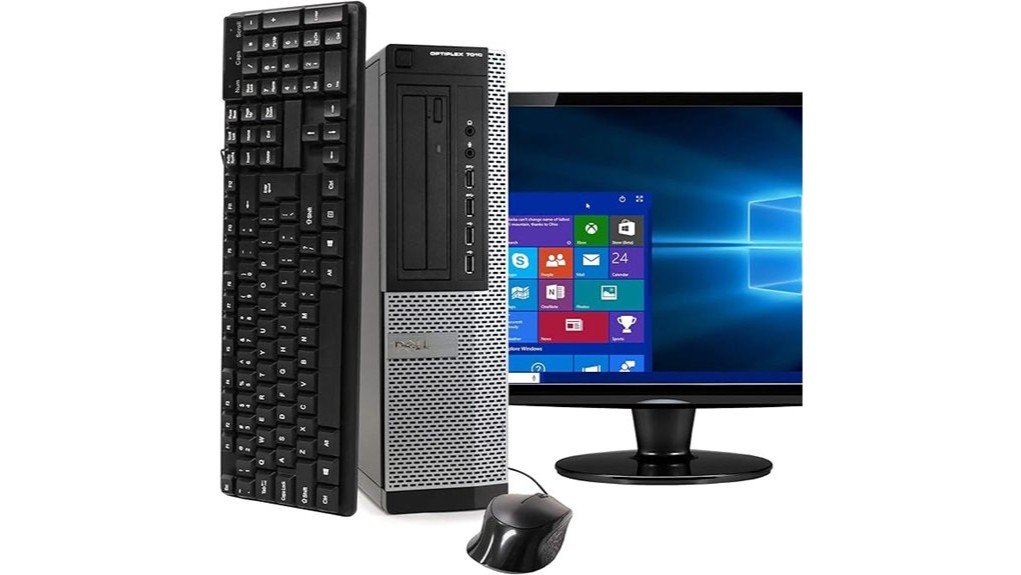
Buying a low-cost refurbished desktop can save money, but older hardware, slow storage, and unclear bundle details can create problems later. The Dell OptiPlex 7010 desktop package combines a quad-core Intel Core i5 computer with 8GB of DDR3 memory, a 500GB hard drive, a 19-inch monitor, and basic accessories. It is practical for light office work, web browsing, and older software, but its 2012-era platform and Windows 11 support status deserve careful attention. This review explains what the bundle includes, where it performs well, and what you should confirm before ordering.
Quick Verdict
Rating: 6.8/10, recommended with caveats
Best For: Budget home offices, basic schoolwork, web browsing, and buyers who need a complete monitor-and-desktop package.
Bottom Line: The bundle gives you a usable desktop setup with an Intel quad-core processor, 8GB of RAM, and essential accessories. Its mechanical hard drive, integrated graphics, refurbished condition, and unofficial Windows 11 hardware support limit its long-term appeal.
| Specification | Detail |
|---|---|
| Brand | Dell |
| Model | OptiPlex 7010 |
| Product type | Renewed desktop computer package |
| Processor | Intel quad-core Core i5 at 3.2GHz; exact processor number is not stated |
| Installed memory | 8GB DDR3 |
| Official memory limit | Up to 16GB on the original Dell platform |
| Storage | 500GB mechanical hard disk drive |
| Graphics | Integrated Intel HD Graphics 2500 |
| Operating system | Windows 11 Pro, as listed by the seller; see compatibility warning below |
| Monitor | 19-inch LCD; brand, model, panel type, and resolution are not specified |
| Video connections | The original platform provides two DisplayPort outputs and one VGA output; supplied adapters may vary |
| Network connections | Gigabit Ethernet and a USB WiFi adapter |
| USB support | USB 2.0 and USB 3.0 ports; confirm the exact available count on the delivered chassis |
| Optical drive | DVD drive |
| Listed dimensions | Approximately 16 × 4 × 14.2 inches for the computer |
| Included accessories | Keyboard, mouse, WiFi adapter, monitor, and compatible connection accessories |
| Listed coverage | 90-day refund or replacement coverage and technical support; confirm the current seller terms |
Before You Buy: The listing includes Windows 11 Pro, but the OptiPlex 7010 normally uses third-generation Intel processors that are not on Microsoft’s current approved Windows 11 processor list. Ask the seller how the operating system was installed, run Microsoft’s PC Health Check after delivery, and understand that unsupported hardware may face compatibility or update issues.
What Is the Dell OptiPlex 7010 Package?
The OptiPlex 7010 is an older business-class Dell desktop originally designed for offices, schools, and managed computer fleets. This renewed package adds a 19-inch LCD monitor, keyboard, mouse, DVD drive, and USB WiFi adapter, giving you most of the equipment needed for a basic workstation.
The reviewed configuration uses an Intel quad-core Core i5 processor running at 3.2GHz, 8GB of DDR3 memory, a 500GB hard drive, and Intel HD Graphics 2500. These parts can still manage common desktop tasks, but they are several generations behind current processors, solid-state storage, and graphics hardware.
The package makes the most sense when your priority is receiving a complete, inexpensive computer setup. It is less appealing when you need fast startup times, modern gaming performance, official Windows 11 compatibility, or predictable monitor specifications.
Who Should Buy It?
Best For
- Home users who need email, web browsing, documents, and basic video playback.
- Small offices that still use USB accessories, VGA displays, DVDs, or older business software.
- Budget buyers who need a monitor, keyboard, mouse, and desktop in one package.
Skip If
- You need officially supported Windows 11 hardware with predictable long-term updates.
- You want fast storage, modern gaming, video editing, 3D design, or demanding creative software.
- You need a specific monitor resolution, cosmetic condition, cable type, or accessory brand.
Design and Refurbished Build Quality
Dell built the OptiPlex line for office use, so the chassis favors practical access and serviceability over a slim or decorative appearance. The seller lists dimensions of roughly 16 × 4 × 14.2 inches, which suits a desk, shelf, or space beside a monitor without requiring a full-size gaming tower area.
Because this is a renewed package, expect signs of previous use. Cosmetic wear can include light scratches, small marks, mismatched accessory colors, or a monitor stand that differs from product photos. These issues do not always affect operation, but the condition will not feel the same as a factory-new computer.
Amazon Renewed accessories may be compatible replacements instead of the parts originally supplied by Dell. That matters for the keyboard, mouse, WiFi adapter, monitor, video adapter, and power cables, so inspect every component as soon as the package arrives.
Performance and Everyday Speed
The quad-core Intel Core i5 processor is adequate for word processing, spreadsheets, email, accounting software, and ordinary browser use. It can also run several light applications at once, although the included 8GB of memory limits how many demanding programs and browser tabs you can keep open comfortably.
The main performance restriction is the 500GB mechanical hard drive. It provides useful file capacity, but it will start Windows, launch applications, and install updates more slowly than a solid-state drive. Background antivirus scans or large Windows updates may make the system feel temporarily unresponsive.
Intel HD Graphics 2500 handles desktop graphics, basic streaming, presentations, and older low-demand games. It is not designed for current high-detail games, GPU rendering, advanced 3D work, or smooth editing of high-resolution video.
Memory Upgrades
The package includes 8GB of DDR3 memory, but that is not the platform’s official maximum. Dell’s original technical guide lists support for up to 16GB, with the available slot arrangement depending on the chassis version.
Before buying memory, check the computer’s form factor, current module layout, operating-system architecture, and compatible DDR3 speed. Installing matched modules is preferable because mixed capacities or speeds can reduce performance or create stability problems.
Storage Upgrades
Replacing the mechanical hard drive with a compatible SATA solid-state drive is the most useful performance upgrade for this system. An SSD can reduce startup and application-loading delays, although you may need a mounting bracket, SATA cable arrangement, operating-system migration, or clean Windows installation.
The exact condition and manufacturer of the included 500GB drive can vary in a refurbished computer. Back up important files from the first day rather than treating an older drive as permanent storage without a second copy.
Connectivity and Display Features
The original OptiPlex 7010 platform includes USB 2.0 and USB 3.0 connections for storage drives, printers, keyboards, mice, webcams, and other accessories. It also provides wired Gigabit Ethernet, which is usually more stable than the included USB WiFi adapter when your desk is close to a router or network port.
The WiFi connection comes from an external USB adapter rather than modern integrated wireless hardware. Performance will depend on the adapter model, router, signal strength, driver quality, and which USB port you use. Bluetooth should not be assumed unless the delivered adapter or seller documentation specifically includes it.
Dell’s native video layout for the standard OptiPlex 7010 platform includes two DisplayPort connections and one VGA connection. The seller’s package may include adapters for the supplied monitor, but you should not assume that every cable, HDMI converter, or dual-monitor adapter shown in listing photos will be included.
Monitor and Multimedia Use
The included 19-inch LCD gives you a complete display setup, but the listing does not identify its brand, panel type, native resolution, refresh rate, or video inputs. It should be suitable for documents and basic web use, though it may feel small beside current 22-inch and 24-inch office monitors.
The integrated graphics can support more than one display through the computer’s native outputs, but the final setup depends on the monitor connections and available adapters. Confirm the delivered ports before buying extra cables or planning a multi-monitor desk.
Audio connections support headphones and external speakers. Do not assume the package includes high-quality built-in speakers, a microphone, or a webcam unless those items are stated in the current listing.
How It Performs in Real Use
For Home Office Tasks
The computer is capable of handling email, browser-based tools, Microsoft Office-style applications, invoices, and video meetings. A separate webcam may be required, and the hard drive can make startup and large updates feel slow before your work session begins.
For School and Household Use
Students can use it for research, documents, online portals, and basic media playback. Families can also keep it as a shared household computer, but multiple user accounts, many browser tabs, and background programs may put pressure on the included 8GB of memory.
For Older Accessories and Software
The mix of USB ports, Ethernet, VGA, DisplayPort, and a DVD drive can be useful when you own older printers, monitors, discs, or business equipment. You should still check current driver support before relying on specialized hardware or older professional software.
For Gaming and Creative Work
The OptiPlex 7010 is not a good choice for current graphically demanding games, advanced photo workflows, modern video editing, CAD, or 3D rendering. Its integrated Intel graphics and older processor architecture are intended for ordinary desktop workloads rather than sustained creative or gaming performance.
Setup Tips Before First Use
- Inspect the full package: Check the desktop, monitor, stand, keyboard, mouse, WiFi adapter, video cable, and power cables for damage or missing parts.
- Record the service tag: The Dell service tag can help you locate the correct manuals, drivers, and original system information.
- Check Windows activation: Open Windows Settings and confirm that Windows is activated before installing personal software.
- Run system updates: Install available Windows and Dell driver updates, then restart the computer until no important updates remain.
- Test every connection: Verify the USB ports, Ethernet, WiFi adapter, DVD drive, audio jacks, monitor inputs, keyboard, and mouse during the return period.
- Check Windows 11 eligibility: Run Microsoft’s PC Health Check rather than assuming that a preinstalled operating system means the hardware is officially supported.
- Create a backup plan: Save important files to cloud storage or an external drive because the age and previous use of the included hard disk are unknown.
Pro Tip: Use the computer for several hours during the return window. Test sleep and restart behavior, play a video, connect to WiFi, copy a large file, and listen for unusual hard-drive clicking or fan noise.
Compatibility and Safety
Place the desktop where air can move around its vents. Avoid enclosing it in a tight cabinet, placing objects over ventilation openings, or allowing dust to collect around the rear exhaust area.
Disconnect the computer and monitor from power before opening the chassis, changing memory, replacing a drive, or connecting internal components. Use compatible parts and follow the Dell service manual if you perform an upgrade yourself.
Older office computers may not include current wireless standards, USB-C, modern display connectors, or official support for every new operating-system feature. Confirm compatibility with any printer, scanner, specialty device, or business application that you must use.
Pros and Cons
Pros
- Complete package includes a 19-inch monitor, keyboard, mouse, WiFi adapter, and DVD drive.
- Quad-core Intel Core i5 processor remains usable for documents, email, and basic browsing.
- 8GB of DDR3 memory can be upgraded to the platform’s official 16GB limit.
- Provides USB 2.0, USB 3.0, Ethernet, VGA, and DisplayPort connectivity.
- Business-oriented chassis is easier to service than many sealed compact computers.
Cons
- The 500GB mechanical hard drive is much slower than a modern SSD.
- The third-generation Intel platform is not officially supported for Windows 11.
- Refurbished condition, monitor model, accessory brands, cables, and cosmetic wear may vary.
Warranty and Support Options
The current Amazon listing states that the renewed package includes 90-day refund or replacement coverage and technical support. These terms are more limited than the multi-year warranties commonly offered with new business computers.
Coverage can depend on the seller, product condition, order date, and current Amazon Renewed policy. Read the live return and warranty details before purchasing, then retain the packaging and test every component promptly.
The article’s earlier claim of a full one-year warranty and lifetime technical assistance could not be confirmed. You should rely on the terms displayed in your order rather than assuming that older promotional coverage still applies.
Is It Worth the Price?
The OptiPlex 7010 package belongs in the budget refurbished category. Its value comes from combining the computer, monitor, input devices, WiFi adapter, and optical drive rather than offering fast or current-generation hardware.
It can be a smart buy for basic everyday use when the complete bundle costs less than purchasing a separate refurbished computer and monitor. Buyers who already own a display, keyboard, and mouse may get better value from a newer desktop with an SSD and a processor that officially supports Windows 11.
Factor a possible SSD upgrade into your decision. Improving the storage may make the computer feel faster, but the upgrade does not solve its older processor, integrated graphics, short coverage period, or operating-system support concern.
How It Compares to Alternatives
A refurbished Dell OptiPlex 7060, HP EliteDesk 800 G4, or Lenovo ThinkCentre M720 with a qualifying eighth-generation Intel processor is a better comparison when official Windows 11 compatibility matters. Those systems often cost more, and you still need to verify the exact processor, TPM configuration, storage, memory, and included accessories.
A current mini PC may provide an SSD, newer wireless technology, quieter operation, and better efficiency in a smaller enclosure. The OptiPlex 7010 remains more useful when you value a DVD drive, older display connections, accessible internal parts, and a package that already includes a monitor.
Frequently Asked Questions
What comes with the Dell OptiPlex 7010 package?
The listing includes the renewed OptiPlex 7010 desktop, a 19-inch LCD monitor, keyboard, mouse, DVD drive, USB WiFi adapter, and Windows 11 Pro. Accessory brands, monitor specifications, cables, and adapters may vary by the delivered package.
Can I upgrade the RAM beyond 8GB?
Yes. Dell’s original technical guide lists a maximum system memory capacity of 16GB for the OptiPlex 7010 platform. Check the chassis version and installed module arrangement before buying compatible DDR3 memory.
Is the OptiPlex 7010 officially compatible with Windows 11?
The seller includes Windows 11 Pro, but the system normally uses third-generation Intel processors that are not on Microsoft’s current approved processor list. Run Microsoft’s PC Health Check and understand the update and support risks of using Windows 11 on ineligible hardware.
Can I replace the 500GB hard drive with an SSD?
The OptiPlex 7010 supports SATA storage, so a compatible SATA SSD is a practical upgrade. You may need a mounting bracket, data migration, or a clean operating-system installation depending on the drive size and chassis.
Does the computer support more than one monitor?
The original platform provides two DisplayPort connections and one VGA connection, so multi-monitor use may be possible. Your setup will depend on the delivered monitor inputs, available cables, adapters, and graphics configuration.
Is WiFi built into the OptiPlex 7010?
This package provides WiFi through an external USB adapter. The adapter’s standard, speed, antenna design, and Bluetooth support are not clearly stated, so wired Ethernet may provide a more consistent connection.
Is the Dell OptiPlex 7010 good for gaming?
It can run older or low-demand games at modest settings, but Intel HD Graphics 2500 is not suitable for current demanding titles. Upgrading graphics may also be limited by the chassis, power supply, card dimensions, and available connectors.
What warranty or return coverage does it include?
The current listing states 90-day refund or replacement coverage and technical support. Review the seller and Amazon Renewed terms at checkout because policies and eligible conditions can change.
The Bottom Line
The renewed Dell OptiPlex 7010 package is worth considering when you need a low-cost computer, monitor, and basic accessories for light office or household tasks. Its complete bundle and useful legacy connections are the main strengths, while the slow hard drive, variable refurbished components, integrated graphics, and unofficial Windows 11 support are the main limitations.
Buy it when simplicity and a low entry cost matter more than speed or long-term platform support. Skip it when you need a modern workstation, predictable monitor specifications, demanding graphics performance, or hardware that officially meets current Windows 11 requirements.
Ready to Buy?
Check the latest package details, condition, seller coverage, and included accessories before you decide.