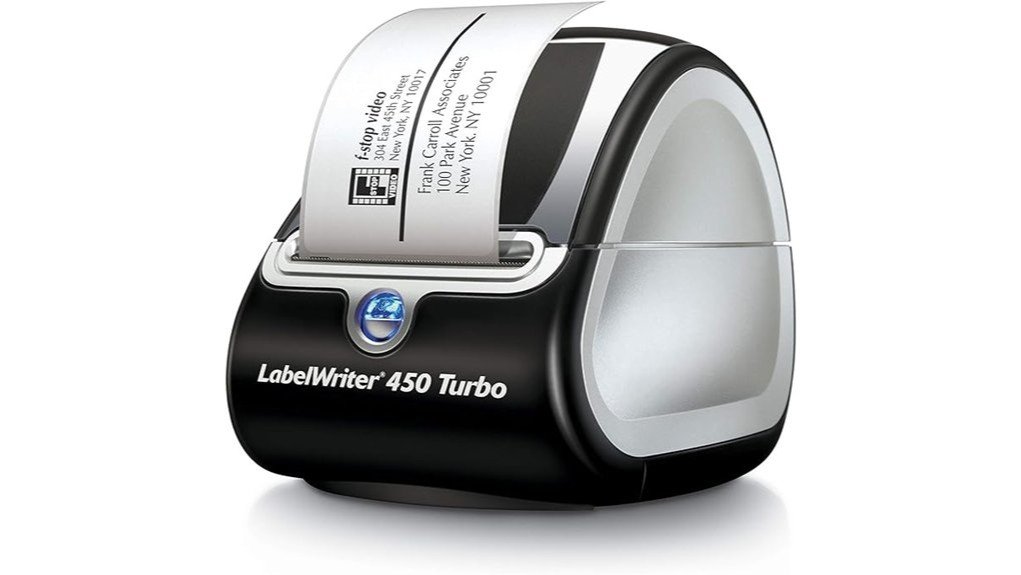
The DYMO LabelWriter 450 Turbo presents a compelling option for those in need of a fast and efficient label printing solution. With a remarkable speed of up to 71 labels per minute, it positions itself as suitable for various applications. However, its dependency on proprietary labels raises concerns about long-term costs. Additionally, user feedback reveals a spectrum of experiences, prompting a closer examination of its overall value and performance. What factors should potential buyers consider?
Overview
The DYMO LabelWriter 450 Turbo is a direct thermal label printer designed for efficiency and versatility in labeling tasks, ranging from shipping and filing to barcode generation and home office organization.
Its notable printing speed of up to 71 labels per minute enhances productivity, allowing users to manage their labeling needs swiftly.
The device supports extensive label customization, enabling seamless integration with software like Microsoft Word and Excel for personalized labels.
Detailed Features
Featuring a robust array of specifications, the DYMO LabelWriter 450 Turbo stands out in the domain of label printing. It offers exceptional print speed, reaching up to 71 labels per minute, enhancing productivity and efficiency. Users can enjoy extensive label customization options via integration with programs like Microsoft Word and Google Contacts. The printer operates without ink, greatly reducing ongoing costs.
| Feature | Specification |
|---|---|
| Print Speed | Up to 71 labels/minute |
| Maximum Resolution | 203 dpi |
| Dimensions | 10.93 x 5.94 x 6 inches |
Pros and Cons
While evaluating the DYMO LabelWriter 450 Turbo, it becomes evident that the printer presents a mix of advantages and drawbacks that potential users should consider.
On the positive side, it boasts impressive label printer efficiency, capable of producing up to 71 labels per minute, thereby enhancing productivity. Additionally, the extensive customization options allow users to create labels tailored to specific needs, integrating seamlessly with various software.
With a speed of up to 71 labels per minute and extensive customization options, this printer enhances productivity and versatility.
Conversely, limitations include dependency on proprietary labels, which may incur additional costs, and a customer rating of only 3.7 stars, indicating mixed satisfaction among users.
These factors warrant careful consideration for prospective buyers.
Concluding Thoughts
Considering the pros and cons highlighted, the DYMO LabelWriter 450 Turbo emerges as a viable option for those seeking an efficient labeling solution.
Its fast printing capabilities and cost efficiency contribute positively to the overall customer experience. The direct thermal technology guarantees no ink is needed, while the ability to customize labels enhances label versatility.
Although it has received mixed reviews, its functionality makes it suitable for various applications in both home and office settings.
Ultimately, potential users should weigh their specific needs against the product’s features to determine if it aligns with their labeling requirements.
Frequently Asked Questions
What Types of Labels Can the DYMO Labelwriter 450 Turbo Print?
The DYMO LabelWriter 450 Turbo can print various label types, including shipping, filing, barcodes, and organizational labels. Its printing capabilities guarantee fast and efficient production, accommodating different sizes for diverse labeling needs in home and office environments.
Is the DYMO Labelwriter 450 Turbo Compatible With Mac and Windows?
“Where there’s a will, there’s a way.” The DYMO LabelWriter 450 Turbo exhibits robust software compatibility, functioning seamlessly across both Mac and Windows operating systems, enhancing efficiency in diverse labeling applications for users seeking liberation from labeling constraints.
How Can I Clean the DYMO Labelwriter 450 Turbo?
Cleaning the DYMO LabelWriter 450 Turbo involves using soft cloths and isopropyl alcohol. Regular maintenance tips include dusting the exterior and ensuring the print head remains free from debris to enhance performance and longevity.
Can I Use Third-Party Labels With This Printer?
While third-party labels may tempt users with promises of cost savings, the DYMO LabelWriter 450 Turbo performs best with authentic labels, ensuring superior label quality and compatibility. Compromising may lead to subpar results, ironically undermining efficiency.
What Is the Warranty Coverage for the DYMO Labelwriter 450 Turbo?
The warranty coverage for the DYMO LabelWriter 450 Turbo includes 90 days of limited warranty protection. Customer support is available for assistance, ensuring users can address any issues within this timeframe efficiently and effectively.