Disclosure: As an Amazon Associate, we earn from qualifying purchases. If you click a link on this page and make a purchase, we may receive a small commission at no extra cost to you.
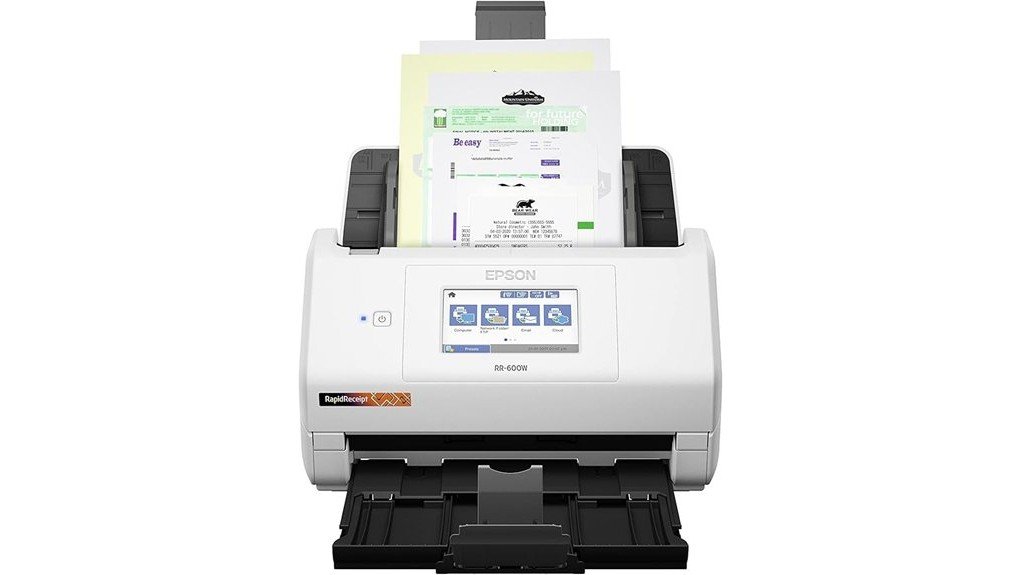
Sorting through piles of receipts, invoices, and business papers can take hours when you rely on manual filing. The Epson RapidReceipt RR-600W Scanner aims to make that work easier with fast two-sided scanning, a 100-sheet feeder, and software that helps organize financial records. Its 4.3-inch touchscreen and wireless features also give you more ways to save your documents. This review explains its strengths, practical limits, and an important buying detail: the linked Amazon product is a Renewed unit, not a standard new scanner.
Quick Verdict
Rating: Recommended with caveats
Best For: Small business owners, bookkeepers, freelancers, and home-office users who regularly scan receipts and documents.
Bottom Line: The RR-600W combines a large document feeder, fast duplex scanning, and useful receipt management tools. Its main drawbacks are the setup needed for advanced software features and the need to check the condition, coverage, and availability of the linked Renewed unit.
Key Specifications
These specifications describe the Epson RapidReceipt RR-600W scanner model. They do not guarantee the cosmetic condition, remaining component life, or exact accessories supplied with a Renewed purchase.
| Specification | Detail |
|---|---|
| Brand | Epson |
| Model | RapidReceipt RR-600W |
| Manufacturer product code | B11B258202 (U.S. model) |
| Linked Amazon listing | B09VMX28RD, Renewed |
| Scanner type | Sheet-fed, one-pass duplex color scanner |
| Scan speed | Up to 35 pages per minute or 70 images per minute |
| Optical resolution | 600 dpi |
| Maximum interpolated resolution | 1200 dpi |
| Automatic document feeder | 100 sheets of standard paper |
| Display | 4.3-inch color touchscreen |
| Connectivity | Wi-Fi 802.11a/b/g/n/ac, USB 3.0, USB flash-drive scanning |
| Wireless bands | 2.4 GHz and 5 GHz |
| Daily duty cycle | Up to 4,000 sheets |
| Document size | Minimum 2 x 2 inches; maximum 8.5 x 240 inches at 200 dpi |
| Paper weight support | 27 to 413 g/m², subject to media handling requirements |
| Dimensions | 11.6 x 6.7 x 6.6 inches (W x D x H) |
| Weight | 8.2 lb |
| Power | AC-powered, 100–240V, 50/60Hz; approximately 13W while scanning |
| Document processing | TrueFeed, HyperClear, Epson ScanSmart, OCR and receipt data extraction |
| Software platforms | Windows and macOS, with mobile scanning through supported Epson apps |
| Typical new-unit accessories | USB cable, AC adapter, power cord, and setup guide |
| Maintenance | Replaceable roller assembly; Epson specifies a 200,000-cycle maintenance interval |
| Best use | Receipt processing, invoice capture, document archiving, and home-office records |
What Is the Epson RapidReceipt RR-600W?
The Epson RapidReceipt RR-600W is a desktop scanner designed to turn paper records into digital files. Unlike a basic flatbed scanner, it uses an automatic document feeder to process stacks of pages without requiring you to position every sheet by hand.
Its main appeal is the combination of document scanning and receipt management. Epson’s software can extract information from receipts and invoices and help prepare that data for financial applications. This can be useful when you need organized expense records rather than a folder full of image files.
The scanner also supports one-pass duplex scanning, which captures both sides of a sheet during a single feed. Its touchscreen provides direct access to scan functions, including saving files to a USB flash drive without using a computer.
Before You Buy: The Amazon link in this review points to a Renewed RR-600W. Check the seller, included accessories, warranty coverage, return terms, and available purchase options. Also confirm access to the Epson software you need. A Renewed listing should not be assumed to provide the same purchase terms as a new unit.
Who Should Buy It?
Best For
- Small business owners: You regularly scan invoices, receipts, and business records.
- Bookkeepers and freelancers: You need searchable digital files and structured expense information.
- Busy home offices: You want to clear paper clutter using batch scanning, Wi-Fi, and a touchscreen.
Skip If
- You scan only a few pages each month and do not need a 100-sheet feeder.
- You need a compact, battery-powered scanner for travel.
- You want a guaranteed new unit with confirmed manufacturer warranty coverage.
Detailed Features
Scanning Speed and Duplex Performance
The RR-600W scans at up to 35 pages per minute or 70 images per minute. The higher image figure reflects scanning both sides of each sheet during one pass.
Epson bases its rated speed on letter-size pages scanned at 300 dpi over USB. Your actual speed can change with document size, resolution, wireless transfer, image processing, and OCR settings.
For a stack of two-sided invoices or contracts, duplex scanning removes the need to turn each page over manually. That can make routine document archiving far less repetitive.
100-Sheet Automatic Document Feeder and TrueFeed
The 100-sheet automatic document feeder is one of the RR-600W’s most useful features. It lets you load a sizable stack of regular office paper for batch scanning.
TrueFeed technology adds paper-skew and staple protection features. These tools are designed to reduce feeding problems, but they do not make damaged or stapled paper safe to scan without preparation.
The stated feeder capacity applies to standard paper. Thick receipts, cards, curled sheets, and mixed media may require smaller batches or special handling.
HyperClear Image Enhancement
Epson’s HyperClear technology improves digital document capture through features such as automatic cropping and background removal.
The scanner also supports adjustments such as skew correction and blank-page removal. These functions can help produce cleaner files when you scan paperwork with uneven edges or blank reverse sides.
Its 600 dpi optical resolution provides detail for receipts, printed documents, and other supported paper media. However, image enhancement cannot reliably restore text that has already faded beyond recognition.
Receipt Management and AI-Assisted Processing
The RR-600W goes beyond ordinary image capture by supporting receipt and invoice data extraction through Epson’s ScanSmart software.
Instead of typing every receipt into a spreadsheet, you can use the supported software to identify and categorize details. Epson advertises exports for workflows involving QuickBooks, TurboTax, and spreadsheet or CSV files.
Epson also promotes ScanSmart AI PRO on its current product information. Software features and versions can change, so confirm what is available for your computer and Renewed purchase.
Receipt extraction is not guaranteed to interpret every document correctly. You should check amounts, dates, taxes, and vendor names before using the data for accounting or tax records.
Wireless Connectivity and Touchscreen Controls
The RR-600W supports 2.4 GHz and 5 GHz Wi-Fi, along with USB 3.0 connectivity. This gives you options for connecting the scanner to a supported Windows or Mac computer.
The 4.3-inch color touchscreen lets you control supported scan jobs from the scanner itself. You can scan directly to a USB flash drive without keeping a computer beside the device.
Supported cloud and mobile workflows include services such as Google Drive, Dropbox, and OneDrive. Some destinations require an internet connection, account authorization, an app, or desktop software.
Keep in mind that computer-free scanning and receipt accounting are separate features. Advanced financial exports require compatible software on a computer.
Design, Size, and Desk Space
At approximately 11.6 inches wide, 6.7 inches deep, and 6.6 inches high, the RR-600W fits on many office desks or shelves. Its body weighs about 8.2 pounds.
You still need room to extend the paper supports and handle incoming and outgoing documents. It also needs access to an electrical outlet because it is not a battery-powered portable scanner.
How It Performs in Real Use
The following examples explain how the scanner’s verified features apply to everyday work. They are workflow assessments, not claims of hands-on testing.
Daily Receipt Scanning
For a small business that collects paper receipts throughout the day, the RR-600W offers a way to build a regular scanning routine. You can digitize receipts and organize expense details with the appropriate computer software.
Thermal receipts often curl or fade, so careful feeding and a check of the captured text are still necessary.
Monthly Bookkeeping and Expense Reports
A bookkeeper working through a month’s invoices can benefit from the 100-sheet feeder and duplex scanning. Multiple pages can be captured in a batch instead of one sheet at a time.
Receipt extraction can also reduce repeated typing. Still, you should check financial details against the originals before importing data into your records.
Contracts and Multi-Page Documents
For double-sided contracts, applications, and business correspondence, one-pass duplex scanning saves you from manually flipping pages.
Searchable PDF tools can help you find text inside scanned files when the documents are clear enough for OCR. This is useful for records that you may need to retrieve months or years later.
Shared Home-Office Scanning
In a home office where several people use different devices, wireless connectivity offers more flexibility than a USB-only scanner.
The touchscreen and USB-drive option can also help when you want a scan without opening a computer application. Each user should still protect private documents and use only approved cloud accounts.
Setup Tips Before First Use
The RR-600W has several ways to connect and save files. A simple setup plan can help you avoid common problems.
- Check the package first. For a Renewed unit, inspect the scanner and confirm the required power accessories are present.
- Choose your connection. Use USB for a direct computer connection or configure the scanner on a compatible Wi-Fi network.
- Install supported Epson software. Download the appropriate scanner driver and applications for your operating system from Epson’s official support site.
- Run a small test batch. Scan a single-sided document and then a double-sided document to check image quality and paper handling.
- Set your save locations. Choose folders or supported cloud destinations and confirm the correct permissions.
- Test receipt recognition. Try a small group of receipts and review the extracted information before processing a large batch.
Pro Tip: Create separate folders for receipts, invoices, contracts, and personal records before your first large scan. Use consistent file names with dates and document types. This makes your scanned files easier to find even if you change accounting software later.
Document Safety and Maintenance
Proper paper handling matters when you use a sheet-fed scanner. Follow Epson’s instructions for preparing documents and cleaning the feed mechanism.
- Remove staples and paper clips: Paper protection features do not replace proper document preparation.
- Flatten curled pages: Bent or curled edges can lead to feeding trouble.
- Use the right media settings: Thick cards and delicate receipts may need special handling or a compatible carrier sheet.
- Clean the scanner as directed: Dirty rollers or scanning surfaces can cause feeding problems or visible marks on scans.
- Check the rollers: Epson lists a roller assembly service interval of 200,000 cycles. A Renewed scanner may already have recorded use.
- Protect private files: Review cloud-sharing settings before uploading financial, identity, or confidential business records.
The scanner’s daily duty cycle is rated at up to 4,000 sheets. This is a workload specification, not a promise that the scanner needs no regular care or that every Renewed unit has the same remaining service life.
Pros and Cons
The RR-600W has practical advantages for users who process paperwork often. The most important tradeoffs involve software setup, media handling, and the Renewed purchasing terms.
Pros
- Fast duplex scanning rated up to 35 ppm and 70 ipm.
- 100-sheet feeder reduces manual page handling.
- Receipt and invoice data extraction supports financial record workflows.
- 4.3-inch touchscreen and direct USB-drive scanning offer computer-free options.
- Wi-Fi, USB, OCR, and image correction features provide flexible document management.
Cons
- Advanced receipt accounting features require compatible desktop software and setup.
- Curling receipts, damaged documents, and mixed paper types may need extra preparation.
- The linked Renewed unit requires closer checks of condition, accessories, warranty, and seller terms.
Is It Worth the Price?
The Epson RapidReceipt RR-600W is best viewed as a feature-rich desktop document scanner rather than a basic budget accessory. Its 100-sheet feeder, duplex speed, touchscreen, and receipt management software are most valuable when you scan paperwork regularly.
For freelancers and small businesses that spend time entering expenses, its financial data tools may be a useful reason to choose it over a simpler scanner. If you only digitize an occasional document, you may not get enough value from its extra features.
The linked Amazon product is Renewed, so its value depends on the actual offer, condition, warranty, and accessories. Compare the total cost and terms with a new RR-600W or another suitable scanner before you decide.
How It Compares to Alternatives
The Epson WorkForce ES-580W is a close alternative if your priority is general document scanning. It also offers 35 ppm duplex scanning, a 100-sheet feeder, wireless connectivity, and a 4.3-inch touchscreen. The RR-600W stands out for its focus on receipt accounting and expense data processing.
The Brother ADS-4700W is another option for office workflows. Brother rates it at up to 40 ppm with an 80-page feeder and includes wired Ethernet connectivity. It may suit an office that needs broader network integration, while the RR-600W makes more sense when receipt organization is the main goal.
Frequently Asked Questions
Can I Use the Scanner Without a Computer?
Yes. The RR-600W can scan directly to a USB flash drive through its touchscreen. Supported cloud and email functions can also work without a computer after the required setup, but advanced receipt accounting features need compatible desktop software.
Can It Export Receipt Information to Accounting Software?
Epson supports receipt data export workflows involving financial applications and spreadsheet formats. You need the appropriate Epson software on a compatible Windows or Mac computer. Check the extracted data before importing it into your accounts.
What Is the Scanning Resolution of the Epson RapidReceipt RR-600W?
The scanner has a maximum optical resolution of 600 dpi and supports up to 1200 dpi interpolated resolution. For many everyday documents, a lower resolution can provide readable files with smaller file sizes. The best setting depends on your document and output needs.
Does It Support Scanning in Color and Black and White?
Yes. The RR-600W supports color, grayscale, and black-and-white scanning. You can choose the mode that best fits your documents, such as color for marked receipts or black and white for simple text pages.
What Types of Documents Can Be Scanned?
The scanner handles supported paper documents such as receipts, invoices, business cards, contracts, and multi-page records. Epson specifies a minimum document size of 2 x 2 inches and supports long documents up to 240 inches at 200 dpi. Follow the manual for special media and fragile originals.
What Comes With a Renewed RR-600W?
A standard new RR-600W package includes power accessories, a USB cable, and setup instructions. Renewed products may use equivalent accessories or different packaging. Check the current Amazon offer for the exact contents and software arrangements.
How Does the Warranty Process Work for This Scanner?
Epson specifies a one-year limited warranty for the standard U.S. model, while the linked Renewed listing advertises its own one-year limited warranty. Do not assume both coverages are identical. Confirm the responsible warranty provider, claim procedure, and eligibility with the seller, and retain your proof of purchase.
How Do I Avoid Paper Jams and Poor Scans?
Remove staples, flatten curled edges, and load documents according to Epson’s instructions. Clean the feed rollers and scanning surfaces when needed. If you are working with delicate receipts or unusual media, follow the manual’s handling guidance instead of forcing them through the feeder.
The Bottom Line
The Epson RapidReceipt RR-600W is worth considering when you need fast two-sided scanning, a large paper feeder, and tools for managing receipts and invoices. It is less suitable if you rarely scan documents or want a simple portable device, and the linked Renewed unit requires careful checks of its condition and purchase terms. For regular business paperwork, its useful features make it a recommended option with those caveats.
Ready to Buy?
Check the current Amazon listing for price, seller availability, Renewed condition, and warranty terms before you decide.