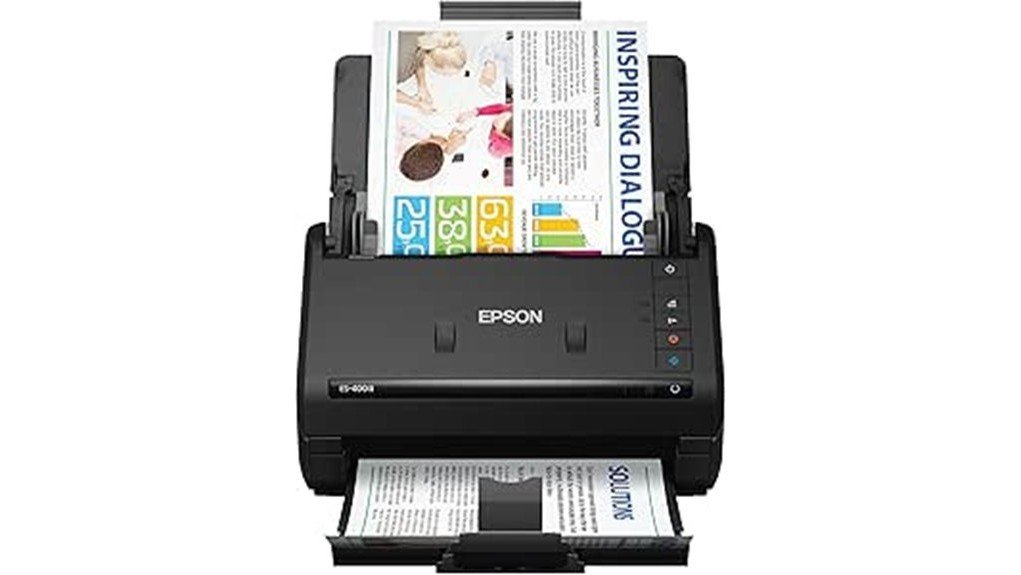
The Epson WorkForce ES-400 II Scanner presents a compelling option for users needing efficient document management. With scanning speeds of up to 35 pages per minute and a 50-sheet auto document feeder, it enhances productivity. Key features include duplex scanning through Single-Step Technology and seamless cloud integration. Supported by a solid customer rating of 4.5 stars, it raises questions about its overall value and performance. What specific advantages does it offer for diverse scanning needs?
Product Features and Specifications
The Epson WorkForce ES-400 II Scanner stands out in the domain of document scanning with its impressive array of features and specifications designed to enhance productivity and efficiency.
With design advantages, it offers a compact size of 6.6 x 11.6 x 6.9 inches and weighs just 8.1 pounds.
Its technical specifications include scanning speeds of up to 35 pages per minute and a 50-sheet auto document feeder, allowing seamless handling of various paper types.
Additionally, it boasts duplex scanning through Single-Step Technology, capturing both sides in one pass, ensuring quick and efficient document management.
Scanning Performance and Quality
With its robust scanning performance, the Epson WorkForce ES-400 II Scanner impressively caters to both personal and professional needs.
This device achieves an impressive scanning speed of up to 35 pages per minute and 70 images per minute, making it a time-efficient choice. Additionally, its Single-Step Technology captures both sides of documents in a single pass, enhancing productivity.
Image clarity is paramount, and the scanner delivers remarkable results through features like auto crop and dirt detection. Users can expect consistent quality across various document types, ensuring each scan meets high standards for clarity and detail.
Software Integration and Usability
Efficiency in software integration and usability defines the user experience of the Epson WorkForce ES-400 II Scanner. Its thoughtful design emphasizes robust software compatibility and an intuitive user interface, facilitating seamless document management.
Users can expect:
Users can anticipate effortless scanning, automatic file naming, and intuitive software for a seamless experience.
- Effortless scanning to cloud storage or creating searchable PDFs.
- Automatic file naming and TWAIN driver integration for easy access.
- User-friendly Epson ScanSmart Software for streamlined scanning, previewing, and emailing.
These features collectively empower users to navigate tasks with ease, liberating them from cumbersome processes.
Customer Reviews and Ratings
Customer feedback for the Epson WorkForce ES-400 II Scanner reflects a generally positive experience, highlighting its practicality and efficiency.
Users appreciate its fast scanning speed of up to 35 pages per minute and the convenience of duplex scanning. Many reviews commend the 50-sheet auto document feeder, making it suitable for various paper types.
With a customer rating of 4.5 out of 5 stars from 132 reviews, user experiences emphasize its reliable performance and integration with cloud storage.
Final Thoughts on the Epson WorkForce ES-400 II
The Epson WorkForce ES-400 II stands out as an excellent choice for individuals and small businesses seeking a reliable and efficient document scanning solution.
Its user experience is enhanced through features that simplify scanning tasks, making it a strong contender in product comparison.
Key highlights include:
- High-speed scanning at up to 35 ppm.
- Duplex scanning with Single-Step Technology.
- Integration with cloud storage for easy access.
Frequently Asked Questions
Is the Epson Workforce ES-400 II Compatible With Mobile Devices?
The Epson WorkForce ES-400 II does not offer direct mobile compatibility. However, its seamless device integration with PC and Mac allows users to efficiently manage documents, enhancing their organizational freedom through reliable scanning capabilities.
What Is the Warranty Period for the Refurbished Model?
When it comes to refurbished warranty, the scanner typically offers a limited period, ensuring durability. Buyers can rest easy, knowing that this device is built to last, even if it’s not brand new.
Can It Handle Mixed Document Types in One Scan?
Yes, it possesses mixed media capabilities, allowing for document versatility. This feature enables users to efficiently scan various document types simultaneously, fostering a seamless experience and promoting liberation in managing diverse paperwork effortlessly.
Does It Support Scanning to Email Directly?
The scanner supports email scanning directly, facilitating seamless document management. Users can liberate their workflow by quickly sending scanned documents via email, enhancing efficiency and simplifying the process of sharing important information.
How Does the Scanner Handle Thick or Embossed Documents?
Thick documents and embossed surfaces glide through the scanner’s capable feed, capturing each intricate detail with precision. The device’s adeptness liberates users from the frustration of handling challenging materials, ensuring seamless and reliable scanning experiences.
Conclusion
To summarize, the Epson WorkForce ES-400 II Scanner is a robust solution for efficient document management, boasting impressive features like 35 pages per minute scanning, a 50-sheet auto document feeder, and duplex scanning capabilities. Its user-friendly software and cloud integration enhance productivity for individuals and small businesses alike. With a strong customer rating of 4.5 out of 5 stars, one must ask: could this scanner be the ultimate tool for your office needs?