Disclosure: As an Amazon Associate, we earn from qualifying purchases. If you click a link on this page and make a purchase, we may receive a small commission at no extra cost to you.
Garmin Dash Cam X210 Review
Driving can change in seconds, and you need video that captures the road clearly when something goes wrong. The Garmin Dash Cam X210 records 1440p HD video, covers a wide 140-degree view, and adds built-in GPS for location, date, and time details. This review explains how the X210 performs in daily use and helps you decide if it is worth buying for your car.
Our Verdict
Rating: 8/10
Best For: Drivers who want a compact 1440p dash cam with GPS, a screen, voice control, and driver alerts.
Bottom Line: The Garmin Dash Cam X210 gives you sharp road footage, a 140-degree field of view, and easy on-device review through its 2.4-inch touchscreen. You give up simple remote access unless you add constant power, active Wi-Fi, and a paid Garmin Vault subscription.
| Specification | Detail |
|---|---|
| Brand | Garmin |
| Model | Garmin Dash Cam X210 |
| Video Resolution | 1440p HD |
| Field of View | 140 degrees |
| Display | 2.4-inch LCD touchscreen |
| Lens and Optics | Built-in Garmin Clarity polarizer and Garmin Clarity HDR optics |
| Connectivity | Bluetooth, USB, and Wi-Fi |
| GPS | Built-in GPS with location, date, and time details |
| Storage | microSDHC or microSDXC card, 8 GB to 512 GB, Class 10 or higher, exFAT |
| Voice Control | English, German, French, Spanish, Italian, and Swedish |
| Dimensions | About 7.00 x 4.22 x 1.95 cm |
| Weight | About 62 g |
| Included Accessories | Garmin Dash Cam X210, low-profile magnetic mount, vehicle power cable, dual-USB power adapter, and documentation |
| Remote Features | Live View and Parking Guard require constant power, active Wi-Fi, the Garmin Drive app, and a paid Vault subscription |
Key Takeaways
- The Garmin Dash Cam X210 records 1440p HD video with a 140-degree field of view for clear front-road coverage.
- The built-in Garmin Clarity polarizer helps reduce windshield glare, while Garmin Clarity HDR optics help with day and night detail.
- The 2.4-inch LCD touchscreen lets you review saved clips and change settings without using your phone first.
- Voice control lets you save video, start or stop audio recording, and use hands-free commands in six supported languages.
- Remote Live View and Parking Guard alerts need constant power, active Wi-Fi, the Garmin Drive app, and a paid Vault subscription.
How We Reviewed the Garmin Dash Cam X210
We checked the product name, model, core specifications, included accessories, and remote feature requirements against current product information. We also reviewed the original article for unclear claims, weak CTAs, missing buyer guidance, and missing schema markup.
This review avoids fixed price claims because dash cam prices change often. You should check the current listing before you buy, especially if you need a bundle with a memory card or a constant power cable.
What Is the Garmin Dash Cam X210?
The Garmin Dash Cam X210 is a compact windshield-mounted dash camera from Garmin. It sits in the premium compact dash cam category because it combines 1440p HD recording, GPS data, voice control, app syncing, and a built-in screen in a small body.
The main reason to consider this model is the balance between video quality and convenience. You get a 140-degree field of view, Garmin Clarity polarizer glare reduction, and Garmin Clarity HDR optics, so the camera can record useful detail in bright sun, shade, and night driving.
The X210 also includes a low-profile magnetic mount, a vehicle power cable, a dual-USB power adapter, and documentation. The mount keeps the camera neat on the windshield, while the extra USB port on the adapter helps if you also need to charge a phone or navigation device.
Who It’s For and Who Should Skip It
Who It’s For
- Drivers who want 1440p front-road footage with GPS location, date, and time stamped into saved incidents.
- Commuters who want a compact dash cam that can sit near the rearview mirror without blocking much windshield space.
- Drivers who prefer a 2.4-inch touchscreen for quick playback instead of checking every clip through a phone app.
Who Should Skip It
- You should skip it if you want remote parking alerts without paying for a Garmin Vault subscription.
- You should skip it if your main priority is 4K recording, since the X210 records at 1440p HD.
- You should consider another option if you want built-in interior cabin recording from the same camera body.
Key Features and Performance
Several core features define the Garmin Dash Cam X210’s performance and practical value. The most important ones are its 1440p HD recording, 140-degree field of view, Garmin Clarity polarizer, GPS logging, touchscreen controls, and app-based clip management.
Video Quality and Road Coverage
The X210 records in 1440p HD, which gives you more detail than basic 1080p dash cams. That extra resolution can help when you need to see road signs, lane position, vehicle movement, or other details after an incident.
The 140-degree field of view gives you wide front-road coverage without going so wide that the image feels heavily stretched. For most cars, that view should capture your lane, nearby lanes, and key activity at intersections.
1440p HD clarity, 140-degree field of view, and a Garmin Clarity polarizer help the X210 capture sharper road footage with less windshield glare.
Garmin Clarity Polarizer and Low-Light Recording
The built-in Garmin Clarity polarizer helps reduce glare from the windshield. This matters during bright daytime driving, especially when sunlight reflects off your dashboard and washes out the road view.
Garmin Clarity HDR optics also help the camera capture detail in mixed lighting. You still should not expect night footage to look like daylight, but the X210 is built to handle low-light road scenes better than a basic budget camera.
Touchscreen and On-Device Playback
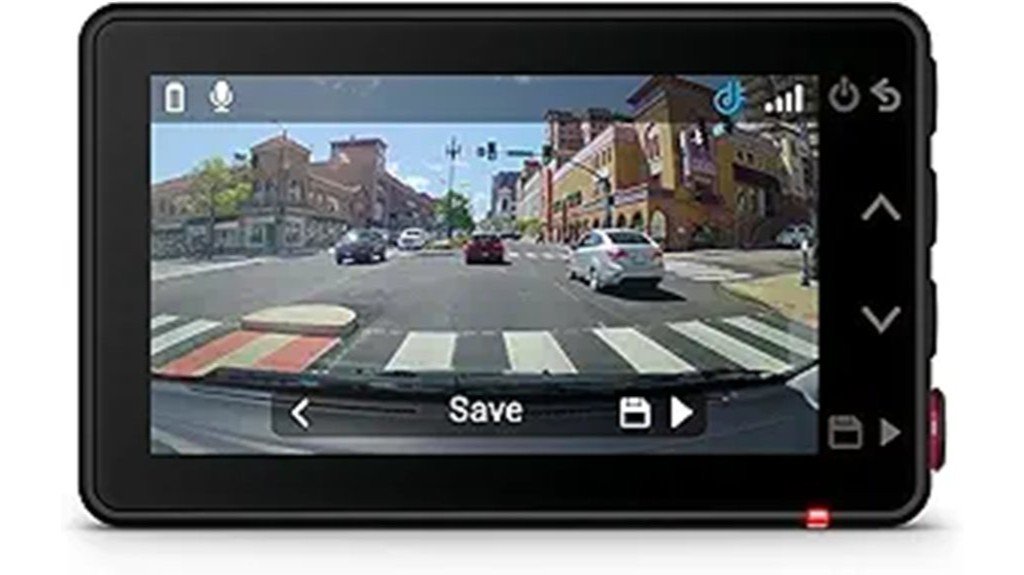
The 2.4-inch LCD touchscreen is one of the X210’s biggest practical strengths. You can review footage, adjust settings, and check saved incidents on the camera without opening the Garmin Drive app first.
This screen helps after a minor parking-lot incident or close call. You can replay the clip right away, confirm that the camera saved the event, and decide if you need to transfer the file to your phone.
Voice Control
Voice control lets you use spoken commands to save video, start or stop audio recording, and control basic camera actions. Garmin lists support for English, German, French, Spanish, Italian, and Swedish.
This is useful because you should not reach for a camera while driving. A simple voice command gives you a safer way to save an important clip when traffic suddenly changes.
GPS and Automatic Incident Detection
The Garmin Dash Cam X210 automatically records while connected to vehicle power. When it detects an incident, it can save the video with GPS location, date, and time details.
Those details can help you organize footage after a crash, road hazard, or insurance claim. You still need to follow local dash cam laws, since some places restrict camera placement, audio recording, or device use.
User Experience and App Integration
The Garmin Drive app adds phone-based clip transfer, clip viewing, and multi-camera management. Garmin says you can view synchronized video clips from up to four compatible dash cams, with each camera sold separately.
This matters if you want front and rear coverage. You can use the X210 as your front camera and add another compatible Garmin dash cam for a second viewpoint.
| Feature | On-device | App |
|---|---|---|
| Screen | 2.4-inch LCD touchscreen | Phone display |
| Controls | Touchscreen and voice commands | Touch menus |
| Sync | Local camera control | Up to 4 compatible Garmin dash cams |
| Playback | Immediate clip review | Saved clip viewing and sharing |
| Storage | microSDHC or microSDXC card | Garmin Vault support for saved clips |
Clip transfers depend on Wi-Fi performance and file size. Short saved clips should be easier to manage than long recordings, especially if your phone or network connection is slow.
Safety Functions and Remote Access
The X210 includes driver alerts such as forward collision, lane departure, and speed camera warnings. These alerts can help your awareness, but availability varies by region and road conditions can affect accuracy.
Remote Live View lets you check the camera feed from your compatible smartphone when you are away from your parked car. Parking Guard can send a phone notification if the dash cam detects an incident while your car is parked.
These remote features are not plug-and-play for every driver. You need constant power, an active Wi-Fi connection, the Garmin Drive app, and a paid Vault subscription, so you should plan for that before buying the X210 mainly for parking protection.
How It Performs in Real Use
How It Performs in Real Use
On a Daily Commute
For commuting, the 1440p resolution and 140-degree field of view make the X210 useful for lane changes, sudden braking, and intersection events. The compact 62 g body should stay discreet near the rearview mirror, so it should not distract you during normal driving.
For Night Driving
At night, the Garmin Clarity HDR optics help the camera preserve more detail in high-contrast scenes. Headlights, signs, and shadows can still challenge any dash cam, but the X210 gives you stronger low-light support than a simple entry-level model.
For Parking Protection
Parking Guard is helpful if your car sits in busy lots, shared garages, or street parking. The tradeoff is setup complexity, since Parking Guard requires constant power, active Wi-Fi, a compatible smartphone with the Garmin Drive app, and a paid Vault subscription for remote notifications.
For Multi-Camera Coverage
The Garmin Drive app can sync clips from up to four compatible Garmin dash cams. This gives you a path toward front, rear, and side-view coverage, but each extra camera adds cost and installation work.
Pros and Cons
Pros
- 1440p HD recording gives you more road detail than basic 1080p dash cams.
- 140-degree field of view captures your lane and nearby road activity without extreme distortion.
- Garmin Clarity polarizer reduces windshield glare during bright daytime driving.
- 2.4-inch touchscreen makes clip review and setting changes easy on the device.
- Voice control supports six languages and lets you save clips without touching the camera.
Cons
- Remote Live View and Parking Guard alerts require a paid Vault subscription.
- Parking features need constant power and active Wi-Fi, which can add installation work.
- It records at 1440p, so buyers who want 4K footage should compare the Garmin X310 instead.
Is It Worth the Price?
The Garmin Dash Cam X210 makes the most sense if you want more than basic recording. You pay for a stronger feature set: 1440p HD video, GPS, a touchscreen, voice control, app syncing, and glare reduction through the built-in Garmin Clarity polarizer.
It offers strong value for the price if you care about easy clip review and clean installation. The 2.4-inch screen, low-profile mount, and dual-USB power adapter make the daily experience feel more complete than many basic no-screen dash cams.
The value drops if you only want simple loop recording and never plan to use Garmin Drive, GPS, Live View, or Parking Guard. In that case, a lower-cost 1080p or 1440p model may cover your needs with fewer subscription concerns.
How It Compares to Alternatives
If you want a simpler Garmin dash cam, the Garmin Dash Cam X110 is worth comparing because it sits below the X210 in the same current family. If you want 4K video, the Garmin Dash Cam X310 is the better match because it targets buyers who want higher resolution.
If you want the smallest possible Garmin camera, the Garmin Dash Cam Mini 3 may fit better because it removes the built-in screen for a more hidden setup. The Garmin Dash Cam X210 remains the stronger pick if you want 1440p video, a touchscreen, GPS, voice control, and a compact windshield design in one unit.
Frequently Asked Questions
Does the Garmin Dash Cam X210 need a subscription?
Basic driving recording does not need a paid subscription. Remote Live View, Vault-based saved clip access, and Parking Guard phone notifications require a paid Garmin Vault subscription plus active Wi-Fi and constant power.
Does the Garmin Dash Cam X210 record in 4K?
No. The Garmin Dash Cam X210 records in 1440p HD. If you want a Garmin model with 4K recording, you should compare it with the Garmin Dash Cam X310.
What memory card does the Garmin Dash Cam X210 use?
The X210 uses a microSDHC or microSDXC card from 8 GB to 512 GB. Garmin specifies Class 10 or higher and exFAT formatting for compatible cards.
Can you review video without using your phone?
Yes. The 2.4-inch LCD touchscreen lets you review saved video and adjust settings directly on the camera. The Garmin Drive app is still useful for phone viewing, sharing, and multi-camera syncing.
Does Parking Guard work while the car is off?
Parking Guard can work when the camera has constant power. For remote alerts, you also need an active Wi-Fi connection, the Garmin Drive app, and a paid Vault subscription.
Can the Garmin Dash Cam X210 manage multiple cameras?
Yes. The Garmin Drive app can show synchronized clips from up to four compatible Garmin dash cams, with each dash cam sold separately. This helps if you want front and rear coverage.
The Bottom Line
The Garmin Dash Cam X210 earns an 8/10 because it gives you 1440p HD video, a 140-degree field of view, GPS, a touchscreen, voice control, and Garmin Clarity glare reduction in a compact body. You should buy it if you want a well-rounded dash cam with easy playback and strong daily usability.
You should look elsewhere if you need 4K footage, built-in cabin recording, or free remote parking alerts. For everyday drivers who want clear front-road evidence and Garmin’s app ecosystem, the X210 is a smart buy for everyday use.
Ready to Buy?