
Disclosure: As an Amazon Associate, we earn from qualifying purchases. If you click a link on this page and make a purchase, we may receive a small commission at no extra cost to you.
Garmin DriveSmart 66 Review: Is This Renewed GPS Worth It?
Your phone can handle navigation, but it also manages calls, messages, music, and battery life. The Garmin DriveSmart 66 gives you a separate 6-inch navigation screen with North America maps, voice control, Bluetooth calling, Wi-Fi updates, and road-trip tools. Its compact display and connected features suit regular driving, although live services still depend on a compatible smartphone. This review explains what the renewed model offers, where it fits best, and which listing details you should verify before buying.
Quick Verdict
Rating: 8.4/10
Best For: Road-trip drivers, commuters, and owners of older vehicles who want a dedicated GPS without replacing the factory stereo.
Main Strength: A sharp 6-inch glass display combines offline navigation with practical trip-planning and connected services.
Bottom Line: The DriveSmart 66 is a strong dedicated navigator when you want maps on a separate screen. The renewed condition, included accessories, seller terms, and one-hour battery limit require a closer look before checkout.
Key Takeaways
- The Garmin DriveSmart 66, model 010-02469-00, is a portable 6-inch car GPS navigator.
- Its 1280 x 720 multi-touch glass display provides a clear route view without using your phone screen.
- North America map updates, route planning, Tripadvisor ratings, Foursquare points of interest, HISTORY sites, and a national parks directory support longer trips.
- Garmin Voice Assist, Bluetooth calling, and Garmin Drive app services require compatible devices and correct pairing.
- Live traffic, weather, fuel prices, parking information, and smart notifications rely on a connected smartphone and mobile data.
- The internal battery lasts up to about one hour, so normal vehicle use requires the power cable.
- A renewed unit can offer good value, but condition, packaging, accessories, and return coverage may vary by seller.
Garmin DriveSmart 66 Specs at a Glance
| Specification | Detail |
|---|---|
| Brand | Garmin |
| Model | DriveSmart 66, part number 010-02469-00 |
| Product type | Portable automotive GPS navigator |
| Listing condition | Amazon Renewed listing, confirm the current seller and condition description |
| Display | 6-inch multi-touch glass HD color TFT with backlight |
| Active display area | About 5.7 x 3.2 inches |
| Resolution | 1280 x 720 pixels |
| Device dimensions | 6.0 x 3.4 x 0.7 inches |
| Weight | 6.17 oz, about 175 g |
| Battery | Rechargeable lithium-ion, up to about 1 hour |
| Map coverage | North America map updates |
| Connectivity | Bluetooth, Wi-Fi, and Garmin Drive app support |
| Storage expansion | microSD card support |
| Camera support | Supports compatible Garmin wireless backup-camera setups; confirm the exact camera model before purchase |
| Expected box contents | GPS unit, suction-cup mount, traffic receiver/vehicle power cable, USB cable, and documentation, subject to renewed-listing details |
| Best use | Commuting, road trips, rental-car travel, and older vehicles without built-in navigation |
What Is the Garmin DriveSmart 66?
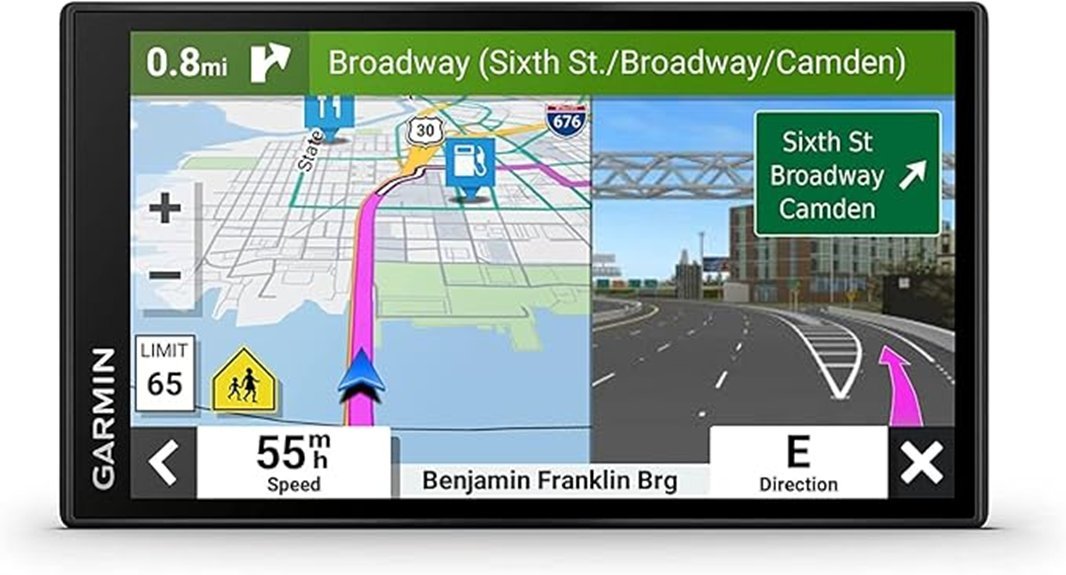
The Garmin DriveSmart 66 is a portable car navigator built around a 6-inch glass touchscreen. Model 010-02469-00 gives you North America maps and a dedicated route display that stays available even when you use your phone for another task.
The device combines offline navigation with connected tools. Core maps and directions run on the GPS, while live traffic, weather, fuel prices, parking data, and smart notifications come through the Garmin Drive app on a compatible smartphone.
This Amazon link points to a renewed listing. That can lower the cost compared with a new unit, but you should treat the seller description as part of the product. The exact cosmetic grade, packaging, cables, mount, and return terms can affect the real value.
Who Should Buy It?
Best For
- Drivers who want a permanent navigation screen without replacing the stereo.
- Road-trip users who value multi-stop routes, travel points of interest, and national parks information.
- Commuters who want offline maps plus optional live traffic and weather through a paired phone.
Skip If
- You need a larger 7-inch or 8-inch display for easier viewing across a wide dashboard.
- You want live connected services without pairing a smartphone or using mobile data.
- You only want a factory-new unit with fixed packaging and accessory coverage.
Before You Buy: Check the live listing for the seller name, cosmetic condition, return window, suction mount, traffic receiver/power cable, USB cable, and documentation. A low renewed price loses value if a key vehicle accessory is missing.
Design, Display, and Build Quality
The 6-inch 1280 x 720 glass display is the main reason to choose this model over a basic entry-level GPS. Maps, lane prompts, and menu text have more room than on a small phone mounted in portrait mode, while the 6.0 x 3.4-inch body remains manageable on most windshields.
At 6.17 oz, the unit is light enough for a suction-cup mount. The glass surface also supports multi-touch input, which makes map browsing and menu navigation more familiar than older resistive-screen GPS units.
The tradeoff is screen size. Six inches feels balanced in a compact or midsize car, but a larger vehicle or distant dashboard may make a 7-inch or 8-inch navigator easier to read at a glance.
Navigation, Maps, and Road-Trip Features
The DriveSmart 66 includes North America maps and supports map updates. Because navigation data lives on the device, you can continue following a saved route when cellular coverage becomes weak, although live data will pause without a phone connection.
Multi-stop route planning helps you organize fuel stops, hotels, restaurants, and scenic locations. You can add a stop during an active route, place it next or last, and adjust the order when plans change.
- Tripadvisor ratings: useful for comparing restaurants, hotels, and attractions along a route.
- Foursquare points of interest: helps you search for nearby businesses and destinations.
- HISTORY notable sites: adds landmarks and historic locations to road-trip planning.
- National parks directory: supports trips that include U.S. parks and visitor destinations.
- Driver alerts: warns about school zones, sharp curves, speed changes, and other road conditions.
- Lane assist and junction view: provides added guidance near exits and complex highway interchanges.
Connectivity, Voice Assist, and Live Services
Bluetooth pairing connects the DriveSmart 66 to a compatible smartphone for hands-free calling and Garmin Drive app services. Garmin Voice Assist can also reduce menu tapping when you search for a destination or request directions.
The connected features are useful, but they do not make the GPS fully independent. Live traffic, weather, fuel prices, parking information, and smart notifications need the phone, the Garmin Drive app, and an active data connection.
| Feature | What It Adds | What You Need |
|---|---|---|
| Bluetooth calling | Hands-free calls through the dashboard device | Compatible paired smartphone |
| Garmin Drive app | Live traffic, weather, fuel prices, parking, and notifications | Phone, app, Bluetooth, and mobile data |
| Garmin Voice Assist | Spoken destination searches and navigation commands | Clear voice input and supported command |
| Wi-Fi updates | Map and software updates without connecting to a computer | Stable Wi-Fi and vehicle or USB power |
Battery and Vehicle Power
The rechargeable lithium-ion battery lasts up to about one hour. That is enough for setup, route review, or a short stop away from the vehicle, but it is not intended for all-day navigation.
For a normal commute or road trip, connect the GPS to the traffic receiver and vehicle power cable. Continuous power keeps the display active and avoids arriving with a drained device after a longer route.
Setup Tips Before First Use
- Confirm the box contents: check for the suction mount, vehicle power/traffic cable, USB cable, and documentation before the return window closes.
- Clean the mounting surface: remove dust and oil from the windshield or approved mounting area so the suction cup holds securely.
- Place the screen carefully: keep it within easy view without blocking the windshield, mirrors, airbags, or important dashboard controls.
- Route the cable safely: keep the power lead away from pedals, the steering column, shifter, and airbag deployment paths.
- Update before a long trip: connect to stable Wi-Fi and vehicle or USB power, then allow map and software updates to finish.
- Pair your phone while parked: complete Bluetooth and Garmin Drive app setup before driving.
Pro Tip: Save your home, work, hotel, and first fuel stop before departure. You will spend less time searching through menus after the trip begins.
Compatibility and Safety
The DriveSmart 66 works as a portable add-on, so you do not need to replace the vehicle stereo. You still need a suitable mounting position and access to vehicle power. Check local windshield-mount rules because permitted placement can vary.
Driver alerts, lane guidance, and live traffic can improve awareness, but they cannot replace road signs or your judgment. Enter destinations, adjust settings, and pair devices while parked. Follow posted restrictions even when the map suggests another route.
For a backup camera, confirm the exact Garmin camera model and required accessories before buying. Compatibility can depend on the navigator version, camera generation, power method, and current firmware.
Renewed Condition and Box Contents
A renewed GPS has a different buying risk from a new retail unit. The electronics may work correctly while the housing, packaging, mount, or cable shows prior use or comes from a compatible replacement source.
The listing describes a package with the DriveSmart 66, suction-cup mount, traffic receiver/vehicle power cable, USB cable, and documentation. Treat that list as something to verify on the live page, not as a guarantee across every renewed seller.
Check the seller rating, return or replacement window, cosmetic description, and recent buyer feedback. Also confirm that the power cable includes the traffic function stated in the listing, because a basic charger may not provide the same feature set.
How It Performs in Real Use
On a Daily Commute
The 6-inch display keeps your route separate from your phone and leaves the phone available for music or calls. Offline maps remain useful when coverage drops, while paired live traffic can help you react to delays.
On Long Road Trips
Multi-stop planning and travel points of interest are the strongest road-trip benefits. You can organize fuel, food, lodging, parks, and attractions without building the entire trip on a small phone screen.
In an Older Vehicle
The GPS adds a mounted navigation display, hands-free calling, voice search, and connected travel data without the cost or wiring of a replacement head unit. It is most useful when the car lacks Apple CarPlay, Android Auto, or factory navigation.
In a Rental Car or Second Vehicle
The compact body and suction mount make the unit easier to move between vehicles than an installed stereo. You still need to pack the correct power cable and check local mounting rules at your destination.
How It Compares to Alternatives
The Garmin Drive 53 may suit you if you want simpler navigation and fewer connected travel features. The DriveSmart 76 is easier to view from farther away because of its larger screen, but it takes up more windshield or dashboard space.
The DriveSmart 66 makes the most sense when you want a middle-size display, road-trip points of interest, Bluetooth calling, voice assistance, and app-based live services. Compare renewed pricing against new or open-box alternatives after accounting for the mount, traffic cable, and return policy.
| Option | Best For | Main Difference |
|---|---|---|
| Garmin DriveSmart 66 Renewed | Balanced screen size and connected features | Strong feature mix, but renewed condition varies |
| Garmin Drive 53 | Simpler everyday navigation | Smaller, more basic feature set |
| Garmin DriveSmart 76 | Drivers who prioritize a larger display | More viewing area, more dashboard space required |
Pros and Cons
Pros
- Clear 6-inch 1280 x 720 multi-touch glass display.
- North America maps work without continuous cellular coverage.
- Multi-stop planning and travel points of interest suit road trips.
- Bluetooth calling, voice assistance, Wi-Fi updates, and Garmin Drive app support add useful connected tools.
- Portable design can move between vehicles without permanent installation.
Cons
- Renewed condition, packaging, accessories, and return terms can vary by seller.
- Live traffic, weather, fuel prices, parking, and notifications require a paired smartphone and data connection.
- One-hour battery life means the unit should remain connected to vehicle power.
Is It Worth the Price?
The renewed DriveSmart 66 can provide strong value when it costs meaningfully less than a comparable new navigator and includes the correct mount and power/traffic cable. Its display, offline maps, trip-planning tools, and connected services place it above a basic point-to-point GPS.
The seller-specific details determine whether the discount is worthwhile. A short return window, missing traffic cable, worn mount, or unclear cosmetic grade can erase the savings.
You will get the most value if you drive often, travel through weak-service areas, or own a vehicle without modern navigation. It is less compelling when your car already has a large CarPlay or Android Auto display that you enjoy using.
Frequently Asked Questions
Does the Garmin DriveSmart 66 work without a smartphone?
Yes. The GPS can provide map-based navigation without a cellular connection. A compatible smartphone is required for Garmin Drive app features such as live traffic, weather, fuel prices, parking information, and smart notifications.
How long does the battery last without vehicle power?
The rechargeable battery lasts up to about one hour. Keep the navigator connected to the vehicle power cable during normal commuting and road trips.
Does it support lane guidance and junction view?
Yes. Lane assist with junction view can show added guidance for exits and complex highway interchanges. You should still follow road signs and current lane markings.
Can I update maps without a computer?
The DriveSmart 66 supports Wi-Fi updates for maps and software. Use stable Wi-Fi, connect the unit to power, and allow enough time for larger updates to finish.
Can it work with a Garmin backup camera?
It supports compatible Garmin wireless backup-camera setups. Confirm the exact camera model, required accessories, and firmware compatibility before ordering because not every Garmin camera uses the same connection method.
What should be included with the renewed unit?
The listing describes the GPS, suction-cup mount, traffic receiver/vehicle power cable, USB cable, and documentation. Verify every item on the current seller page because renewed packages can differ.
Is the renewed Garmin DriveSmart 66 worth buying?
It can be worth buying when the discount is clear, the seller has reliable feedback, and the package includes the correct vehicle accessories. Skip it when the condition notes or return coverage are unclear, or when a new unit costs only slightly more.
The Bottom Line
The Garmin DriveSmart 66 earns an 8.4/10 for its sharp 6-inch display, offline North America navigation, route-planning tools, voice assistance, and optional live services. It suits frequent drivers and older vehicles, but buyers who want a larger display, phone-free live data, or guaranteed new condition should choose another option.
Ready to Buy?
Check the latest seller, condition, included accessories, return terms, and product details before you decide.


[…] power stations, not a replacement for a home solar system. It makes the most sense for sunny road trips, camping stops, RV storage, short hiking breaks, and emergency kits where space […]
[…] clearer hands-free calling, and a useful backup-camera display. The KENWOOD DMX150BT targets drivers who want those basics without paying for a feature-heavy smartphone receiver. Its article-listed […]
[…] motorcycle GPS needs to stay readable in bright sun, respond through gloves, and keep working when the weather […]