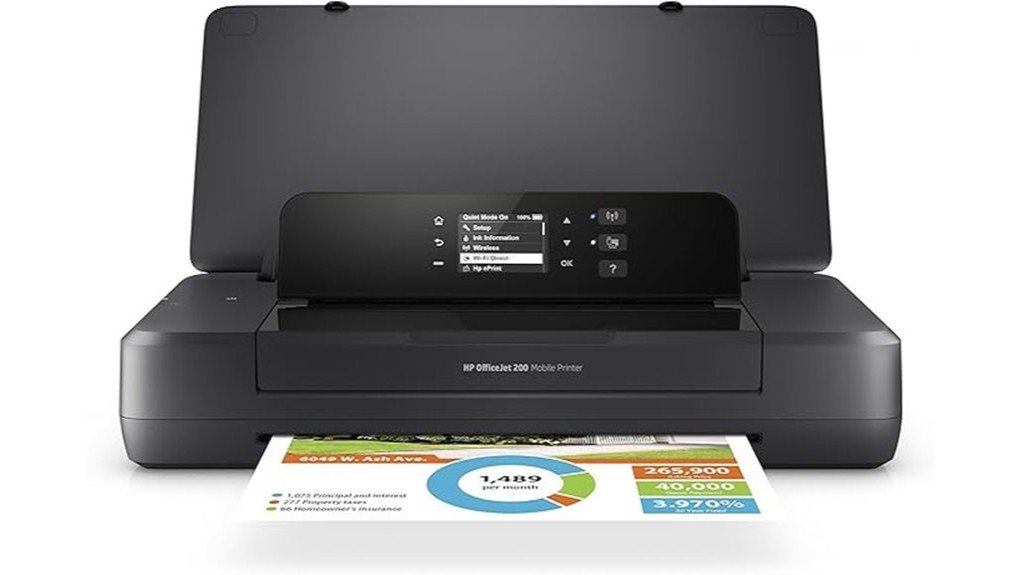
The HP OfficeJet 200 Portable Printer stands out for professionals needing reliable printing solutions while on the move. With compact dimensions of 7.32D x 14.3W x 2.7H inches and a weight of only 4.84 pounds, it is designed for portability. It offers a maximum print resolution of 4800 x 1200 dpi and speeds up to 10 pages per minute. But what truly sets it apart is its wireless connectivity, making it a versatile option for various work environments. What features will best meet your needs?
Design and Portability
The HP OfficeJet 200 Portable Printer exemplifies a well-thought-out design tailored for professionals on the move.
Its compact design, measuring 7.32D x 14.3W x 2.7H inches and weighing just 4.84 pounds, guarantees travel convenience. This lightweight printer easily fits into bags, making it ideal for remote offices or client meetings.
The long-lasting battery allows for printing without being tethered to an outlet, enhancing mobility. With its sleek form and quiet operation, it caters to those who value both functionality and discretion.
The long-lasting battery and sleek design ensure printing freedom and quiet operation for the on-the-go professional.
Consequently, the HP OfficeJet 200 stands as an essential tool for the modern, liberated professional.
Printing Quality and Performance
Delivering impressive printing quality, the HP OfficeJet 200 Portable Printer stands out with its ability to produce sharp text and vibrant graphics.
With a maximum color print resolution of 4800 x 1200 dpi and a black-and-white resolution of 1200 dpi, it guarantees clear and professional documents.
Users will appreciate its print speed, reaching up to 10 pages per minute for black-and-white prints.
This printer excels in producing contracts, invoices, and promotional materials, making it ideal for professionals on the move.
Connectivity and Compatibility
When considering a portable printer, connectivity options and compatibility play a crucial role in ensuring seamless operation across devices.
The HP OfficeJet 200 excels in this area, offering robust wireless printing capabilities, allowing users to connect effortlessly with laptops and mobile devices. Supporting both Wi-Fi and USB connections, it adapts to various environments, whether in a hotel room or a client’s office.
This printer is compatible with multiple operating systems, ensuring it meets diverse user needs. Its flexibility empowers professionals to print documents on the go, enhancing productivity without being tethered to a single device or location.
User Experience and Feedback
How do users truly feel about the HP OfficeJet 200 Portable Printer after putting it to the test? Overall, user feedback reveals a strong sense of satisfaction, particularly regarding its portability and print quality.
- Users appreciate the compact design, making it easy to carry.
- Many find the battery life ideal for on-the-go printing.
- The wireless connectivity is celebrated for seamless device integration.
- However, some express a desire for dual-sided printing capabilities.
This blend of positive user satisfaction and constructive feedback underscores the printer’s appeal for professionals who value efficiency and flexibility in their work.
Overall Value and Recommendation
The HP OfficeJet 200 Portable Printer stands out as a practical solution for professionals who require reliable printing capabilities while on the move. Its cost effectiveness makes it appealing to the target audience, offering high-quality output without compromising portability.
Weighing just 4.84 pounds and measuring 7.32D x 14.3W x 2.7H inches, it easily fits into bags for travel. The long-lasting battery and wireless connectivity enhance its appeal, ensuring users can print documents in various settings.
Frequently Asked Questions
What Types of Paper Can the HP Officejet 200 Print On?
The printer can print on various media, including standard paper, photo paper, and cardstock options. This versatility allows users to create high-quality documents and vibrant images, providing the freedom to express creativity in their projects.
How Long Does the Battery Last During Printing Sessions?
Battery longevity during printing sessions typically lasts up to 500 pages, showcasing impressive printing efficiency for mobile professionals. This allows users to maintain productivity and freedom while on the move, without frequent recharging interruptions.
Can It Print Wirelessly From a Desktop Computer?
Yes, it can print wirelessly from a desktop computer, offering seamless connectivity and desktop compatibility. This feature liberates users from restrictive cords, allowing them to print documents effortlessly from anywhere within the wireless range.
What Is the Warranty Period for the HP Officejet 200?
The warranty period for this product typically spans one year, providing essential warranty details to customers. For further assistance or inquiries, customer support remains accessible to guarantee satisfaction and resolve any potential issues.
How Does It Handle Different Paper Sizes?
The printer accommodates various paper size compatibility, allowing users to print on different formats. However, print quality variations may occur depending on the paper type, influencing overall output aesthetics and professionalism in documents produced.
Conclusion
In conclusion, the HP OfficeJet 200 Portable Printer stands out as a game-changer for mobile professionals. With its sleek dimensions of 7.32D x 14.3W x 2.7H inches, lightweight design, and remarkable print quality of up to 4800 x 1200 dpi, it delivers unparalleled convenience. Its wireless connectivity guarantees seamless printing from anywhere, making it an essential tool for those who refuse to be tethered to a desk. For anyone seeking portable printing perfection, this printer is hard to overlook.