Disclosure: As an Amazon Associate, we earn from qualifying purchases. If you click a link on this page and make a purchase, we may receive a small commission at no extra cost to you.
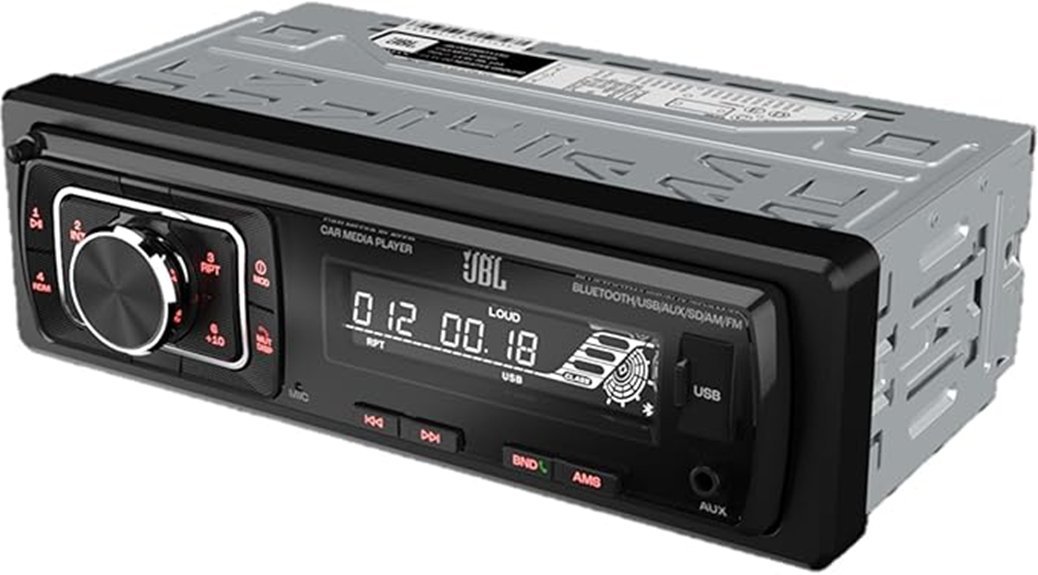
Replacing your factory car stereo can give you Bluetooth music and more ways to play audio, but choosing the right receiver takes more than checking its advertised power. The JBL Celebrity150 is a single-DIN digital media receiver with Bluetooth, USB, AUX, SD card playback, and AM/FM radio. It also has a detachable faceplate and front/rear RCA outputs for a more flexible audio setup. This review explains its verified features, installation needs, everyday benefits, and limitations so you can decide if it suits your vehicle.
Quick Verdict
Rating: Recommended with caveats
Best For: Drivers replacing a basic single-DIN stereo who want Bluetooth calling, music streaming, AM/FM radio, and several playback inputs.
Bottom Line: The JBL Celebrity150 offers useful everyday audio features in a compact, traditional car stereo. Its detachable faceplate and 4V RCA outputs are appealing, but it lacks the touchscreen and advanced phone integration available on more expensive receivers.
JBL Celebrity150 Key Specifications
These specifications come from JBL’s published product information and owner’s manual. They describe the hardware, not results from independent audio testing.
| Specification | Detail |
|---|---|
| Brand | JBL |
| Model | Celebrity150 (Celebrity 150) |
| Product Type | Single-DIN digital car media receiver |
| Design | Black, mechless, detachable front panel |
| Installation Dimensions | 178 x 50 x 87 mm (W x H x D) |
| Maximum Power | 4 x 50 W peak |
| RMS Power | 4 x 20 W RMS, as listed by JBL |
| Frequency Response | 20 Hz to 20 kHz |
| Bluetooth | Bluetooth 5.0, with audio streaming and hands-free calling |
| Bluetooth Range | Up to 10 meters, according to JBL |
| Playback Sources | Bluetooth, USB, AUX, SD card, AM/FM radio |
| Radio Presets | 30 total: 18 FM and 12 AM |
| RCA Outputs | Two pairs of 4V preamp outputs, front and rear |
| Power Supply | 12V DC, negative-ground vehicle electrical system |
| Fuse Rating | 10 A |
| Recommended Speaker Impedance | 4 ohms |
| Included Accessories | Two ISO wiring harnesses, two removal tools, four face-fixing screws, owner’s manual, and safety sheet |
| Best Use | Basic stereo replacement, music playback, radio, and Bluetooth phone calls |
What Is the JBL Celebrity150?
The JBL Celebrity150 is a single-DIN mechless car media player. Unlike a traditional CD receiver, it plays audio from digital sources and radio rather than physical discs. Its 178 x 50 x 87 mm installation size makes it a compact option for compatible dashboard openings.
It is intended for drivers who want a practical stereo without paying for a large touchscreen. You can stream from a Bluetooth phone, play music from a FAT32-formatted USB drive or SD card, connect an AUX source, or listen to AM/FM radio.
The detachable faceplate offers a theft-deterrent feature, while the two pairs of RCA line outputs give you a way to connect compatible external amplification. That makes it useful for either a straightforward speaker setup or a system you plan to expand.
Key Takeaways
- Compact single-DIN design: The 178 x 50 x 87 mm installation dimensions help it fit compatible dashboards, although some vehicles require extra mounting parts.
- Practical Bluetooth features: Bluetooth 5.0 supports wireless audio streaming and hands-free phone calls.
- Several listening options: USB, SD card, AUX, and AM/FM radio offer alternatives when you do not want to stream from your phone.
- Useful audio connections: Four speaker channels and two pairs of 4V RCA outputs support basic playback and potential amplifier upgrades.
- Important limitation: The 4 x 50 W claim is peak power, not continuous output. The receiver is also designed for traditional audio control rather than a touchscreen experience.
Who Should Buy It?
Best For
- Drivers replacing an older single-DIN stereo that lacks Bluetooth calling and streaming.
- People who want music from USB drives, SD cards, AUX devices, and AM/FM radio.
- Owners building a simple car audio setup that may include an external amplifier.
Skip If
- You need Apple CarPlay, Android Auto, touchscreen navigation, or a backup camera display.
- Your vehicle needs a model-specific integrated stereo or uses factory functions that cannot easily be retained.
- You want detailed sound processing controls or higher-powered amplification built into the receiver.
Design and Installation
Compact Design and Detachable Faceplate
The Celebrity150 has a black front panel with a small LCD, physical buttons, and a rotary volume control. Its appearance is suited to a traditional dashboard rather than a large multimedia display.
The detachable faceplate can be removed when you leave your vehicle. This makes the receiver less appealing to opportunistic thieves, although it does not make the entire stereo theft-proof.
Its mechless design also avoids the need for an internal CD mechanism. This helps keep the mounting depth relatively short at 87 mm.
Vehicle Fit and Mounting Requirements
The receiver uses a single-DIN installation format. If your vehicle already has a suitable single-DIN opening, fitting it may be simpler than installing a double-DIN multimedia receiver.
However, a single-DIN size does not guarantee a direct fit. Your vehicle may still require a dash installation kit, wiring harness adapter, antenna adapter, or a suitable interface for factory electronics.
JBL includes two ISO wiring harnesses, two removal tools, and fixing screws. You should still check the supplied parts and vehicle-specific requirements before removing the original stereo.
Before You Buy: Confirm that your dashboard supports a single-DIN receiver and check whether the vehicle needs an adapter. Also verify compatibility with factory amplifiers, steering-wheel controls, and other integrated functions. The receiver’s physical size alone does not confirm full vehicle compatibility.
Audio Performance
Understanding the 4 x 50 W Power Rating
The JBL Celebrity150 advertises 4 x 50 W maximum power. That number describes peak output, not the continuous power you should use when comparing amplifier capability.
JBL also lists 4 x 20 W RMS output. This lower figure is more useful when assessing the receiver’s normal power capability with suitable speakers.
For a basic four-speaker system, the built-in amplifier may meet everyday listening needs. However, actual loudness, bass response, and clarity will depend on your speakers, installation, sound settings, and vehicle acoustics.
Frequency Response and Sound Controls
JBL specifies a frequency response of 20 Hz to 20 kHz. This describes the stated range of audio frequencies the electronics can reproduce. It does not, by itself, prove that the receiver has unusually strong bass or low distortion.
The controls include bass, treble, balance, and fader adjustment. You can use these settings to tailor playback to your speakers and seating position without needing additional software.
Using an External Amplifier
The Celebrity150 includes two pairs of 4V RCA line outputs for front and rear channels. These connections can send low-level audio signals to compatible external amplifiers.
That is useful if you later want more output than the internal amplifier can supply. However, JBL’s documented rear connections identify front and rear RCA outputs, not a separate dedicated subwoofer RCA pair. Check your intended amplifier or subwoofer configuration before buying parts.
Connectivity Options
Bluetooth 5.0 for Music and Calling
The receiver supports Bluetooth 5.0, with a manufacturer-stated operating range of up to 10 meters. In a car, your phone will usually be much closer to the stereo.
Bluetooth audio support lets you play music and other audio from a compatible phone. The hands-free calling feature uses the microphone on the receiver’s front panel and allows you to answer calls through the stereo.
JBL lists Bluetooth profiles such as A2DP, AVRCP, and HFP. Actual behavior can still vary with the connected phone.
USB, AUX, and SD Card Playback
The USB and SD card inputs are useful when you want to listen to stored music without depending on a cellular connection.
According to JBL’s manual, USB flash drives and SD memory cards must use the FAT32 file system. The receiver offers track selection, pause, repeat, and random playback controls.
The AUX input provides a wired option for compatible devices with an analog audio output. You may need an appropriate cable or adapter for a newer phone.
The presence of a USB socket should not be mistaken for confirmed support for phone screen mirroring, navigation, or every mobile audio format.
AM/FM Radio and Preset Stations
The Celebrity150 provides 30 radio presets, divided into 18 FM and 12 AM memories. This is more precise than describing all 30 as FM presets.
You can search for stations, store frequently used channels, and use the automatic station memory function described in the manual.
Radio reception will depend on your antenna, location, signal coverage, and installation. The receiver also supports region-specific radio frequency ranges described by JBL.
User Experience
Physical Controls and Everyday Operation
The Celebrity150 uses buttons and a rotary knob instead of a touch interface. The main controls cover power, source selection, volume, radio tuning, stored stations, and audio adjustment.
For daily driving, physical controls can be useful once you become familiar with their positions. However, smaller buttons and menu combinations may take practice.
The LCD shows basic operating information. It is not intended to provide maps, album artwork, or advanced phone applications.
Phone Pairing and Media Selection
JBL’s manual identifies the Bluetooth device name as CAR AUDIO and gives 8888 as the pairing code when requested. After pairing, you can select Bluetooth audio mode and control supported playback functions.
For USB and SD card playback, you can move between tracks using the front-panel buttons. This suits a simple music library, although browsing large collections is less convenient than on a touchscreen receiver.
How It Performs in Real Use
The following examples describe how its documented features apply to common driving situations. They are not claims from a hands-on road test.
1. Daily Commuting
During a short commute, you can use Bluetooth for music, podcasts, or other phone audio. Once you know the source and volume controls, the stereo offers the main functions needed for basic listening.
The main tradeoff is that you will not get a large screen for navigation or detailed playback information.
2. Hands-Free Phone Calls
The built-in Bluetooth calling function lets you route compatible phone calls through the stereo. JBL’s manual explains how to answer and end calls using the controls.
Call clarity may vary based on road noise, the microphone position, and your phone. The available specifications do not establish that it matches a dedicated premium hands-free system.
3. Long Road Trips
On longer drives, the range of playback sources becomes useful. You can switch between radio, a USB music library, an SD card, or a Bluetooth device.
Stored music can be handy in areas with poor mobile data coverage. Keep your media properly formatted and check playback before departure.
4. Upgrading a Four-Speaker System
For a compatible four-speaker setup, the integrated amplifier provides a basic starting point. If you plan to add an external amplifier, the 4V front and rear RCA outputs offer additional connection options.
You still need to match the amplifier, speakers, wiring, and electrical requirements. The receiver alone does not determine the final audio quality.
Setup Tips Before First Use
- Verify dashboard fit: Check the single-DIN opening, mounting depth, wiring connectors, and any required adapter kit before installation.
- Inspect the supplied accessories: Confirm the ISO harnesses, removal tools, fixing screws, and documentation are included.
- Pair your phone while parked: Find CAR AUDIO in your Bluetooth settings and use the pairing code in the manual if your phone asks for one.
- Prepare removable media: Format a compatible USB drive or SD card as FAT32 and load supported audio files before testing playback.
- Set audio controls gradually: Start at a low volume, then adjust bass, treble, balance, and fader to suit your installed speakers.
- Save your radio presets: Store the FM and AM stations you listen to most often so you can access them with fewer adjustments while driving.
Pro Tip: Before reinstalling the dashboard trim, test every speaker, radio reception, Bluetooth calling, and USB playback. Also check whether stored settings remain after switching off the ignition. Catching an installation problem at this stage can save you from removing the stereo again.
Compatibility and Installation Safety
The Celebrity150 is intended for a 12V DC, negative-ground vehicle electrical system. JBL specifies a 10 A fuse and recommends 4-ohm speakers.
Incorrect power or speaker wiring can damage the receiver. JBL’s manual also warns against connecting speaker wires to vehicle ground or the positive power supply.
The manual distinguishes between ignition-switched power and constant battery power. Mixing these connections incorrectly can cause battery drain or loss of stored settings.
Follow the official installation instructions and your vehicle manufacturer’s guidance. If you are unsure about wiring, factory amplifiers, or dashboard modifications, use a qualified car audio installer.
For safe daily operation, finish Bluetooth pairing and audio setup while parked. Keep the receiver and cables clear of vehicle controls, and avoid adjusting complicated settings while driving.
Pros and Cons
Pros
- Bluetooth 5.0 supports audio streaming and hands-free calls.
- USB, SD card, AUX, and AM/FM provide several playback choices.
- Short single-DIN chassis works with suitable dashboard openings.
- Detachable faceplate offers a practical theft-deterrent feature.
- Two pairs of 4V RCA outputs support compatible external amplifier connections.
Cons
- No Apple CarPlay, Android Auto, or touchscreen navigation.
- Installation may require extra adapters or professional help.
- The 4 x 50 W peak specification can be mistaken for continuous power.
Is It Worth the Price?
The JBL Celebrity150 belongs in the basic car audio receiver category rather than the touchscreen multimedia segment. Its value comes from combining Bluetooth, removable-media playback, radio, and traditional physical controls in one compact unit.
It is worth considering if your main goal is to replace an older stereo with a straightforward Bluetooth receiver. The 4V RCA outputs also make it appealing if you expect to add compatible external amplification. However, its value depends on the actual purchase price and the total cost of installation parts.
It is less compelling if you want navigation on the receiver, smartphone app integration, advanced audio tuning, or modern display features. In those cases, spending more on a different receiver may make better sense than buying this model and later replacing it.
How It Compares to Alternatives
The Pioneer MVH-S322BT is another single-DIN Bluetooth media receiver worth comparing. Pioneer lists smartphone integration through its Smart Sync app and a 13-band equalizer, making it more attractive if you want additional sound adjustment and app-based features.
The Kenwood KMM-BT332U is another alternative with Bluetooth, front USB and AUX inputs, a 13-band EQ, and three preamp outputs. The JBL Celebrity150 is a simpler option if you mainly want common playback sources, a detachable faceplate, and front/rear RCA connectivity. Compare installation requirements and current selling prices before deciding.
How This Review Was Evaluated
This assessment is based on the official JBL Celebrity150 product specifications, the JBL owner’s manual, and product identification from the Amazon listing.
We have not presented independent speaker measurements, road-test results, or hands-on listening impressions. Actual performance depends on the installed system and vehicle. Product availability, packaging, and warranty coverage should be confirmed with the seller before purchase.
Frequently Asked Questions
What Is the Warranty Period for the JBL Celebrity150?
JBL’s US warranty guidance generally lists one year for car audio products, but coverage may differ by model, seller, or region. Check the warranty card, seller terms, and official JBL warranty information before purchase.
Is the Faceplate of the JBL Celebrity150 Detachable?
Yes. JBL confirms that the Celebrity150 has a removable faceplate designed as a theft deterrent. Remove and reattach it according to the owner’s manual to avoid damaging the contacts or mounting parts.
What Is the Weight of the JBL Celebrity150 Media Receiver?
An exact net weight could not be confirmed from JBL’s published specifications. Some retailer data gives an implausibly small weight, so it should not be used for installation planning. Contact JBL or the seller if you need a confirmed unit weight.
Does the JBL Celebrity150 Support AM Radio Stations?
Yes. The receiver supports both AM and FM radio, with 12 AM presets and 18 FM presets. The exact tuning frequency range varies by selected radio region.
What Are the Dimensions of the JBL Celebrity150?
JBL lists installation dimensions of 178 x 50 x 87 mm, or approximately 7.01 x 1.97 x 3.43 inches, in width, height, and depth order. Verify the dashboard opening and mounting hardware before assuming a direct fit.
Will the JBL Celebrity150 Fit My Car?
It is designed for single-DIN installation openings. Some vehicles need a mounting kit, harness adapter, or interface to retain factory features. Check your vehicle’s year, make, model, trim, and stereo configuration before buying.
How Do You Pair a Phone With the JBL Celebrity150?
Turn on the receiver and enable Bluetooth on your phone while parked. Select CAR AUDIO from the available devices and enter 8888 if prompted, as instructed by JBL. After pairing, select Bluetooth audio mode for compatible music playback.
Does the JBL Celebrity150 Support Apple CarPlay or Android Auto?
No. The Celebrity150 is a traditional audio receiver with Bluetooth and basic media playback, not a touchscreen smartphone integration system. If you need CarPlay or Android Auto navigation and apps, choose a compatible multimedia receiver instead.
The Bottom Line
The JBL Celebrity150 is recommended with caveats for drivers who want a compact, straightforward stereo with Bluetooth, AM/FM radio, USB, SD card, AUX, and external amplifier connections. Its main strengths are playback flexibility and traditional controls, while its main limitations are the absence of modern touchscreen features and the need to verify vehicle compatibility. Skip it if integrated navigation or advanced smartphone features are essential to your upgrade.
Ready to Buy?
Check the latest product details, seller terms, and price before making your decision.