Disclosure: As an Amazon Associate, we earn from qualifying purchases. If you click a link on this page and make a purchase, we may receive a small commission at no extra cost to you.
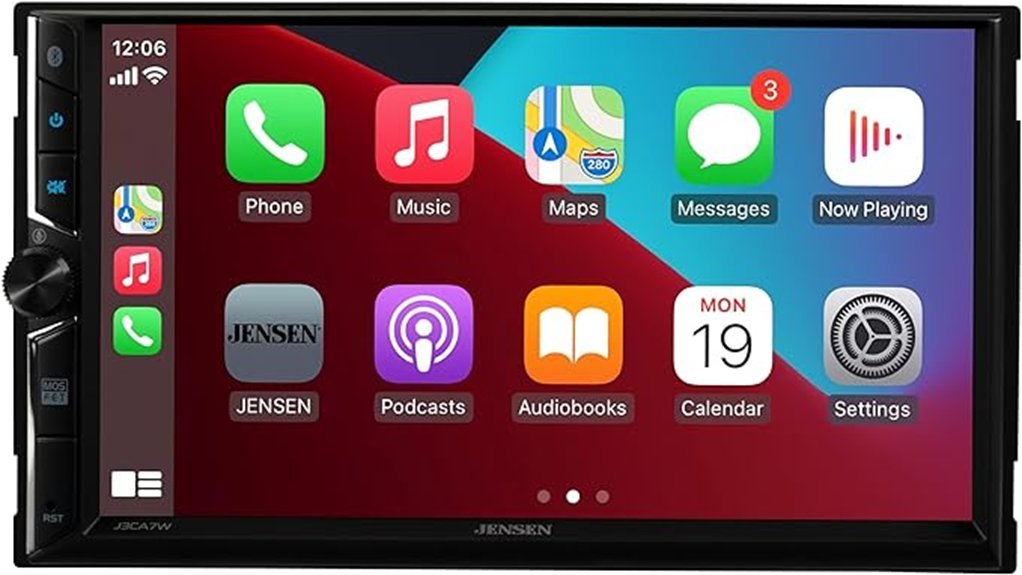
Adding modern phone integration to an older vehicle can be useful, but only if the receiver fits your dash, connects reliably, and gives you enough audio and camera support for your setup. The JENSEN J3CA7W is a double-DIN digital media receiver with a 7-inch touchscreen, wired and wireless Apple CarPlay and Android Auto, Bluetooth, front and rear camera inputs, and three pairs of 4V preamp outputs. Its main strength is a broad feature set without requiring built-in navigation, while the biggest limitation is that installation may still require a vehicle-specific dash kit, wiring harness, antenna adapter, or steering-wheel-control interface. This review explains the specifications, fit considerations, audio features, setup requirements, and situations where the J3CA7W makes the most sense.
Quick Verdict
Rating: Recommended with caveats
Best For: Drivers who want wireless CarPlay or Android Auto, a 7-inch double-DIN screen, camera expansion, and 4V RCA outputs.
Bottom Line: The JENSEN J3CA7W offers a useful mix of wireless phone integration, audio tuning, camera inputs, and amplifier-ready preouts. It is less suitable if your vehicle needs extensive dash modification or you want built-in standalone GPS, SiriusXM support, or a premium audiophile platform.
Key Specifications
| Specification | Detail |
|---|---|
| Brand | JENSEN |
| Model | J3CA7W |
| Product Type | Double-DIN digital multimedia receiver |
| Screen | 7-inch digital TFT touchscreen |
| Resolution | 1024 × 600 |
| Brightness | 500 cd/m² |
| Chassis Dimensions | 7 × 4 × 4 inches (W × D × H) |
| Apple CarPlay | Wired and wireless |
| Android Auto | Wired and wireless |
| Bluetooth | Audio streaming, hands-free calling, phonebook support, external microphone, voice activation |
| Peak Power | 240 W total, 60 W × 4 peak |
| CEA-2006 Output | 16 W RMS × 4 at 4 ohms and less than 1% THD+N |
| Preamp Outputs | 3 pairs of 4V RCA outputs for front, rear, and subwoofer |
| Audio Tuning | 10-band EQ and 7 EQ presets |
| Camera Inputs | Front and rear camera inputs |
| USB | 2 rear USB connections, up to 2.1A charging |
| USB Audio Files | MP3 and FLAC |
| Steering Wheel Controls | Compatible with an additional adapter |
| Vehicle Electrical System | 12VDC negative ground vehicles |
| Warranty | Limited 2-year warranty; JENSEN advertises an upgrade to 3 years when a professionally installed unit is registered within 60 days of purchase |
What Is the JENSEN J3CA7W?
The JENSEN J3CA7W is a digital multimedia receiver designed for vehicles with a compatible double-DIN radio opening. It replaces a traditional factory or aftermarket radio with a 7-inch touchscreen interface that combines AM/FM radio, Bluetooth, USB media playback, Apple CarPlay, and Android Auto.
Its main selling point is smartphone integration. You can connect a compatible iPhone or Android phone wirelessly or by USB and use supported navigation, phone, messaging, and audio apps through the receiver. Because navigation comes from your connected phone, the J3CA7W does not need its own standalone GPS map database.
The receiver also gives you room to expand the system. Three pairs of 4V preamp outputs support front, rear, and subwoofer amplifier connections, while separate front and rear camera inputs give you more flexibility than a receiver limited to a single backup-camera input.
Who Should Buy It?
Best For
- Drivers upgrading an older double-DIN vehicle to wireless Apple CarPlay or Android Auto.
- Buyers planning to add an amplifier or subwoofer using the three pairs of 4V RCA outputs.
- Drivers who want both front and rear camera inputs instead of only a backup-camera connection.
Skip If
- Your vehicle cannot accept a double-DIN receiver without major modification.
- You specifically need built-in navigation that works independently of a smartphone.
- You want steering-wheel controls to work without buying or configuring an additional adapter.
Before You Buy: A double-DIN label does not guarantee a direct fit. Check your vehicle for the correct dash kit, wiring harness, antenna adapter, camera wiring, and steering-wheel-control interface before ordering.
Design and Display Performance
The J3CA7W uses a 7-inch digital TFT touchscreen with a verified 1024 × 600 resolution. JENSEN specifies 500 cd/m² brightness, a 500:1 contrast ratio, and viewing angles of 50 degrees up, 70 degrees down, 70 degrees left, and 70 degrees right.
The chassis measures 7 × 4 × 4 inches. That 4-inch depth is important when you compare it with the space behind your factory radio because wiring harnesses, RCA cables, USB leads, and adapters also need room behind the receiver.
The interface includes six selectable wallpapers and six illumination colors. Physical controls provide access to power, mute, volume or voice activation, and reset functions, so you are not completely dependent on touchscreen controls for basic operation.
Smartphone Integration and Connectivity
The J3CA7W supports both wired and wireless Apple CarPlay as well as wired and wireless Android Auto. This is a meaningful advantage if you prefer leaving your phone in your pocket for short drives but still want the option of a wired connection.
Wireless CarPlay uses Bluetooth during the initial connection process and Wi-Fi for the CarPlay connection. Wireless Android Auto also uses the receiver’s Bluetooth and wireless connection process. Compatible phone requirements can change over time, so you should confirm that your current phone and operating system support the connection mode you plan to use.
Bluetooth also works separately for hands-free calling and audio streaming. JENSEN lists phonebook support, an external microphone, and a voice activation button among the Bluetooth features.
Pro Tip: Before finalizing the dash installation, test wireless CarPlay or Android Auto, both USB leads, the microphone, camera inputs, and speaker outputs. Fixing a loose connection is much easier before the trim panels go back on.
Audio Performance and Expansion
The J3CA7W is rated at 240 watts peak, or 60 watts peak across four channels. The more useful amplifier specification is the CEA-2006 figure of 16 watts RMS per channel into 4 ohms at less than 1% THD+N. That is enough to power typical vehicle speakers, but buyers planning a higher-output system will benefit more from the receiver’s preamp connections.
You get three pairs of 4V RCA preamp outputs for front, rear, and subwoofer channels. This makes the receiver easier to integrate with external amplifiers without relying on speaker-level converters.
For sound adjustment, JENSEN includes a 10-band EQ plus seven presets: Pop, Jazz, Rock, Flat, Classic, Beat, and User. These controls give you more flexibility than a simple bass and treble adjustment, although final sound quality still depends heavily on your speakers, amplifier, installation, door treatment, and tuning.
Camera, USB, and Everyday Features
The J3CA7W provides separate inputs for optional front and rear cameras. A properly connected rear camera can switch automatically when the vehicle enters reverse, while the front camera can be accessed through the receiver when configured correctly.
Two rear USB connections support phone integration, charging, and media use. JENSEN lists up to 2.1A USB charging and supports MP3 and FLAC playback from USB storage. That keeps local music playback simple, although buyers with libraries in other formats should verify compatibility before relying on USB playback.
The AM/FM tuner stores up to 30 presets, with 18 FM and 12 AM presets, and supports RDS. Steering-wheel-control compatibility is also available, but an adapter is required and not every original vehicle function is guaranteed to be supported.
Installation and Safety
The J3CA7W is designed for 12VDC negative-ground vehicles. JENSEN recommends professional installation or installation by an authorized dealer, especially when your vehicle uses factory amplifiers, data-bus controls, integrated climate displays, steering-wheel buttons, or other radio-dependent systems.
Before installation, the negative battery terminal should be disconnected according to the vehicle manufacturer’s procedures. The parking-brake safety connection must also be installed correctly because video-related functions are restricted while driving.
Do not bypass the parking-brake safety system. The receiver should also be installed away from excessive heat, water exposure, dirt, and strong vibration, and the correct fuse rating and automotive-grade wiring should be used.
How It Performs in Real Use
Daily Commuting
For regular commuting, wireless CarPlay and Android Auto are the J3CA7W’s most useful features. Once your compatible phone is configured, you can access supported navigation, calls, messages, podcasts, and music without connecting a cable every time you enter the vehicle.
Long Trips
On longer drives, the wired connection remains useful because it can keep your phone connected through USB while you use navigation and audio. The 7-inch screen gives maps and media controls more space than a basic single-DIN radio display.
Parking and Camera Use
If your vehicle has a backup camera, the rear-camera input can display the image when reverse is triggered correctly. The additional front-camera input can also be useful for parking or checking clearance in vehicles where front visibility is limited.
Upgraded Audio Systems
If you plan to add external amplification, the three pairs of 4V RCA outputs are more important than the built-in peak-power number. Separate front, rear, and subwoofer outputs allow a cleaner system layout and more flexible tuning.
Setup Tips Before First Use
Confirm your dash opening and required installation parts before removing the factory radio. Many vehicles need a model-specific dash kit and wiring harness, and some also require adapters for factory amplifiers, antennas, cameras, or steering-wheel controls.
Run the external microphone to a location where it can pick up your voice without excessive wind or HVAC noise. Route USB leads where they can be reached after installation, especially if you expect to switch between wired smartphone projection and USB storage.
After installation, verify speaker balance, Bluetooth calling, wireless phone projection, USB operation, front and rear cameras, steering-wheel controls, and radio reception before reinstalling all trim pieces.
Pros and Cons
Pros
- Supports both wired and wireless Apple CarPlay and Android Auto.
- 7-inch 1024 × 600 display with 500 cd/m² rated brightness.
- Separate front and rear camera inputs provide useful expansion.
- Three pairs of 4V preamp outputs support external amplifiers and a subwoofer.
- 10-band EQ, seven presets, Bluetooth calling, dual rear USB, MP3, and FLAC playback add useful everyday flexibility.
Cons
- Vehicle-specific installation hardware or wiring adapters may be required.
- Steering-wheel-control integration needs a separate compatible adapter.
- Navigation depends on a connected smartphone rather than built-in standalone maps.
Warranty and Value
The owner’s manual states a limited two-year warranty, with proof of purchase required. JENSEN’s current J3CA7W product page also advertises an upgrade to a three-year warranty when a professionally installed unit is registered within 60 days of purchase. Keep your receipt and confirm the registration requirements that apply to your purchase.
From a value standpoint, the strongest parts of the J3CA7W are wireless smartphone integration, two camera inputs, a 10-band EQ, and three pairs of 4V RCA outputs. Those features make it worth considering if you want more system flexibility than a basic touchscreen receiver.
Is It Worth the Price?
The J3CA7W makes the most sense for buyers who will actually use its wireless phone integration, front and rear camera capability, and amplifier-ready outputs. Those are practical upgrades that can remain useful even if you later improve the speakers or add a subwoofer.
Its value is weaker if you only need Bluetooth audio and FM radio, because you may be paying for features you will not use. It is also not the best fit if installation in your vehicle requires expensive adapters or significant dashboard modification.
How It Compares to Alternatives
Within JENSEN’s own lineup, the CAR710W is another 7-inch receiver with wired and wireless CarPlay and Android Auto. It adds SiriusXM readiness, while the J3CA7W stands out with front and rear camera inputs and a 10-band EQ. Comparing those specific features can help if satellite radio or camera flexibility matters to you.
The Sony XAV-AX4000 is another wireless CarPlay and Android Auto option worth comparing if you want a different interface and more extensive audio tuning. The J3CA7W remains attractive when you specifically want its dual-camera support and three pairs of 4V preamp outputs.
Frequently Asked Questions
Does the JENSEN J3CA7W support wireless Apple CarPlay and Android Auto?
Yes. The J3CA7W supports both wired and wireless Apple CarPlay and Android Auto. You can choose the connection method that works best with your compatible phone and driving routine.
Does the J3CA7W have built-in GPS navigation?
It does not use a standalone built-in map system. Navigation is provided through compatible apps on your connected phone using Apple CarPlay or Android Auto.
Can I connect an external amplifier and subwoofer?
Yes. The receiver provides three pairs of 4V RCA preamp outputs for front, rear, and subwoofer channels. That makes it suitable for systems that use external amplification.
Does it support a front camera as well as a backup camera?
Yes. JENSEN lists separate front-view and rear-view camera inputs. Cameras are optional unless the particular package you buy specifically states that one is included.
What USB audio formats does the J3CA7W support?
JENSEN lists MP3 and FLAC file playback. If your music library uses other formats, confirm compatibility before transferring a large collection to a USB drive.
Will my factory steering-wheel controls still work?
They may work with a compatible third-party steering-wheel-control adapter. JENSEN specifically notes that an adapter is required and that not every original vehicle function is guaranteed to be supported.
What are the actual chassis dimensions?
The official manual lists the chassis at 7 × 4 × 4 inches, measured width × depth × height. You should still check the space behind your dash because wiring and adapters require additional room.
Should I install the J3CA7W myself?
Experienced installers may be comfortable with a straightforward double-DIN installation, but vehicle wiring can vary significantly. JENSEN recommends professional or authorized-dealer installation, especially when factory amplifiers, cameras, data systems, or steering-wheel controls are involved.
The Bottom Line
The JENSEN J3CA7W is a strong fit for drivers who want a 7-inch double-DIN receiver with wired and wireless CarPlay and Android Auto, front and rear camera inputs, useful audio tuning, and 4V amplifier outputs. Skip it if you need standalone navigation, a guaranteed plug-and-play installation, or steering-wheel-control support without extra hardware.
Its biggest advantage is the amount of connectivity and system expansion packed into one receiver. Its main limitation is that the quality and cost of the final upgrade will depend heavily on your vehicle-specific installation requirements.