Disclosure: As an Amazon Associate, we earn from qualifying purchases. If you click a link on this page and make a purchase, we may receive a small commission at no extra cost to you.
Choosing a beginner drone gets harder when you want simple controls, phone-free flying, and a complete starter bundle without paying for advanced camera hardware. The K6 MAX Drone targets that need with a foldable body, a controller with its own screen, three listed batteries, and optical-flow positioning. Its convenience is the main attraction, but the camera claims, range confidence, and support details need a careful look. This review helps you decide whether it fits casual practice or whether you should step up to a more established camera drone.
K6 MAX Drone Verdict
Quick Verdict
Rating: Recommended with caveats, 7/10
Best For: Beginners who want a lightweight, phone-free practice drone with extra batteries in the box.
Bottom Line: The K6 MAX Drone is worth considering if quick setup, a built-in screen controller, and extra batteries matter more than polished video. Skip it if you expect mechanically stabilized footage, proven long-range control, GPS return-to-home, or clearly documented support.
The K6 MAX makes its strongest case as a simple starter drone. The listing gives a weight of 6.4 oz, about 181 g, and the foldable body helps it fit into a small carry case. The screen controller is the main convenience feature because you do not need to mount your phone, sign into an app, or let phone notifications interrupt the live view.
The main tradeoff is uncertainty around image quality and transmission polish. The listing promotes 4K video capture, while another technical detail references 1920×1080 output. Until the seller clearly confirms the recording resolution, treat this as a casual camera drone rather than a creator-grade aerial video tool.
Before You Buy: Do not buy the K6 MAX expecting a mechanical gimbal, verified long-range control, GPS return-to-home, or a mature parts ecosystem. Its best role is close-range practice, simple daylight photos, and learning basic flight controls in open spaces.
Key Specs
| Specification | Detail |
|---|---|
| Branding | QAONIE appears in manual-style support data, but marketplace branding may vary. Confirm the current seller and brand field. |
| Model / ASIN | K6 MAX / B0DMKR81GM |
| Product Type | Foldable camera drone / remote-control quadcopter |
| Listed Dimensions | 3.2 × 1.9 × 6 in |
| Listed Weight | 6.4 oz, about 181 g |
| Design | Lightweight foldable body with screen controller |
| Body Material | Foldable plastic shell, based on listing details |
| Motor Type | Brushless motor |
| Camera Claim | The listing advertises 4K capture, but another detail references 1920×1080 output. Exact recording resolution is unclear. |
| Media | MP4 video, JPEG photos, SD card media support |
| Connectivity | Wireless controller and live-view connection; Bluetooth, Wi-Fi, and RF appear across support and marketplace details |
| Positioning Aid | Optical-flow localization / optical-flow sensor |
| Obstacle Sensing | Advertised four-way sensing aid; do not treat it as full collision protection |
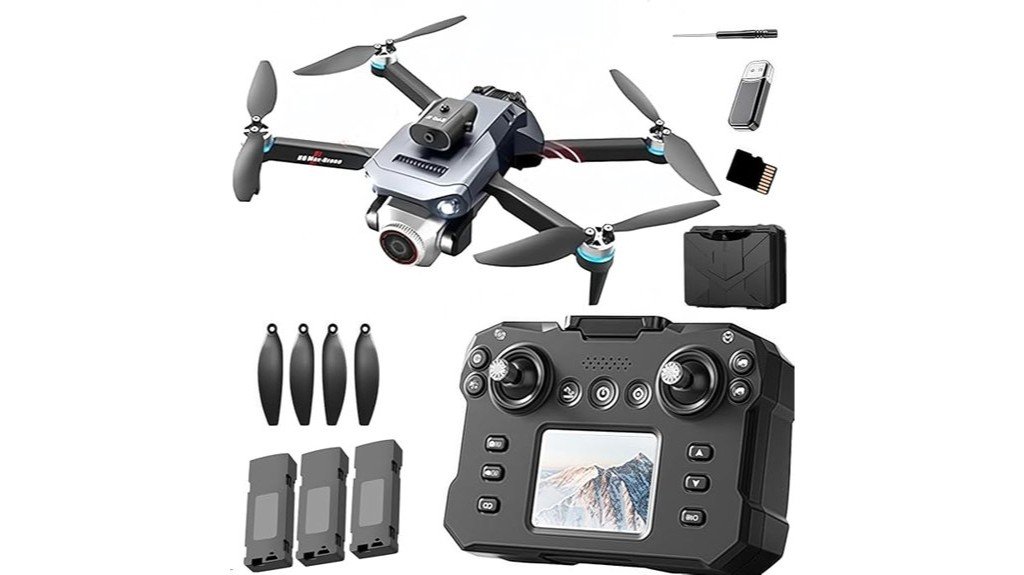
| Included Accessories | Drone, screen controller, 3 lithium-ion batteries, SD card, handbag/carry case, camera, charging cable, and spares as listed |
| Battery Note | Three rechargeable lithium-ion batteries included; per-battery flight time is not consistently listed |
| Warranty | Specific warranty terms are not clearly listed. Check the Amazon Warranty & Support area and seller terms before purchase. |
| Best Use | Beginner practice, casual park flying, simple photos, and short-range video clips |
Prices, bundle contents, seller names, and availability can change often. Check the Amazon page before you buy.
What Is the K6 MAX Drone?
The K6 MAX Drone is a lightweight foldable quadcopter aimed at new pilots who want a simpler path into drone flying. Its main selling point is the included controller with its own display, which removes the need to use your phone as the live-view screen.
The bundle is more complete than many entry-level drones because it lists three batteries, an SD card, a carry bag, and spare accessories. That makes it a practical gift or starter kit for someone who wants to open the box and practice without immediately shopping for extra batteries or storage.
You should still view it as a budget-tier training drone. Optical-flow positioning, one-key controls, waypoint flight, and the advertised sensing aid may reduce some early mistakes, but they do not replace careful flying, open space, or direct line-of-sight control.
Who Should Buy It?
Best For
- Beginners who want phone-free flying with a screen controller.
- Casual users who value three included batteries and a compact carry setup.
- Gift buyers who want a simple starter drone for open-field practice.
Skip If
- You need cinematic footage with gimbal-level stabilization.
- You plan to fly far from the controller or in crowded Wi-Fi areas.
- You want a mature accessory ecosystem, detailed documentation, and clear warranty terms.
Feature-by-Feature Review
Design and Build Quality
The K6 MAX uses a compact foldable layout, so it is easy to store in a backpack, drawer, or small gear bag. The listed 6.4 oz weight also keeps the drone light in hand, which helps new users handle setup and battery changes without fuss.
The lightweight plastic shell suits a starter drone, but it offers less margin for rough landings than a heavier platform. Use a level launch area, keep clear of branches, and avoid windy practice sessions that can push a light quadcopter off course.
Screen Controller Convenience
The screen controller is the K6 MAX Drone’s most useful feature. You do not need to attach a phone, drain your phone battery, or switch between a camera app and flight controls before every takeoff.
This setup can also feel easier for parents, grandparents, and first-time users to understand. The tradeoff is that the display and flight controls depend on the same controller, so you should stop the session and restart the pairing process if the screen becomes unresponsive.
Camera and Stabilization
The product listing promotes 4K video capture, but another technical detail references 1920×1080 output. That conflict matters because the advertised label may create expectations that the saved footage cannot consistently meet.
Expect usable daylight clips for practice, family moments, and simple aerial views. Do not expect smooth travel footage, clean low-light clips, or the floating look you get from a true 3-axis gimbal drone.
Flight Controls and Beginner Aids
One-key takeoff and landing reduce early stress because you can focus on orientation before learning fine throttle control. Optical-flow positioning helps the drone hold position near the ground, especially when you fly slowly over suitable surfaces.
Waypoint flight gives new pilots a simple way to test planned movement. The advertised four-way sensing may help during slow approaches, but you should fly as if it were only a backup aid, not full crash protection.
Batteries and Session Time
The three-battery bundle is a real advantage for practice. Even if each pack gives only a short flight, you can rotate batteries and get more learning time from one outing.
Because per-pack flight time is not clearly and consistently listed, plan for short sessions. Carry the supplied charging cable and a compatible power source, and let warm batteries cool before charging.
Pro Tip: Before your first full flight, test one battery at low altitude in an open area, confirm the SD card is recognized, and practice manual landing before trying waypoint routes or the sensing feature.
How It Performs in Real Use
For First Flights
The K6 MAX works best when you treat the first few flights as training sessions. Use one-key takeoff, keep the drone low, and practice small forward, backward, and turning movements until the controls feel natural.
The screen controller helps here because you can watch the drone and glance at the display without juggling a separate phone mount. New pilots should still keep the drone in direct sight instead of relying only on the live-view feed.
For Park and Backyard Practice
In open spaces, the foldable body and light weight make the drone easy to carry and quick to set up. Keep plenty of distance from trees, fences, and power lines because thin objects can be difficult for basic sensing systems to detect.
Bright daylight gives you the best camera results. Dusk, shadows, and fast yaw movements can make footage look softer or shakier than expected.
For Travel and Storage
The included carry bag helps keep the drone, controller, batteries, SD card, and spares together. That matters because small propellers, charging cables, and battery packs are easy to misplace.
For travel, power the drone off, protect the propellers from bending, keep battery contacts covered, and check airline and destination rules before packing lithium-ion batteries.
For Learning Camera Angles
The K6 MAX is useful for learning framing, altitude, and basic movement before you invest in a pricier drone. You can practice slow approach shots, overhead views, and simple path planning without risking a premium camera platform.
The camera is better for learning than polished production. If your goal is YouTube travel footage, real estate clips, or commercial video, step up to a drone with a mechanical gimbal and stronger transmission system.
Setup Tips Before First Use
- Charge all three batteries first: Start with full packs so you can test the drone, controller, and camera without stopping early.
- Use a clear open area: Choose grass or a wide field away from people, roads, pets, trees, and overhead wires.
- Calibrate at a new location: If the drone drifts or feels unstable, follow the manual’s calibration steps before flying higher.
- Check the SD card: Make sure the card is inserted, recognized, and has free space before recording.
- Fly in calm weather: A lightweight drone can struggle in wind, so keep early flights low and close.
- Restart after a screen problem: If the controller display becomes unresponsive, power down both devices and complete the pairing steps again before takeoff.
Compatibility and Safety Notes
The K6 MAX is a flying device with spinning propellers, lithium-ion batteries, and wireless control. Keep it away from faces, pets, crowds, moving vehicles, airports, and restricted areas. Check the rules for your location before flying because weight alone does not remove every operating requirement.
Battery care matters with any small drone. Store the batteries in a cool, dry place, do not charge them unattended, and stop using a pack if it swells, leaks, smells unusual, or becomes damaged after a crash.
For maintenance, use a soft dry cloth on the drone and controller. Avoid liquid cleaners around the camera, motors, battery contacts, screen, and charging port.
Pros and Cons
Pros
- Screen controller removes the need to use your phone for live view.
- Three included batteries make practice sessions more useful.
- Listed 6.4 oz weight keeps it light and easy to pack.
- Optical-flow positioning helps beginners with low-altitude hovering.
- Foldable design and carry bag improve storage and portability.
Cons
- Camera output can look closer to casual 1080p than crisp stabilized 4K.
- The controller combines the live view and flight controls, so a display problem can stop the session.
- Warranty terms and long-term parts support are not clearly listed.
Is It Worth the Price?
The K6 MAX Drone is worth considering if you want a budget-tier starter drone with a screen controller and multiple batteries included. Those two details give it stronger day-one value than many basic drones that require your phone or include only one battery.
You get the most value if you want to learn basic flying, practice camera angles, and keep setup simple. You get less value if video quality, range, warranty clarity, and long-term accessory support matter more than the bundle.
Before you decide, compare the current Amazon price with drones that clearly document a mechanical gimbal, GPS return-to-home, flight time, and warranty support. The K6 MAX makes the most sense when simple setup and bundle contents matter more than camera polish.
How It Compares to Alternatives
Compared with beginner drones that require a phone, the K6 MAX offers simpler setup because its controller has a display. Compared with established camera drones such as the DJI Mini 2 SE, it gives up mechanical stabilization, clearer flight specifications, and a more mature support ecosystem.
If you want GPS-focused training, the Holy Stone HS720E is another model to compare. If you want a small practice drone with a built-in screen and a fuller listed bundle, the K6 MAX remains the more convenient starter choice. Compare current packages carefully because batteries, cases, and accessories can vary by seller.
| Model | K6 MAX Drone | DJI Mini 2 SE | Holy Stone HS720E |
|---|---|---|---|
| Best Reason to Buy | Phone-free flying with screen controller | More polished controls and stabilized footage | GPS-focused training features |
| Best For | Budget practice and gifting | Travel video and smoother clips | Pilots who want GPS features |
| Main Tradeoff | Softer video and less support clarity | Usually costs more | Larger and less pocketable |
| Pick This If | You want the easiest screen-controller bundle | You care more about camera polish | You want GPS practice features |
Frequently Asked Questions
Does the K6 MAX Drone weigh under 250 g?
The listing gives a weight of 6.4 oz, about 181 g, which is below 250 g. You should still check local registration, training, and location rules because weight alone does not remove every operating requirement.
Is the K6 MAX camera truly 4K?
The listing promotes 4K video capture, but another technical detail references 1920×1080 output. Treat it as a casual camera drone unless the current seller clearly confirms the saved recording resolution and stabilization method.
Do you need a phone to fly it?
The main flight setup uses the controller’s built-in display, so a phone is not required for the core experience described in the listing. That can reduce setup time and avoid phone-mount or app distractions.
What comes in the box?
The bundle lists the drone, screen controller, three lithium-ion batteries, SD card, handbag or carry case, camera, charging cable, and spare accessories. Check the current Amazon seller details because bundle contents can vary by listing or seller.
Does the K6 MAX Drone have GPS?
GPS is not clearly documented as a core feature for this ASIN. The listed positioning aid is optical-flow localization, which can support low-altitude hovering but does not provide the same navigation or return-to-home functions as GPS.
Is it good for indoor flying?
It can be used indoors only with caution, plenty of open space, and low-speed control. Avoid glossy floors, fans, pets, curtains, and tight rooms while learning.
Where do videos and photos save?
The listing references SD card media, MP4 video, and JPEG image formats. Before recording important clips, confirm the SD card is inserted, recognized, and has enough free space.
Who should skip the K6 MAX Drone?
Skip it if you need mechanically stabilized video, proven long-range control, GPS return-to-home, or clearly documented support. It is better suited to close-range practice than serious aerial production.
The Bottom Line
The K6 MAX Drone is worth considering for beginners who want a light, foldable drone with a built-in screen controller and three listed batteries. Its main strength is simple phone-free practice, while its main limitation is unclear camera output and limited confidence in range, GPS functions, support, and documentation.
Buy it for close-range practice, basic camera angles, and a convenient starter bundle. Skip it if you need smooth cinematic footage, proven long-range control, GPS return-to-home, or an established parts and support ecosystem.