Disclosure: As an Amazon Associate, we earn from qualifying purchases. If you click a link on this page and make a purchase, we may receive a small commission at no extra cost to you.
Kenwood DMX500S Review: 6.8-Inch Wireless CarPlay Head Unit
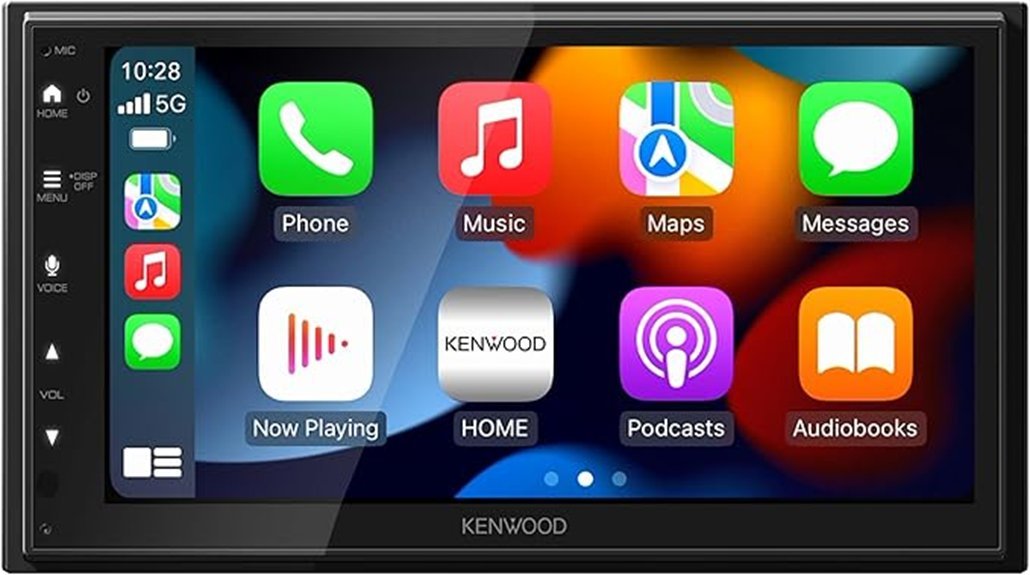
Replacing a factory stereo can improve navigation, calls, and music, but only when the new receiver fits your dashboard and supports the features you actually use. The Kenwood DMX500S combines a 6.8-inch touchscreen with wireless Apple CarPlay, wireless Android Auto, Bluetooth 5.0, sound tuning, and a shallow chassis.
Its strongest benefits are cable-free phone integration, clear controls, and useful expansion outputs. Its main limits are the 2.5V preouts, lack of built-in navigation, and reduced factory-integration support compared with some higher-end Kenwood receivers.
This review helps you decide whether the DMX500S suits your vehicle, speakers, phone, camera setup, and future audio plans.
Quick Verdict
Rating: 8/10
Best For: Drivers who want wireless CarPlay and Android Auto, a shallow chassis, clear factory-speaker sound, and room for a basic amplifier or subwoofer upgrade.
Bottom Line: The Kenwood DMX500S delivers the phone features and sound controls most drivers use every day. Its 2.5V preouts and limited advanced vehicle integration make it less suitable for complex audio or factory-feature retention projects.
Key Takeaways
- The 6.8-inch capacitive display uses a 1024 x 600 pixel layout, giving maps, menus, and media controls more detail than basic low-resolution receivers.
- Wireless and wired Apple CarPlay and Android Auto provide access to compatible navigation, calling, messaging, and audio apps.
- The amplifier produces 50W x 4 maximum power and 22W x 4 full-bandwidth power at less than 1% total harmonic distortion.
- A 13-band equalizer, digital time alignment, crossovers, subwoofer level, and phase controls provide useful cabin tuning.
- Front, rear, and subwoofer preouts support external amplifiers, but their 2.5V rating is below the 4V or 5V outputs found on many premium receivers.
- The main unit measures 178 x 100 x 85.7 mm and weighs 2.20 pounds, although your vehicle still needs the correct installation parts.
- The DMX500S supports a rear camera and adjustable parking guidelines, but the camera is sold separately.
Key Specifications
| Specification | Detail |
|---|---|
| Brand | Kenwood |
| Model | DMX500S |
| Product Type | Digital multimedia receiver with touchscreen monitor |
| Display | 6.8-inch WSVGA capacitive touchscreen |
| Resolution | 1024H x 600V x RGB, 1,843,200 pixels |
| Display System | Transparent TN LCD, TFT active matrix, LED backlight |
| Phone Integration | Wireless and wired Apple CarPlay and Android Auto |
| Wi-Fi | IEEE 802.11 a/n/ac, 5GHz |
| Bluetooth | Bluetooth 5.0 with HFP, SPP, PBAP, A2DP, and AVRCP profiles |
| Bluetooth Codecs | SBC and AAC |
| Maximum Power | 50W x 4 |
| Full-Bandwidth Power | 22W x 4 at less than 1% THD |
| Speaker Impedance | 4 to 8 ohms |
| Preouts | Front, rear, and subwoofer RCA outputs, 2.5V/10 kΩ |
| Preout Impedance | 100 ohms |
| Audio Tuning | 13-band EQ, digital time alignment, high-pass and low-pass filters, subwoofer level and phase |
| USB | Rear USB 2.0 high-speed connection, DC 5V 2.1A maximum output |
| USB D/A Converter | 24-bit |
| Audio File Support | MP3, WMA, OGG, AAC, WAV, and FLAC |
| Video File Support | MPEG1, MPEG2, MPEG4, WMV, H.264, and MKV |
| Camera Support | RCA rear-camera input with adjustable parking guidelines |
| Video Connections | NTSC/PAL external video input and RCA video output |
| Main Unit Size | 178 x 100 x 85.7 mm, or 7 x 3-15/16 x 3-3/8 inches |
| Main Unit Weight | 1.00 kg, or 2.20 pounds |
| Operating Voltage | 12V DC vehicle electrical system |
| Included Accessories | Wiring harness, GPS antenna, microphone, parking-brake wire, trim parts, mounting hardware, Quick Start Guide, and warranty card |
| Warranty | One-year limited warranty |
What Is the Kenwood DMX500S?
The Kenwood DMX500S is a touchscreen digital media receiver designed to replace a compatible factory or aftermarket head unit. It does not contain a CD or DVD transport. Instead, it handles radio, Bluetooth audio, smartphone apps, USB files, calls, and connected camera functions.
Its shallow 85.7 mm chassis leaves more space behind the unit than many full-depth receivers. That space can make it easier to position a wiring harness, antenna adapter, USB extension, steering-wheel-control interface, and other installation modules.
The DMX500S sits between basic wired-phone receivers and higher-priced models with stronger preouts or more advanced factory integration. It is made for everyday smartphone use rather than a competition-level audio build.
How This Review Was Checked
We checked the current Amazon product page, Kenwood’s DMX5710S/DMX50S/DMX500S instruction manual, installation diagrams, specifications, and current firmware support information.
The review uses the DMX500S-specific figures where the shared manual lists different specifications for each model. This distinction matters because the DMX500S has 2.5V preouts and does not receive every connector or integration feature listed for the DMX5710S and DMX50S.
Who Should Buy It?
Best For
- Drivers who regularly use Apple Maps, Google Maps, Waze, music, podcasts, and hands-free calls.
- Vehicle owners who need a shallow receiver because wiring space behind the dashboard is limited.
- Buyers who want to run factory speakers now and add a modest amplifier or subwoofer later.
Skip If
- You want 4V or 5V preouts for a complex multi-amplifier audio system.
- You need built-in navigation that works without a connected smartphone.
- Your installation depends on direct iDatalink Maestro or SiriusXM tuner support from the receiver.
Before You Buy: A shallow chassis does not make this a universal plug-and-play stereo. Confirm your dash opening, trim kit, harness, antenna adapter, steering-wheel-control interface, factory amplifier retention, camera wiring, and parking-brake connection before ordering installation parts.
Feature-by-Feature Review
Design and Display Quality
The DMX500S uses a 6.8-inch capacitive touchscreen with 1024 x 600 resolution. Map labels, album artwork, source icons, and settings appear sharper than they do on many entry-level 800 x 480 displays.
The display uses a transparent TN LCD panel with a TFT active matrix and LED backlight. It offers clear detail from the driver’s normal viewing position, although the panel technology is not as premium as the wide-view displays used in some higher-priced receivers.
Physical Home, Menu, Voice, and volume buttons provide quick access to common functions. The DMX500S uses volume-up and volume-down buttons rather than a rotary volume knob.
Sound Performance and Audio Features
The built-in amplifier provides 50W x 4 maximum power. The more useful real-world figure is 22W x 4 full-bandwidth power at less than 1% THD, which suits many factory speakers and efficient aftermarket replacements.
You can adjust the cabin with a 13-band graphic equalizer, digital time alignment, front and rear delay settings, high-pass filters, a subwoofer low-pass filter, subwoofer level, and normal or reverse subwoofer phase.
These controls help you reduce boomy door-speaker bass, move vocals toward the driver, and blend a subwoofer with the front speakers. Results still depend on speaker quality, placement, door treatment, and careful setup.
Three sets of RCA connections cover front, rear, and subwoofer channels. Their 2.5V output is adequate for many entry-level and mid-range amplifiers, but it provides less signal voltage than a premium 4V or 5V receiver.
Smartphone Integration and Bluetooth
The DMX500S supports both wireless and wired Apple CarPlay and Android Auto. Wireless use reduces cable handling during short trips, while a USB connection can charge the phone during longer drives.
Bluetooth 5.0 supports hands-free calling, phonebook access, audio streaming, and playback control through HFP, SPP, PBAP, A2DP, and AVRCP profiles. SBC and AAC Bluetooth audio codecs are supported.
The receiver can store several registered Bluetooth devices, although the available active functions depend on which phone and source you select. Connection stability can also vary with the phone, software version, cabin interference, and app behavior.
MirrorAPP+ can display compatible iPhone and Android content on the receiver. Kenwood states that mirroring should be used while parked, and some apps or protected content may not display or play audio.
USB Playback and Charging
The rear USB 2.0 connection supplies up to 5V at 2.1A. It supports common music formats, including MP3, WMA, OGG, AAC, WAV, and FLAC, along with several video formats.
Because the USB connection sits behind the receiver, plan the cable route during installation. A glove-box, center-console, or flush-mounted USB location usually provides cleaner access than leaving the cable loose behind the dashboard.
The 2.1A output can slow battery drain during navigation and streaming, but charging speed depends on the phone, cable, app load, screen use, and temperature.
Rear Camera and Parking Support
The DMX500S includes an RCA rear-camera input and adjustable parking guidelines. A connected camera can display automatically when the receiver receives the correct reverse-gear trigger signal.
The camera itself is not included. You need a compatible camera, power connection, RCA video cable, and reverse-signal wiring. The parking lines are visual references and do not replace checking mirrors, surroundings, and the area behind the vehicle.
You can compare compatible camera options in this guide to choosing a backup or driving camera setup, but confirm that the chosen rear camera provides the correct RCA video output.
Installation, Compatibility, and Expandability
The main unit measures 178 x 100 x 85.7 mm, or about 7 x 3-15/16 x 3-3/8 inches. Use these chassis measurements when checking space, not the shipping-box dimensions or packaged product weight.
The official main-unit weight is 2.20 pounds. Retail listings may show a higher packaged weight because the box also contains wiring, brackets, antennas, hardware, documentation, and other accessories.
Steering-wheel buttons can work through a compatible vehicle-specific adapter. Retaining a factory amplifier, factory camera, warning chimes, climate controls, or vehicle settings may require additional interfaces, and some vehicles may not retain every original function.
The receiver supports front, rear, and subwoofer preouts, a rear-camera input, video output, speaker outputs, a microphone connection, GPS antenna, USB, and steering remote wiring. This gives you room for a practical speaker, amplifier, or subwoofer upgrade later.
Setup Tips Before First Use
- Check vehicle fitment first. Match the receiver to your exact year, make, model, trim, factory audio package, and dashboard configuration.
- Route the microphone carefully. Place it near the driver while keeping it away from strong air vents, loose trim, and surfaces that can create vibration noise.
- Extend the rear USB connection. Choose an accessible location before the receiver is secured in the dashboard.
- Set speaker size and crossovers. Avoid sending deep bass to small factory speakers when you use a subwoofer.
- Adjust time alignment gradually. Measure speaker distances and make small changes instead of using extreme delay settings.
- Update firmware carefully. Follow Kenwood’s current USB update guide and keep vehicle power stable throughout the process.
Pro Tip: Test CarPlay, Android Auto, Bluetooth calls, every speaker, the reverse camera, steering-wheel controls, and USB charging before reinstalling all dashboard trim. Fixing a loose connection is easier while the receiver remains accessible.
Installation and Driving Safety
Disconnect the vehicle battery as directed before working on power, speaker, or signal wiring. Incorrect battery, ignition, ground, speaker, or parking-brake connections can damage the receiver, drain the battery, or create a short circuit.
Kenwood recommends professional installation when you do not have the tools or experience to mount and wire the unit safely. Use the supplied hardware where specified, insulate unused connections, and do not bypass safety wiring.
Complete detailed searches, pairing, mirroring, camera-line adjustment, and audio tuning while parked. Keep your attention on the road and use voice or simple physical controls when driving.
How It Performs in Real Use
On a Daily Commute
Wireless CarPlay and Android Auto provide the biggest daily convenience. After initial setup, you can access compatible maps, calls, messages, podcasts, and music without connecting a cable for every short trip.
The physical volume buttons are easier to find than a small on-screen slider. A rotary knob would still be faster for large volume changes, especially on rough roads.
During Hands-Free Calls
Bluetooth 5.0 and the included microphone support normal hands-free calling. Call clarity depends heavily on microphone position, window noise, tire noise, vehicle insulation, and the cabin fan setting.
A careful microphone installation can matter more than changing Bluetooth settings. Keep the microphone secure and test it with the vehicle moving before finalizing the trim.
For Parking and Reversing
A properly connected rear camera can activate when you shift into reverse. Adjustable parking guidelines help you set a visual reference for your vehicle, but they must be calibrated carefully and may not match the actual path in every situation.
The single rear-camera input suits a basic reversing setup. Buyers who need several camera views, automatic front-camera switching, or more advanced camera processing should compare higher-tier receivers.
With Speaker and Subwoofer Upgrades
The built-in amplifier and tuning controls can improve a factory-speaker system without an external amplifier. Replacing weak factory speakers may provide a larger improvement than simply raising EQ bands.
The front, rear, and subwoofer preouts support a straightforward amplifier and subwoofer system. For multiple amplifiers or long RCA runs, a receiver with stronger preout voltage may provide a better starting point.
On Road Trips
Wireless phone integration keeps the dashboard tidy, while rear USB charging helps during long navigation and streaming sessions. Wired use may be more practical when your phone needs steady power for several hours.
Navigation still depends on the connected phone, map app, GPS conditions, downloaded maps, and mobile data. Download offline map areas before traveling through locations with weak coverage.
Pros and Cons
Pros
- 6.8-inch 1024 x 600 capacitive display provides clear menus, maps, and media information.
- Supports both wireless and wired Apple CarPlay and Android Auto.
- Physical Home, Menu, Voice, and volume controls reduce reliance on touchscreen menus.
- 13-band EQ, time alignment, crossovers, and subwoofer controls support detailed tuning.
- Shallow 85.7 mm chassis leaves useful space for adapters and wiring behind the dashboard.
Cons
- The 2.5V preouts are less suitable for demanding multi-amplifier systems than 4V or 5V outputs.
- No built-in navigation, so maps depend on a compatible connected phone.
- Vehicle-specific installation and factory-feature retention can require several extra adapters.
Is It Worth the Price?
The Kenwood DMX500S offers strong value for the price when your priorities are wireless phone integration, a clear screen, a shallow chassis, and detailed sound controls. These features affect almost every drive and provide a meaningful upgrade over a basic Bluetooth stereo.
You receive the most value when you plan to use factory speakers, efficient replacement speakers, or a simple amplifier and subwoofer. The receiver gives you enough tuning and expansion for that type of system without forcing you into a premium model.
Its value drops when your project requires high-voltage preouts, several cameras, built-in navigation, direct SiriusXM tuner support, or advanced factory-data integration. Those requirements can justify paying more for another receiver.
How It Compares to Alternatives
The Alpine iLX-W670 is worth comparing when you want a shallow receiver with a clean interface and broader amplifier-focused system options. A Pioneer DMH-series receiver may suit you when you prefer Pioneer’s menus or need a different mix of camera and phone features.
The Kenwood DMX709S is the stronger Kenwood alternative when you want an Excelon model with 4V preouts, HD Radio, SiriusXM readiness, and more premium expansion features. The DMX500S makes more sense when wireless phone access, compact depth, and everyday sound tuning matter more than those upgrades.
Frequently Asked Questions
Does the Kenwood DMX500S support wireless Apple CarPlay and Android Auto?
Yes. It supports wireless and wired Apple CarPlay and Android Auto. Actual compatibility depends on your phone, operating system, cable, wireless settings, and supported apps.
Does the DMX500S have built-in navigation?
No. It uses navigation apps from a connected smartphone, such as Apple Maps, Google Maps, or Waze. Download offline maps before traveling through areas with unreliable mobile coverage.
Are the Kenwood DMX500S preouts rated at 4V?
No. Kenwood lists the DMX500S preout level as 2.5V/10 kΩ. The outputs can run many amplifiers, but a 4V or 5V receiver may suit a more demanding audio build.
How much installation depth does the DMX500S need?
The main chassis is 85.7 mm, or about 3-3/8 inches, deep. Leave extra space for the harness, antenna connection, USB cable, RCA plugs, camera cable, and vehicle-specific interfaces.
Does the DMX500S support SiriusXM or iDatalink Maestro?
The shared Kenwood manual identifies the SiriusXM tuner and iDatalink Maestro connectors as DMX5710S and DMX50S features. Do not assume the DMX500S provides those connections when planning factory integration.
Does the Kenwood DMX500S include a backup camera?
No. It provides an RCA rear-camera input and adjustable parking guidelines, but you must purchase and wire a compatible camera separately.
Can you update the DMX500S firmware wirelessly?
No. Kenwood provides a USB-memory update process for this receiver family. Follow the current manufacturer guide, use a compatible USB drive, and do not interrupt power during the update.
What comes in the box with the Kenwood DMX500S?
The package includes the receiver, wiring harness, GPS antenna, microphone, parking-brake wire, trim and mounting components, screws, Quick Start Guide, and warranty card. Your vehicle may still require a dash kit and several adapters.
The Bottom Line
The Kenwood DMX500S earns an 8/10 for its clear 6.8-inch display, wireless phone integration, shallow chassis, physical controls, and useful sound tuning. It is a smart buy for daily drivers and modest audio upgrades, but buyers who need high-voltage preouts, built-in navigation, SiriusXM integration, or advanced factory-data retention should compare higher-tier receivers.
Ready to Buy?
Check the latest price, seller details, and package contents before you decide.