Disclosure: As an Amazon Associate, we earn from qualifying purchases. If you click a link on this page and make a purchase, we may receive a small commission at no extra cost to you.
LaserPecker LP1 Pro Engraver Review
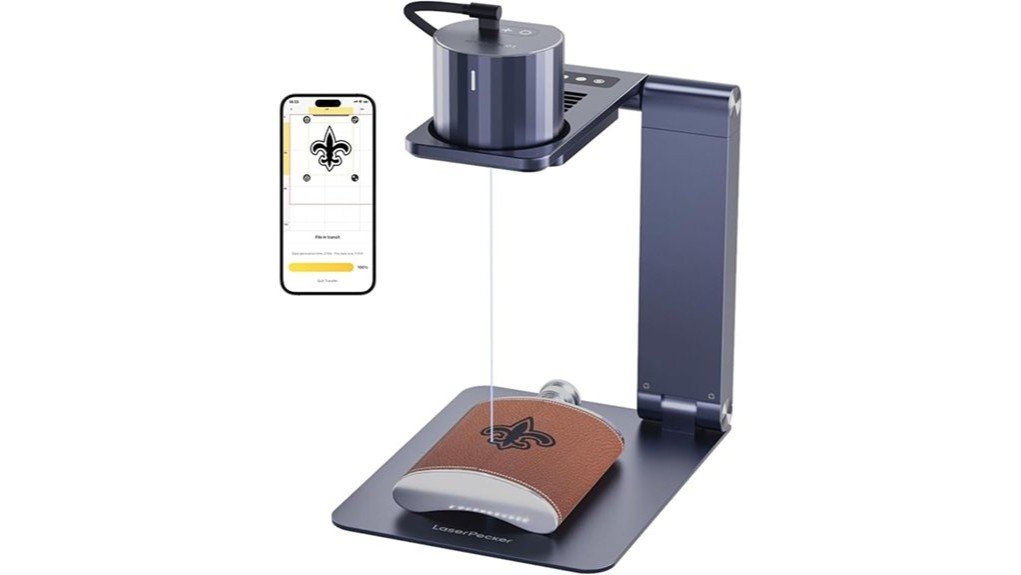
A large desktop laser can take up more room than your projects require. The LaserPecker LP1 Pro offers a smaller alternative for names, logos, labels, and decorative designs that fit inside a 100 × 100 mm work area. Its 500 mW laser and mobile app make basic engraving approachable, but its low power, mobile-only workflow, and strict safety requirements limit what it can do. This review helps you decide whether its portability outweighs those tradeoffs.
Quick Verdict
Rating: 8/10, recommended with caveats
Best For: Beginners and hobbyists who want a portable engraver for small designs on compatible soft, non-metal materials.
Bottom Line: The LP1 Pro combines a compact 190 g design, a fine 0.15 mm laser point, and simple Bluetooth control. You give up cutting power, computer compatibility, a large work area, and the easier safety management provided by a fully enclosed consumer machine.
| Specification | Detail |
|---|---|
| Brand | LaserPecker |
| Model | LP1 Pro |
| Product Type | Portable diode laser engraver |
| Laser Type | 405 nm blue-violet diode laser |
| Laser Power | 500 mW / 0.5W |
| Laser Point | 0.15 × 0.15 mm |
| Maximum Working Area | 100 × 100 mm, about 4 × 4 inches |
| Engraving Speed | 1 to 20 mm/s |
| Preview Speed | 33 mm/s |
| Resolution Modes | 1K, 1.3K, and 2K |
| Preview Modes | Square preview and graphic preview |
| Focal Distance | 190 to 200 mm |
| Listed Weight | 190 g, about 6.7 oz |
| Laser Head Dimensions | 65 × 61 × 53 mm |
| Folded Electric Stand | 204 × 153 × 23 mm |
| Safety Shield Size | 190 × 170 mm |
| Stand Adjustment Range | Electric stand: 198 to 293 mm; tripod: 140 to 330 mm |
| Power Input | USB-C, 5V⎓2A |
| Connectivity | Bluetooth 5.0 |
| Software | LaserPecker Design Space mobile app |
| Device Compatibility | iOS 9.0+ and Android 7.0+; official specifications list it as incompatible with computers |
| Supported Files | G-code, JPG, PNG, and BMP |
| Suitable Materials | Paper, leather, bamboo, light wood, felt, cloth, fruit, photosensitive seals, and compatible plastics or acrylics |
| Laser Classification | Class 4 laser; proper enclosure and controls are needed to create Class 1 operating conditions |
| Listed Certifications | CE, RoHS, FCC, FDA CDRH, IEC 60825-1, and TELEC (MIC) |
| Warranty | 12 months through official LaserPecker channels |
| Package Note | The linked ASIN is associated with a suit set featuring an auto-focus stand and safety glasses, but package contents can vary by seller or listing revision. |
How This Review Was Checked
We compared the article claims with LaserPecker’s current LP1 Pro specification page, support FAQ, user manual page, warranty information, and updated laser safety guidance. We also checked marketplace data for ASIN B08K8Z1H4G to confirm that the link corresponds to the LP1 Pro suit set.
The official product page and support FAQ publish different continuous-operation figures. Because that detail could not be confirmed consistently, this review does not use either number as a buying claim.
What Is the LaserPecker LP1 Pro?
The LaserPecker LP1 Pro is a compact 500 mW diode laser engraver for small personalization and craft work. It uses a 405 nm blue-violet laser with a maximum 100 × 100 mm engraving area, so it suits tags, wallets, notebooks, ornaments, bamboo pieces, and similarly small objects.
Its main selling point is portability rather than raw power. The laser head measures 65 × 61 × 53 mm, and the listed weight is 190 g. The electric stand and safety shields fold down for storage, while USB-C power lets you use a suitable wall adapter or power bank.
You control the machine through the LaserPecker mobile app over Bluetooth 5.0. This keeps the first setup simpler than many open-frame engravers, but the LP1 Pro is not designed for a computer-based LightBurn workflow.
Who Should Buy It?
Best For
- Beginners who want to engrave names, line art, logos, or labels on small compatible materials.
- Hobbyists who have limited storage space and do not want a large open-frame machine.
- Mobile makers who can create a stable, ventilated, access-controlled workspace.
Skip If
- You need to cut thick wood, acrylic sheets, or other substantial materials.
- You want LightBurn, desktop design software, or direct computer control.
- You need dependable direct marking on bare metal, glass, stone, or ceramic.
Before You Buy: The LP1 Pro is a Class 4 laser. Do not assume its small size or basic shields make it safe for open operation. Follow the current manual and local laser-safety requirements, and use a proper enclosure and control measures when required.
Design and Portability
The LP1 Pro takes up far less space than a conventional gantry-style laser. Its laser head is about 2.56 × 2.4 × 2.09 inches, while the folded electric stand measures 204 × 153 × 23 mm. You can store the main components on a shelf or in a small equipment case instead of dedicating a workbench to the machine.
The electric stand gives you a more repeatable setup than a loose handheld arrangement. Its adjustment range runs from 198 to 293 mm, while the compatible tripod covers 140 to 330 mm. The electric stand also supports automatic focal adjustment, which reduces manual measuring before each project.
USB-C power adds flexibility, but portability does not remove the need for a controlled workspace. You still need a stable, nonflammable surface, correct ventilation, restricted access, and a dependable 5V⎓2A power source.
Engraving Detail and Performance
The LP1 Pro’s 0.15 × 0.15 mm laser point is its strongest technical feature. It can produce readable small text, fine outlines, basic logos, and simple line art when your source file is clean and the material responds well to a 405 nm diode.
You can choose 1K, 1.3K, or 2K resolution. Higher resolution can preserve more detail, but it also increases job time. A simple name or icon may finish quickly, while a dense image covering most of the 100 × 100 mm area can require patience.
The engraving speed ranges from 1 to 20 mm/s. Slower settings can create a darker mark on some materials, but excessive power or repeated passes can scorch, warp, or ignite a workpiece. Run a small test grid before committing a valuable item.
Working Area, Focus, and Preview
The maximum 100 × 100 mm work area equals roughly 4 × 4 inches. That is enough for a luggage tag, wallet corner, coaster, notebook, small ornament, or product label. It is not enough for large signs, wide cutting boards, or batch layouts containing many pieces.
The listed focal distance is 190 to 200 mm. Correct focus keeps the beam concentrated, while poor focus produces a wider, weaker, or uneven mark. The electric support stand can adjust the focal position automatically, while tripod use requires manual height adjustment.
Square and graphic preview modes trace the planned work area before engraving. Use the preview to check size, rotation, and alignment, but do not treat the guide path as a substitute for securing the object.
App, Software, and Connectivity
The LP1 Pro connects to a compatible phone through Bluetooth 5.0. You can import JPG, PNG, BMP, and G-code files, resize the design, adjust its position, and send the job from the LaserPecker mobile app.
This workflow lowers the learning curve for simple text and graphics. You do not need to configure a gantry, install a USB driver, or learn a complex desktop interface before completing a basic project.
The tradeoff is limited software flexibility. LaserPecker lists the LP1 Pro as a mobile-only model, and its support documentation says it does not currently support LightBurn. Buyers who need layers, advanced material libraries, detailed vector controls, or computer-based batch layouts should choose another machine.
Material Compatibility
LaserPecker lists paper, leather, bamboo, plastic, acrylic, fruit, felt, cloth, photosensitive seals, and other soft non-metal materials. Its support information also includes wood. Results still depend on the material’s composition, color, thickness, finish, and ability to absorb the 405 nm wavelength.
Light wood, bamboo, dark leather, paperboard, and felt make sensible practice materials. Clear, white, reflective, or heat-sensitive surfaces can be harder to mark. Some plastics may also release corrosive or toxic fumes when heated.
The LP1 Pro is not designed for dependable direct engraving on bare metal. Coatings or marking compounds may create a surface mark in some cases, but this does not give the machine the same capability as an infrared or fiber laser.
Setup Tips Before First Use
- Confirm the exact package. Check whether your seller includes the electric auto-focus stand, suitable safety glasses, shields, cables, and any accessories shown in the listing.
- Read the current manual. Safety instructions and app workflows can change after older marketplace descriptions were published.
- Use a stable work surface. Place the machine on a level, nonflammable surface away from reflective objects and combustible clutter.
- Secure lightweight materials. Paper, felt, and thin wood can shift from airflow or accidental contact.
- Run a material test. Start with lower power or faster speed, then adjust gradually to avoid excessive scorching.
- Check the preview path. Confirm that the full design stays on the workpiece and does not cross clamps, shields, or nearby objects.
- Stay with the machine. Never leave an active engraving job unattended.
Pro Tip: Save a small test grid for each material you use. Record the power, speed, resolution, and number of passes so you can repeat a successful result without guessing.
Laser Safety and Ventilation
LaserPecker identifies the LP1 Pro as a Class 4 laser. A Class 4 beam can present eye, skin, reflection, fire, and air-contaminant hazards. The manufacturer’s safety guidance says Class 1 operating conditions require a suitable enclosure and correctly functioning controls.
Small shields and glasses can form part of a safety plan, but they do not make careless open operation acceptable. Keep children, pets, visitors, and untrained users away. Do not operate the machine in a public area without the enclosure, procedures, training, and access controls required for that environment.
Laser processing can release smoke and airborne contaminants. Use effective local exhaust or filtration appropriate for the material. Never engrave PVC, vinyl, unknown plastic, or any material that may release chlorine, corrosive gas, or toxic fumes.
Keep combustible items and reflective surfaces away from the beam path. Watch the entire job, keep suitable fire-response equipment accessible, and turn off power before cleaning or maintenance.
How It Performs in Real Use
For Small Craft Projects
The LP1 Pro works best when the project matches its scale. Names, thin line art, simple logos, and short phrases fit comfortably on tags, leather patches, bamboo pieces, paperboard, felt, and small wooden blanks.
The fine laser point can preserve small details, but the source image must be sharp. Low-resolution artwork, thin gray lines, or busy photographs can lose clarity after conversion and engraving.
For Gifts and Personalization
Wallet corners, notebook covers, ornaments, coasters, and gift tags suit the 100 × 100 mm area. The preview path helps center a name or logo before marking the surface.
Material tests remain essential. Two pieces of wood or leather can react differently because of grain, coating, dye, moisture, or surface finish.
For Compact or Mobile Workspaces
The 190 g design, folding stand, and USB-C power input make the LP1 Pro easier to transport than a full-size frame laser. It can work in a small home workshop or controlled temporary setup where you can provide stable power, ventilation, enclosure, and restricted access.
Portability does not make open public operation safe. A craft-fair booth, classroom, or shared studio may require additional enclosure, training, signage, supervision, and local compliance measures.
For Repeated Jobs
The LP1 Pro can repeat small personalization jobs, but its 500 mW output and 20 mm/s maximum engraving speed favor portability over production volume. Repeated high-resolution designs can become slow when compared with stronger diode or galvo machines.
A larger or faster machine will make more sense when you need to process many products each day. The LP1 Pro is better for occasional custom pieces than a high-throughput production line.
User Experience, Maintenance, and Support
The app-based setup is easier than assembling and calibrating a conventional open-frame engraver. You can import a design, preview its position, and start a small project without learning desktop laser software.
Keep the lens and optical surfaces clean according to the manual. Smoke residue can weaken the beam and reduce consistency. Turn the machine off before maintenance, remove dust from the stand, and check cables, shields, fasteners, and the work surface for damage.
LaserPecker advertises a laser lifespan of more than 10,000 hours, but that figure is not the same as a warranty period. The official product warranty is listed as 12 months, and coverage can depend on where and from whom you buy the machine.
Pros and Cons
Pros
- Compact 65 × 61 × 53 mm laser head requires little storage space.
- Listed 190 g weight makes transport easier than a large frame machine.
- Fine 0.15 × 0.15 mm laser point supports small text and line art.
- Electric stand provides automatic focal adjustment and folds for storage.
- Bluetooth 5.0 and mobile app control simplify basic design placement.
Cons
- The 500 mW laser is unsuitable for serious cutting or deep engraving.
- Mobile-only operation and no LightBurn support limit advanced workflows.
- The 100 × 100 mm area cannot handle large signs or efficient batch layouts.
- Class 4 laser safety requirements make controlled setup more important than the compact design suggests.
Is It Worth the Price?
The LP1 Pro offers strong value when portability, fine small-scale engraving, and simple mobile control matter more than power. The folding stand, 0.15 mm laser point, preview modes, and compact head give beginners a practical route into small personalization projects.
Its value falls when you need computer software, a large bed, rapid batch production, cutting capability, or direct metal marking. You are paying for a compact format and approachable workflow rather than high output.
It is worth considering for occasional labels, gifts, leather details, paper crafts, bamboo pieces, and small wooden items. A stronger or fully enclosed system is a better investment when your projects are larger, faster, harder to mark, or completed around other people.
How It Compares to Alternatives
The LaserPecker LP1 Plus is the newer entry-level option to compare when you want a current compact LaserPecker model. The LaserPecker LP2 offers more speed and a broader range of projects for buyers willing to spend more.
A conventional 5W or 10W open-frame diode engraver gives you a larger working area and more cutting ability, but it requires more space and setup. The LP1 Pro makes the most sense when small size, easy storage, and basic mobile engraving are your top priorities.
Frequently Asked Questions
What software works with the LaserPecker LP1 Pro?
The LP1 Pro works with the LaserPecker mobile app over Bluetooth 5.0. It supports G-code, JPG, PNG, and BMP files, but LaserPecker states that the model does not currently support LightBurn.
Can you control the LP1 Pro from a computer?
Official specifications list the LP1 Pro as compatible with iOS and Android phones, not computers. Choose another model if a Windows, Mac, or LightBurn workflow is essential.
Can the LaserPecker LP1 Pro engrave metal?
The LP1 Pro is not intended for dependable direct engraving on bare metal. A coating or marking compound may create a surface mark in some cases, but an infrared or fiber laser is better for regular metal work.
Can the LP1 Pro cut wood or acrylic?
Its 500 mW output is designed mainly for surface engraving. Very thin material may react after repeated passes, but you should not buy this model for dependable cutting.
What materials work best with the LP1 Pro?
Good starting materials include paperboard, bamboo, light wood, dark leather, felt, and cloth. Check each material’s composition first, and never laser unknown plastics, PVC, or vinyl.
How large can an LP1 Pro design be?
The maximum working area is 100 × 100 mm, or about 4 × 4 inches. Leave a small margin around the design and use the preview function to confirm that it stays on the workpiece.
Is the LaserPecker LP1 Pro safe to use indoors?
Indoor use requires a suitable enclosure, ventilation or filtration, restricted access, and compliance with the current manual and local rules. LaserPecker classifies the LP1 Pro as a Class 4 laser unless proper controls create Class 1 operating conditions.
What should you check when the LP1 Pro arrives?
Confirm the exact stand, shields, glasses, cables, and accessories included by your seller. Inspect all components for damage, read the current manual, and test the machine on scrap material before engraving a valuable item.
The Bottom Line
The LaserPecker LP1 Pro earns an 8/10 for buyers who want a compact mobile-controlled engraver for small, detailed projects. Its 0.15 mm laser point, folding stand, and 190 g design are useful strengths, but the 500 mW output, small work area, mobile-only software, and Class 4 safety requirements are meaningful limitations.
Buy it for occasional labels, gifts, leather details, bamboo pieces, and light craft personalization. Skip it when you need serious cutting, large production runs, computer control, or dependable engraving on hard materials.
Ready to Buy?
Check the latest price, seller, package contents, and product details before you decide.