
Battery care advice often sounds stricter than it needs to be. The useful question is not whether you must stop every charge at exactly 80%. It is whether spending less time fully charged can preserve battery capacity without making your phone or watch inconvenient to use.
I followed an approximately 80% charging routine on an iPhone and an Apple Watch Ultra for about 21 months. The results were strong, but this was a personal real-world test rather than a controlled laboratory study. Here is what the test showed, what current manufacturer guidance says, and how to choose a charging routine that fits your day.
Quick Answer
Yes, an 80% charge limit can reduce the time a lithium-ion battery spends at a stressful high state of charge, especially when the phone is warm or plugged in for hours. Use it on ordinary days when 80% is enough, then allow 100% before travel, navigation, events, or other long days.
Last updated: July 14, 2026
Key Takeaways
- High temperature and long periods at a high state of charge can accelerate lithium-ion battery aging.
- An 80% limit is most practical when you normally finish the day with power left or remain near a charger.
- Optimized or adaptive charging is a better compromise when you regularly need a full battery.
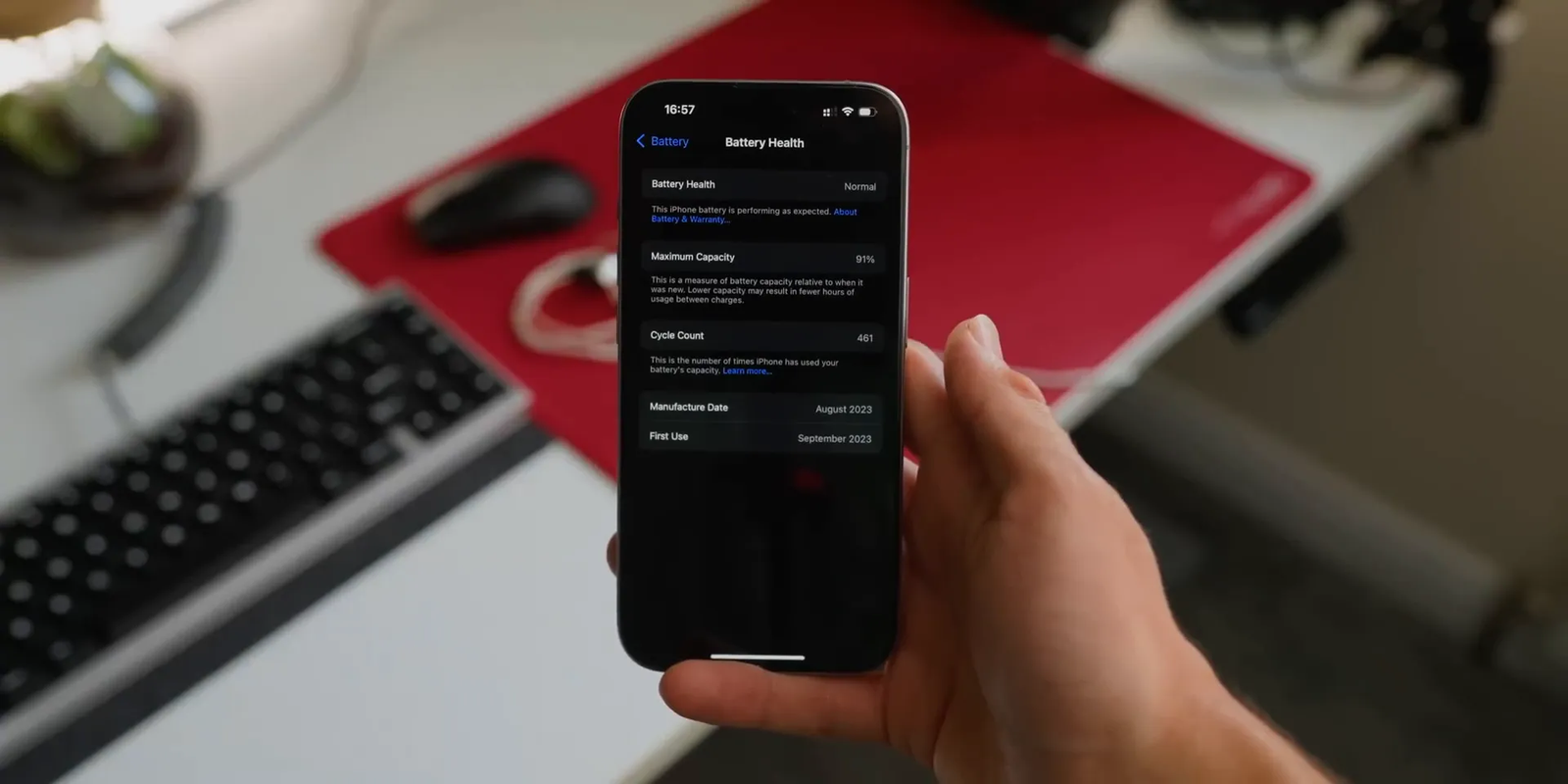
- My iPhone showed 91% maximum capacity after 461 cycles, while the Apple Watch Ultra showed 97% after about 21 months.
- Heat control, safe charging equipment, and replacing a failing battery matter more than following a perfect percentage rule.
Why Limit Charging to 80%?
The idea comes from how lithium-ion batteries age. Temperature, state of charge, and load are major external stress factors. Higher state-of-charge operation can accelerate degradation, while temperature is often the strongest stress factor. A peer-reviewed review in Physical Chemistry Chemical Physics explains these mechanisms in detail. Read the lithium-ion battery degradation review.
A phone at 80% is not protected by a magical cutoff. The benefit comes from reducing how long the battery remains near its highest voltage. The value is greatest when a device would otherwise stay at 100% for hours, especially in a warm room, hot car, or heat-trapping case.
Apple uses this principle in its charging features. Optimized Battery Charging reduces the time an iPhone stays fully charged, while iPhone 15 models and later can use a fixed Charge Limit from 80% to 100% in 5% steps. See Apple’s current Charge Limit guidance.
You do not need to treat 80% as a daily law. A practical battery-care routine has three priorities: limit unnecessary heat, avoid leaving the device full for long periods when convenient, and use enough charge to complete your day.
Apple recommends avoiding use or charging in ambient temperatures above 95°F (35°C), because high heat can permanently reduce battery lifespan. See Apple’s iPhone battery maintenance guidance.
Note: Charging to 100% is normal and safe with a compatible charger. The long-term concern is repeated time spent hot and fully charged, not the act of reaching 100% once.
Battery Cycle Ratings: What 80% Health Means
Battery health usually describes how much charge the battery can hold compared with its original capacity. A battery rated at 5,000 mAh that has declined to 80% maximum capacity may hold roughly 4,000 mAh under comparable test conditions. The phone’s estimate is useful, but it is not a laboratory measurement and can change after software recalibration.
| Device category | Apple’s stated capacity target | What it means |
|---|---|---|
| iPhone 14 models and earlier | 80% of original capacity at 500 complete charge cycles under ideal conditions | This is a design target, not a promise for every battery. |
| iPhone 15 models and later | 80% of original capacity at 1,000 complete charge cycles under ideal conditions | Newer iPhones have a higher stated cycle target. |
| Apple Watch | Up to 80% of original capacity at 1,000 complete charge cycles | Actual capacity still depends on use, charging, and temperature. |
Apple lists the 500-cycle and 1,000-cycle targets for iPhone models in its current battery guidance. See Apple’s iPhone battery cycle information. Apple also states that Apple Watch batteries are designed to retain up to 80% of original capacity at 1,000 complete cycles. See Apple’s battery service and recycling guidance.
A complete cycle does not mean one connection to a charger. It represents cumulative use equal to 100% of the battery’s capacity. For example, using 50% one day and 50% the next adds up to one complete cycle.
The 2-Year Test Results
For this experiment, I used an iPhone and an Apple Watch Ultra that I had used consistently since their release. I kept charging near 80% for about 21 months, while allowing a higher charge whenever I expected a long day. The original test record did not identify the exact iPhone model, so the result should not be used as a model-to-model comparison.
Note: This was an uncontrolled personal test. I did not hold temperature, charger power, app use, signal strength, or background activity constant, and I did not run a second identical device at 100% as a control.
| Device | Use period | Charging habit | Battery health result | Cycle count |
|---|---|---|---|---|
| iPhone | About 21 months | Mostly limited near 80% | 91% | 461 cycles |
| Apple Watch Ultra | About 21 months | Mostly limited near 80% | 97% | Not shown in the same way on the device |
- The iPhone’s reported maximum capacity was 91% after 461 charge cycles.
- The Apple Watch Ultra’s reported maximum capacity was 97%.
After about 21 months, the tested iPhone reported 91% maximum capacity at 461 cycles, while the Apple Watch Ultra reported 97%. These are personal results, not a guaranteed outcome.
The results are consistent with the idea that reducing time at high charge can support battery longevity. They do not prove that the 80% limit caused the outcome. Battery-cell variation, device temperature, workload, software behavior, and charging hardware could also explain part of the result.
My Charging Routine
Here is the routine I followed most of the time. It was flexible enough to keep using without turning charging into a daily project.
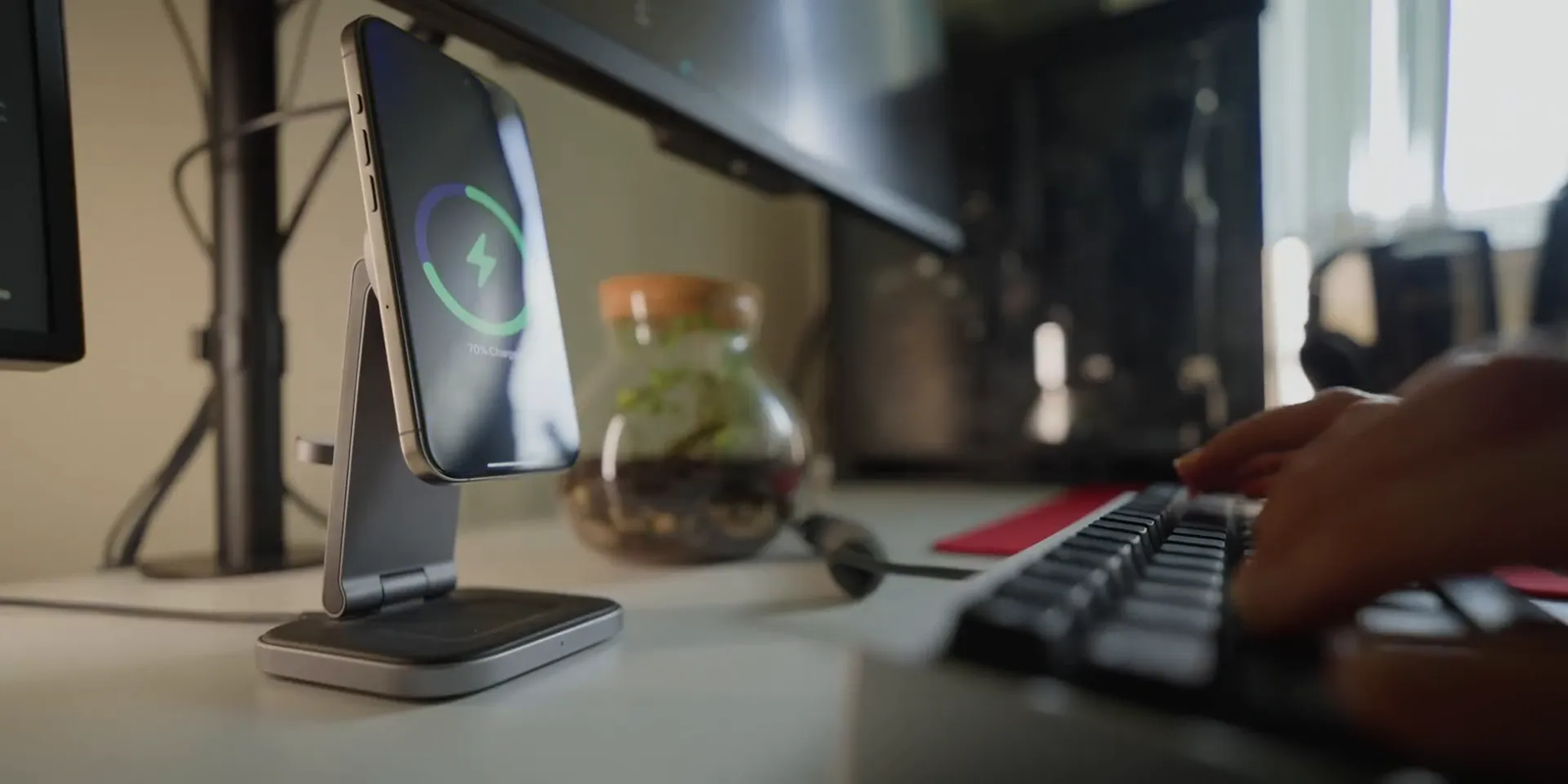
- I mostly used wireless charging on a MagSafe dock at my desk and bedside table.
- I charged in shorter sessions and usually avoided letting the battery run completely flat.
- If I was at my desk or in bed, the phone was usually near a charger.
- For long video calls with family, I often connected a power bank so the battery would not drain heavily during the call.
- I avoided demanding tasks while charging whenever the phone felt unusually warm.
- I allowed a full charge before travel or other days when 80% might not last.
Wireless charging was convenient, but alignment and heat mattered. A poorly aligned phone, thick case, warm room, or high-power charging session can raise temperature. A slow wired charger may run cooler in some setups, but the result depends on the phone, adapter, cable, case, and room temperature.
| Habit | Likely battery effect | Practical advice |
|---|---|---|
| Keeping charge near 80% | Reduces time spent at a high state of charge | Use it on normal days when 80% comfortably covers your needs. |
| Avoiding repeated full discharge | Avoids unnecessary deep cycling | Charge when convenient instead of deliberately draining to 0%. |
| Wireless charging | Convenient, but poor alignment can add heat | Center the phone correctly and remove a heat-trapping case if it becomes hot. |
| Heavy use while charging | Gaming, navigation, video, and camera use can add heat | Pause or reduce the workload if the device becomes hot. |
| Charging to 100% | Provides maximum runtime but increases time at high charge | Use it when the extra runtime has real value. |
The biggest lesson was not to obsess over every percentage point. Keeping the phone reasonably cool and using a flexible charge limit was more useful than trying to maintain a perfect 20% to 80% window.
80% Charge Limit vs. Optimized or Adaptive Charging
A fixed charge limit and optimized charging solve the same problem in different ways. A fixed limit stops below full charge. Optimized or adaptive charging still reaches 100%, but delays the final part so the phone spends less time sitting full.
| Charging option | Best for | Main tradeoff |
|---|---|---|
| Fixed 80% limit | People who have battery headroom and stay near power | You begin each day with about one-fifth less usable charge. |
| Optimized or adaptive charging | People who want a full battery with less time at 100% | It depends on a predictable routine and may not activate during travel. |
| Manual full charge when needed | Travel, long commutes, events, camera use, and navigation | The battery spends more time at a high state of charge. |
Pro Tip: Keep the limit enabled for routine days, then temporarily choose a higher limit or “Charge to Full Now” before a demanding day. This preserves convenience without abandoning battery protection entirely.
How to Use Charge Limits on iPhone, Apple Watch, Pixel, Samsung, and ROG Phones
Battery protection features vary by brand, model, software version, charger, and region. Update the device, then check its own Battery or Charging menu before assuming a feature or menu path is available.
iPhone Charge Limit and Optimized Battery Charging
iPhone 15 models and later can use a Charge Limit between 80% and 100% in 5% increments. When the limit is below 100%, the iPhone may occasionally charge to 100% to maintain accurate state-of-charge estimates. iPhone 14 models and earlier use Optimized Battery Charging rather than a fixed charge limit. Apple explains both charging options.
- Open Settings.
- Tap Battery.
- On iPhone 15 or later, tap Charging and choose a limit.
- On iPhone 14 or earlier, tap Battery Health & Charging and keep Optimized Battery Charging enabled.
Apple Watch Optimized Charge Limit
Supported Apple Watch models use Optimized Battery Charging and, with watchOS 10 or later, Optimized Charge Limit. The watch learns your routine and may stop near an optimized level on some days while allowing a full charge on others. See Apple’s current Apple Watch charging guidance.
- Open Settings on the Apple Watch.
- Tap Battery, then Battery Health.
- Review Optimized Battery Charging and Optimized Charge Limit, if shown.
- To override the limit for one charge, leave the watch on its charger, tap the charging icon, and choose Charge to Full Now.
Google Pixel 80% Charging Limit
Google says the fixed 80% option is available on Pixel 6a and later devices. Google also states that a Pixel using this setting needs a full charge every tenth cycle to keep capacity readings accurate. Leave it connected for at least 30 minutes after it reaches 100% when that calibration charge occurs. See Google’s Pixel charging optimization guidance.
- Open Settings.
- Tap Battery.
- Tap Battery health.
- Tap Charging optimization.
- Turn on charging optimization and choose Limit to 80%.
Samsung Galaxy Battery Protection and Gaming Mode
Many Galaxy phones include a Battery protection menu under Settings > Battery. Available modes and charge ceilings vary by model and One UI version, so use the option shown on your device rather than relying on an old menu screenshot.
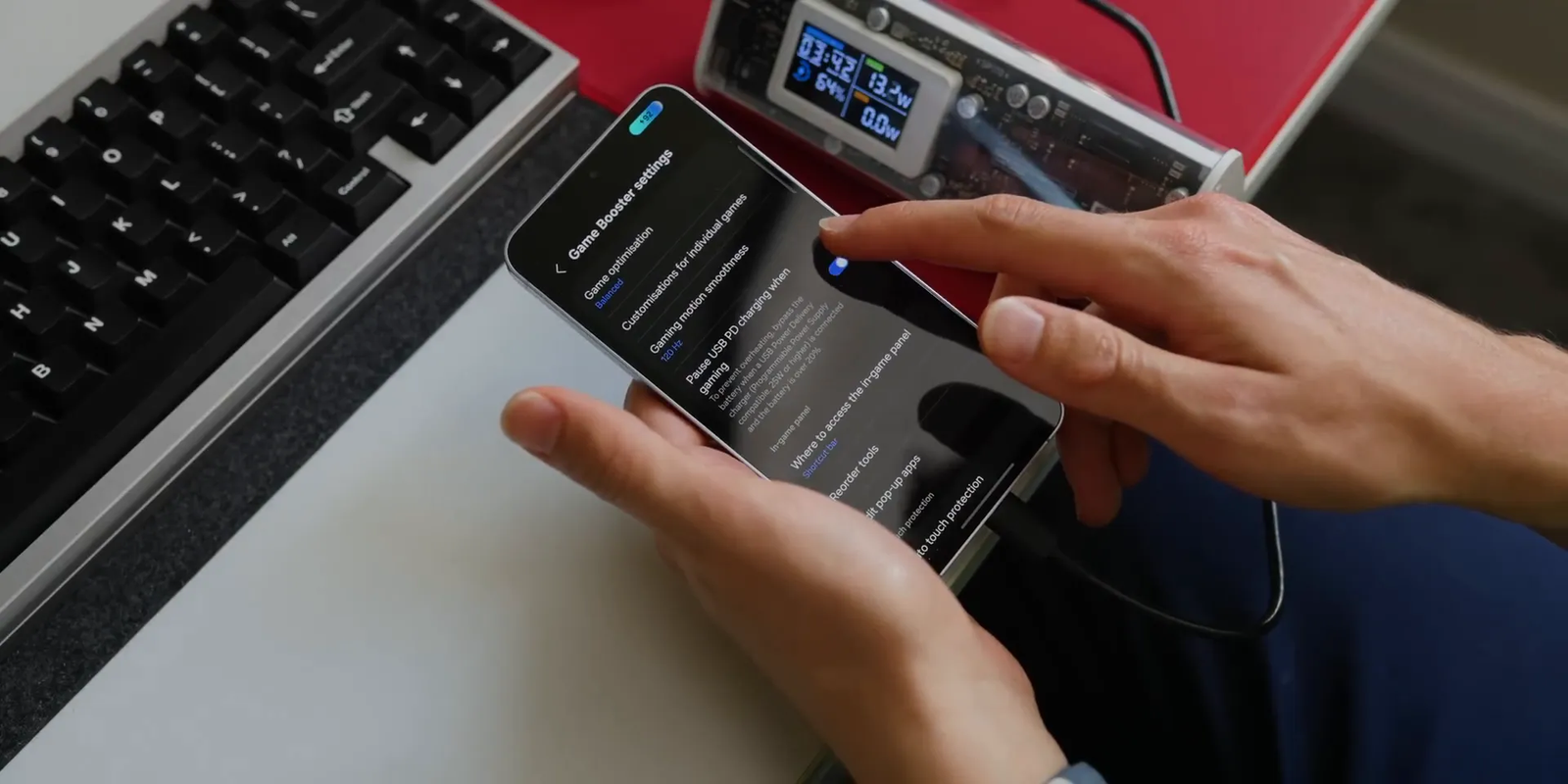
Some compatible Galaxy phones also include Pause USB PD charging when gaming in Game Booster. Samsung states that the feature needs a compatible model, an active game, at least 20% battery, and a 25W-or-higher USB PD charger with PPS support. See Samsung’s requirements and setup steps.
- Connect a supported USB PD PPS charger.
- Open Gaming Hub.
- Tap More, then Game Booster.
- Turn on Pause USB PD charging when gaming, if available.
ASUS ROG Phone Bypass Charging
ASUS has documented bypass charging for ROG phones through Game Genie. The feature powers the phone from the connected adapter while reducing or stopping battery charging during supported use. Availability and menu names vary by ROG Phone model and software version, so confirm the feature in your phone’s current Game Genie menu or model manual. See ASUS’s ROG Phone bypass-charging explanation.
USB Pass-Through Charging: The Android Feature Heavy Users Should Know
USB pass-through charging, often called bypass charging, lets a compatible phone use power from the charger while reducing or pausing power sent to the battery. This can reduce battery cycling and heat during demanding plugged-in tasks.
The feature is most useful for long gaming sessions. It can also be valuable in principle for navigation, livestreaming, video calls, or camera work, but app and manufacturer restrictions matter. Samsung’s official implementation is tied to an active game in Game Booster, so it is not a universal bypass mode for every app.
Bypass charging also depends on compatible hardware. A charger with enough power, the correct USB PD or PPS support, a minimum battery level, and a supported phone may all be required. If the option is missing or grayed out, check the charger first, then the phone model, software version, and active app.
Common Battery Myths You Can Stop Worrying About
Battery advice becomes unhelpful when a reasonable guideline turns into a strict rule. These common claims need more context.
Myth 1: You Must Always Stay Between 20% and 80%
You do not need to manage every percentage point. A 20% to 80% range can reduce time at charge extremes, but it is not a safety requirement. Use the full battery when your day calls for it.
Myth 2: Charging Overnight Always Ruins Your Battery
Modern phones manage charging and stop continuously forcing current into a full battery. The more relevant concern is how long the phone stays full and warm. Optimized charging features reduce that time by delaying the final part of the charge.
Myth 3: Wireless Charging Is Always Bad
Wireless charging is not automatically harmful. Poor alignment and trapped heat are the practical concerns. If the phone remains cool and the charger is compatible, wireless charging can be a reasonable daily option.
Myth 4: A Battery Health Drop Means Your Phone Is Broken
Maximum capacity naturally declines as a battery chemically ages. A gradual drop is normal. Rapid decline, unexpected shutdowns, swelling, or a large change in daily runtime deserves closer attention.
Myth 5: You Should Never Use Fast Charging
Fast charging is useful when time matters, and phones control charging power to stay within their design limits. Heat is the factor to watch. Use a compatible charger, keep the phone ventilated, and switch to a slower charger when speed has no value and the faster setup runs noticeably warmer.

When an 80% Charge Limit Is Worth Using
An 80% limit makes the most sense when your normal routine gives you extra battery headroom. It is especially useful if you work near a charger, use a desk dock, charge in short sessions, or regularly finish the day with 20% or more remaining.
- Use an 80% limit on routine workdays when you stay near power.
- Use it overnight when your device supports a reliable fixed limit.
- Use it when the phone often remains plugged in for hours.
- Consider a 85%, 90%, or 95% limit on supported devices if 80% is too restrictive.
- Turn the limit off or raise it before travel, events, long commutes, or heavy camera and navigation use.
The best routine is flexible. Battery care should support your life rather than make your phone less useful.
When Battery Health Matters More Than Charging Habits
Charging habits can slow some forms of wear, but they cannot stop chemical aging. Once the battery no longer meets your needs, service usually provides more value than adding stricter charging rules.
Consider professional battery service when you notice one or more of these signs:
- Maximum capacity has fallen near or below 80% and daily runtime is no longer adequate.
- The phone shuts down unexpectedly before the battery reaches 0%.
- Performance is limited because the battery cannot deliver enough peak power.
- The device cannot last through your normal day even after software and app issues are ruled out.
- The battery swells, the case separates, or the screen begins lifting from the frame.
Warning: Stop charging and using a device with a swollen battery, unusual chemical odor, smoke, hissing, or extreme heat. Do not puncture, press, or attempt to remove the battery yourself. Move away from flammable materials if it is safe to do so and contact the manufacturer or a qualified repair provider.
Apple states that battery replacement is available for iPhones and that eligible AppleCare coverage includes replacement at no extra charge when capacity drops below 80%. Coverage, fees, and consumer-law rights vary by country and plan. See Apple’s current iPhone battery service information.
Conclusion: Should You Limit Your Battery Charge?
Based on this approximately two-year real-world test, an 80% charge limit can be a sensible habit when it fits your routine. The tested iPhone reported 91% maximum capacity after 461 cycles, and the Apple Watch Ultra reported 97% after about 21 months. Those are strong personal results, but they are not proof or a guarantee.
The practical takeaway is simple: use a lower charge limit when you have enough daily runtime, avoid unnecessary heat, and allow a full charge when the extra power matters. Optimized or adaptive charging is a useful middle ground when a fixed 80% limit feels too restrictive.
If your device already lasts all day, enable the available battery protection feature and stop thinking about every charge. If it barely lasts through your routine, use the full battery and consider service when capacity or reliability becomes a problem.
Frequently Asked Questions
Why is 80% often recommended for lithium-ion batteries?
A lower limit reduces the time the battery spends at a high state of charge and high voltage. That can reduce one source of long-term stress, especially when the device would otherwise remain full and warm for hours.
Will limiting my phone’s charge to 80% reduce daily battery life?
Yes. You begin with less usable energy, so the setting is a poor fit when you already struggle to finish the day. It works best when you usually have charge left or spend much of the day near power.
Is charging to 100% bad for my phone?
No. Reaching 100% is normal and useful when you need maximum runtime. For long-term battery care, avoid leaving the phone hot and fully charged for unnecessary periods.
Is wireless charging bad for my battery?
Wireless charging is generally fine with compatible equipment. Check the phone’s temperature, alignment, case thickness, and ventilation. A setup that repeatedly makes the phone hot is less desirable than one that stays cool.
What is USB pass-through or bypass charging?
It lets a compatible phone draw power from the adapter while reducing or pausing battery charging. This can reduce battery cycling and heat during supported activities, although charger, app, and model requirements vary.
Which phones support an 80% charging limit?
iPhone 15 models and later and Pixel 6a and later support a fixed limit through current software. Many Samsung Galaxy phones and some gaming phones offer battery protection or charge-limit features, but exact options vary by model, software version, and region.
Should I keep my phone between 20% and 80% all the time?
No. Treat that range as a battery-care guideline rather than a strict rule. Avoiding long periods at the extremes may help, but convenience and reliable daily runtime matter more than perfect percentage control.
Does fast charging damage phone batteries?
Compatible fast charging is managed by the phone and is useful when you need speed. It may produce more heat in some conditions. Heat, charger quality, and device temperature matter more than treating all fast charging as harmful.
When should I turn off the 80% charge limit?
Raise or disable it before travel, long workdays, outdoor events, heavy navigation, camera-intensive use, or any situation where running out of power would create a bigger problem than modest extra battery wear.
When should I replace my phone battery?
Consider service when reduced capacity, unexpected shutdowns, performance limits, or poor runtime interfere with normal use. Treat swelling or physical separation as an urgent safety issue, regardless of the displayed health percentage.
Do I need to drain my phone to 0% to calibrate the battery?
Usually not. Modern battery-management systems estimate charge without routine full discharges. Follow the manufacturer’s software behavior instead. For example, a Pixel using the 80% limit performs a scheduled full calibration charge every tenth cycle.
Does plugging in twice count as two battery cycles?
No. A complete cycle is based on cumulative battery use equal to 100% of capacity, not the number of charging sessions. Two separate 50% discharges add up to about one complete cycle.
Sources
- Physical Chemistry Chemical Physics: Lithium-ion battery degradation review — explains the effects of temperature, state of charge, load, and degradation mechanisms.
- Apple: Charge Limit and Optimized Battery Charging on iPhone — confirms supported iPhone charge-limit options and charging behavior.
- Apple: iPhone battery and performance — confirms battery health displays and stated cycle-capacity targets.
- Apple: Optimized Battery Charging on Apple Watch — explains Optimized Charge Limit, supported models, and manual full-charge overrides.
- Google Pixel Help: Charging optimization and 80% limit — confirms Pixel compatibility, menu steps, and the tenth-cycle calibration charge.
- Samsung: Pause USB PD charging when gaming — confirms charger, battery-level, software, and gaming requirements.