Disclosure: As an Amazon Associate, we earn from qualifying purchases. If you click a link on this page and make a purchase, we may receive a small commission at no extra cost to you.
Keeping a vehicle battery charged during storage can be difficult, especially when you own several battery types. The OPTIMA Batteries Digital 400+ 12V Battery Charger and Maintainer offers 4-amp automatic charging, dedicated battery profiles, and a clear LCD display. It supports compatible AGM, flooded lead-acid, and OPTIMA lithium iron phosphate batteries. This review explains where its smart charging features help, why battery compatibility matters, and when its 4A output may be too slow for your needs.
Quick Verdict
Editorial Rating: 8/10, Recommended with caveats
Best For: Owners of compatible 12V batteries who want clear charging feedback, routine charging, and dependable storage maintenance.
Bottom Line: The OPTIMA Digital 400+ combines four battery profiles, an informative LCD, and automatic maintenance in a practical charger. However, its 4A output is not ideal for rapid recovery of large batteries, and its 120V-class AC input limits where you can use it.
Key Specifications
| Specification | Detail |
|---|---|
| Brand | OPTIMA Batteries |
| Product | Digital 400+ 12V Battery Charger and Maintainer |
| Model | 150-41220 (D400+) |
| Amazon ASIN | B0D285RZ5C |
| Product type | Automatic multi-stage battery charger and maintainer |
| Supported battery voltage | 12V |
| Maximum charging current | 4A |
| AC power input | 100–120V AC, 60Hz, as specified in the D400+ manual |
| DC charging output | Up to 14.75V DC, digitally and temperature controlled |
| Battery compatibility | Compatible 12V flooded lead-acid, AGM, and specified OPTIMA LiFePO4 batteries |
| Charging profiles | OPTIMA Li, OPTIMA AGM, Auto/Marine, Powersport |
| Charging stages | Analyze, Charging, Conditioning, Auto Maintain |
| Display | Illuminated LCD and four-color LED status bar |
| Additional controls | Battery selector, pre-charge status, charge-level gauge, silence control |
| Connection types | Battery clamps, ring terminals, OPTIMA LiFePO4 connection |
| Cable length | 6-foot AC and DC cables, according to the D400+ manual |
| Dimensions | Approximately 8.2 × 4 × 2.8 inches in the manual; Amazon separately lists 7 × 3 × 9 inches |
| Mounting options | Portable placement, hook/kickstand, included wall organizer bracket |
| Safety features | Reverse-polarity protection, over-temperature protection, spark-free connection technology |
| Independent charging outputs | 1 |
| Warranty | 3-year limited manufacturer warranty, subject to warranty conditions |
| Best use | Seasonal vehicle storage, compatible battery maintenance, routine charging |
Editorial note: This assessment uses the linked Amazon listing, OPTIMA specifications, and D400+ operating instructions. Charging speeds and long-term results have not been independently bench-tested for this review. The different published dimensions are presented separately rather than treated as one confirmed measurement.
What Is the OPTIMA Digital 400+?
The OPTIMA Digital 400+ (model 150-41220) is a microprocessor-controlled charger for compatible 12V vehicle batteries. Instead of supplying a fixed charging current throughout the process, it uses automatic charging stages and a selected battery profile to manage charging and maintenance.
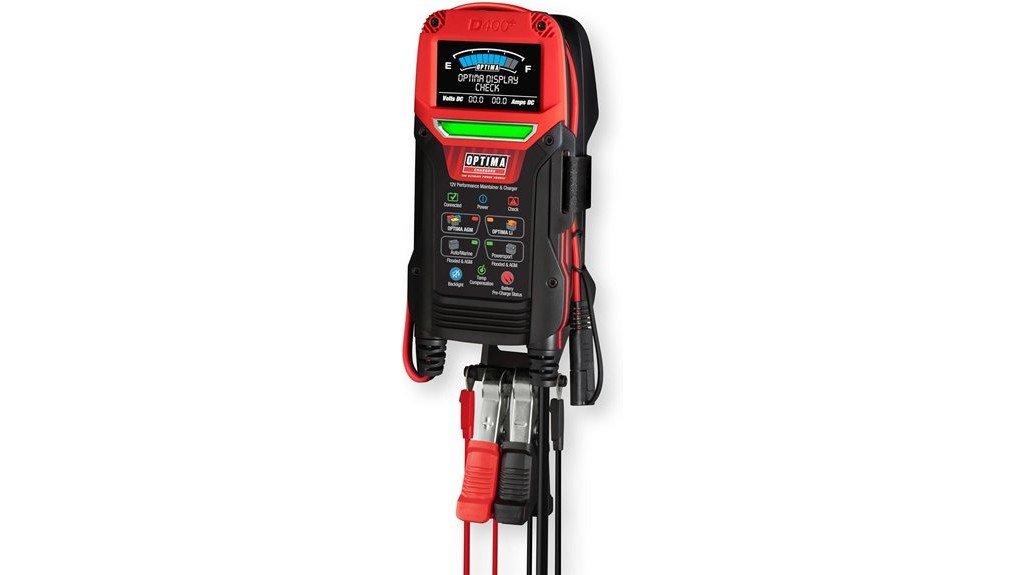
Its four profiles cover OPTIMA lithium iron phosphate, high-performance AGM, standard automotive or marine batteries, and smaller powersport lead-acid batteries. The illuminated display, interchangeable leads, and automatic maintenance mode make it useful when you charge batteries at home or keep vehicles parked between seasons.
It is a single-output charger, not a multi-bank charging system. Its main advantage is controlled charging and useful feedback, rather than high charging current.
Key Takeaways
- 4A maximum output: Suitable for routine 12V charging and maintenance, but slower than high-output chargers.
- Four charging profiles: You can select the mode that matches a supported battery type.
- LCD and LED feedback: You can monitor voltage, charging current, status, and progress.
- Automatic storage maintenance: Energy Saver Auto Maintain mode helps keep compatible batteries charged during storage.
- Multiple connection options: Clamps, ring terminals, and a dedicated OPTIMA lithium connection support different setups.
- Important limits: The unit is designed for 12V batteries and 100–120V AC power, not 6V batteries, 220–240V direct AC input, or large 4D and 8D batteries.
Before You Buy: Confirm your battery voltage, chemistry, size, and local AC supply. The D400+ manual specifies 100–120V AC, 60Hz input, so you must not connect it directly to a 220–240V wall outlet. It is not intended for 6V batteries, high-capacity 4D or 8D batteries, or every type of lithium battery. Check the manual and battery manufacturer’s requirements before purchasing.
Key Features and What Sets It Apart
Four Digital Battery Charging Profiles
The battery-type selector is central to the Digital 400+. Charging needs vary by battery chemistry, so selecting the right profile matters more than simply connecting the clamps.
- OPTIMA Li: Intended for supported OPTIMA 12V LiFePO4 batteries, including applicable ORANGETOP models.
- OPTIMA AGM: Intended for OPTIMA AGM and other compatible high-performance AGM batteries.
- Auto/Marine: Intended for compatible standard 12V flooded lead-acid and AGM applications.
- Powersport: Intended for smaller compatible 12V flooded and AGM batteries used in motorcycles and similar equipment.
The charger remembers the selected battery type after your first setup. This is convenient when you maintain the same vehicle, but you must check the setting when switching to another battery.
Do not assume the lithium setting supports every lithium chemistry or brand. The D400+ manual specifically documents OPTIMA LiFePO4 compatibility. Confirm any other lithium battery with its manufacturer before use.
LCD Display and Four-Color LED Status Bar
The illuminated LCD displays charging information such as battery voltage, current, and state of charge. A separate LED bar helps you identify the charging stage.
- Blue: Battery analysis is underway.
- Red: Active charging.
- Amber: Conditioning stage.
- Green: Automatic maintenance mode.
The pre-charge status feature and charge-level gauge add more detail than a basic maintainer with a single indicator light. A separate Check indicator alerts you when the charger detects a connection or battery fault.
This information is useful when you maintain several vehicles because you can check charging progress without relying entirely on elapsed time.
Energy Saver Auto Maintain Mode
Once the charging and conditioning process is complete, the Digital 400+ can enter Auto Maintain mode. It then monitors the battery and maintains charge rather than continuously applying its full charging current.
This makes the charger especially useful for seasonal cars, motorcycles, and other equipment that sits unused. The Energy Saver design also aims to reduce AC power consumption during maintenance.
You still need a healthy, compatible battery and a suitable charging environment. Maintenance mode cannot repair internal battery damage or correct an electrical fault that keeps draining the battery.
Battery Clamps, Ring Terminals, and POWERLINK Compatibility
The Digital 400+ includes interchangeable connections for different charging situations.
Battery clamps are useful when you regularly move the charger between compatible batteries. Ring terminals support repeated access to a seasonal vehicle’s battery without reinstalling clamps each time.
The dedicated OPTIMA LiFePO4 cable supports compatible OPTIMA lithium battery setups. For the HYPERCORE LITHIUM connection described in the manual, the charger-side cable connects to the battery’s POWERLINK cable. The mating POWERLINK cable is supplied with the applicable battery, so confirm your complete connection setup before charging.
For these OPTIMA lithium batteries, the manual instructs you to use the specified POWERLINK connection rather than connecting ordinary clamps or ring terminals directly to the battery posts.
Design, Build, and Usability
The Digital 400+ has a compact body with integrated cable management, a hook and kickstand, and a wall organizer bracket. This gives you several ways to position the charger while keeping its display visible.
The D400+ manual lists dimensions of approximately 8.2 × 4 × 2.8 inches. Amazon lists 7 × 3 × 9 inches for ASIN B0D285RZ5C. Because those measurements differ, confirm the physical dimensions if you need to fit the charger into a tight storage location.
The wall bracket is useful for a fixed charging station. The cable wrap helps keep the AC and DC cords organized when the unit is stored.
You can select a charging profile using the front controls and check its operating stage on the display. The main learning step is understanding which battery profile matches your battery, especially when changing between AGM, flooded, and lithium applications.
Performance: Charging, Efficiency, and Safety
How Fast Does the 4A Charger Work?
The maximum output is 4 amps. This provides a practical charging rate for smaller batteries and routine maintenance, but larger batteries generally need more time to recharge.
For example, replacing 20 amp-hours of charge would take at least five hours at a constant 4A rate. Real charging usually takes longer because charging current can taper, and battery condition and charging stages affect the result.
That means you should not expect a fixed charging time for every 12V battery. Capacity, starting charge level, temperature, and battery condition all matter.
Multi-Stage Charging and Temperature Compensation
The Digital 400+ analyzes the battery, charges it, completes its conditioning stage, and then enters maintenance when appropriate. This automatic process reduces the need for you to manage charging stages manually.
Its digitally controlled charging system also provides temperature compensation. This helps the charger adjust its charging behavior under supported operating conditions.
These features are useful, but they do not guarantee that a worn-out or damaged battery can be restored.
Safety Protections and Fault Detection
OPTIMA lists reverse-polarity protection, spark-free connection technology, and over-temperature protection. The display can also report problems that require attention.
If the Check indicator appears, stop and consult the manual. Possible causes include reversed connections, unsuitable battery voltage, poor connections, excessive temperature, or battery failure.
Do not bypass safety warnings or attempt improvised recovery methods on a damaged or severely discharged battery. A qualified battery technician can test the battery when normal charging does not work.
How It Performs in Real Use
The following scenarios describe expected suitability based on the charger’s documented features, not results from independent hands-on testing.
For Seasonal Car Storage
The Digital 400+ is well suited to keeping a compatible 12V battery maintained when a car spends weeks or months parked.
Once charging finishes, Auto Maintain mode can monitor the battery during storage. The ring-terminal connection is also convenient when you repeatedly maintain the same vehicle.
If the vehicle has a persistent electrical drain, maintenance alone may not solve the underlying problem.
For Motorcycles and Powersport Equipment
Motorcycle and ATV batteries can differ significantly from full-size car batteries. The Powersport profile gives you a dedicated option for supported smaller AGM and flooded lead-acid batteries.
For an OPTIMA lithium powersport battery, use the specific lithium mode and connection procedure required by the manual.
Check battery capacity and the manufacturer’s permitted charging current before use. A 4A charger is not automatically suitable for every small battery.
For Marine and Recreational Use
The Auto/Marine profile supports compatible 12V flooded and AGM applications. The Digital 400+ can therefore suit a single marine or recreational battery that needs routine charging or maintenance.
However, the D400+ manual requires marine batteries to be removed and charged on shore. It is not a replacement for a purpose-built multi-bank onboard marine charger.
For Large or Deeply Discharged Batteries
The 4A output becomes a limitation when you need rapid recovery of a large battery. A higher-output charger can be a better choice when charging time matters.
Battery size also affects compatibility. OPTIMA specifically excludes large 4D and 8D batteries from the D400+’s intended applications.
Very low battery voltage may trigger a fault rather than normal charging. If that happens, have the battery checked instead of assuming the charger can restore it.
What’s in the Box and Compatibility
The D400+ documentation identifies the following equipment:
- OPTIMA Digital 400+ charger and maintainer
- Battery clamp connection cable
- Ring-terminal connection cable
- OPTIMA LiFePO4 connection cable
- Wall organizer bracket and mounting hardware
- AC and DC power cables
- Operating instructions
The manual specifies 6-foot AC and DC cables. The charger can be mounted or used portably, depending on your setup.
Check the exact package contents when ordering, especially if you plan to use the OPTIMA lithium connection. The applicable battery-side POWERLINK cable may be supplied with the battery rather than the charger.
This is a single-output charger for supported 12V batteries. Having several connector styles does not mean you can charge several independent batteries at once.
Setup Tips Before First Use
- Identify your battery: Confirm that it is a supported 12V battery and find its chemistry and charging requirements.
- Check your AC supply: The D400+ manual specifies 100–120V AC, 60Hz. Do not connect it directly to a 220–240V outlet.
- Choose a safe location: Use a stable, ventilated position away from heat, flames, and damaged electrical equipment.
- Inspect the cables: Check clamps, connectors, cords, and terminals for damage or corrosion.
- Connect before applying AC power: Follow the manual’s connection sequence and the vehicle manufacturer’s battery instructions.
- Select the correct profile: Match the charging mode to the battery type. Check the saved setting whenever you switch batteries.
- Confirm normal operation: Watch the LCD and status indicators for the expected charging stage or any fault warning.
- Disconnect safely: Remove AC power before disconnecting the charging leads, following the manual’s procedure.
For a battery installed in a vehicle, the correct clamp connection points can depend on the vehicle’s grounding system and manufacturer instructions. Do not assume every installation uses the same connection sequence.
Pro Tip: If you store the same vehicle each season, consider installing the supplied ring-terminal lead in a protected, accessible location, following the manual. Before each charging session, verify the saved battery profile. This is especially useful when you also maintain a motorcycle or another vehicle with a different battery chemistry.
Compatibility and Safety
Battery charging involves electrical current and the possibility of flammable gases from some batteries. Wear eye protection, follow the battery and vehicle instructions, and keep the charging area ventilated.
Never charge a frozen, leaking, swollen, or visibly damaged battery. Do not use damaged charger cables or attempt to repair the sealed charging unit yourself.
The D400+ operating instructions specify a properly grounded, GFCI-protected AC outlet. The charger is not described as a universal-voltage unit, so buyers in regions with 220–240V mains power need to confirm a safe, compatible power arrangement before use.
For OPTIMA HYPERCORE LITHIUM batteries, follow the specified LiFePO4 and POWERLINK connection instructions. Do not use a lead-acid charging profile for lithium batteries.
Use a qualified technician when you cannot identify the battery chemistry, the battery repeatedly fails to charge, or the electrical system has an unresolved fault.
Who Should Buy It?
Best For
- Owners of compatible 12V AGM, flooded, or specified OPTIMA LiFePO4 batteries.
- Seasonal-vehicle owners who want automatic charging and storage maintenance.
- Home users who value an LCD display, battery-specific profiles, and flexible connections.
Skip If
- You need 6V support, direct 220–240V AC operation, or several independent charging outputs.
- You frequently recharge large batteries and need much faster charging.
- You need to maintain 4D, 8D, or other unsupported high-capacity battery systems.
Pros and Cons
Pros
- Four dedicated profiles for supported battery types.
- Illuminated LCD and four-color status bar provide detailed charging feedback.
- Automatic multi-stage charging and Energy Saver maintenance mode.
- Battery clamps, ring terminals, and OPTIMA lithium connection support several charging setups.
- Portable design with cable management, mounting options, and safety protections.
Cons
- 4A maximum output can make larger charging jobs slow.
- Limited to compatible 12V batteries, with restrictions on lithium and large-capacity applications.
- 100–120V AC input and one charging output limit its use in some locations and setups.
Is It Worth the Price?
The OPTIMA Digital 400+ is best viewed as a feature-focused battery charger rather than a basic low-cost trickle charger. Its value comes from selectable battery profiles, detailed charging feedback, automatic maintenance, and several connection options.
It is worth considering if you regularly maintain seasonal cars, motorcycles, or other compatible 12V equipment. The display and mounting features are especially useful when you want a dedicated charging station instead of a simple plug-in maintainer.
However, you may get better value from a higher-output model if you mostly recharge large batteries. If your only task is maintaining one small lead-acid battery, a simpler compatible maintainer may be enough.
How It Compares to Alternatives
The OPTIMA D200+ is a maintenance-focused alternative with a lower 2A maximum output. It is worth comparing if you mainly maintain compatible batteries during storage and do not need the D400+’s higher charging current and detailed interface.
The OPTIMA D1200+ is a higher-output alternative for buyers who need faster charging on supported batteries. The Digital 400+ sits between these options, with more charging current than the D200+ but less capacity for rapid charging than the larger D1200+.
Frequently Asked Questions
Can the OPTIMA Digital 400+ charge lithium batteries?
Yes, it has a dedicated profile for supported OPTIMA 12V LiFePO4 batteries. Use the specified OPTIMA lithium cable and POWERLINK connection where required. Do not assume it supports every lithium battery chemistry or brand.
Will the Digital 400+ charge a 6V battery?
No. The charger is designed for compatible 12V batteries. Use a charger specifically rated for 6V batteries if that is your system voltage.
Can I leave the OPTIMA Digital 400+ connected during storage?
Its Energy Saver Auto Maintain mode is designed for short- and long-term battery maintenance. Use this feature only with a supported battery and a safe power connection. Follow the manufacturer instructions for the charging environment and connection method.
Can the Digital 400+ charge two batteries at the same time?
No. It has one independent charging output and is not a multi-bank charger. Its interchangeable connections are intended for different battery setups, not simultaneous independent charging.
Does the Digital 400+ work with non-OPTIMA batteries?
It supports compatible 12V AGM and flooded lead-acid batteries from other manufacturers. Match the battery chemistry and charging requirements to the appropriate profile. For non-OPTIMA lithium batteries, confirm compatibility before use.
How long does the OPTIMA Digital 400+ take to charge a battery?
Charging time depends on capacity, starting charge level, battery condition, and charging stages. The maximum current is 4A, but actual current can decrease during charging. Larger or heavily discharged batteries usually need more time.
Who should skip the OPTIMA Digital 400+?
Skip it if you need 6V charging, multiple independent charging outputs, direct 220–240V AC operation, or rapid charging of large batteries. It is also unsuitable for high-capacity 4D and 8D batteries and unsupported battery chemistries. Choose a charger designed for your specific system instead.
The Bottom Line
The OPTIMA Batteries Digital 400+ 12V Charger and Maintainer is a recommended choice if you want automatic maintenance, clear charging information, and selectable profiles for compatible batteries. Its strongest features are the LCD display, four charging modes, and flexible connection options. However, its 4A output and compatibility limits make it less suitable for large batteries, rapid charging, and unsupported electrical systems.
Ready to Buy?
Confirm your battery compatibility and check the latest price and product details before you decide.