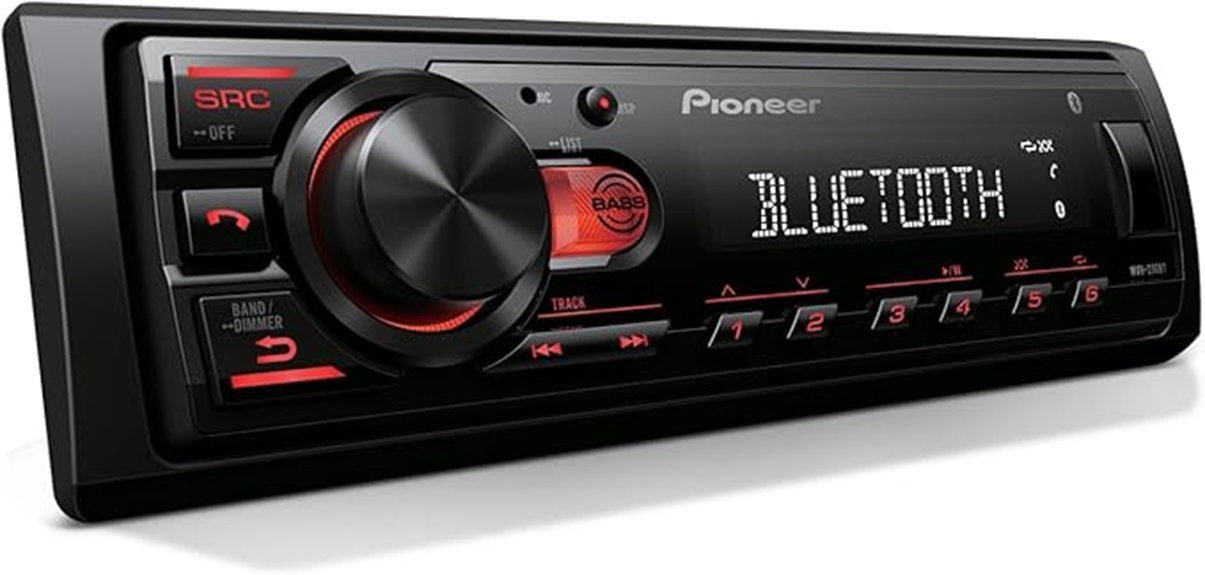
The Pioneer MVH-S230BT presents a compelling option for those seeking quality audio in their vehicle. With features such as Bluetooth connectivity for hands-free calling, a versatile USB input for multiple media formats, and audio enhancements like the Advanced Sound Retriever, this unit caters to diverse listening preferences. Measuring in at a compact size, it fits seamlessly into various dashboards. What specific audio enhancements can elevate your driving experience even further?
Key Takeaways
- The Pioneer MVH-S230BT offers seamless Bluetooth connectivity for hands-free calling and easy smartphone integration, enhancing driving safety.
- It features a USB input compatible with various media formats like MP3, WMA, and AAC for versatile music playback.
- Advanced audio quality enhancement includes an Equalizer and Dynamic Bass Enhancer, providing a richer sound experience.
- Its compact design (3.875” x 7” x 2”) allows for straightforward installation in various vehicle configurations.
- Overall, the receiver combines advanced features and audio performance, representing strong value in the digital media receiver market.
Bluetooth Connectivity and Hands-Free Calling
When considering a digital media receiver for a vehicle, the Bluetooth connectivity and hands-free calling features of the Pioneer MVH-S230BT stand out as particularly beneficial.
This model enables seamless Bluetooth pairing with smartphones, allowing drivers to make calls without distraction. Users can engage voice commands to access contacts, enhancing safety on the road.
The receiver supports a wide range of devices, ensuring compatibility with both iPhone and Android platforms. Additionally, the built-in microphone enhances call clarity, making conversations easier and more efficient.
USB Input and Media Playback Capabilities
The Pioneer MVH-S230BT excels in its USB input and media playback capabilities, making it a versatile choice for music enthusiasts.
It features a USB port that allows easy connection to smartphones, MP3 players, and USB drives. Users can enjoy a variety of media source options, including MP3, WMA, AAC, and WAV formats, ensuring excellent USB file compatibility. This flexibility caters to diverse digital music libraries, empowering users to play their favorite tracks with ease.
The receiver’s design also emphasizes straightforward installation, with dimensions of 3.875” x 7” x 2”, accommodating various vehicle configurations effectively.
Audio Quality Enhancement Features
Enhancing audio quality is a standout feature of the Pioneer MVH-S230BT, designed to elevate the listening experience for users.
With its innovative technology, this receiver effectively restores lost audio details, ensuring a more vibrant sound profile.
Key enhancements include:
- Advanced Sound Retriever: This feature improves sound restoration, making compressed music sound richer.
- Equalizer Options: Users can adjust frequencies to enhance audio clarity according to personal preferences.
- Dynamic Bass Enhancer: This function adds depth to lower frequencies, resulting in a fuller, more immersive sound.
Frequently Asked Questions
What Is the Warranty Period for the Pioneer MVH-S230BT?
The warranty details for the Pioneer MVH-S230BT typically span one year from the date of purchase, ensuring coverage for manufacturing defects and contributing to the overall product lifespan and user satisfaction with the receiver.
Can It Fit in Vehicles With Limited Installation Space?
The compact design of the Pioneer MVH-S230BT allows it to fit in vehicles with limited installation space. Its versatile installation options facilitate compatibility with various dashboards, making it a practical choice for space-constrained environments.
Is the Receiver Compatible With Both Ios and Android Devices?
The receiver is compatible with both iOS and Android devices, allowing 80% of smartphone users to connect seamlessly. Its Bluetooth connectivity enhances hands-free calling, while mobile app compatibility supports various music streaming options for an enriched experience.
How Do I Reset the Receiver to Factory Settings?
To reset the receiver to factory defaults, hold the reset button for several seconds until the display resets. Users should consult the manual for additional resetting tips to guarantee proper functionality post-reset.
Does It Support Voice Control Features for Smart Devices?
The device lacks robust voice command capabilities for smart integration, making it less revolutionary than some competitors. Users seeking seamless voice control for smart devices might find this feature disappointing in their audio experience.
Conclusion
To sum up, the Pioneer MVH-S230BT stands out as an excellent choice for drivers seeking superior audio performance and modern features. With its seamless Bluetooth connectivity, versatile USB input, and advanced audio enhancements, it caters to a wide range of listening preferences. For instance, a user in a busy city found the hands-free calling feature invaluable for maintaining focus on the road. Overall, this model combines quality and functionality, making it a remarkable option for music enthusiasts.