Disclosure: As an Amazon Associate, we earn from qualifying purchases. If you click a link on this page and make a purchase, we may receive a small commission at no extra cost to you.
Your old VHS tapes may hold family memories that you cannot replace, but finding a working VCR is becoming harder. The Sony SLV-N750 VCR offers four video heads, Hi-Fi stereo sound, and playback support for VHS and S-VHS tapes. It also has useful tracking controls, although its analog output and aging hardware bring some limits. This review explains its features, connections, tape compatibility, and buying risks so you can decide whether a renewed unit suits your needs.
Quick Verdict
Verdict: Recommended with caveats for VHS playback and basic home video digitizing.
Best For: VHS collectors, families preserving old home recordings, and buyers who need an NTSC VCR with Hi-Fi stereo sound.
Bottom Line: The Sony SLV-N750 combines four video heads, automatic tracking, and Quasi S-VHS playback in a 17-inch chassis. However, it has no HDMI output or built-in time base corrector, and the condition of a renewed unit can affect your experience.
Key Specifications at a Glance
| Specification | Detail |
|---|---|
| Brand | Sony |
| Model | SLV-N750 |
| Product Type | Standalone VHS video cassette recorder |
| Video System | NTSC VHS |
| Video Heads | Dual-azimuth, 4-head system with 19-micron heads |
| Audio System | VHS Hi-Fi stereo |
| Tape Playback | VHS SP, LP, EP; Quasi S-VHS playback |
| Recording Speeds | VHS SP and EP |
| S-VHS Recording | Not supported |
| Video Connections | Composite RCA video and RF coaxial connections |
| Audio Connections | Left/right RCA stereo audio |
| AV Inputs | One front and one rear composite AV input |
| Modern Outputs | No native HDMI, USB, or S-Video output |
| Tracking | Digital automatic tracking with manual adjustment |
| Time Base Corrector | No built-in TBC |
| Rewind Performance | Approximately 60 seconds for a T-120 tape under normal conditions |
| Recording Timer | Up to 8 programs |
| Dimensions | Approximately 17 × 3⅞ × 10½ inches (W × H × D) |
| Weight | Approximately 6 lb 3 oz (2.8 kg) |
| Power | 120V AC, 60Hz; 16W rated consumption |
| Finish | Silver |
| Original Accessories | Remote control, two AA batteries, and coaxial cable; renewed packages may differ |
Specification source: Sony SLV-N750 Operating Instructions. Dimensions and weight describe the VCR itself, not the shipping carton.
What Is the Sony SLV-N750 VCR?
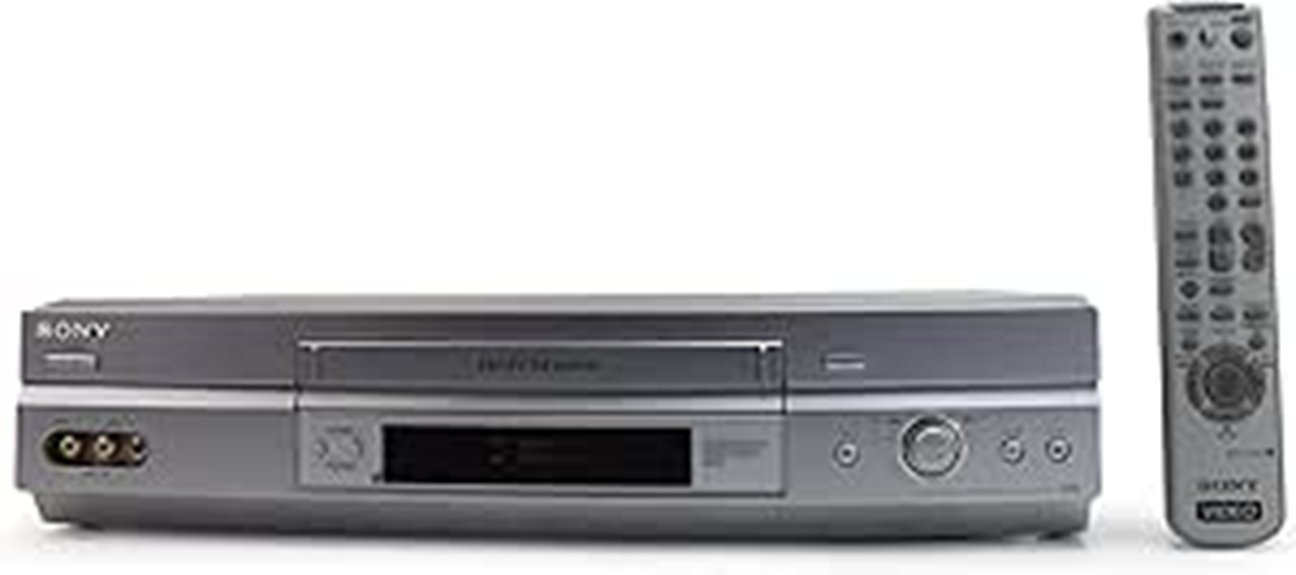
The Sony SLV-N750 is a standalone analog video cassette recorder designed for playing and recording NTSC VHS tapes. It uses a dual-azimuth, four-head video system and supports VHS Hi-Fi stereo sound. Its silver, 17-inch chassis was designed for home entertainment systems.
One useful feature is Quasi S-VHS playback. This lets you play S-VHS recordings on the deck, although you will not see the higher resolution that a full S-VHS player can provide. The SLV-N750 also supports automatic tracking, manual tracking adjustment, instant replay, and commercial skip.
You can use it to watch old movies, play family recordings, or feed analog video to an external capture device. It does not turn tapes into digital files by itself, so you need separate capture equipment for that task.
Who Should Buy It?
Best For
- Families who want to watch or digitize NTSC VHS home recordings.
- Collectors who value four-head playback, Hi-Fi stereo, and manual tracking controls.
- Buyers with older TVs, composite AV equipment, or an existing VHS capture setup.
Skip If
- You need built-in HDMI, USB recording, or direct digital video output.
- You need full-quality S-VHS playback, S-VHS recording, or a built-in time base corrector.
- You want a new, modern device without the risks of aging tape mechanisms.
Design and Build Quality
The Sony SLV-N750 uses a silver chassis that measures about 17 inches wide, 3⅞ inches high, and 10½ inches deep. At roughly 6 lb 3 oz, it fits on many standard media shelves without taking up the space of a larger combination deck.
The front panel provides direct access to important functions, including tape playback and tracking adjustment. Its playback dial also supports tape navigation. These controls matter when you buy a used unit without its original remote.
However, exterior condition tells you only part of the story. A clean-looking VCR can still have worn belts, dirty heads, or loading problems. When shopping for a renewed unit, pay more attention to verified playback and tape-ejection function than minor scratches on the cabinet.
Before You Buy: The SLV-N750 is an NTSC VCR designed for 120V AC, 60Hz power. It has no native HDMI connection and is not a PAL-format player. Check your tape format, electrical supply, TV inputs, and the seller’s included accessories before ordering.
Performance and Video Processing
Four-Head Video System
The SLV-N750 uses four dual-azimuth video heads, including 19-micron heads designed to improve extended-play recording quality. This arrangement also supports special playback functions such as still frames, slow motion, and picture search.
Four heads can offer more flexible playback than a basic two-head VHS deck. Still, they cannot restore detail that was never recorded or repair a physically damaged tape.
Automatic and Manual Tracking
Sony’s digital auto-tracking system adjusts playback to follow the recorded video tracks. This is helpful when you switch between tapes originally recorded on different VCRs.
If you see horizontal noise or a shaky picture, you can use the TRACKING +/- controls on the VCR. Manual adjustment may improve the image, but heavily worn tapes or recordings made in LP mode on another machine can remain difficult to play.
Hi-Fi Stereo Audio
VHS Hi-Fi stereo is a major reason to consider this model over a basic mono VCR. When you play a properly recorded Hi-Fi tape, the deck can reproduce separate left and right audio channels through its rear RCA outputs.
This is useful for concert recordings, commercial VHS movies, and home videos with stereo sound. However, an old tape recorded with mono audio will not gain true stereo detail simply because you play it on a Hi-Fi machine.
Flash Rewind and Tape Navigation
Sony specifies approximately one minute to rewind a T-120 tape. That can save time when you regularly watch movies or review recordings.
The deck also provides instant replay, index search, and commercial skip. These features make recorded programs easier to navigate, although actual performance depends on the tape and the condition of the mechanism.
Connectivity and Home Video Digitizing
Connecting to an Older Television
The easiest connection uses the rear composite RCA outputs. Connect yellow for video, white for left audio, and red for right audio to matching inputs on your TV or AV receiver.
The VCR also provides RF coaxial connections for older television setups. Composite AV is generally the more useful choice when you want stereo sound and a direct video signal.
Connecting to a Modern Smart TV
If your television has no composite input, you can use an active RCA-to-HDMI converter. Connect the VCR’s RCA outputs to the converter, then connect its HDMI output to the TV.
Choose a converter that accepts NTSC composite video and provides the output format your display needs. Remember that HDMI conversion does not turn VHS footage into true high-definition video.
Using a USB Capture Device
For digital archiving, connect the VCR’s composite video and stereo audio outputs to a compatible capture device. The capture device then sends the signal to a computer or recording system.
The SLV-N750 does not have a built-in time base corrector. As a result, tapes with unstable timing or damaged recordings may cause capture interruptions, dropped frames, or image distortion. A separate video stabilizing device or professional transfer service may be useful for difficult recordings.
How It Performs in Real Use
For Digitizing Family Home Videos
The four-head transport, Hi-Fi stereo outputs, and tracking controls make the SLV-N750 a reasonable candidate for basic VHS capture. You can connect it to an external capture device and record the video on your computer.
However, the VCR cannot guarantee stable digital capture from every aging tape. Test a short section first, check sound synchronization, and inspect the result before capturing a long recording.
For Watching Commercial VHS Movies
For standard NTSC VHS movies, you get features such as automatic tracking, Hi-Fi audio, and fast rewind. Instant replay is handy when you want to watch a scene again.
The picture will still have normal VHS limits, including relatively low resolution and possible analog noise. Playback quality also depends on how well the individual tape has aged.
For Playing S-VHS Recordings
The SLV-N750 can identify and play S-VHS cassettes through its Quasi S-VHS function. This provides a way to view compatible recordings when you do not own a dedicated S-VHS deck.
The important tradeoff is resolution. Sony states that enhanced S-VHS detail will not be visible, and some special playback modes may show distortion. If you need the best transfer quality from S-VHS originals, a proper S-VHS player is a better choice.
For Occasional Analog Recording
The front and rear AV inputs let you record compatible analog video sources onto VHS tapes. The SLV-N750 supports SP and EP recording and includes an eight-event timer.
Modern HDMI-only devices need suitable analog output equipment before you can connect them. Content protection may also prevent recording certain sources. The deck records standard VHS, not high-definition video.
Setup and Connection Tips for Best Results
A careful first setup can help you spot problems before you use important recordings.
- Check the power requirements: Use the specified 120V AC, 60Hz supply. Do not connect the unit directly to an incompatible electrical system.
- Inspect the tape: Look for broken cases, loose tape, visible mold, or other damage before inserting it.
- Test with a replaceable cassette: Confirm that the VCR loads, plays, stops, rewinds, and ejects properly before using valuable family tapes.
- Use the correct output: Connect the rear LINE OUT jacks to your TV, converter, or capture device. The front RCA connections are inputs, not playback outputs.
- Select the right TV input: Choose the composite AV input or the HDMI input connected to your converter.
- Adjust tracking when needed: Use the TRACKING +/- controls if the picture has noise. Ejecting and reinserting a tape restores automatic tracking.
- Check the audio: Use both red and white RCA connections when you want stereo playback.
Pro Tip: Before digitizing an irreplaceable recording, test the VCR with a spare tape and capture a short sample. Check the picture, audio, and tracking before starting the full transfer. This helps you catch equipment problems without risking your most valuable cassette.
Compatibility, Tape Safety, and Maintenance
Older VCRs need careful handling, especially when you use tapes that have been stored for many years. Avoid forcing a cassette into the loading slot or pulling out a tape that becomes stuck. If the mechanism jams, stop using the unit and seek qualified repair help.
Protecting Old VHS Tapes
Keep tapes away from moisture, heat, dust, and strong magnetic fields. If you notice visible mold or serious tape damage, do not play the cassette in a working VCR. A professional media restoration service is the safer option.
Repeated rewinding and playback can put extra stress on fragile recordings. For valuable tapes, consider making a digital copy once the equipment is working correctly.
Cleaning the VCR
The SLV-N750 includes an automatic head-cleaning feature, but it cannot correct every playback problem. Dirty video heads can still cause a snowy, unclear, or missing picture.
Sony’s manual recommends a Sony video head-cleaning cassette when cleaning is needed. It warns against commercially available liquid-type cleaning cassettes because they may damage the video heads. If the proper cleaning method is unavailable or the picture remains poor, consult a qualified technician.
Ventilation and Electrical Safety
Place the unit on a stable, level surface with room for air circulation. Do not cover its ventilation openings or place liquids on top of the cabinet.
If you move the VCR from a cold area into a warm room, Sony recommends allowing about three hours before use to reduce the risk of internal condensation. Never open the case for repairs unless you are qualified to service electrical equipment.
Customer Experience and Feedback
For an older VCR, seller condition and functional testing deserve more attention than an unverified average star rating. A refurbished listing should clearly explain the unit’s condition, testing process, included accessories, and return terms.
Before ordering, read recent seller feedback and look for specific comments about tape loading, playback, tracking, rewind, and ejection. A listing that only describes cosmetic condition may not tell you enough about the internal mechanism.
If the product is sold through Amazon Renewed, check the applicable condition grade and return coverage. Eligible Renewed items may have different return periods depending on their classification. Confirm the specific listing terms rather than assuming every refurbished VCR has identical protection.
Pros and Cons
Pros
- Four-head, dual-azimuth playback with 19-micron video heads.
- VHS Hi-Fi stereo audio through left and right RCA outputs.
- Quasi S-VHS playback supports viewing compatible S-VHS tapes.
- Digital automatic tracking with manual correction controls.
- Flash rewind, instant replay, and index search make tape navigation easier.
Cons
- No HDMI, USB, S-Video output, or built-in time base corrector.
- Quasi S-VHS playback does not retain full S-VHS picture resolution.
- Renewed units may have worn components or missing accessories, and the NTSC/120V design does not suit every region.
Is It Worth the Price?
The Sony SLV-N750 is worth considering if you need a standalone VHS deck with Hi-Fi stereo and Quasi S-VHS playback. Its four-head system, manual tracking controls, and analog connections make it useful for home VHS viewing and basic tape transfers.
Value depends heavily on the condition and price of the specific unit. A refurbished VCR that has been tested for stable playback, rewind, and ejection can be a better purchase than a cheaper untested machine. Check whether the seller includes a remote, cables, and meaningful return protection.
If you mainly want to digitize fragile or high-value recordings, the SLV-N750 may not be the best investment on its own. Its lack of a built-in time base corrector and full S-VHS output can limit the results you achieve with difficult tapes.
How It Compares to Alternatives
Compared with a basic two-head mono VHS deck, the Sony SLV-N750 provides Hi-Fi stereo, four-head video operation, and more playback controls. If you already own standard VHS tapes and want those features, it is a useful model to compare.
The Sony SLV-N900 is another older Sony VHS model worth examining. It adds controls such as a Quickset Timer Dial and jog/shuttle features. For higher-quality S-VHS archiving, the JVC HR-S9911U is a different class of machine, with true S-VHS recording and playback, S-Video connections, and a digital time base corrector. Both are older products, so their mechanical condition also matters.
Frequently Asked Questions
Can I connect the Sony SLV-N750 to a modern Smart TV?
Yes. If your TV has composite RCA inputs, you can connect the VCR directly. For an HDMI-only television, use a compatible RCA-to-HDMI converter, which changes the connection type but does not create true HD picture quality.
Can the Sony SLV-N750 play and record S-VHS tapes?
It can play S-VHS recordings using Quasi S-VHS playback, but the extra S-VHS resolution will not be visible. It cannot record in S-VHS mode. Choose a dedicated S-VHS recorder if you need full S-VHS recording and playback features.
Can I use this VCR to digitize family VHS tapes?
Yes, with an external analog video capture device or compatible recorder. Connect the VCR’s composite video and stereo audio outputs to the capture equipment. The SLV-N750 does not create digital files by itself, and damaged tapes may require additional stabilization.
Does the Sony SLV-N750 have a built-in time base corrector?
No. It has automatic and manual tracking controls, but these are not the same as a time base corrector. If your tapes produce unstable video during digital capture, you may need other capture equipment or a professional transfer service.
Will the Sony SLV-N750 play PAL tapes or work outside the United States?
The SLV-N750 is an NTSC VHS recorder designed for 120V AC, 60Hz power. It is not specified as a PAL player or a universal-voltage device. Buyers in other regions should confirm both tape format and electrical compatibility before use.
Does a renewed Sony SLV-N750 include the original remote and cables?
The original Sony package included a remote control, AA batteries, and a coaxial cable. A refurbished or renewed package may not contain the same accessories. Read the individual seller listing and confirm what comes in the box.
What should I do if my VHS picture is snowy or unstable?
First check the cable connections and adjust the TRACKING +/- controls. If the problem remains, test another known-good tape to help identify whether the issue is with the recording or VCR. Dirty heads or worn mechanical parts may require professional cleaning or repair.
What warranty or return protection comes with a renewed Sony SLV-N750?
Eligible Amazon Renewed products may qualify for return periods based on their condition grade, including 90 days for select standard Renewed items. Coverage depends on the actual offer and seller. Check the product page and your order details for the applicable terms before purchasing.
The Bottom Line
The Sony SLV-N750 is worth considering if you want a four-head VHS player with Hi-Fi stereo, manual tracking controls, and basic S-VHS tape compatibility. Its analog-only outputs, lack of a time base corrector, and the risks of renewed hardware make it less suitable for demanding archival work. If you have compatible NTSC tapes and find a properly tested unit with reasonable return protection, it can still serve as a practical home VHS deck.
Ready to Buy?
Check the current listing, seller condition, included accessories, and return terms before you decide.