Disclosure: As an Amazon Associate, we earn from qualifying purchases. If you click a link on this page and make a purchase, we may receive a small commission at no extra cost to you.
Sony XAV-AX4000 Review: Wireless CarPlay, Android Auto, and Detailed Sound Control
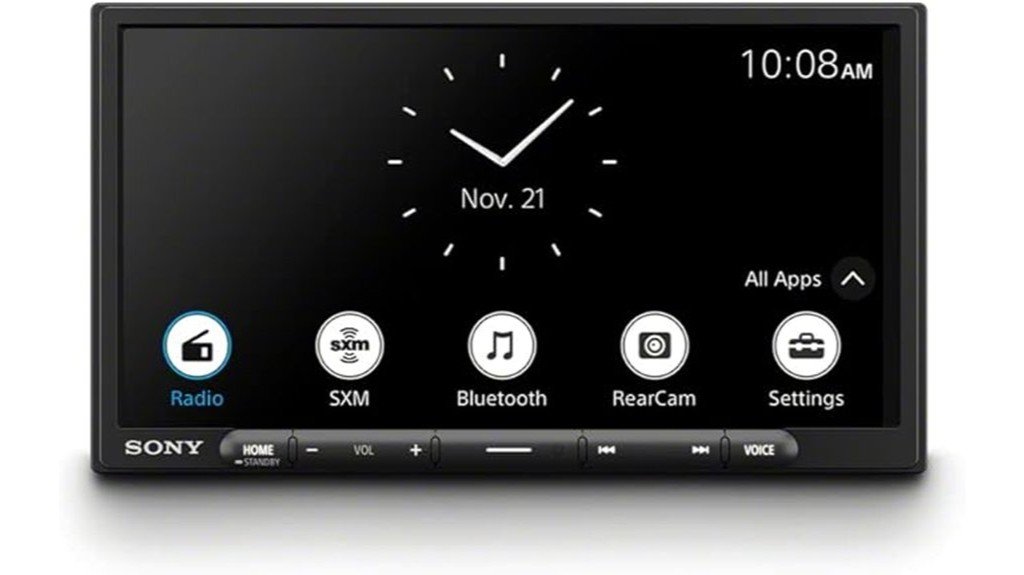
Upgrading an older car stereo is rarely just about getting a larger screen. You also need the receiver to fit your dashboard, work with your phone, retain important vehicle controls, and connect safely to your existing audio system. The Sony XAV-AX4000 covers the core technology well with wireless Apple CarPlay, wireless Android Auto, a 6.95-inch display, and useful sound-tuning tools. Its main tradeoffs are a resistive touchscreen, no physical volume knob, and installation costs that depend heavily on your vehicle.
Quick Verdict
Rating: 8/10
Best For: Drivers who want cable-free phone integration, detailed audio adjustment, and a relatively shallow double-DIN receiver.
Bottom Line: The XAV-AX4000 combines wireless CarPlay and Android Auto with a 14-band EQ, time alignment, LDAC Bluetooth, and three preamp-output pairs. The resistive screen works differently from a modern phone, and some vehicles require several optional adapters for a complete installation.
| Specification | Detail |
|---|---|
| Brand | Sony |
| Model | XAV-AX4000 |
| Product type | Digital multimedia car receiver |
| Display | 6.95-inch, 800 x 480 TFT display |
| Touch panel | Resistive with anti-glare treatment |
| Maximum dimensions | About 7.01 x 3.94 x 5.20 inches (W x H x D) |
| Weight | About 2.2 pounds |
| Amplifier output | 20 watts RMS x 4 at 4 ohms; 55 watts x 4 maximum |
| Phone integration | Wireless and wired Apple CarPlay; wireless and wired Android Auto |
| Bluetooth | Bluetooth 5.0 with SBC, AAC, and LDAC codec support |
| USB | Rear USB Type-C port, up to 3.0 A |
| Audio adjustment | 14-band EQ, time alignment, high-pass and low-pass filters, slope control, and subwoofer phase |
| Audio expansion | Three preamp-output pairs for front, rear, and subwoofer channels |
| Camera support | One rear-camera input with adjustable parking-line markers |
| Optional integration | iDatalink Maestro RR/RR2 and SiriusXM Connect tuner support on the U.S. model |
| Listed box contents | External microphone, GPS antenna, USB-C extension, power leads, steering-control cable, and audio/camera cables |
| Limited warranty | One year in the U.S. and Canada when warranty conditions are met |
What Is the Sony XAV-AX4000?
The Sony XAV-AX4000 is a digital multimedia receiver built for drivers who want modern phone access without adding a separate navigation system. It supports Apple CarPlay and Android Auto through either a wireless connection or a USB cable, so you can use compatible navigation, calling, messaging, and audio apps through the receiver.
The front panel is about 7 inches wide and 4 inches tall, which makes it a double-DIN-size unit rather than a standard single-DIN receiver. Its depth is about 5.2 inches, so the rear chassis is shorter than many older disc-playing stereos. That reduced depth can leave more room for wiring and adapters behind the dash, but it does not remove the need for a vehicle-specific dash kit and harness.
Who Should Buy It?
Best For
- Drivers who want wireless CarPlay and Android Auto but still want a wired option.
- Listeners who will use the 14-band EQ, crossover controls, and time alignment to tune an upgraded audio system.
- Vehicles with a double-DIN opening and enough aftermarket support for a dash kit, wiring harness, and steering-control interface.
Skip If
- You want a capacitive, multi-touch screen that feels like a current smartphone.
- Your dashboard only accepts a standard single-DIN face without major modification.
- You need a built-in disc player, included satellite-radio tuner, or included backup camera.
Before You Buy: Check the receiver opening, dash-kit availability, factory-amplifier interface, steering-wheel-control adapter, antenna adapter, camera wiring, and total installation cost for your exact vehicle. The XAV-AX4000 is not a standard single-DIN-face receiver.
Display and Controls
The 6.95-inch screen uses an 800 x 480 TFT panel with anti-glare treatment. Sony rates the typical brightness at 600 cd/m², which gives the display enough output for normal daytime use when the installation angle is sensible. The 16:9 layout also gives CarPlay and Android Auto enough space for maps, playback controls, and app shortcuts.
The touch panel is resistive rather than capacitive. It responds to deliberate taps, but it does not support the smooth multi-touch gestures you may expect from a phone. Sony adds physical Home, volume up and down, custom, track, and voice buttons, although there is no rotary volume knob.
Wireless Connectivity and Media
Wireless Apple CarPlay and Android Auto are the main reasons to consider this receiver. After the first pairing process, the system is designed to connect your compatible phone when the car starts. Wired CarPlay and Android Auto remain available through the rear USB-C connection, which is useful when you want charging and a direct data link.
Bluetooth 5.0 supports hands-free calling and audio streaming with SBC, AAC, and LDAC codecs. The rear USB-C port also supports compatible audio files, including common compressed and lossless formats. Wireless performance can still vary with the phone, operating-system version, interference, and installation quality, so keeping a cable in the car is a practical backup.
Sound Tuning and Audio Expansion
The XAV-AX4000 gives you more control than a basic factory replacement. Its 14-band equalizer lets you adjust a wide range of frequencies and save two custom curves. Time alignment compensates for the different distances between your listening position and each speaker, which can pull vocals and instruments toward the center of the dashboard.
You can also adjust high-pass and low-pass filters, crossover slopes, subwoofer level, and subwoofer phase. Three preamp-output pairs support front, rear, and subwoofer connections for an external amplifier setup. The built-in amplifier is rated at 20 watts RMS per channel at 4 ohms under the CTA-2006 standard, with a stated 55-watt-per-channel maximum.
Fit, Installation, and Safety
The receiver needs a 12-volt negative-ground vehicle electrical system and 4- to 8-ohm speakers. A typical installation may require a dash kit, wiring harness, antenna adapter, USB routing, microphone placement, GPS-antenna placement, and a steering-wheel-control interface. Vehicles with factory amplifiers, data networks, climate controls, or integrated cameras can require more parts and programming.
The optional iDatalink Maestro RR or RR2 can retain supported factory features in compatible U.S. vehicles. Rear-camera video uses the dedicated camera input, but the camera itself is not included. Adjustable parking markers are available, while dynamic guidelines depend on a compatible Maestro setup and supported vehicle data.
Follow Sony’s wiring instructions and local safety rules. Keep wires away from pedals, the steering column, airbags, and moving controls. A professional installer is the safer choice when your vehicle has airbags near the dash, a factory amplifier, unusual wiring, or integrated safety features.
Pro Tip: Build a complete parts list before ordering the receiver. A correct dash kit, harness, antenna adapter, steering-control interface, and factory-amplifier adapter can matter as much as the head unit itself.
Setup Tips Before First Use
- Update the software: Check Sony’s support page and install the current update through a USB flash drive or supported USB-tethering method.
- Place the microphone carefully: Mount it where your voice is clear without running its cable near moving controls or airbag paths.
- Confirm the GPS connection: The GPS antenna supports location accuracy for wireless phone integration, so place it where it has a clear signal path.
- Set the listening position: Start with the driver position, then measure speaker distances if you plan to use custom time alignment.
- Adjust camera markers: Use a safe, level area and follow the manual. Treat the lines as a parking aid, not a substitute for checking around the vehicle.
How It Performs in Real Use
Daily Commuting
The practical advantage is faster access to navigation, calls, and audio without handling your phone. Physical volume buttons help with basic adjustments, but the lack of a knob and the resistive panel may require more attention than a receiver with larger tactile controls. Steering-wheel-control retention can reduce that issue when your vehicle and adapter support it.
Long Road Trips
Wireless phone integration keeps the USB port available, while the wired option gives you a stable backup and up to 3.0 A from the port for a compatible device. The 14-band EQ and listening-position controls are useful when road noise changes the balance of vocals, bass, and treble. SiriusXM requires a separate compatible tuner and subscription.
Aftermarket Amplifier Systems
The front, rear, and subwoofer preamp outputs make the receiver suitable for a multi-amplifier or five-channel setup. Crossovers, subwoofer phase, and time alignment can reduce the amount of basic tuning you need to perform at the amplifiers. You should still match gains correctly and use qualified help if you are not comfortable setting an audio system safely.
Older-Vehicle Upgrades
The shorter rear depth can simplify cable management in some dashboards, but the 4-inch-tall front still needs double-DIN space. Older vehicles may need fewer data adapters, while newer vehicles can require extra modules to retain factory controls. The total value therefore depends on fitment and installation parts, not just the receiver price.
Pros and Cons
Pros
- Supports wireless and wired Apple CarPlay and Android Auto.
- Offers a 14-band EQ, time alignment, crossover controls, and subwoofer adjustments.
- Includes three preamp-output pairs for front, rear, and subwoofer expansion.
- Supports Bluetooth 5.0 with SBC, AAC, and LDAC codecs.
- Uses a relatively shallow 5.2-inch chassis depth for easier cable management in some dashboards.
Cons
- The resistive panel does not provide smartphone-style multi-touch operation.
- There is no rotary volume knob, so tactile control depends on buttons or retained steering-wheel controls.
- Vehicle-specific adapters, a camera, and a SiriusXM tuner are optional and can raise the installed cost.
Is It Worth the Price?
The Sony XAV-AX4000 sits in the mid-range part of the wireless smartphone-receiver market. It offers strong value when you will use its EQ, time alignment, crossover controls, LDAC support, camera input, and optional Maestro integration. Buyers replacing a simple factory radio may get more benefit from these features than buyers who only need Bluetooth audio.
Your real cost includes the installation parts. A basic older vehicle may need only a dash kit and harness, while a newer model may need several interfaces to retain the amplifier, steering controls, camera, and vehicle data. It is worth considering when the complete installed package still fits your budget and you accept the resistive screen.
How It Compares to Alternatives
The Sony XAV-AX6000 is the closest same-brand step-up to compare when you want a more premium screen experience. Pioneer’s DMH-W2770NEX and Kenwood’s DMX8709S are also relevant wireless CarPlay and Android Auto alternatives. Compare display type, camera inputs, preamp design, physical controls, vehicle-integration support, and the total cost of required adapters rather than choosing by screen size alone.
Frequently Asked Questions
Is the Sony XAV-AX4000 a single-DIN or double-DIN receiver?
Its front measures about 7.01 inches wide by 3.94 inches tall, so it needs a double-DIN-size opening or a compatible conversion kit. The chassis is relatively shallow, but the face is not standard single-DIN height.
Does it support both wireless and wired CarPlay and Android Auto?
Yes. Sony’s help guide covers wireless and USB-cable operation for both Apple CarPlay and Android Auto. Phone and operating-system compatibility can change, so check Sony’s current support information before installation.
Is the touchscreen capacitive?
No. The XAV-AX4000 uses a resistive touch panel with anti-glare treatment. It works with direct taps, but it does not offer the same multi-touch feel as a capacitive phone screen.
Can it retain factory steering-wheel controls and vehicle information?
It can retain supported functions in compatible vehicles with the correct interface. The U.S. model supports optional iDatalink Maestro RR and RR2 modules, but available functions vary by vehicle and installation.
Does the receiver include a backup camera?
No. It includes a rear-camera input, but the camera and its vehicle wiring are separate. Adjustable parking markers are built in, while dynamic guidelines require compatible vehicle data and Maestro integration.
Can you connect external amplifiers and a subwoofer?
Yes. The receiver has three preamp-output pairs for front, rear, and subwoofer channels. It also provides crossover, subwoofer-level, phase, and time-alignment controls for system tuning.
What installation parts may be required?
Common parts include a dash kit, wiring harness, antenna adapter, and steering-wheel-control interface. Factory amplifiers, cameras, USB ports, climate displays, and vehicle-data systems can require additional adapters.
How do you update the XAV-AX4000 software?
Download the current software and instructions from Sony’s support site. Sony supports updating through a USB flash drive and also documents a USB-tethering method with a compatible smartphone.
The Bottom Line
The Sony XAV-AX4000 is a strong choice for drivers who want wireless phone integration and detailed sound control in a relatively shallow double-DIN receiver. Skip it if you need a capacitive multi-touch screen, a standard single-DIN face, or a low-cost plug-and-play installation with every factory feature retained.