Disclosure: As an Amazon Associate, we earn from qualifying purchases. If you click a link on this page and make a purchase, we may receive a small commission at no extra cost to you.
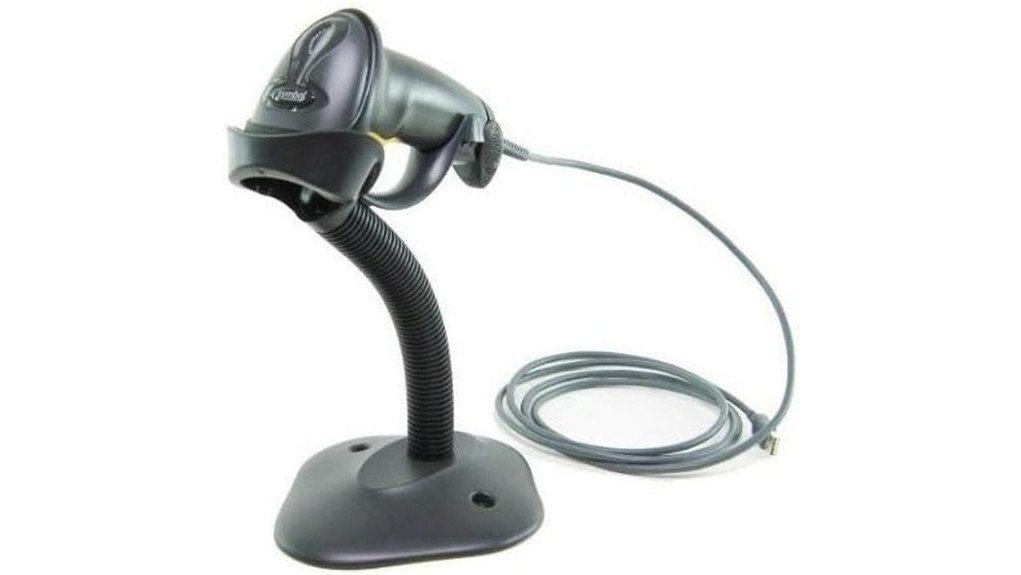
Scanning product labels all day can slow down your checkout or inventory work if your barcode scanner is hard to use or misses common codes. The Symbol Zebra LS2208 Corded Handheld Barcode Scanner offers a simple way to capture printed 1D barcodes with a lightweight laser scanner. This renewed Twilight Black model is listed with a USB cable and gooseneck stand, making it worth considering for a fixed workstation. However, it cannot read QR codes, and its corded design limits how far you can move. This review covers its scanning speed, build quality, setup, compatibility, and value so you can decide if it fits your business.
Quick Verdict
Rating: Recommended with caveats
Best For: Retail counters, small businesses, stockrooms, and offices that scan printed 1D barcodes.
Bottom Line: The Zebra LS2208 offers a verified 100-scan-per-second laser engine, a comfortable handheld design, and support for common retail barcodes. Its main drawbacks are the lack of QR code support, wired operation, and the need to check renewed-product condition and warranty coverage.
Zebra LS2208 Key Specifications
These specifications combine Zebra’s published LS2208 hardware details with information from the linked renewed-product listing. Scanner specifications may differ from shipping-package measurements.
| Specification | Detail |
|---|---|
| Brand | Zebra Technologies (Symbol Zebra) |
| Model | LS2208-SR20007R |
| Linked listing | Renewed, manufacturer part LS2208-SR20007R-cr |
| Product type | Corded handheld 1D laser barcode scanner |
| Color | Twilight Black |
| Scanning speed | 100 scans per second |
| Scanning technology | 650 nm Class 2 laser, single-line scan pattern |
| Supported barcodes | 1D codes including UPC/EAN, Code 39, Code 128, Code 93, and GS1 DataBar |
| 2D barcode support | No QR Code or Data Matrix decoding |
| Dimensions | 6.0 inches high × 2.5 inches wide × 3.3 inches deep (manufacturer figures) |
| Scanner weight | 5.3 oz (150 g), without cable |
| Connection | USB cable in this bundle; scanner platform supports other interfaces with suitable cables |
| Power | Host-powered, typically through USB for this configuration |
| Typical UPC range | Up to 25.1 inches (63.8 cm) for a 13 mil UPC under specified conditions |
| Protection rating | IP30 |
| Drop specification | Designed to withstand multiple 5-foot drops to concrete |
| Included items | Scanner, USB cable, and gooseneck stand as advertised in the linked renewed listing |
| Listed warranty | 90-day limited warranty on the renewed listing; check applicable terms |
| Primary use | Printed 1D barcode scanning at retail and inventory workstations |
What Is the Symbol Zebra LS2208?
The Zebra LS2208 is a handheld barcode reader designed to capture printed one-dimensional barcodes. It uses a single-line laser instead of a camera-style imaging sensor. The scanner is suited to tasks such as reading product UPC labels, shelf labels, and supported inventory codes.
This particular Amazon listing is for a renewed Twilight Black LS2208-SR20007R. It advertises a USB cable and gooseneck stand, which can help you set up a scanning station without choosing those accessories separately. Since the unit is renewed, confirm the included parts and current condition shown by the seller.
Its main advantage is focused functionality. You get a dedicated scanner for routine 1D barcode tasks without needing wireless pairing or battery charging. The tradeoff is that you cannot use it for modern 2D codes such as QR codes.
Who Should Buy It?
Best For
- Retail counters that scan printed UPC and EAN product labels.
- Small offices and stockrooms entering 1D inventory codes into a computer.
- Businesses that want a corded scanner with an advertised stand for a fixed checkout station.
Skip If
- You need to scan QR codes, Data Matrix codes, or other 2D symbols.
- You need wireless scanning while moving around a large warehouse.
- Your work depends on reliably reading barcodes displayed on smartphone screens.
Before You Buy: The LS2208 is a 1D laser scanner, not a 2D imager. Check the barcodes used by your POS system or inventory workflow before ordering. Also confirm that the renewed listing includes the USB cable and gooseneck stand, since other LS2208 configurations may be sold without these accessories.
Scanning Performance and Efficiency
The LS2208 has a manufacturer-rated scanning speed of 100 scans per second. That refers to how often its laser sweeps across a barcode, not a promise that it will process 100 separate products each second. Actual results depend on barcode quality, scanning distance, and positioning.
Barcode Accuracy and Supported Formats
The scanner supports common linear barcode formats, including UPC/EAN, Code 39, Code 128, Code 93, and GS1 DataBar. These cover many product identification, stock tracking, and retail tasks.
Zebra specifies a 20% minimum reflective difference for barcode contrast. Labels that are very faded, dirty, damaged, or poorly printed can still cause reading problems. You may need to adjust the distance or use a better label.
Scanning Distance and Angle
Zebra rates the LS2208 to read a standard 13 mil UPC barcode from near contact to about 25.1 inches under specified conditions. That can help when you need to scan items on a counter without placing the scanner directly against every label.
Read distance changes with barcode size and print quality. Small, high-density codes generally require closer positioning than larger labels. The LS2208 also allows some variation in wrist angle, but aiming the laser across the full barcode remains important.
Handheld and Hands-Free Scanning
The LS2208 is designed for handheld use, and its supported Intellistand accessory allows hands-free presentation scanning. The renewed bundle advertises a gooseneck stand. When the supplied stand is compatible and properly set up, you can position the scanner for items passed in front of it.
This is useful at a small checkout station where you want to keep one hand free. For large or awkward items, you can pick up the scanner instead.
Design and Build Quality
The LS2208 has a compact pistol-grip shape and a Twilight Black finish. It measures approximately 6.0 inches high, 2.5 inches wide, and 3.3 inches deep, according to Zebra’s specification sheet.
The scanner itself weighs about 5.3 ounces (150 grams) without its cable. This is much lighter than the 2.05-pound listing figure sometimes associated with the item, which should not be treated as the handheld scanner’s actual weight.
Comfort During Long Shifts
The shaped handle and single trigger make the LS2208 straightforward to operate. Its low weight is helpful when you repeatedly pick it up to scan items during a shift.
However, comfort still depends on your workstation layout. Place the scanner within easy reach, avoid sharp wrist angles, and position the stand so you do not need to stretch across the counter.
Durability and Protection
Zebra describes a durable design with single-board construction and a scratch-resistant tempered-glass exit window. The LS2208 is designed to withstand multiple drops from 5 feet onto concrete under the manufacturer’s test conditions.
It also has an IP30 rating. That provides limited protection against solid objects but does not indicate water resistance. Keep the scanner away from spills, rain, and wet cleaning methods.
Because the linked item is renewed, these original hardware specifications do not guarantee the cosmetic condition or remaining lifespan of the particular unit you receive.
Connectivity and Compatibility
The renewed bundle includes a USB cable according to its listing. With a compatible USB host, the scanner can receive power through the same connection used to send barcode data.
Zebra also supports RS-232, keyboard-wedge, and certain IBM POS interfaces through appropriate cable configurations. Those options do not mean every cable is included with this package.
USB Keyboard Operation
In USB keyboard mode, the scanner sends decoded barcode characters to your computer much like keyboard input. This can work well when your checkout, inventory, or spreadsheet application accepts text in an active field.
Compatibility is not universal. Some POS systems require approved scanner models, specific interfaces, or custom settings. Check your software requirements before purchase, especially if you use a tablet, mobile device, or proprietary checkout terminal.
Barcode Formatting Options
Zebra’s product documentation describes configurable output features, including Advanced Data Formatting. These settings can help match scanned data to the format expected by your host application.
For example, some workflows need an Enter key after each barcode. Use the programming barcodes in Zebra’s manual to set the correct suffix rather than assuming that every application needs the same output.
Setup Tips Before First Use
You do not need a complex installation process for a basic compatible USB workstation. Still, a short setup check helps prevent data entry problems.
- Inspect the renewed unit. Check the scan window, trigger, cable connection, and advertised accessories for visible damage or missing parts.
- Connect the interface cable. Insert the scanner-side connector securely, then connect the USB end to a suitable host port.
- Check the startup signals. Follow Zebra’s quick start guide to confirm that the scanner powers on and uses the correct host interface.
- Test a printed barcode. Open a text field and scan a known, supported 1D barcode to check whether the expected characters appear.
- Configure output if necessary. If your POS software needs an Enter or Tab suffix, use the appropriate programming instructions.
- Position the stand. Place it on a stable counter where customers, cables, and other objects will not block the scan path.
Pro Tip: Before connecting the LS2208 to your POS application, test it in a plain text field using a printed UPC label. If the numbers appear correctly, the scanner and host connection are working. You can then check any formatting or software-specific requirements separately.
How It Performs in Real Use
The following scenarios explain how the published features fit common workflows. They are practical assessments of the product design, not claims of independent hands-on testing.
Retail Checkout Counters
At a checkout counter, the LS2208 is suited to printed UPC labels on packaged goods. The 100-scan-per-second engine and supported presentation scanning can help you process routine items without typing product numbers by hand.
It is less suitable if customers mainly present QR-based coupons, tickets, or loyalty codes on their phones.
Inventory and Stockrooms
In a stockroom, you can use the LS2208 to enter supported 1D item codes into an inventory system. Its light body is convenient for scanning products on a nearby shelf or worktable.
The cable limits reach. If you must walk between distant racks, a cordless model will generally be more practical.
Small Office Recordkeeping
For an office that tracks assets, files, or equipment with printed Code 39 or Code 128 labels, the LS2208 can reduce repeated manual entry. A compatible USB keyboard configuration may let you scan data into ordinary input fields.
Your software must still be set up to handle the data correctly. The scanner reads the barcode; it does not create an inventory database or manage records by itself.
Repeated Daily Use
The lightweight design, reinforced construction, and simple trigger support repeated scanning at a fixed station. Keeping the scanner in its stand when not in use can also help maintain an organized counter.
For a renewed scanner, inspect the cable, trigger response, and scan window during your return or warranty period. The manufacturer’s durability rating does not establish how much wear an individual refurbished unit has already experienced.
Compatibility and Safety
The LS2208 uses a Class 2 laser. Follow Zebra’s operating instructions, avoid staring into the laser beam, and do not attempt to modify the scanning assembly.
The scanner should be kept dry because its IP30 rating does not provide water-ingress protection. Keep the cable routed away from foot traffic and surfaces where it could be pulled, pinched, or damaged.
Clean the scanning window using the method recommended in the official product guide. Avoid abrasive tools that could scratch the exit window. If the scanner is damaged or fails to operate correctly, consult Zebra’s troubleshooting instructions or a qualified service provider.
Common Scanning Problems and What to Check
If the LS2208 does not read a barcode, the cause is not always a defective scanner. Start with the basics before changing its configuration.
- No power or startup response: Check the cable connection and whether the host USB port supplies power.
- Scanner activates but cannot decode: Try a clear, printed 1D barcode and adjust your scanning distance.
- Barcode reads but no text appears: Check that the correct application field is active and the interface is configured correctly.
- Wrong characters appear: Review the selected keyboard layout, host settings, and barcode data formatting.
- Some codes work but others fail: Confirm that the barcode type is supported and enabled.
- QR codes do not scan: This is a product limitation rather than a fault. The LS2208 is not a 2D barcode reader.
Zebra’s official LS2208 quick start and product reference guides provide the programming barcodes and troubleshooting procedures for these checks.
Customer Feedback and Value
These figures can change, and the limited sample should not be treated as proof of long-term reliability.
The listing’s review history includes positive reports about simple POS setup and use with a stand. Such experiences are useful context, but they do not guarantee that every POS system or renewed unit will work the same way.
The main customer-value question is whether you need an inexpensive way to scan printed 1D labels at a stationary workstation. If that matches your workflow, the LS2208 has a practical feature set. If you need wireless operation or 2D scanning, you may get more value by choosing a different model from the start.
Pros and Cons
Pros
- Manufacturer-rated scanning speed of 100 scans per second.
- Reads common printed 1D barcodes, including UPC/EAN and Code 128.
- Lightweight 5.3-ounce scanner body with a handheld grip.
- Advertised USB cable and gooseneck stand in this renewed bundle.
- Durable design with a scratch-resistant scan window and published drop specification.
Cons
- Cannot decode QR codes or other 2D barcodes.
- USB cable limits movement around a large work area.
- Renewed condition and applicable warranty coverage need checking before purchase.
Is It Worth the Price?
The Zebra LS2208 is worth considering as a basic, business-focused 1D scanner. Its value comes from a proven scanning platform, common barcode support, and a simple corded setup rather than extra features such as Bluetooth or 2D imaging.
The renewed listing may appeal to buyers comparing lower-cost equipment with new scanners. However, the actual value depends on the current selling price, warranty terms, accessory bundle, and condition of the unit delivered. No specific saving should be assumed without comparing current offers.
If you need printed UPC scanning at one counter, this is a sensible model to compare. If you expect to accept mobile QR coupons or expand into 2D barcode workflows, paying more for a suitable imager may avoid replacing the scanner later.
How It Compares to Alternatives
The Zebra DS2208 is a useful alternative if you need a corded 2D barcode imager. It can handle QR codes and other supported 2D symbols, making it more suitable for businesses that work with both traditional product labels and newer barcode formats.
The Zebra LI2208 is another alternative for buyers who mainly scan 1D barcodes but want linear imaging technology rather than the LS2208’s laser engine. Compare its display-scanning support and other specifications with your workflow. The LS2208 remains a straightforward option when your labels are printed 1D codes and you want a fixed workstation scanner.
Frequently Asked Questions
What Types of Barcodes Can the LS2208 Scan?
The LS2208 reads supported 1D barcodes, including UPC/EAN, Code 39, Code 128, Code 93, and GS1 DataBar. It is well suited to printed product labels and many inventory codes. It does not support 2D barcode formats.
Can the Zebra LS2208 Scan QR Codes?
No. The LS2208 uses a single-line laser designed for 1D barcodes. For QR codes, Data Matrix, or similar 2D codes, choose a compatible 2D imager such as the Zebra DS2208.
Is the LS2208 Compatible With All Operating Systems?
No scanner should be assumed to work with every operating system and application. The LS2208 supports USB keyboard operation on compatible hosts, but POS software and specialized systems may have extra requirements. Check the supported scanner interface and device requirements before buying.
How Long Is the USB Cable Included With the Scanner?
The original article described an approximately six-foot USB cable, but that exact length could not be independently verified for the current renewed bundle. The listing confirms a USB cable is included. Check the seller’s package details if cable length is important for your workstation.
Can the LS2208 Be Used for Mobile Scanning?
The LS2208 is corded and does not provide built-in wireless freedom. It works best near a connected workstation. If you need to move around a warehouse or scan away from a computer, consider a compatible cordless scanner.
What Is the Warranty Policy for This Renewed LS2208?
The linked Amazon listing describes a 90-day limited warranty. Exact coverage, claims procedures, and return conditions should be checked on the current offer before purchase. Do not assume that a renewed unit receives the same warranty terms as a new Zebra scanner.
Does the Zebra LS2208 Need Special Software or Drivers?
For basic USB keyboard use, the scanner can operate through supported host input functions without dedicated barcode-reading software. Some systems may require interface selection or programming barcode setup. Your inventory or POS application must still be able to receive and process the scanned information.
Does the Renewed LS2208 Include a Stand, and Can It Scan Hands-Free?
The linked renewed listing advertises a scanner, USB cable, and gooseneck stand. The LS2208 supports hands-free scanning with an appropriate stand and configuration. Confirm the advertised accessories before ordering, since other LS2208 packages may not include a stand.
The Bottom Line
The Symbol Zebra LS2208 is a practical choice for buyers who need a lightweight, corded scanner for printed 1D barcodes at a checkout counter or office workstation. Its verified scanning performance and simple design make it worth considering, but you should skip it if you need QR code support, wireless movement, or guaranteed new-product condition. For the linked renewed bundle, confirm the accessories, current selling terms, and warranty before deciding.
Ready to Buy?
Check the latest price, renewed condition, included accessories, and warranty details before you decide.