Disclosure: As an Amazon Associate, we earn from qualifying purchases. If you click a link on this page and make a purchase, we may receive a small commission at no extra cost to you.
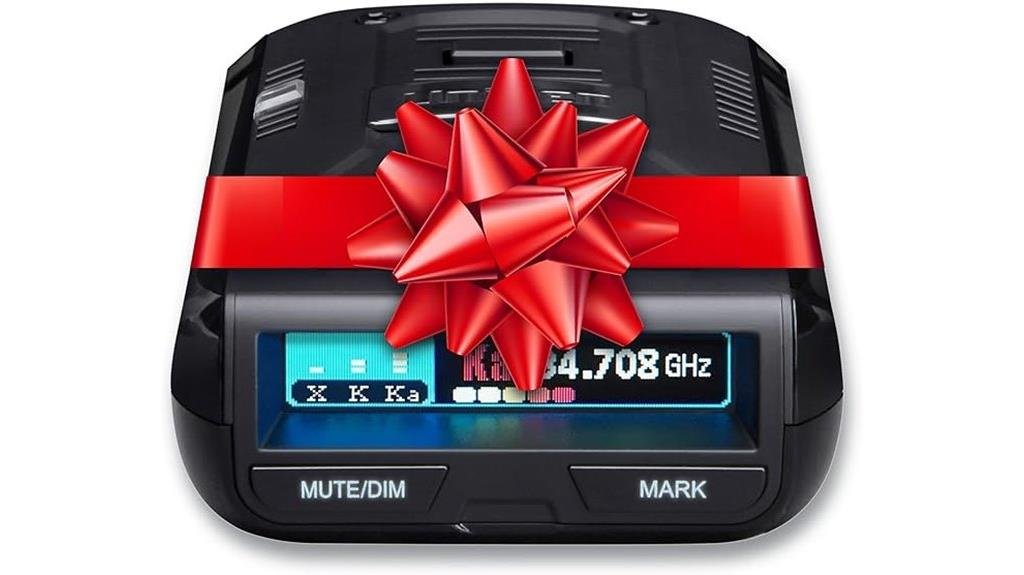
A radar detector is only useful if it gives you meaningful warnings without turning every drive into a stream of unnecessary alerts. The Uniden R3 Laser/Radar Detector combines long-range radar and laser detection with built-in GPS, configurable filtering, voice notifications, and location-based mute functions. Its biggest strengths are sensitivity and customization, while its main tradeoffs are the learning curve and lack of directional arrows found on more expensive models. This review will help you decide whether the R3 still makes sense for your daily commute, highway driving, or longer road trips.
Quick Verdict
Rating: Recommended with caveats
Best For: Drivers who want strong radar sensitivity, GPS-based alert control, and extensive settings without paying for directional arrows.
Bottom Line: The Uniden R3 gives you a strong combination of long-range detection, GPS functions, configurable filtering, and ongoing firmware support. You should look higher in Uniden’s range if directional threat arrows or newer convenience features matter more to you.
| Specification | Detail |
|---|---|
| Brand | Uniden |
| Model | R3 |
| Product Type | Long-range radar and laser detector with GPS |
| X Band | 10.525 GHz |
| K Band | 24.150 GHz |
| Ka Band | 33.400 to 35.700 GHz |
| Laser | 800 to 1,100 nm |
| Dimensions | 4.88 × 3.85 × 1.52 inches |
| Weight | 4.9 oz (140 g) |
| Power | DC 11.0 to 16.0 V |
| GPS Functions | User marks, mute memory, red-light camera alerts, and speed-camera alerts |
| User Marks | Up to 500 |
| Display | OLED display with adjustable brightness |
| Included Accessories | 12V DC RJ11 power cord, premium suction-cup mount, double-cup windshield mount, and carrying case |
| Updates | Downloadable firmware and GPS database updates |
What Is the Uniden R3?
The Uniden R3 is a compact windshield or dashboard radar and laser detector built around long-range detection and GPS-assisted alert management. It monitors X, K, and Ka radar bands as well as laser signals, and you can adjust how the unit responds to different driving environments.
Its built-in GPS adds features that basic radar detectors do not have. You can save locations, mute recurring stationary alerts along familiar routes, receive compatible red-light and speed-camera database warnings, and use speed-related alert settings. The R3 also supports downloadable firmware and GPS database updates, which gives the hardware more long-term usefulness than a detector that cannot be updated.
Key Takeaways
- Long-range focus: The R3 is designed for high-sensitivity radar and laser detection, especially when you use Highway mode on open roads.
- Built-in GPS: GPS supports mute memory, user marks, red-light camera alerts, speed-camera alerts, and speed-based functions.
- Adjustable filtering: K-band filtering, Traffic Sensor Filter options, band controls, and sensitivity settings help you manage unwanted alerts.
- Compact hardware: At 4.9 oz, the detector is small enough for routine windshield use and easy removal when needed.
- Ongoing support: Uniden continues to provide downloadable R3 firmware and GPS database updates.
- Main limitation: The R3 does not provide directional arrows that tell you whether a detected signal is ahead, beside, or behind you.
Who Should Buy It?
Best For
- You spend significant time on highways or open roads and value early radar awareness.
- You drive repeat routes and want GPS mute memory to reduce recurring stationary alerts.
- You like adjusting bands, sensitivity, filters, voice alerts, and display behavior yourself.
Skip If
- You specifically want arrows showing the direction of a radar source.
- You want the newest convenience features with very little manual configuration.
- Radar detectors or windshield-mounted devices are restricted where you drive.
Before You Buy: Check the laws that apply where you drive and how you plan to mount the detector. Radar-detector rules and windshield-mount restrictions can vary by jurisdiction and vehicle type.
Performance and Detection Capabilities
Detection sensitivity is the R3’s core selling point. It monitors X band at 10.525 GHz, K band at 24.150 GHz, Ka from 33.400 to 35.700 GHz, and laser wavelengths from 800 to 1,100 nm. Those specifications tell you what the detector is designed to monitor, but they do not translate into one guaranteed warning distance.
Real detection range changes with terrain, curves, hills, traffic, antenna orientation, surrounding vehicles, the radar source, and where the detector is mounted. For that reason, fixed claims such as an exact number of yards for every Ka or K-band encounter are not realistic buying metrics.
The R3 gives you Highway, City, and Advanced sensitivity options. Highway mode prioritizes sensitivity, while City mode reduces K-band sensitivity to help control unwanted alerts. Advanced mode gives you more control over sensitivity settings when you want to tune the detector for your local environment.
You can also control individual radar bands and filtering functions. That flexibility matters because the best configuration for a rural interstate may be unnecessarily noisy in dense urban traffic.
GPS, Alerts, and False Alert Filtering
Long detection range becomes frustrating if every supermarket door or roadside sensor produces the same urgency as a meaningful alert. The R3 addresses that problem with GPS-based mute memory and configurable radar filtering.
When you identify a recurring stationary alert along a familiar route, you can store a mute location. The detector can then recognize that location and reduce repeated nuisance warnings. The R3 also supports up to 500 user marks, allowing you to save locations you want the unit to remind you about later.
Quiet Ride can reduce X and K-band alert noise below a speed threshold you choose. K-band filtering and Traffic Sensor Filter settings provide additional control for areas with radar-based traffic sensors or vehicle driver-assistance systems that may contribute to unnecessary warnings.
These features work best when you configure them rather than leaving every option at a random setting. Over-filtering can make the detector quieter, but you should understand what a filter does before disabling or suppressing a band that may matter where you drive.
Pro Tip: Start with a conservative configuration and drive your normal routes for several days before aggressively changing filters. Save repeat stationary false alerts through GPS mute memory, then adjust broader filtering only when you understand which signals are causing the problem.
Display, Usability, and Updates
The R3 uses an OLED display that can show useful driving and alert information such as detected radar band, frequency, vehicle speed when GPS is active, signal information, voltage, and operating mode. Brightness settings include options designed for daytime and nighttime use.
Physical controls let you reach frequently used functions without depending on a phone. Voice notifications can announce alerts, which helps you identify an event without continuously watching the display.
Another strength is update support. Uniden provides an R-Series update tool along with R3 firmware and GPS database downloads. Updating requires connecting the detector to a compatible computer and following Uniden’s update procedure.
This matters most for the GPS database and software refinements. An R3 that has been sitting unused for a long period may have older firmware or camera-location data, so checking for updates before regular use is sensible.
Setup and Mounting
The current R3 package includes a premium suction-cup mount and a double-cup windshield mount. Uniden’s instructions also describe windshield and dashboard installation options. Whichever method you use, the detector needs an unobstructed view through the windshield for the best practical performance.
Mount the unit where you can read and reach it without blocking your normal view of the road. Avoid burying it behind objects or placing it where windshield treatments, metallic tint, or other obstructions may interfere with reception.
The detector operates from DC 11.0 to 16.0 V and includes a 12V DC RJ11 power cord. If you prefer a cleaner installation than a hanging power cable, check compatibility carefully before purchasing a separate hardwire accessory.
How It Performs in Real Use
For Daily Commuting
GPS mute memory is especially useful when you travel the same roads every day. Once you identify recurring stationary alerts, you can reduce repeated warnings instead of manually muting the same location every morning and evening.
For Highway Driving
Open-road driving is where the R3’s sensitivity-focused design makes the most sense. Highway mode gives you maximum configured sensitivity, while voice alerts and signal information help you judge how an alert develops as you continue along the road.
For Busy Urban Areas
Dense traffic can expose a detector to more K-band interference from vehicles and roadside electronics. City sensitivity, Quiet Ride, K-band filters, and GPS mute locations give you several ways to reduce noise. You may need some trial and error to find a useful balance.
For Road Trips
The carrying case makes the R3 easier to remove and store when you leave the vehicle. Before a longer trip, check for firmware and GPS database updates and review your enabled bands, especially if you are traveling into a region with different enforcement equipment or different detector laws.
Compatibility and Safety
A radar detector is an awareness device, not a guarantee that you will receive an early warning in every situation. A detector can only react to signals it is capable of receiving when those signals are present. Driving conditions, enforcement methods, terrain, and mounting can all affect what you experience.
You should also verify local laws before installing or using the R3. Rules may differ for passenger vehicles, commercial vehicles, military property, and windshield-mounted equipment. Follow traffic laws regardless of what the detector displays.
For installation and firmware work, follow Uniden’s instructions rather than improvising power or connection methods. This is particularly important when updating the detector through its data connection.
Pros and Cons
Pros
- Designed around high-sensitivity X, K, Ka, and laser detection.
- Built-in GPS supports mute memory, user marks, and camera alerts.
- Multiple sensitivity and filtering controls let you tune alert behavior.
- Voice notifications reduce the need to watch the display continuously.
- Firmware and GPS database support extends the usefulness of the hardware.
Cons
- No directional arrows to show where a detected radar source is located.
- Getting the quietest useful setup may require manual configuration and testing.
- Legal and mounting restrictions can limit where some drivers can use it.
Is It Worth the Price?
The R3 makes the most sense for buyers who value detection performance and GPS-based alert management more than having the newest interface features. You get the core functions that matter for everyday radar-detector use: selectable bands, adjustable sensitivity, GPS memory, voice alerts, camera-location data, and downloadable updates.
Its value becomes less compelling if you specifically want directional arrows, automatic learning features from newer premium models, or broader connected features. In that case, spending more on a newer detector may save you from upgrading again later.
For a driver who is comfortable configuring settings and does not need arrows, the R3 remains worth considering because its basic detection and GPS feature set is still practical.
How It Compares to Alternatives
The Uniden R4 is a newer step up if you want additional processing and connected features while keeping a conventional single-antenna detector format. It is worth comparing if you want newer hardware and are willing to spend more.
The Uniden R7 is the more obvious upgrade when directional information matters. Its dual-antenna design adds arrows that help you determine where an alert is coming from. The R3 makes more sense when you care about strong detection and GPS functions but do not need directional arrows.
Frequently Asked Questions
Does the Uniden R3 have built-in GPS?
Yes. GPS supports functions such as user marks, mute memory, speed-related settings, and compatible red-light and speed-camera database alerts. It is one of the R3’s most useful advantages over basic non-GPS detectors.
How many locations can the R3 save?
The R3 supports up to 500 user marks. These let you save geographic locations where you want a future reminder as you approach.
Does the R3 automatically eliminate every false alert?
No. GPS mute memory and filtering can reduce repeated nuisance alerts, but you still need to configure the detector for your driving environment. Some interference can remain, especially in traffic with radar-based driver-assistance systems.
Does the Uniden R3 have directional arrows?
No. The R3 alerts you to detected signals but does not show whether the source is ahead, beside, or behind you. If arrows are important, a model such as the Uniden R7 is a more suitable comparison.
Can you update the R3 after purchase?
Yes. Uniden provides R3 firmware, GPS database files, and an R-Series update tool. Check Uniden’s current instructions before updating because the required software and procedure can change over time.
Where should you mount the Uniden R3?
Install it where it has a clear view through the windshield while remaining easy to see and operate without blocking your view of the road. Follow Uniden’s mounting instructions and check local windshield-mounting rules.
Does the R3 have an internal battery for normal operation?
The R3 is designed to operate from vehicle power, with an operating source of DC 11.0 to 16.0 V. You should not buy it expecting cordless operation from an internal rechargeable battery.
Who should skip the Uniden R3?
Skip it if directional arrows are a priority, if you want the newest connected detector features, or if local rules prevent the type of installation you want. A newer Uniden model may be a better long-term fit in those situations.
The Bottom Line
The Uniden R3 remains a practical choice when you want strong radar and laser detection, built-in GPS, adjustable filtering, voice alerts, and ongoing software support without paying specifically for directional arrows. It is best for drivers willing to spend a little time tuning the settings, while buyers who want arrows or newer connected features should compare newer models before deciding.