Disclosure: As an Amazon Associate, we earn from qualifying purchases. If you click a link on this page and make a purchase, we may receive a small commission at no extra cost to you.
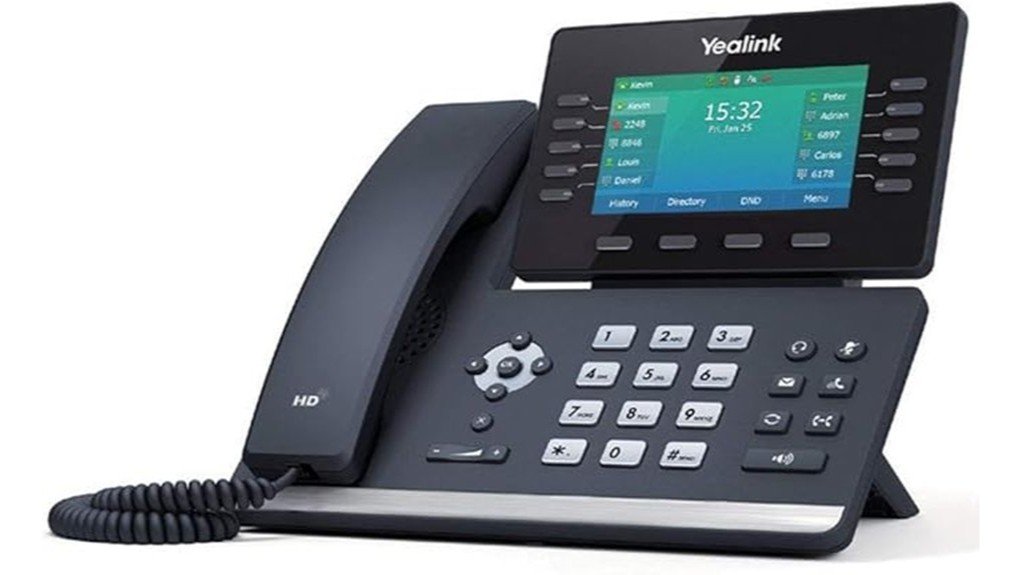
A business desk phone needs to handle more than basic calling when you manage several lines, use headsets, or switch between wired and wireless networks. The Yealink T54W IP Phone combines support for up to 16 VoIP accounts with a 4.3-inch adjustable color display, Gigabit Ethernet, dual-band Wi-Fi, Bluetooth, and PoE. The linked Amazon model is a renewed SIP-T54W, so condition and included accessories deserve as much attention as the phone’s feature set. This review explains where the T54W works well, what you need for setup, and which buyers may be better served by another model.
Quick Verdict
Rating: 8/10, Recommended with caveats
Best For: Offices, reception desks, managers, and frequent callers who need multiple SIP accounts plus wired and wireless connectivity.
Bottom Line: The T54W gives you a useful mix of 16-account capacity, HD voice features, Wi-Fi, Bluetooth, Gigabit Ethernet, and expansion support. The main tradeoff is that this Amazon listing is renewed and does not include a power adapter, so you should confirm your PoE setup and seller details before ordering.
| Specification | Detail |
|---|---|
| Brand | Yealink |
| Model | SIP-T54W / T54W |
| Product Type | Business SIP/VoIP desk phone |
| Amazon Listing Condition | Renewed |
| VoIP Accounts | Up to 16 |
| Display | 4.3-inch adjustable color display, 480 x 272 pixels |
| Wi-Fi | Built-in 2.4 GHz / 5 GHz, IEEE 802.11a/b/g/n/ac |
| Bluetooth | Built-in Bluetooth 4.2 |
| Ethernet | Dual-port Gigabit Ethernet |
| USB | 1 x USB 2.0 for compatible headsets, USB recording, EXP50 modules, and supported accessories |
| Power | IEEE 802.3af PoE, Class 3; optional 5V/2A external Yealink adapter |
| Audio | Yealink HD Voice, Acoustic Shield, Smart Noise Filtering, full-duplex speakerphone |
| Expansion | Supports up to three Yealink EXP50 expansion modules |
| Dimensions | About 9.17 x 8.76 x 7.33 inches |
| Listed Weight | About 1.26 kg |
| Other Features | HAC handset, wall-mount support, multilingual interface, programmable line keys |
| Important Package Note | The linked Amazon listing states that a power adapter is not included. |
What Is the Yealink T54W?
The Yealink SIP-T54W is a business IP desk phone designed for SIP-based calling. Its support for up to 16 VoIP accounts makes it better suited to multi-line business use than a basic home telephone. You can connect it through Gigabit Ethernet or its built-in dual-band Wi-Fi, and Power over Ethernet can carry network data and power through the Ethernet connection when your network equipment supports PoE.
The phone centers its controls around an adjustable 4.3-inch, 480 x 272 color screen. Ten line keys can provide access to up to 27 programmable features across three pages, while dedicated controls cover common functions such as hold, mute, transfer, headset use, redial, speakerphone, and volume.
Yealink also builds in Bluetooth 4.2 and a USB 2.0 port. That combination gives you more headset choices and allows compatible USB accessories, USB call recording, and up to three EXP50 expansion modules. These features are particularly useful when you manage a busy extension list or spend much of your workday on calls.
Who Should Buy It?
Best For
- You manage several SIP lines or extensions from one desk.
- You want Ethernet plus built-in Wi-Fi and Bluetooth rather than relying on add-on wireless adapters.
- You use headsets, programmable keys, or expansion modules in a reception, management, sales, or support role.
Skip If
- You need a built-in camera or a phone designed primarily for video meetings.
- Your VoIP provider does not support or provision the T54W.
- You specifically want a brand-new unit rather than the renewed product linked in this review.
Before You Buy: The linked Amazon T54W is a renewed unit and its listing states that a power adapter is not included. Confirm that your network switch or PoE injector supports IEEE 802.3af PoE, or plan for a compatible external power adapter.
Design and Display
The 4.3-inch color screen is one of the T54W’s main usability advantages. Its 480 x 272 resolution is not intended to compete with a smartphone, but it provides enough room for call information, menus, contacts, line status, and soft-key functions. The display angle is adjustable, which helps you position it for a clearer view on a desk.
You also get physical keys rather than a touch-only interface. For high-volume office calling, that can be useful because common actions remain available through dedicated buttons instead of several layers of menus. The phone is also wall mountable with the appropriate setup.
Audio Quality and Call Handling
Yealink equips the SIP-T54W with its HD Voice technology, Acoustic Shield, Smart Noise Filtering, and a full-duplex hands-free speakerphone. These features are intended to improve speech clarity and reduce distracting background sound during business calls. The handset is hearing-aid compatible as well.
Call management is extensive for a desk phone. The T54W supports functions such as hold, call forwarding, call waiting, transfer, mute, do-not-disturb, redial, auto answer, call pickup, and 10-way conferencing. Your actual feature availability can still depend on your SIP service, PBX configuration, and administrator settings.
Connectivity and Expansion
The T54W gives you three practical network and accessory paths. Dual Gigabit Ethernet ports suit a wired desk setup, built-in 2.4 GHz and 5 GHz Wi-Fi can reduce cable requirements where your network permits it, and Bluetooth 4.2 supports compatible Bluetooth headsets and mobile-contact synchronization.
The USB 2.0 port adds another layer of flexibility. Yealink lists support for wired or wireless USB headsets, USB call recording through a flash drive, supported speakerphones and accessories, and as many as three EXP50 expansion modules. For a receptionist or administrator who needs many programmable contacts or functions, that expansion support is a meaningful advantage.
Pro Tip: Before buying expansion modules or a headset, check the current Yealink compatibility information and your phone’s firmware. Accessory support can depend on the hardware combination and software version.
Power and Installation
The easiest office installation is usually PoE. The T54W supports IEEE 802.3af Class 3 Power over Ethernet, so a compatible PoE switch or injector can power the phone through its network cable. This avoids another power brick at the desk.
If your network does not provide PoE, Yealink specifies an optional external adapter with 100 to 240V AC input and 5V/2A output. Do not assume that adapter is in the box. The Amazon product reviewed here specifically identifies the power adapter as not included.
Compatibility and Power Safety
The T54W supports SIP and is designed for VoIP/PBX environments, but buying a SIP phone does not guarantee automatic compatibility with every hosted phone service. Check your provider’s supported-device list, provisioning instructions, account credentials, and any required firmware before you order.
For power, use a compliant PoE source or the correct compatible adapter. Avoid substituting an unverified power supply just because its connector fits. If the phone belongs to a managed office network, your IT administrator should handle provisioning, firmware, VLAN, security, and recording policies.
How It Performs in Real Use
For a Busy Office Desk
The 16-account capacity is useful when you handle several lines, departments, or SIP identities. Programmable line keys also reduce the amount of menu navigation required for common contacts and functions. This makes the T54W a more practical choice for frequent callers than a stripped-down single-line IP phone.
For Headset-Based Calling
Built-in Bluetooth and USB support give you several headset options without forcing you to rely on the handset. This matters for sales, customer support, reception, and other jobs where you need your hands free while talking.
For Wireless Office Placement
Dual-band Wi-Fi gives you more placement flexibility when running a new Ethernet cable is inconvenient. You still need to solve the power requirement, however. Wi-Fi does not power the phone, so a wireless installation normally needs the appropriate external power solution.
For Growing Teams
The ability to connect EXP50 expansion modules is valuable when your role outgrows the phone’s built-in programmable keys. Yealink states that the USB port can support up to three EXP50 modules, giving high-volume users substantially more programmable DSS-key capacity.
Setup Tips Before First Use
- Confirm provider support first. Make sure your hosted VoIP provider or PBX can provision a SIP-T54W.
- Decide how you will power it. Use compatible IEEE 802.3af PoE or obtain the appropriate adapter before installation.
- Use Ethernet for the simplest managed setup. A wired connection is often easier for IT departments to provision and troubleshoot.
- Check firmware before adding accessories. Headsets, expansion modules, security features, and provisioning behavior can depend on firmware.
- Ask your administrator about recording. The phone supports USB recording, but workplace policies and local laws may govern when calls can be recorded.
Pros and Cons
Pros
- Supports up to 16 VoIP accounts for multi-line business use.
- Built-in dual-band Wi-Fi and Bluetooth 4.2 reduce the need for separate wireless adapters.
- Dual-port Gigabit Ethernet and IEEE 802.3af PoE suit managed office networks.
- HD Voice, Acoustic Shield, Smart Noise Filtering, and a full-duplex speakerphone support business calling.
- USB 2.0 and support for up to three EXP50 modules provide useful expansion options.
Cons
- The linked Amazon product is renewed, so cosmetic condition and accessory packaging may vary.
- A power adapter is not included with the linked listing.
- Your SIP provider or PBX still needs to support and provision the phone correctly.
Is It Worth the Price?
The T54W is most compelling when you actually need its business-focused features. Sixteen VoIP accounts, wireless networking, Bluetooth, PoE, Gigabit Ethernet, USB accessories, and expansion-module support can replace several add-ons that a simpler desk phone may require.
The renewed condition can make this version worth considering for an office that wants T5-series functionality without insisting on a new unit. The tradeoff is variability: condition, packaging, and accessory details deserve closer checking than they would with a factory-new package. It is not the best fit if you only need one basic line or want a phone that arrives with its own power adapter.
How It Compares to Alternatives
Within Yealink’s T5 family, the SIP-T53W is worth comparing if you can work with a smaller display and fewer VoIP accounts. The T54W steps up to a 4.3-inch color screen and support for up to 16 accounts, making it better suited to users who spend more time managing multiple lines and programmable functions.
If you want a larger screen, the Yealink SIP-T57W sits higher in the same family with a 7-inch color display. The T54W occupies a useful middle ground if you want more screen space and account capacity than the T53-class models without moving to the larger T57W.
Frequently Asked Questions
Does the Yealink T54W support video calls?
The T54W is primarily a voice-focused SIP desk phone and does not include a built-in camera. Yealink lists content-sharing functions, but you should not buy this model expecting a self-contained video-conferencing phone.
Can you use the T54W without Wi-Fi?
Yes. The phone has dual-port Gigabit Ethernet, so you can use a wired network connection instead of Wi-Fi. A PoE-capable Ethernet connection can also provide power when your network equipment supports IEEE 802.3af.
Is a power adapter included?
The Amazon listing reviewed here says the power adapter is not included. If you do not have a compatible PoE switch or injector, check the current listing and Yealink’s power specifications before choosing an external adapter.
How many VoIP accounts does the Yealink T54W support?
Yealink specifies support for up to 16 VoIP accounts. That capacity makes the T54W useful for business users who need to manage multiple lines, identities, or extensions from one phone.
Does the T54W support Bluetooth headsets?
Yes. Bluetooth 4.2 is built into the T54W and Yealink lists Bluetooth-headset support. The USB 2.0 port also supports compatible wired and wireless USB headsets, giving you more than one headset connection option.
Does the Yealink T54W support multiple languages?
Yes. Yealink’s documentation specifies a multilingual user interface. The exact language choices available to you can depend on firmware and provisioning settings.
Will the T54W work with every VoIP provider?
Not automatically. The T54W supports SIP, but your provider or PBX still needs compatible provisioning and account settings. Check your provider’s supported-device information before purchasing, especially in a managed business environment.
What should you check when buying the renewed version?
Check the current seller, cosmetic-condition description, included accessories, return terms, and Amazon Renewed coverage. Renewed accessories may be compatible replacements rather than the original accessories, and the linked T54W listing specifically says the power adapter is not included.
The Bottom Line
The Yealink T54W is a strong choice when you need a serious SIP desk phone with 16-account support, an adjustable color display, HD voice features, Wi-Fi, Bluetooth, Gigabit Ethernet, PoE, and useful expansion options. You should skip it if you need built-in video conferencing, cannot confirm provider compatibility, or specifically want a new phone with an included AC adapter.
For a compatible office environment, the T54W earns an 8/10 recommendation, with the renewed condition and power requirements being the main points to check before buying.
Ready to Buy?
Check the latest price, seller details, renewed condition, and included accessories before you decide.