Best Phone Holders for Toyota Highlander
If you drive a Toyota Highlander, the best phone holder is the one that matches your exact model year, screen size, and preferred mounting spot. A 2014–2019 vent mount will not fit the same way as a 2020–2026 screen-base holder, so compatibility matters before anything else. Below, you’ll find five Highlander-specific picks for different dashboards, plus a quick comparison and buying guide to help you choose a secure mount for navigation, calls, and everyday driving.
Quick Comparison: Toyota Highlander Phone Holders
| Product | Best For | Mount Type | Key Fit Note | CTA |
|---|---|---|---|---|
| ELOHEI Car Phone Mount | 2020–2025 Highlander owners who want a hazard-area custom fit | Custom dashboard base | Fits 4.7–7 inch phones | Check Price on Amazon |
| MagSafe-Compatible Vent Mount | 2014–2019 Highlander drivers who prefer a magnetic vent holder | Vent mount | Includes metal ring for non-MagSafe phones | Check Price on Amazon |
| Autorder Custom Fit Holder | 2020–2022 Highlander models with a 12.3-inch screen | Screen-area bracket | Fits phones 4.7–6.9 inches | Check Price on Amazon |
| LUNQIN 8-Inch Touch Screen Holder | 2020–2026 Highlander L/LE/XLE/XSE owners with 8-inch screens | Screen-base holder | Fits 4–7 inch phones up to 14mm thick | Check Price on Amazon |
| PZK 8-Inch Auto Lock Vent Cradle | 2020–2025 Highlander 8-inch-screen trims that need an auto-clamp cradle | Vent or touchscreen-base cradle | Not for 12.3-inch screen or Limited/Platinum trims | Check Price on Amazon |
ELOHEI Car Phone Mount for Toyota Highlander (Fits 4.7–7 in Phones)
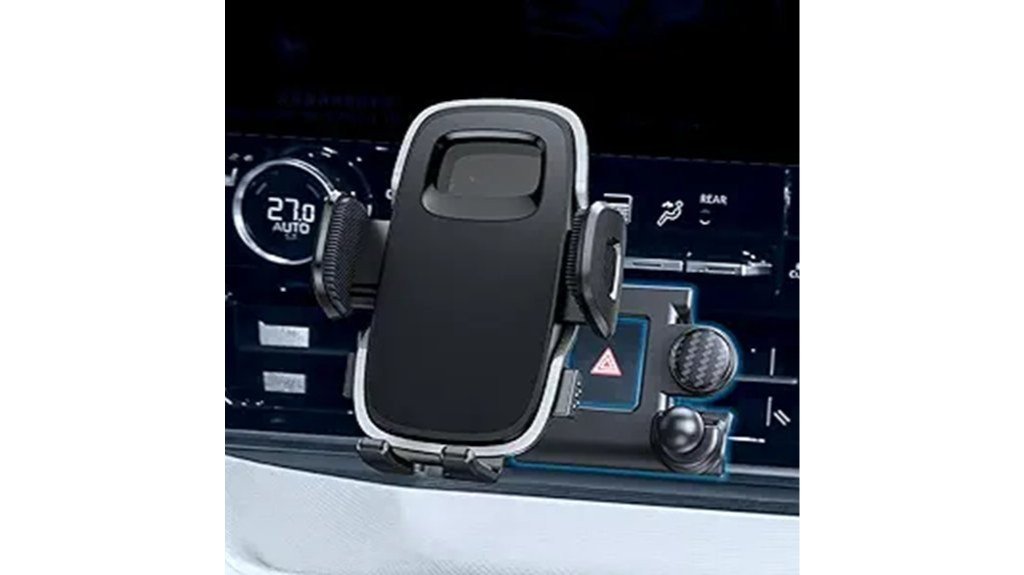
If you drive a 2020–2025 Toyota Highlander and want a secure, vehicle-specific mount, the ELOHEI Car Phone Mount is a strong match because its custom-molded soft rubber base locks into the hazard button area without adhesive. That makes it useful for drivers who want a snug fit without sticking anything to the dash.
You’ll align, press, and snap the base into place, then fine-tune the angle by loosening a nut. The arc-shaped silicone pad helps prevent scratches, while a 360-degree rotating clamp lets you adjust the viewing angle for navigation. One-touch release makes it easier to mount or remove your phone with one hand when parked.
Best For: Drivers of 2020–2025 Toyota Highlander who want a vehicle-specific, non-damaging, easy-to-install phone mount for 4.7–7.0 inch phones.
Who Should Skip It: Skip this option if you do not drive a compatible Highlander year or if your phone is outside the listed size range.
Pros:
- Custom-molded soft rubber base locks into the hazard button area without adhesive for a tight, secure fit.
- One-touch release and 360-degree rotating clamp allow single-handed use and flexible viewing angles.
- Arc-shaped silicone pad and snug fit help protect the phone from scratches.
Cons:
- Only compatible with 2020–2025 Toyota Highlander, not suitable for other car models.
- Requires precise alignment to snap into the hazard button area; may take an extra minute to install.
- May not fit phones outside the 4.7–7.0 inch size range.
Bottom Line: Choose this mount if you want a Highlander-specific holder that avoids adhesive and keeps the phone close to the center controls.
Car Phone Holder for Toyota Highlander (2014–2019) — 360° Rotating MagSafe-Compatible Vent Mount
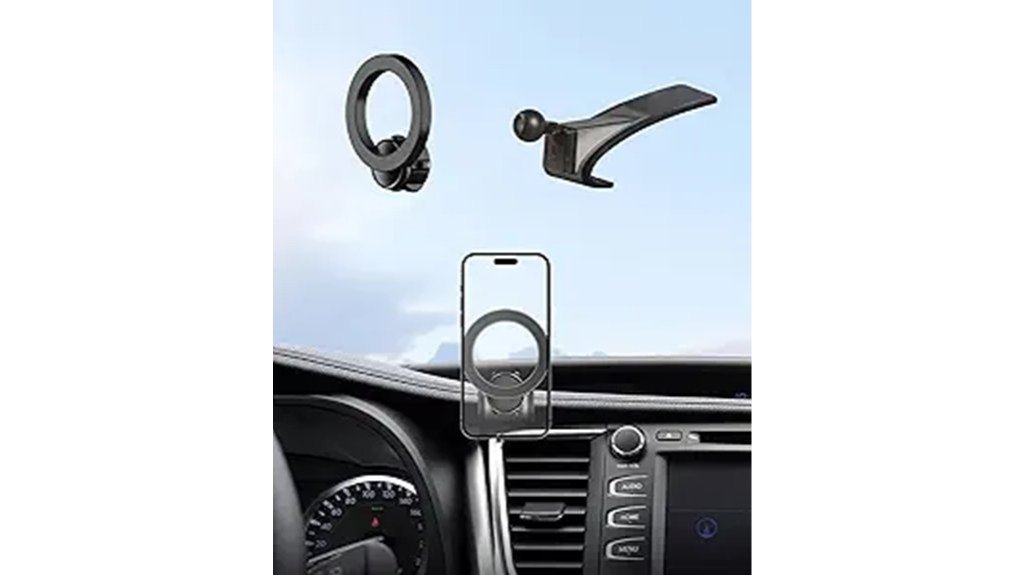
Drivers who want a secure, quick-install magnetic mount for daily use may prefer this 360° rotating MagSafe-compatible vent holder made for 2014–2019 Toyota Highlanders. It is designed for Highlander vents, so it makes the most sense for buyers who want the phone near the dash without using adhesive or a windshield suction cup.
You’ll get a MagSafe-ready mount with a metal ring for other phones, plus a vent-focused design intended to avoid fully blocking airflow. The listing-style details in the article mention triangular fixation, automatic locking, a black aluminum alloy body, and 20 wider N55 magnets, but these claims should be checked on the live Amazon page before publishing. Its compact size may appeal to drivers who want a small holder rather than a large cradle.
Best For: Drivers of 2014–2019 Toyota Highlanders who want a quick-install, MagSafe-compatible vent mount that holds phones securely without major dashboard changes.
Who Should Skip It: Skip it if you dislike vent mounts, use a very heavy phone setup, or want a cradle-style holder instead of a magnetic mount.
Pros:
- Tailored fit for Highlander vents with non-destructive, seconds-long installation.
- MagSafe-compatible with included metal ring for other phones and 360° rotation for flexible viewing angles.
- Compact vent-mounted design avoids adhesive on the dashboard.
Cons:
- Specifically designed for 2014–2019 Highlander vents — not universally compatible with other vehicles.
- Vent-mounted design may not suit users who prefer dash or windshield mounts or those with fragile vents.
- Magnetic holders can require careful alignment, especially with thicker cases or metal plates.
Bottom Line: This is the most natural fit in the list for 2014–2019 Highlander owners who want a magnetic, vent-mounted holder instead of a clamp cradle.
Autorder Custom Fit Car Phone Holder for 2020-2022 Toyota Highlander (12.3″ Screen)
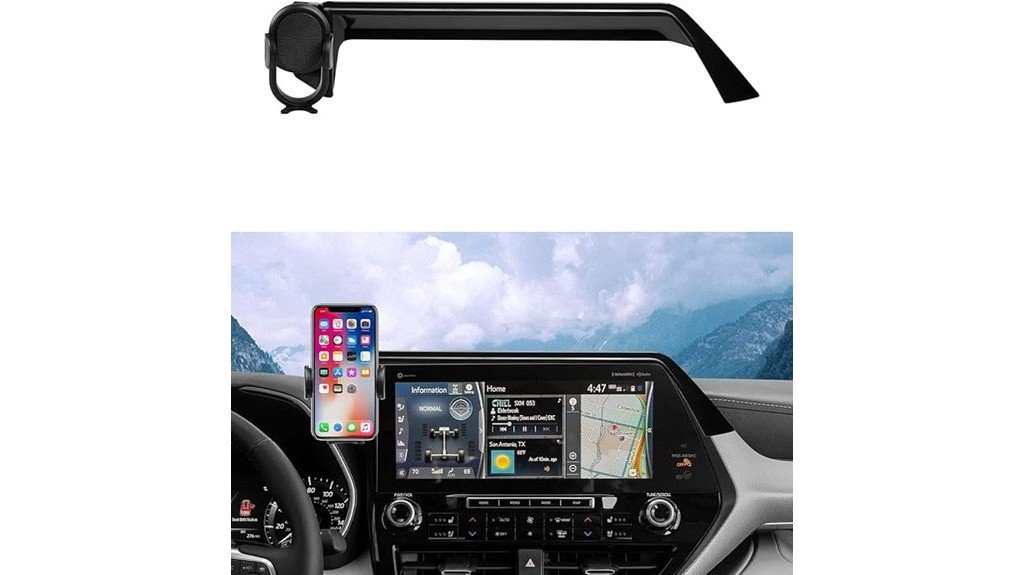
For Highlander owners with the 12.3″ touchscreen who want a secure, OEM-style mount, the Autorder Custom Fit Car Phone Holder offers a tailored fit that won’t block vents and lets you adjust height and angle quickly. This is the most relevant option here if your main concern is matching the larger Highlander screen setup.
You’ll mount the ABS bracket to the screen area without tools or drilling; the stabilizer is listed for phones 4.7–6.9 inches. A pivoting ball joint gives 360-degree rotation for portrait or landscape, and one-hand operation keeps daily use simple. Because this design sits near the screen, buyers should double-check that it will not interfere with their preferred viewing angle or dashboard controls.
Best For: Highlander owners (2020–2022) with the 12.3″ touchscreen who want a secure, OEM-looking phone mount that doesn’t block vents and allows easy height/angle adjustment.
Who Should Skip It: Skip it if your Highlander has the 8-inch touchscreen or if you want a vent, cup holder, or windshield mount.
Pros:
- Custom-fit ABS design matches factory aesthetics and avoids obstructing air vents.
- Stable cradle for phones 4.7–6.9″ with one-hand operation.
- 360° pivot and height-adjustable base let you quickly switch between portrait and landscape and set an optimal viewing position.
Cons:
- Only compatible with Toyota Highlander models that have the 12.3″ touchscreen.
- Adds a visible bracket to the screen area, which may not appeal to those wanting a completely seamless dash.
- Does not provide vent, cup holder, wireless charging, or windshield mounting.
Bottom Line: Pick this one if your Highlander has the 12.3-inch screen and you want a cradle that looks more integrated than a universal mount.
Car Phone Holder for Toyota Highlander (8-inch Touch Screen)
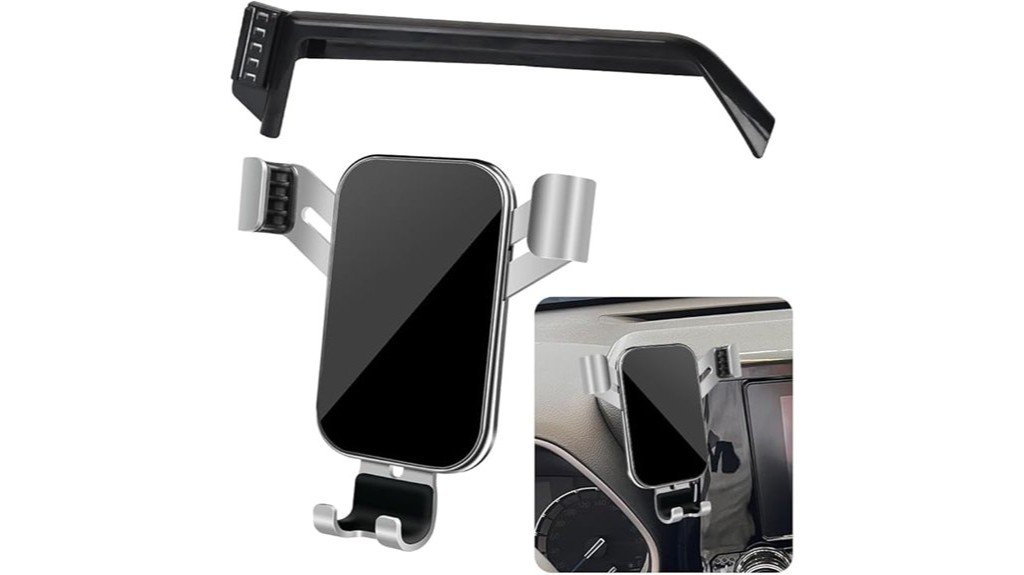
Owners of 2020–2026 Highlander L/LE/XLE/XSE with the 8-inch touchscreen may appreciate this LUNQIN phone holder’s tailored car-base design and gravity clamp. It is built for a specific Highlander dashboard setup, which helps reduce the guesswork that comes with universal holders.
The article details list a compact mount size of 4.33 x 4.33 x 2.36 inches and 8.7 oz, with fit for phones 4–7 inches up to 14mm thick, including many iPhone and Galaxy S models. It won’t fit 2024–2026 Grand Highlander. The auto-lock and adjustable arm slots help hold the device in place, while silicone-lined clamps reduce scratch risk. You can tilt left or right without blocking vents; horizontal mode isn’t supported.
Best For: Owners of 2020–2026 Toyota Highlander L/LE/XLE/XSE with the 8-inch touchscreen who want a compact, vehicle-specific phone mount that enables one-handed use and secure holding.
Who Should Skip It: Skip it if you drive a Grand Highlander, need landscape mode, or have a Highlander trim with a different screen layout.
Pros:
- Tailored car-base design and gravity clamp allow easy one-handed insertion/removal and a secure fit.
- Silicone-lined clamps protect the phone; supports phones 4–7 inches up to 14mm thick.
- Does not block vents and allows left/right tilt adjustments for good viewing angles.
Cons:
- Not compatible with 2024–2026 Grand Highlander.
- Horizontal (landscape) mode is not supported.
- Limited to specific Highlander models and 8-inch touchscreen configuration, so not universally applicable.
Bottom Line: This is a practical pick for 8-inch-screen Highlander owners who want a compact gravity holder and do not need landscape viewing.
PZK Car Phone Mount for Toyota Highlander (2020–2025) — 8-inch Auto Lock 360° Vent Cradle (Not for 12.3-inch)
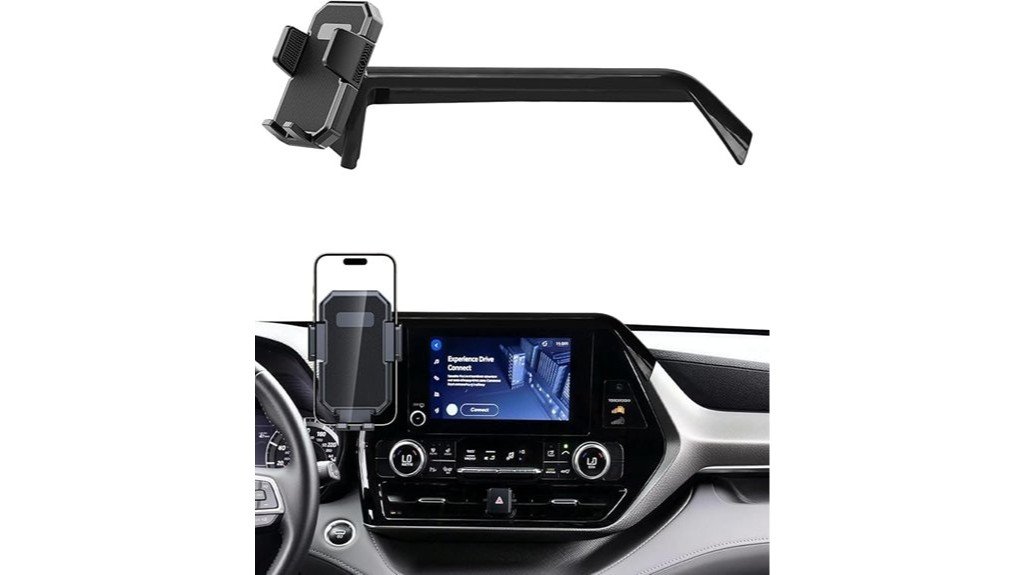
If you want a seamless, no-drill install tailored to Highlanders with the 8-inch screen, the PZK Car Phone Mount is worth comparing with the LUNQIN option above. It is custom-fit for 2020–2025 L/LE/Hybrid XLE/Nightshade models and clips onto the vent or touchscreen base without tools.
You’ll get an adjustable base designed to avoid blocking air outlets, an upgraded auto-clamp that secures 4–7 inch phones, and a one-touch release for single-handed removal. Made from ABS with a compact profile and 360° ball joint, it keeps your phone visible for hands-free calls and navigation. The key limitation is compatibility: it’s not for 12.3-inch screens or Limited trims.
Best For: Drivers of 2020–2025 Toyota Highlander L/LE/Hybrid XLE/Nightshade models with the 8-inch screen who want a no-drill, vent or touchscreen-mounted, hands-free phone solution.
Who Should Skip It: Skip this mount if you own a Limited/Platinum trim, a 12.3-inch-screen Highlander, or a vehicle outside the listed compatibility range.
Pros:
- Custom-fit design and adjustable base help prevent blocked air outlets and allow tool-free installation onto the vent or touchscreen area.
- Upgraded auto-clamping securely holds 4–7 inch phones and offers one-touch release for one-handed removal.
- Durable ABS construction with a compact profile and 360° rotating ball joint for flexible viewing.
Cons:
- Not compatible with Highlander Limited/Platinum or any models with the 12.3-inch screen.
- Clips to vent or touchscreen — may not suit users who prefer dash or suction-mount placements.
- Auto-clamp and vent mounting could potentially interfere with some vent designs or heavier phones during bumpy driving.
Bottom Line: Choose the PZK if you have one of the listed 8-inch-screen trims and want an auto-clamping cradle with a 360° ball joint.
Factors to Consider When Choosing Cell Phone Holder For Toyota Highlander
When choosing a phone holder for your Toyota Highlander, check compatibility with your model year and where you want to mount it: vent, dash, touchscreen area, windshield, or cup holder. Make sure the cradle fits your phone size, installs easily, and locks firmly. You’ll also want a mount that stays stable on bumpy roads so your device doesn’t shift or fall.
Compatibility With Model
Since Highlander designs change across years and trims, you’ll want a phone holder made for your specific model year and trim to ensure a precise fit and unobstructed controls. Start by confirming the holder lists compatibility with your Highlander range, such as 2014–2019 or 2020–2025. Then verify it explicitly states fit for your trim level so it won’t interfere with premium features or special-edition panels.
Match the holder to your phone’s dimensions—options cover roughly 4.7 to 7 inches or narrower ranges like 4.7 to 6.9 inches—and verify compatibility with your vehicle’s screen size when applicable. Some mounts suit 8-inch touchscreens, while others are built only for 12.3-inch touchscreens. Finally, choose a design that secures your device without blocking essential functions like vents or touchscreen access.
Mounting Location Options
Picking the right mounting location makes a big difference in how safe and convenient your phone use will be while driving the Highlander. You’ll choose among dashboard, air vent, and touchscreen-area mounts, each with trade-offs.
Air vent mounts install without tools, offer easy angle adjustments, and keep the phone near your line of sight, but may block airflow. Dashboard mounts can deliver greater stability and a more permanent setup, though they often need adhesive or extra installation steps. Touchscreen-area mounts can look seamless and integrate neatly, but you must avoid obstructing critical controls or displays. Always check your Highlander’s model year and interior layout before buying, since compatibility and ideal placement vary with design and screen size.
Phone Size Fit
After you pick the mount location, check phone size and thickness to make certain the holder will fit and hold your device securely. You’ll want a holder rated for phones from about 4.7″ up to 7.0″ to cover most models.
Measure your phone with its case. Some holders accept thickness up to roughly 14mm, but not every mount handles bulky protective cases. Pick a lightweight, compact holder to minimize dashboard obstruction and keep your sightlines clear. Finally, verify the holder’s weight rating and clamp design to make sure it supports your specific phone model and case for stable, rattle-free driving.
Installation Ease
When choosing a cell phone holder for your Highlander, favor models that install without drilling or tools so you can set them up quickly and without risking your dash. Look for quick-attach mounts with locking bases that avoid blocking vents, one-touch release buttons for effortless phone removal, and simple height or angle adjustments so you can fine-tune the position.
A no-drill system is easier to remove and less likely to damage trim. Quick-attach features also save time when switching vehicles or sharing the mount. A locking base that clears vents preserves airflow and cabin controls, while one-touch release means safer, single-handed removal when the vehicle is stopped.
Stability on Roads
Because your Highlander encounters bumps, turns, and sudden stops, stability is the key feature to focus on. Choose mounts with triangular fixation or automatic locking, custom-fit bases for a snug vehicle-specific fit, and upgraded auto-clamps or strong magnets/gravity mechanisms so your phone is less likely to shift or fall on rough roads.
Triangular fixation or automatic locks can help distribute force and reduce wobble during sharp maneuvers. A custom-fit base keeps the mount steady without blocking vents or controls. Intelligent auto-clamps adjust to different phone sizes and case thicknesses, while strong magnets or gravity clamps can add extra holding support depending on the design.
Vent and Screen Safety
If you want clear sightlines and effective climate control, pick a holder that won’t block vents or the screen and that installs without stressing vent blades. Choose designs with a custom-fit base or adjustable mounting so the holder sits flush and won’t bend slats or restrict airflow.
Look for models that intentionally avoid covering the infotainment display or driver sightlines; you shouldn’t have to shift your view or reach awkwardly. An auto-lock feature adds stability, keeping your phone secure during bumps without forcing you to reposition vents. Soft rubber or silicone padding can help prevent scratches on both the phone and the Highlander’s interior while cushioning contact points.
Material Durability
Although materials might seem like a small detail, they determine how long a holder will last in your Highlander and how well it survives heat, humidity, and daily use. You’ll want high-grade ABS plastic for strength and resilience against wear, while rubber or silicone pads protect your phone and interior from scratches and slipping.
Check that clips and joints feel sturdy and can tolerate temperature swings without warping. Heavier-feeling mounts often use more robust components and resist breakage, but the best designs blend metal with quality plastics to balance durability and weight. Avoid cheap, brittle materials if you want more secure, long-lasting performance in everyday driving.
Frequently Asked Questions
Will These Holders Block Dashboard Sensors or Airbags?
They generally won’t block sensors or airbags if you position them correctly; you’ll avoid airbag zones and sensor arrays, follow manufacturer placement instructions, and choose low-profile or vent-mounted designs to guarantee safety and unobstructed operation.
Are Adhesive Mounts Safe for Textured Highlander Surfaces?
They can work, but adhesion’s unpredictable on textured Highlander surfaces; you’ll need high-bond automotive adhesive, thorough cleaning, and heat for best grip. Expect potential peeling over time and check periodically to avoid sudden failure.
Can I Wirelessly Charge Through These Mounts?
Yes, you can wirelessly charge through many mounts if they have built-in Qi pads and proper alignment. Avoid metal plates or very thick cases, and position your phone carefully for reliable charging and safe screen visibility.
Do Any Mounts Interfere With Apple Carplay or Android Auto?
Generally no, they won’t interfere with Apple CarPlay or Android Auto. You should avoid magnetic mounts placed over ports or wireless charging coils, and you’ll want mounts that keep the screen and cable access clear for reliable connections.
Are Child-Seat or Pet-Safety Regulations Affected by Phone Placement?
No, phone placement usually won’t change child-seat or pet-safety regulations, but you should avoid obstructing airbags, seat anchors, or visibility; follow vehicle and local laws, and secure devices so they don’t become projectiles in a crash.
Conclusion
The right Toyota Highlander phone holder depends on your model year, screen size, and preferred mount style. Choose the ELOHEI if you want a 2020–2025 custom hazard-area fit, the Autorder if your Highlander has the 12.3-inch screen, or the LUNQIN/PZK options if you need an 8-inch-screen setup. For older 2014–2019 Highlanders, the MagSafe-compatible vent mount is the more targeted choice. Before buying, confirm your trim, screen size, phone thickness, and case compatibility so the holder stays secure without blocking vents, controls, or visibility.