Disclosure: As an Amazon Associate, we earn from qualifying purchases. If you click a link on this page and make a purchase, we may receive a small commission at no extra cost to you.
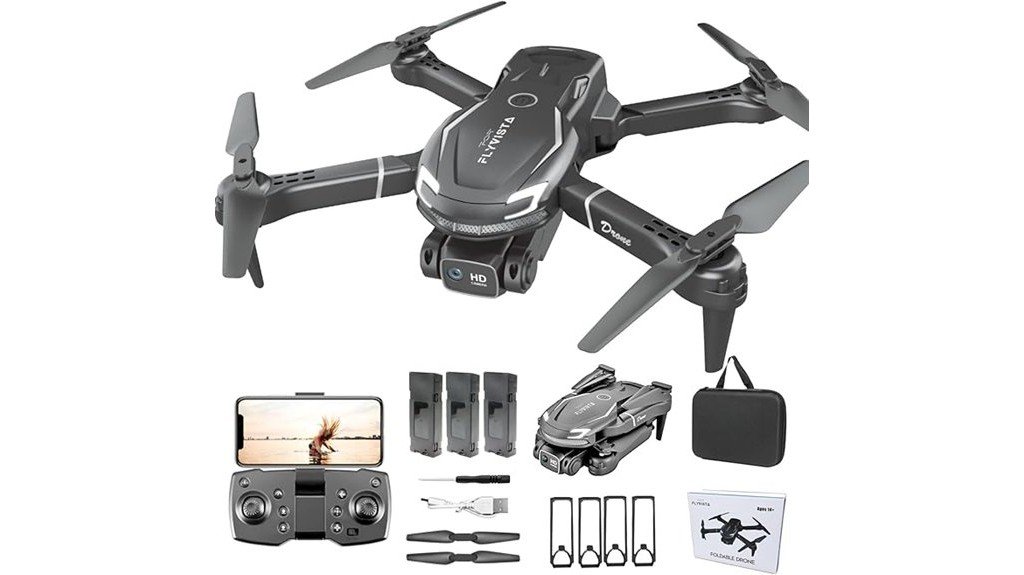
Buying a first camera drone can be tricky because easy controls, useful flight time, and realistic camera expectations matter more than a long feature list. The FLYVISTA Cool Mini Drone V88 is a lightweight, shark-styled FPV drone aimed at beginners, younger pilots with adult supervision, and casual adult users. Its strongest points are one-click takeoff and landing, optical-flow-assisted hovering, a manually adjustable 1080P camera, and two 1,800mAh batteries for about 20 minutes of advertised total flight time. Its main tradeoffs are wind sensitivity and a camera system built more for fun and basic aerial clips than stabilized photography.
Quick Verdict
Rating: 7.5/10
Best For: First-time pilots, supervised younger users, and families wanting a compact FPV toy drone.
Bottom Line: The V88 gives you simple controls, useful beginner aids, and two batteries in a compact package. Choose it for learning and casual fun, not for windy conditions, long-range flying, or smooth cinematic footage.
Key Specifications
| Specification | Detail |
|---|---|
| Brand | FLYVISTA |
| Model | V88 |
| Product type | Mini FPV camera drone |
| Design | Compact foldable body with shark-inspired styling |
| Camera | 1080P HD with 90° manual angle adjustment |
| FPV connection | Wi-Fi live view to a compatible phone or tablet |
| Battery setup | 2 × 1,800mAh rechargeable drone batteries |
| Advertised flight time | About 10 minutes per battery, about 20 minutes total |
| Controls | Remote control or app |
| Beginner aids | One-click takeoff/landing, altitude hold, optical flow positioning, headless mode, emergency stop, propeller guards |
| Fun modes | 360° flips, 3 speed gears, gravity sensing, gesture photo/video, path flight |
| Listed weight | 100 g (3.53 oz) |
| Listed folded dimensions | 4.8 × 3 × 2.1 in |
| Material | Plastic |
Product Overview
The FLYVISTA V88 is a small remote-control quadcopter that combines a 1080P FPV camera with controls designed to reduce the learning curve. You can fly it with the included remote or use the app for supported functions such as live camera viewing, gravity sensing, gesture capture, and path flight.
Its optical flow system and bottom camera help the drone hold position more steadily than a basic toy drone with altitude hold alone. That can make early practice easier, but it does not turn the V88 into a GPS drone. The current listing does not advertise GPS, return-to-home, a mechanical gimbal, or obstacle avoidance, so you should keep your expectations in the beginner toy-drone range.
The current Amazon listing for this ASIN shows two 1,800mAh batteries. Each is advertised for roughly 10 minutes of flight, giving about 20 minutes total under favorable use. Frequent flips and repeated altitude changes can reduce the actual time you get from each battery.
Before You Buy: Older descriptions of this ASIN may mention three batteries and about 30 minutes of total flight. The current Amazon product summary shows two batteries and about 20 minutes total, so check the live listing before ordering if battery count is a deciding factor.
Who Should Buy It?
Best For
- First-time pilots who want one-click takeoff, headless mode, and altitude hold.
- Families who want a compact FPV drone for supervised indoor or calm-weather flying.
- Casual users who want simple 1080P clips, flips, and app-based flight features.
Skip If
- You need GPS, return-to-home, obstacle avoidance, or long-range navigation.
- You want stabilized, cinematic camera footage.
- You expect reliable outdoor performance in noticeable wind.
Key Features and Buying Factors
Design and Build Quality
The V88 uses a compact plastic body with distinctive shark styling. At a listed 100 g, it is easy to carry and light enough for simple indoor practice, but that low weight also explains why wind matters. The seller specifically recommends first flights indoors or in an open area without wind.
Propeller guards are part of the beginner-focused design. They can help protect the props during minor bumps, but you should still keep the drone away from faces, hair, pets, fragile objects, and crowded areas.
Controls and Flight Stability
One-click takeoff and landing removes one of the harder early steps for a new pilot. Headless mode can also simplify orientation because your control inputs are easier to understand when you are still learning which way the drone is facing.
Altitude hold and optical flow positioning are the more useful stability features. The bottom camera supports position holding near the ground, which can make hovering and low-speed practice less frustrating. Three speed gears let you start slowly and increase responsiveness after you are comfortable.
1080P Camera and FPV
The front camera is advertised at 1080P and can be manually tilted through a 90° range. You can connect a phone or iPad to the drone’s Wi-Fi for a live FPV view, and captured photos or videos can be saved to the connected device.
The resolution is useful for casual clips and seeing where the drone is pointed, but the listing does not state that the camera has a mechanical gimbal or electronic image stabilization. That means you should expect movement, vibration, and tilt changes in the footage when the drone turns or reacts to air movement.
Battery Life
The current bundle uses two 1,800mAh rechargeable batteries. FLYVISTA advertises about 10 minutes per battery, for roughly 20 minutes total. That gives you two short practice sessions without waiting for the first battery to recharge.
Flight time is not fixed. The seller notes that flips and frequent altitude changes reduce endurance, so calmer hovering and basic directional practice should stretch each battery farther than repeated acrobatics.
App Features and Fun Modes
The V88 can be controlled by the remote or app. Supported app functions include gravity sensing, gesture-triggered photo or video capture, and path flight. The drone also performs 360° flips and offers three speed settings.
These modes add variety, but beginners should learn basic takeoff, hover, forward flight, turning, and landing before relying on app tricks. Stable manual control is more important than using every feature on the first flight.
Pro Tip: Start in the lowest speed gear in a large indoor room or a calm open area. Save flips and fast direction changes until you can hover, turn, and land consistently, and use gentler flying when you want the longest battery session.
How It Performs in Real Use
For First Indoor Flights
This is where the V88 makes the most sense. One-click takeoff, headless mode, propeller guards, and optical-flow-assisted hovering reduce several common beginner frustrations. A large room with clear floor space gives you a safer place to learn throttle and direction before dealing with wind.
For Calm Outdoor Practice
You can use the V88 outside, but calm conditions matter. Its 100 g weight makes it easier for wind to push the drone off course, and the seller warns that outdoor use may be disturbed by wind. Keep it close, fly low while learning, and avoid using it near roads, trees, power lines, or other hazards.
For Family Fun and Supervised Younger Pilots
The shark design, 360° flips, and simple flight controls give the V88 strong toy appeal. For younger users, direct adult supervision is the safer choice because spinning propellers, lithium batteries, and unexpected movement still require care even on a small drone.
For Casual Photos and Video
The 1080P FPV camera is useful for basic aerial views, family moments, and learning how camera angle changes your shot. It is not a substitute for a stabilized camera drone. If video smoothness and detailed aerial photography are your main goals, you should move up to a model with verified stabilization and stronger outdoor flight systems.
Setup Tips Before First Use
- Charge both flight batteries fully before your first session so you can practice without stopping after one short flight.
- Install the propeller guards for early practice and inspect the propellers for damage before takeoff.
- Begin in the lowest speed gear until your turns and landings feel predictable.
- Use a calm, open practice area. FLYVISTA specifically recommends indoor or wind-free conditions for the first flight.
- Connect your phone to the drone’s Wi-Fi before using FPV or app features, then confirm the live view before takeoff.
- Adjust the camera angle for the shot you want and remember that the lens adjustment is manual.
- Limit flips when battery time matters. Aggressive maneuvers and repeated altitude changes can shorten the session.
Compatibility and Safety
The V88 uses Wi-Fi for FPV viewing and app functions, so your phone or tablet must be able to connect to the drone’s wireless network. The verified listing supports remote and app control, but you should follow the included instructions for pairing and app setup rather than assuming every phone behaves the same way.
For safer use, keep fingers and hair away from spinning propellers, do not catch the drone while the motors are running, and keep clear of people, animals, buildings, traffic, and power lines. Inspect batteries before charging or flying, stop using any battery that appears damaged or swollen, and follow the supplied charging instructions. Children should fly only with direct adult supervision.
Pros and Cons
Pros
- 1080P FPV camera with 90° manual angle adjustment.
- Two 1,800mAh batteries provide about 20 minutes of advertised total flight time.
- Optical flow, altitude hold, headless mode, and one-click takeoff help new pilots.
- Three speed gears let you increase responsiveness as your control improves.
- 360° flips, gesture capture, gravity sensing, and path flight add useful play value.
Cons
- Low weight makes the drone more vulnerable to wind outdoors.
- No verified GPS, return-to-home, obstacle avoidance, or camera stabilization is stated in the current listing.
- Battery configuration has changed from older descriptions, so you should confirm the live bundle before buying.
Customer Reviews
At the time of this editorial check, Amazon displayed a 3.8 out of 5-star customer rating for the V88. Treat that number as a snapshot because ratings can change as new reviews are added.
For your buying decision, the product’s verified limitations matter more than the score alone. This is a light beginner drone with short per-battery sessions and no verified stabilized camera system, so it is best judged as an entry-level FPV toy rather than a photography platform.
Is It Worth the Price?
The V88 makes the most sense as an entry-level purchase for learning basic drone control and having casual camera fun. The two-battery setup, beginner flight aids, FPV viewing, and extra play modes give you a broader experience than a very basic no-camera mini drone.
Its value drops if your priority is outdoor stability, long flights, GPS features, or smooth video. In that case, paying more for a more capable camera drone can save you from outgrowing this model quickly.
How It Compares to Alternatives
The Holy Stone HS440 is another beginner-focused 1080P camera drone and is worth comparing if you want a larger platform with a more established beginner-drone ecosystem. The DEERC D20 is a simpler foldable alternative with a 720P camera and two batteries, so the V88 has the higher stated camera resolution on paper.
The V88 stands out most for its shark styling, optical-flow-assisted hover, two-battery current bundle, and mix of remote and app features. If you want GPS-assisted navigation or stabilized footage, neither of those basic toy-drone comparisons should be your endpoint, and you should shop in a higher capability class.
Frequently Asked Questions
How many batteries does the current FLYVISTA V88 listing include?
The current Amazon product summary for ASIN B0D5CXY6X8 shows two 1,800mAh rechargeable batteries. Older descriptions may show three, so confirm the live listing if battery count is important to you.
How long does the FLYVISTA V88 fly?
FLYVISTA advertises about 10 minutes per battery, or roughly 20 minutes total with the current two-battery bundle. Flips and frequent altitude changes can reduce the time you get from a charge.
Is the V88 good for a complete beginner?
Yes, that is its strongest use case. One-click takeoff and landing, headless mode, altitude hold, optical flow positioning, propeller guards, and three speed gears all help you learn basic control gradually.
Does the V88 have GPS or return-to-home?
Those features are not stated in the verified current listing. The drone uses altitude hold and optical flow for beginner-friendly hovering, which should not be confused with GPS positioning or an automatic return-to-home system.
Is the 1080P camera good for serious aerial photography?
It is better suited to casual photos, basic video, and FPV viewing. The current listing does not state a mechanical gimbal or image stabilization, so you should not expect the smooth footage of a dedicated camera drone.
Can you fly the V88 outdoors?
Yes, but choose a calm, open area. FLYVISTA warns that wind can disturb outdoor flight, and the drone’s light 100 g listed weight means you should be conservative about conditions.
Who should skip the FLYVISTA V88?
Skip it if you need GPS, obstacle avoidance, long-range flight, strong wind resistance, or stabilized video. Those needs point to a more advanced camera drone rather than an entry-level mini FPV model.
The Bottom Line
The FLYVISTA V88 is a good fit if you want a compact first drone with easy controls, FPV viewing, fun flight modes, and two batteries for short practice sessions. Its biggest strengths are beginner accessibility and feature variety, while wind sensitivity and the lack of verified advanced navigation or camera stabilization are the main reasons to skip it.
For supervised family fun and learning basic flight, the 7.5/10 verdict fits. For serious aerial photography or confident outdoor flying in changing conditions, choose a more capable model.
Ready to Buy?
Check the latest price, battery bundle, and product details before you decide.